TAP-Windows Adapter V9: What It Is and How to Fix It
TAP-Windows Adapter V9 is a virtual network driver used by VPNs. Fix common errors like connectivity loss and adapter conflicts on Windows 10/11.
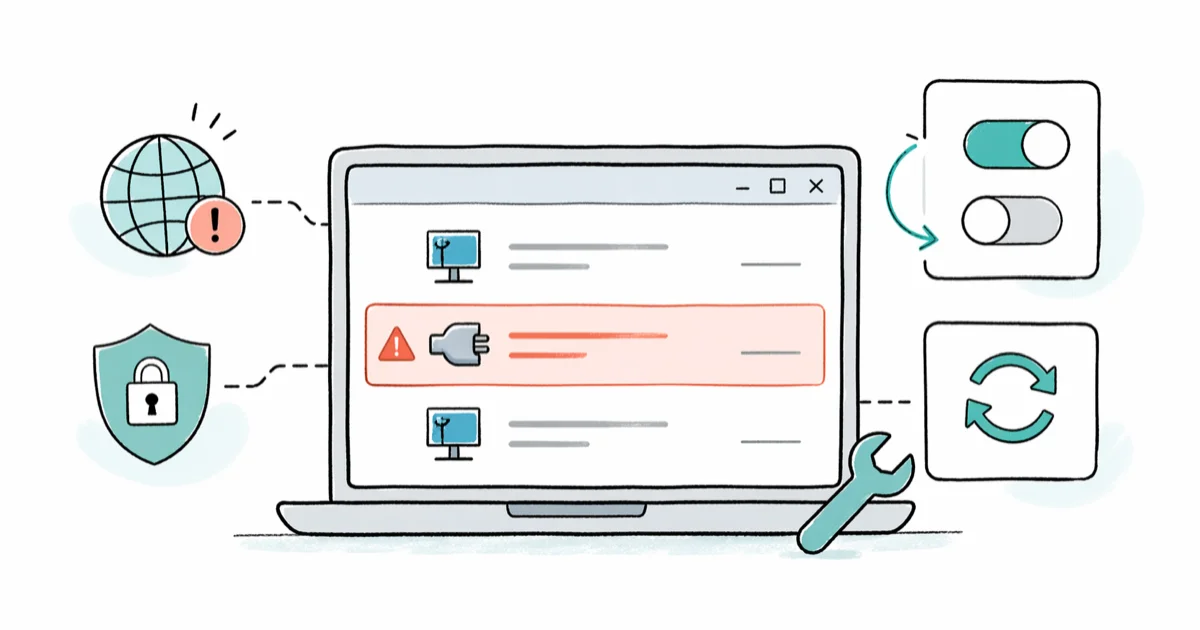
Quick AnswerTAP-Windows Adapter V9 is a virtual network driver that VPN software installs to create encrypted tunnels. If it causes internet problems, disable and re-enable it in Network Connections, or reinstall it through Device Manager.
Your VPN dropped its connection and the only odd thing in Device Manager is “TAP-Windows Adapter V9.” That single line is your VPN’s virtual network card, and when it misbehaves, every site you open hangs.
Most TAP errors on Windows 10 and Windows 11 still take only a few minutes to troubleshoot. The trick is knowing which fix to try in which order. Start with an adapter reset, then reinstall the driver, then remove abandoned VPN clients, and only move to network-stack repairs when the simpler steps don’t hold.
- TAP-Windows Adapter V9 is a virtual NIC that VPN clients like OpenVPN, CyberGhost, and Hamachi install to route traffic through encrypted tunnels.
- Disabling and re-enabling the adapter in Network Connections is the quickest first step for the “All TAP-Windows adapters in use” error.
- The current NDIS 6 driver (versions 9.21 through 9.27) supports Windows 7 through Windows 11; the older NDIS 5 driver (9.9.x) is deprecated and breaks on modern Windows.
- Leftover TAP drivers from uninstalled VPNs sit in Device Manager and conflict with your active VPN, causing random connectivity drops.
- Running two VPN clients at once (such as NordVPN plus OpenVPN) makes them fight over the same TAP interface, and both will fail to connect cleanly.
#What Is TAP-Windows Adapter V9?
TAP-Windows Adapter V9 is a software-defined network interface that pretends to be a physical network card. Windows treats it like real hardware, but instead of plugging into a router, every packet it sees gets routed into your VPN tunnel.
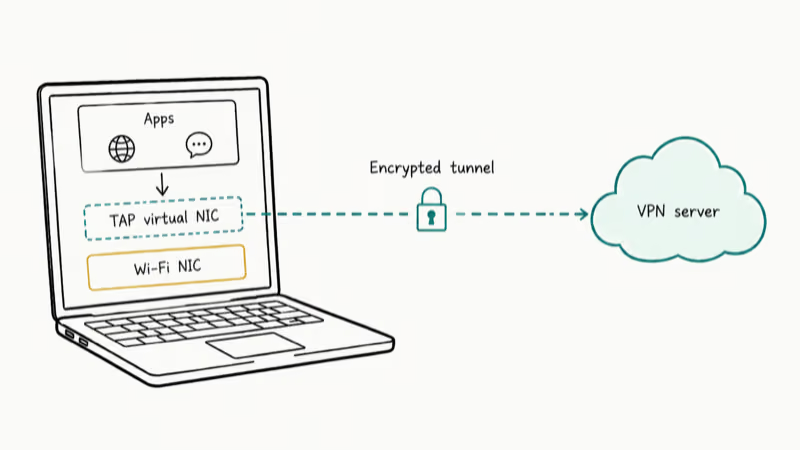
According to OpenVPN’s tap-windows6 repository, the driver targets Windows 7 and later, and the current branch ships as a kernel-mode NDIS 6 driver. VPN clients including OpenVPN, CyberGhost, SoftEther, and Hamachi all bundle some build of this driver to function.
You can find it in two places on your PC:
- Device Manager under Network Adapters (look for “TAP-Windows Adapter V9”)
- Program Files at
C:\Program Files\TAP-Windows
There are two driver generations to know about. The original NDIS 5 build (9.9.x) was written for Windows XP and Vista. The current NDIS 6 build (9.21 and newer, with 9.27 as the latest stable release) works on Windows 7 through Windows 11. Microsoft dropped legacy NDIS support years ago, so the 9.9.x driver now refuses to load on most modern installs.
If you have ever traced a driver power state failure or a thread stuck in device driver error on Windows, you already know how disruptive a misbehaving kernel driver is. The TAP adapter behaves the same way when it goes wrong.
#Why Does the TAP-Windows Adapter Cause Problems?
Three patterns explain most TAP problems on Windows.
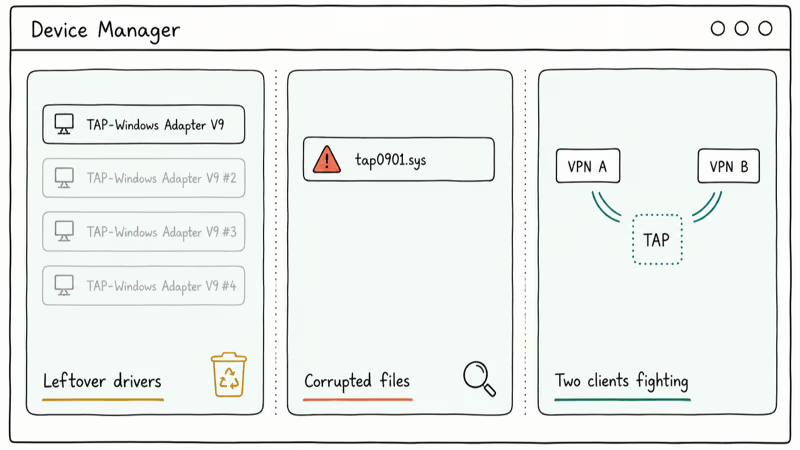
Leftover drivers from old VPNs. You uninstalled a VPN months ago, but its TAP adapter is still sitting in Device Manager. The orphaned driver can clash with your current network stack and cause random connectivity drops.
Corrupted driver files. A bad update or interrupted install can leave the driver half-written.
Two VPN clients fighting over one adapter. Got NordVPN and OpenVPN installed side by side? They both expect to own the TAP interface, and they will trip over each other within a few minutes.
The error message you see most often is “All TAP-Windows adapters on this system are currently in use.” TechRadar’s TAP adapter guide confirms this almost always means the previous VPN session disconnected uncleanly, leaving the adapter locked in an active state that blocks the next handshake.
If your internet drops entirely while the adapter is active, that points to a DNS issue or a deeper IP address conflict instead of the TAP driver itself.
#How to Disable and Re-enable the TAP Adapter
This is the fastest first fix for the “adapters in use” error, and the whole sequence takes under a minute.
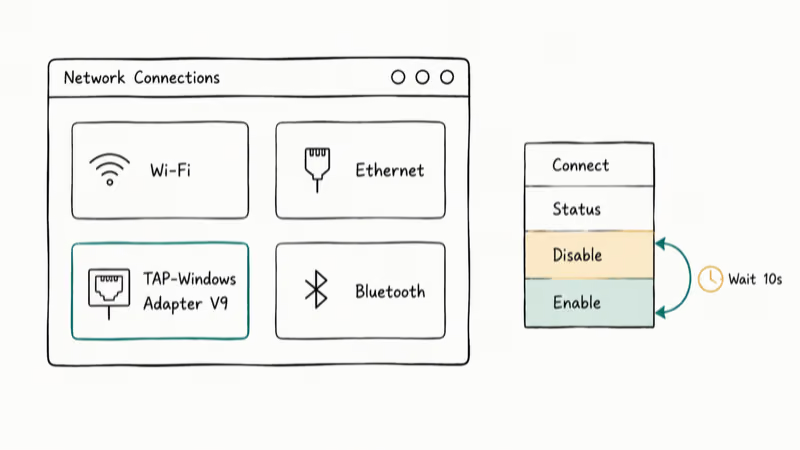
- Go to Control Panel > Network and Internet > Network and Sharing Center > Change adapter settings
- Find the connection labeled TAP-Windows Adapter V9
- Right-click it, choose Disable, wait 10 seconds, then right-click again and choose Enable
Reconnect your VPN. If the same error returns immediately, jump to the reinstall section below.
If the VPN still won’t connect after one reset, disable and re-enable the adapter once more before moving on to a driver reinstall.
#How to Reinstall the TAP-Windows Driver
When the disable-enable trick stops working, a clean reinstall almost always finishes the job. Windows Report’s analysis of TAP errors found that reinstalling the driver from an elevated prompt clears most stuck-state errors that survive a reset. The reinstall takes about three minutes if you have admin rights and your VPN client handy. Skip the manual download unless your VPN refuses to repair itself.
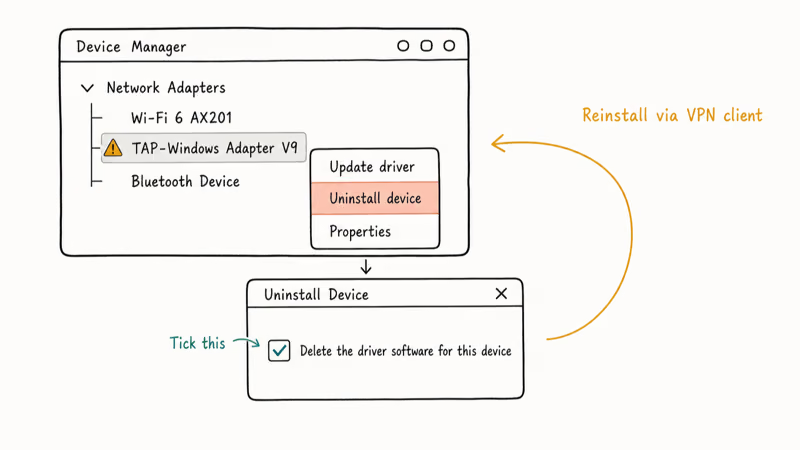
Step 1: Disconnect your VPN and quit the client. Open Task Manager (Ctrl + Shift + Esc) and end any leftover VPN processes. They keep handles on the TAP device and block reinstall.
Step 2: Open Device Manager. Press Windows + R, type devmgmt.msc, and press Enter.
Step 3: Expand Network Adapters. Look for TAP-Windows Adapter V9. A yellow exclamation mark on the icon confirms the driver is corrupted.
Step 4: Uninstall the device. Right-click TAP-Windows Adapter V9 and pick Uninstall device. Tick the box that says “Delete the driver software for this device” if it appears, otherwise the same broken files will load again.
Step 5: Reinstall the driver. Two routes work:
- Let your VPN handle it. Open your VPN client. Most apps (OpenVPN Connect, NordVPN, CyberGhost) detect the missing driver during launch and reinstall it.
- Install it manually. Grab the latest tap-windows installer from the OpenVPN community downloads page and run it as Administrator.
After reinstalling, reopen Device Manager. The exclamation mark should be gone.
If it sticks around, the TAP driver itself is probably not the real problem. According to Microsoft Learn’s Q&A thread on TAP adapter issues, endpoint security suites and network monitoring agents often hook the same driver pipeline, which is the same class of conflict behind many DPC watchdog violation cases on Windows machines.
#How to Fully Remove TAP-Windows From Your PC
Done with VPNs for good? You can pull the TAP adapter completely. Just be aware that VPN startup services will reinstall the driver on every boot unless you also remove the VPN client from Programs and Features.
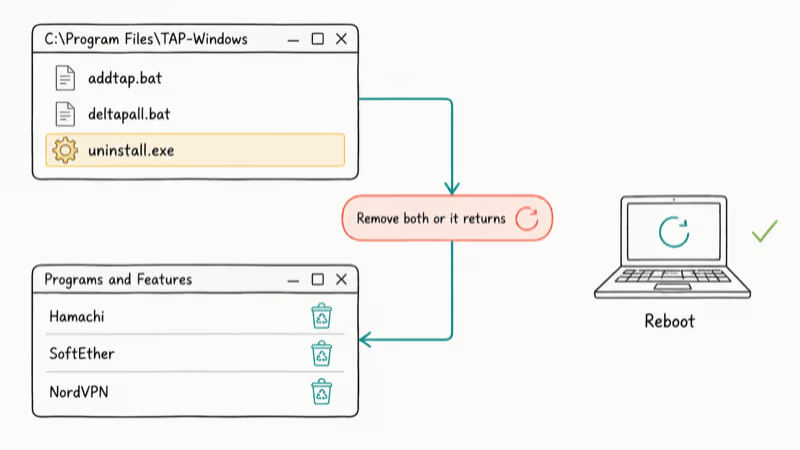
Remove the driver:
- Open File Explorer and go to
C:\Program Files\TAP-Windows - Double-click
uninstall.exeand follow the prompts
Remove the VPN client:
- Press Windows + R, type
appwiz.cpl, and press Enter - Find your VPN software in the list and uninstall it
- If you have used several VPNs over time, uninstall every one of them
Restart your PC. The TAP adapter should not come back.
Removing only the TAP driver often isn’t enough when legacy VPN clients remain installed. The adapter can reappear after reboot until the old VPN apps are removed too, which lines up with what Appuals reports about VPN startup services force-reinstalling the driver.
Hit Hamachi service stopped errors during cleanup? The fix is similar: remove the orphaned service before pulling the driver.
If your Windows 10 still feels slow after pulling old VPN software, leftover startup services and network filter drivers may still be eating CPU cycles in the background.
#Advanced Fixes for Persistent TAP Errors
When the standard fixes fail, the issue is usually not the TAP driver alone. Try these next.
Reset your network stack. Open Command Prompt as Administrator and run these two commands:
netsh winsock reset
netsh int ip reset
Restart afterward. This wipes corrupted Winsock and TCP/IP state without touching your files. It’s the same approach that often clears ERR_EMPTY_RESPONSE errors in Chrome.
Check for conflicting security software. Antivirus firewalls (Kaspersky, Bitdefender, Avast) can block TAP driver registration. Pause the suite, reinstall TAP, then add a VPN exception. The same interference often triggers Private Internet Access errors.
Switch VPN protocols. Most modern VPN clients now support WireGuard, which uses its own lightweight driver called Wintun instead of TAP. Switching protocols sidesteps TAP problems entirely. OpenVPN’s agent and adapter error guide recommends trying this when TAP errors keep coming back after a clean reinstall.
Last resort: reset Windows. Settings > System > Recovery > Reset this PC, with the “Keep my files” option, will wipe third-party drivers and apps while preserving your documents. Plan for about 90 minutes for the reset plus another hour for reinstalling drivers and your VPN client. A reset also clears custom SSL certificates and saved Wi-Fi passwords.
#Bottom Line
Start with the disable-enable reset in Network Connections. That single move clears most “adapters in use” errors and costs you under a minute. If the same error returns, do a full driver uninstall and reinstall through Device Manager with admin privileges. And if you are walking away from VPNs entirely, remove both the TAP driver and every VPN client you have ever installed, otherwise the auto-start service will quietly put the adapter back the next time you reboot.
#Frequently Asked Questions
Is TAP-Windows Adapter V9 a virus or malware?
No. It’s a legitimate open-source driver from the OpenVPN project (GitHub). Any VPN you’ve installed on Windows bundled this driver with it.
Can I delete TAP-Windows if I still use a VPN?
No. Your VPN can’t tunnel traffic without it. The client will either fail to connect or silently reinstall the driver the next time it launches.
Why does TAP-Windows Adapter keep coming back after I uninstall it?
VPN clients run a startup service that scans for missing drivers every time Windows boots. If the TAP driver is gone, the service reinstalls it before you even reach the desktop. The only way to break that cycle is to uninstall the VPN client itself through Programs and Features. Pulling only the adapter from Device Manager won’t stick on its own.
Does TAP-Windows slow down my internet?
The adapter itself adds negligible overhead. Any speed loss you notice comes from VPN encryption and server distance, not the driver. If your connection drags even when the VPN is disconnected, that points to a separate driver conflict.
What’s the difference between TAP and TUN adapters?
TAP works at Layer 2 (Ethernet frames); TUN works at Layer 3 (IP packets). WireGuard skips both with its own Wintun driver.
How do I fix “There are no TAP-Windows adapters on this system”?
The driver was either never installed or got fully removed. Open your VPN client and let it try to reinstall the driver. If that fails, grab the standalone tap-windows installer from the OpenVPN community downloads page, run it as Administrator, and reboot.
Can I have multiple TAP adapters installed at once?
Yes, and you need one per simultaneous VPN connection. Add extras by running addtap.bat from C:\Program Files\TAP-Windows\bin in an elevated Command Prompt.
Is WireGuard better than TAP-Windows for VPN connections?
For raw performance, yes. WireGuard’s Wintun driver is smaller and designed for modern VPN tunneling, while TAP remains common for OpenVPN compatibility. The catch is that not every VPN provider supports WireGuard yet, and some enterprise networks still require OpenVPN with TAP for compatibility with older infrastructure.

Best Laptop for Running LLMs in 2026: Memory Comes First
The best laptop for running LLMs is a memory purchase first. Compare MacBook unified memory against NVIDIA laptop VRAM, and see what each tier really runs.

How to Run a Local LLM on Windows: A 2026 Setup Guide
Run a local LLM on Windows with LM Studio or Ollama. Pick a model that fits your GPU memory, keep every prompt offline, and skip the monthly bill.

Bluetooth Not Working on Snapdragon X? Fixes for 2026
Bluetooth not working on your Snapdragon X Copilot+ PC? Generic audio, mice, and keyboards work, but vendor apps often lack an ARM build. Fixes inside.

Docker Desktop and WSL2 Not Working on Snapdragon X? Fix It
WSL2 runs fine on Snapdragon X, but Docker Desktop ARM is Early Access and throws WSL errors. Use WSL2 plus native ARM64 Ubuntu and Docker Engine.