Music Production on Snapdragon X Elite: What Works in 2026
Music production on Snapdragon X in 2026: which DAWs run native ARM64, the new in-box ASIO driver, and why x64 plugins load via ARM64EC. Full guide.
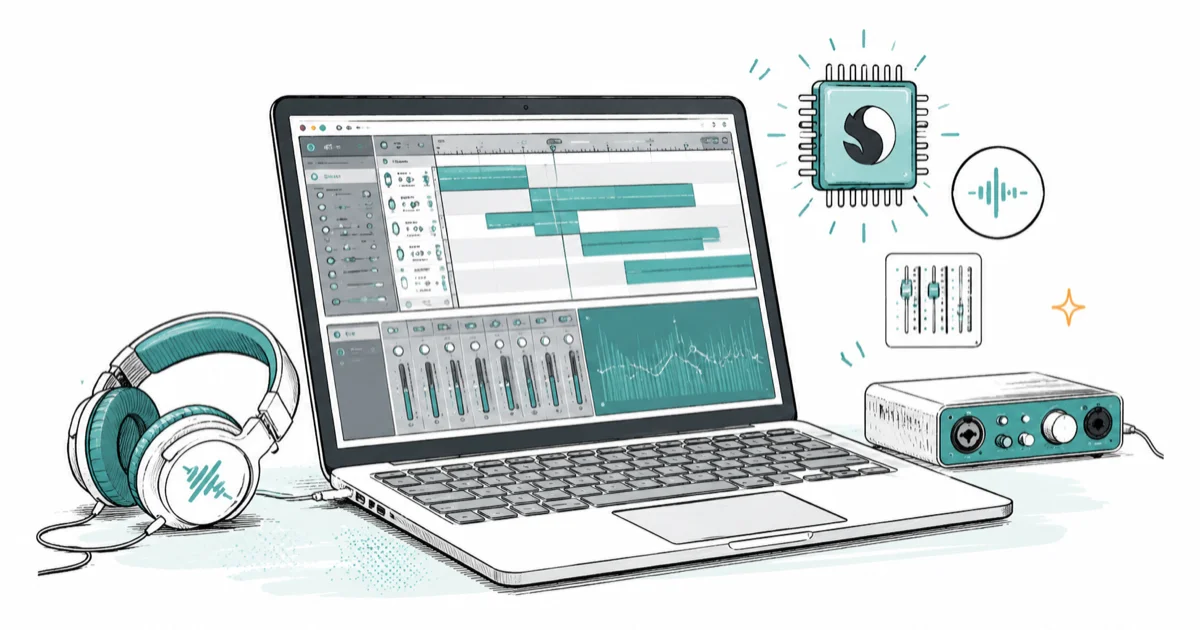
Quick AnswerMusic production on Snapdragon X works in 2026 if your DAW has a native ARM64 build, since Reaper, Cubase, Nuendo, Bitwig, and Cakewalk Sonar all run native and ARM64EC loads most x64 VST3 plugins. The real limit is native plugin and audio-interface driver support, not the DAW.
Music production on Snapdragon X is a real option in 2026, with a catch most pages skip. Several major DAWs now ship native ARM64 builds, and Windows added an in-box ASIO driver for class-compliant interfaces. What decides whether your setup is smooth isn’t the DAW. It’s your plugins and your audio interface.
- Reaper, Cubase, Nuendo, Bitwig Studio, and Cakewalk Sonar ship native ARM64 builds for Windows on ARM.
- These DAWs compile to ARM64EC, which lets them load most x64 VST3 plugins in the same process under emulation.
- VST2 plugins are not supported on Windows on ARM, so VST3 versions are the safe bet.
- Windows now has an in-box USB Audio Class 2 driver with a native ASIO interface for plug-and-play class-compliant gear.
- Kernel-mode audio drivers can’t run under emulation, so vendor interface drivers must be ARM64 or you fall back to the in-box driver.
#Which DAWs Run Native on Snapdragon X?
Several do, and the list keeps growing. A native ARM64 build means the DAW runs on the chip directly, with no emulation tax on the parts that matter for performance.
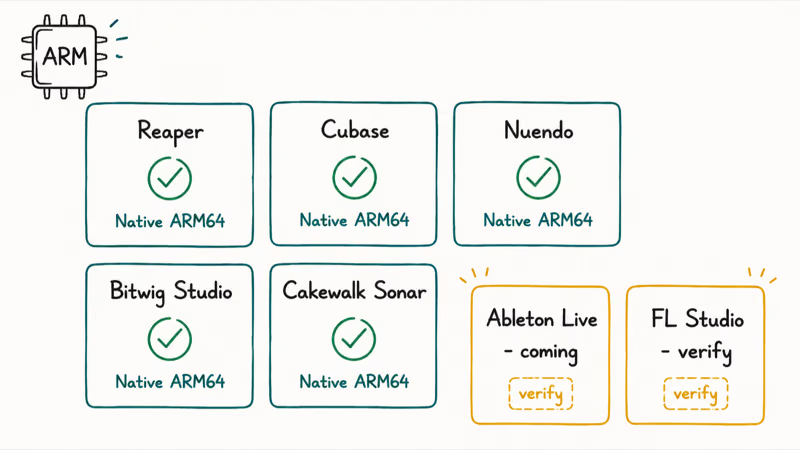
According to Microsoft’s Windows Music dev blog, Steinberg’s Cubase and Nuendo were “among the first on the platform,” Reaper is an “early adopter for Windows on Arm,” and Bitwig Studio “went fully native on Arm64.” The same update lists Cakewalk Sonar on Arm64 and Ableton Live as coming. That’s a real shortlist for a platform that ran nothing native two years ago, and it covers the DAWs most working producers actually reach for first.
Reaper now ships as a native ARM64 build, so the host application is no longer the bottleneck it was at launch. That’s the single biggest change for anyone who tried this platform early and walked away frustrated.
The list moves fast, though. Do one thing first. Open the download page for your specific DAW and confirm it ships an ARM64 or Windows-on-Arm build. A DAW that isn’t native still runs under the Prism emulator, but you give up the efficiency that makes these laptops worth buying.
| DAW | ARM64 status (verify on vendor page) |
|---|---|
| Reaper | Native ARM64EC build available |
| Cubase / Nuendo | Native, among the first on Windows on ARM |
| Bitwig Studio | Fully native on Arm64 |
| Cakewalk Sonar | Available on Arm64 |
| Studio One / Fender Studio | Listed as native on Arm64 |
| Ableton Live | Native build announced, check current status |
| FL Studio | Check Image-Line’s download page before buying |
#How Native ARM64 DAWs Load Your x64 Plugins
Mostly they just do, and this is the part that surprises people. You’d expect a native ARM64 program to reject an x64 plugin outright, since the two are different architectures. The trick is a Windows technology called ARM64EC. According to Microsoft’s ARM64EC documentation, ARM64EC “is native Arm64, but has the ability to load and interop with x64 binaries into the same process, under emulation in Windows 11,” and “this does not require any recompilation of the x64 plug-in DLLs.”
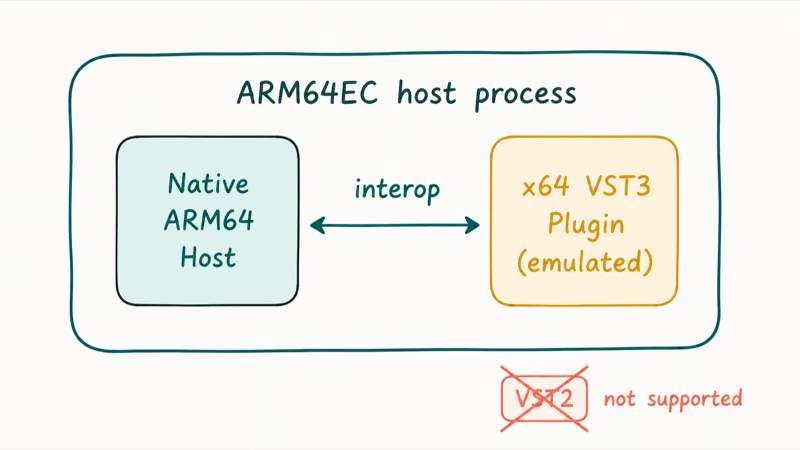
In plain terms: the host runs native and fast, while your old x64 plugins run inside it under emulation. Microsoft calls this “the best of both worlds,” and the DAWs above are built this way on purpose.
There are two real catches. VST2 plugins aren’t supported on Windows on ARM, so you’ll want the VST3 version of anything you rely on. An emulated plugin also costs more CPU than a native one, so a heavy project stacked with old x64 synths leans on the processor harder than a native set, and a few demanding instruments could push your buffer up. The fix over time is native plugins, which is what plugin developers are building now.
#The Audio Interface and ASIO Story
This used to be the dealbreaker, and Windows fixed the worst of it. Low-latency recording on Windows runs through ASIO, and historically that ASIO driver came from your interface’s manufacturer. On ARM, a vendor driver compiled for x86 won’t load. Drivers can’t be emulated.
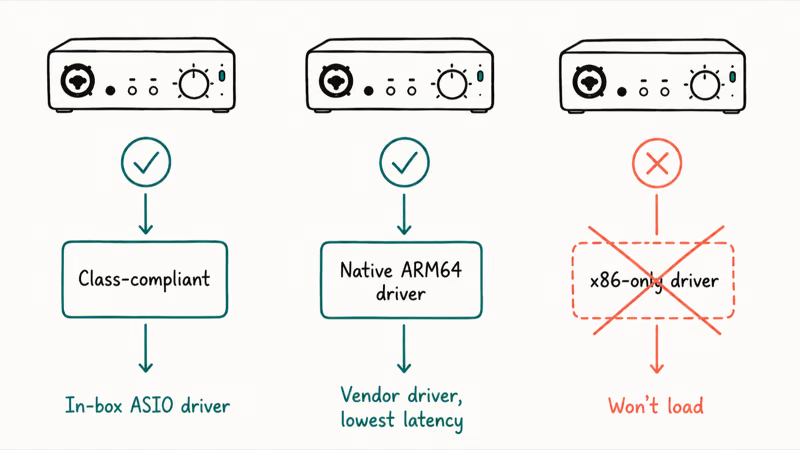
That last point is the root cause, and it’s documented. Microsoft’s emulation guide states plainly that “emulation only supports user mode code and doesn’t support drivers. Any kernel mode components must be compiled as Arm64.” A Focusrite or RME driver written for Intel can’t run on a Snapdragon laptop unless the vendor ships an ARM64 build.
The fix is the new in-box driver. Microsoft built a USB Audio Class 2 driver into Windows, with Qualcomm and Yamaha, that exposes a native ASIO interface. Per the same Windows Music dev team, it “provides plug & play compatibility with all USB Audio Class 2 interfaces so that musicians, podcasts, and audio professionals can have a ‘just works’ experience right out of the box.” Class-compliant interface? Plug it in, no driver hunt.
Here’s the practical split:
- Class-compliant interface (USB Audio Class 2): works with the in-box ASIO driver, no download needed.
- Interface with a native ARM64 driver: install the vendor driver for the lowest latency and full feature set.
- Interface with only an x86 driver: the proprietary driver won’t load. You’re limited to the in-box driver, if the unit is class-compliant, or it won’t work at all.
A class-compliant USB interface can use the in-box ASIO driver without manufacturer software or a separate driver download. If you’re shopping for new gear, the audio interfaces worth buying roundup and the sound cards for music production guide both flag which units are class-compliant, which is the spec that matters most on ARM.
#Setting Up Your First Session on ARM
The fastest way to know your setup works is to build the chain in order before you commit to a project. Start with the host, confirm the driver, then load plugins last.
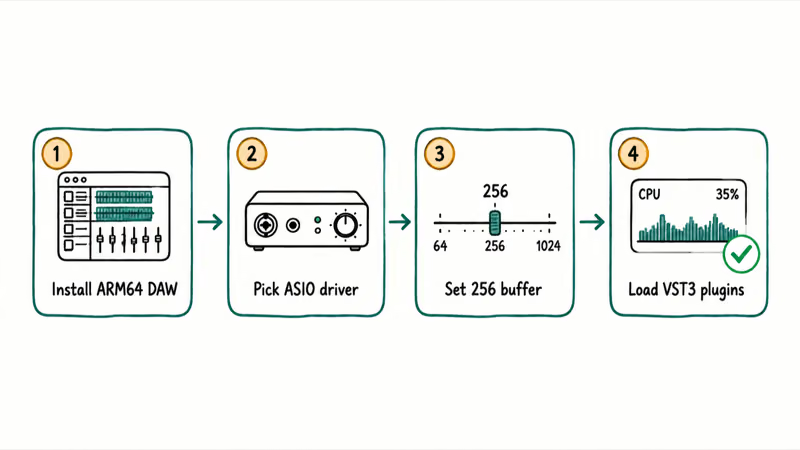
- Install the ARM64 build of your DAW from the vendor’s site, not an old installer you have saved.
- Plug in your interface and pick its ASIO driver in the DAW, or the in-box Windows USB Audio driver if the unit is class-compliant.
- Set a sane buffer, around 256 samples, and confirm you get input and output before lowering it.
- Load your plugins as VST3 and watch the CPU meter as emulated ones spin up.
If something fails, it’s almost always the driver or a VST2 plugin, not the DAW itself. Building the chain in this order isolates the culprit fast: if the DAW opens but you get no audio, it’s the driver, and if a specific plugin refuses to load or crashes the session, it’s an unsupported VST2 or a flaky emulated x64 instrument. You rarely have to guess.
#The Real Gaps for a Producer
The gaps are narrower than the old reputation suggests, but they’re specific. The DAW usually isn’t the problem anymore. The trouble clusters around the edges of a session, in the plugins and the hardware that hang off the host.
Native plugin coverage is uneven. The big names are moving to ARM64EC and ARM64X builds, but niche synths and effects from smaller developers may only exist as x64, which means they run emulated or, for VST2-only plugins, don’t run at all. Depend on a specific older plugin? Check it first.
Audio interface drivers are the second gap, and it’s the one most likely to bite a working studio. A class-compliant unit on the in-box driver is fine for most work. An interface that needs its own driver for DSP mixing, custom routing, or very low buffer sizes needs that vendor’s ARM64 release to do those things. This is the same architecture-mismatch rule that blocks other x86 drivers on ARM, covered in the Windows on ARM app compatibility overview.
Battery and thermals cut the other way, and this is where the platform shines. A native DAW running native plugins on a Snapdragon X laptop sips power next to an x86 machine, which is a real edge for mobile recording. That benefit shrinks the moment you load a stack of emulated plugins, because emulation burns extra CPU. The cleaner your project stays, the more the platform’s efficiency shows.
If you’re weighing this against an Intel or AMD laptop in general terms, the Snapdragon X vs Intel Core Ultra vs AMD Ryzen AI comparison breaks down the wider tradeoffs beyond audio.
#Do You Even Need a Snapdragon X Laptop for This?
Most readers asking this really mean whether a Copilot+ PC makes sense for music, since that’s the laptop class Snapdragon X ships in. The audio features above don’t need the NPU or the AI branding. They come from native ARM64 software plus the in-box driver, and any Snapdragon X laptop on Windows 11 gets them. For the full picture on that laptop class, the explainer on what a Copilot+ PC is lays it out.
A quick reality check helps here. A producer who lives in Cubase or Reaper, runs mainstream VST3 plugins, and uses a class-compliant interface has a clean path today. A producer with a VST2-heavy template, a boutique-plugin habit, or a driver-dependent interface should verify each piece first.
Either way, the DAW will run. The question is everything plugged into it.
For light, mobile, or learning setups, a Snapdragon laptop is easy to recommend. A primary studio rig with years of accumulated plugins is the harder call, so confirm your exact chain or stay on x86 for now. Hit silence after setup? The general no sound on laptop fixes cover the Windows-side checks that aren’t ARM-specific.
#Bottom Line
If you mainly use Reaper, Cubase, or Bitwig with VST3 plugins and a class-compliant USB interface, buy the Snapdragon X laptop and enjoy the battery life, because that setup runs native today. If your work depends on VST2 plugins, boutique x64-only synths, or an interface that needs its own driver, check each one on the vendor’s page first. The DAW is no longer the risk. The plugins and the interface driver are.
AI PCs and Copilot+ Laptops
#Frequently Asked Questions
Does Reaper run natively on Snapdragon X?
Yes. According to Microsoft’s Windows Music dev team, Reaper is an early adopter for Windows on ARM with a native ARM64 build. It’s compiled to ARM64EC, so it runs natively while still loading most x64 VST3 plugins, without needing the host itself to run as an emulated x64 app.
Will my x64 VST plugins work on a native ARM64 DAW?
Most x64 VST3 plugins work, because the major DAWs are compiled to ARM64EC, which loads x64 binaries into the same process under emulation without recompiling them. VST2 plugins are the exception. They aren’t supported on Windows on ARM, so you’ll need the VST3 version of anything you depend on.
What about my audio interface and ASIO?
If your interface is USB Audio Class 2 compliant, Windows now has an in-box ASIO driver that recognizes it with no download. If your interface needs its own driver, that driver must be an ARM64 build, because x86 drivers can’t run under emulation on ARM. Check the manufacturer’s page for an ARM64 or Windows-on-Arm driver release.
Why won’t my interface’s installer work on Snapdragon X?
Because audio interface drivers are kernel-mode components, and Windows on ARM can’t emulate drivers. Microsoft’s documentation confirms kernel-mode code must be compiled as ARM64. An x86 driver installer will either fail or install a driver that never loads. A class-compliant interface sidesteps this by using the built-in driver instead.
Is a Snapdragon X laptop good enough for serious music production?
It can be, with two conditions met: a native ARM64 DAW and an interface that either is class-compliant or has an ARM64 driver. Round-trip latency on the platform is now competitive when those pieces line up. The weak spots are native plugin coverage and proprietary interface drivers, so a producer with a deep x64 or VST2 plugin library should verify their chain before switching.
Does FL Studio or Ableton Live run native on ARM yet?
Ableton Live has announced a native ARM build, and Microsoft’s update lists it as coming to the platform. FL Studio’s status changes over time, so check Image-Line’s download page directly rather than trusting a third-party list. When a DAW isn’t native, it still runs under the Prism emulator, just without the efficiency advantage.
Do I need a Copilot+ PC specifically for music production?
No. The audio capabilities here come from native ARM64 software and the in-box ASIO driver, not from the NPU or the Copilot+ label. Any Snapdragon X laptop running Windows 11 on ARM gets the same audio stack. The AI features are a separate selling point that doesn’t affect your DAW.

Bluetooth Not Working on Snapdragon X? Fixes for 2026
Bluetooth not working on your Snapdragon X Copilot+ PC? Generic audio, mice, and keyboards work, but vendor apps often lack an ARM build. Fixes inside.

Docker Desktop and WSL2 Not Working on Snapdragon X? Fix It
WSL2 runs fine on Snapdragon X, but Docker Desktop ARM is Early Access and throws WSL errors. Use WSL2 plus native ARM64 Ubuntu and Docker Engine.
Does OBS Studio Work on Snapdragon X? ARM64 Build Guide
Yes, OBS Studio has an experimental ARM64 build since version 31.1, but x64 plugins won't load and hardware encoding is missing. Here is what works.
Does Photoshop Run on Snapdragon X? Native ARM Answer
Does Photoshop run on Snapdragon X? Yes, as a native ARM64 build. See which features work, which Adobe apps emulate, and fix the 0xc000007b error.