Games Not Launching on Snapdragon X? Fix It (2026)
Games not launching on Snapdragon X? The cause is usually anti-cheat or a Prism crash. Per-symptom fixes plus which titles actually run on ARM in 2026.

Quick AnswerGames that refuse to start on a Snapdragon X laptop are usually blocked by anti-cheat, not the chip. Anti-cheat supports ARM now, but each game needs its own developer update, so Fortnite runs while many competitive titles still won't.
Games not launching on Snapdragon X almost always come down to anti-cheat, not the chip. Your laptop runs Windows on ARM, and most competitive games carry a kernel-level anti-cheat built for x64 hardware that the double-click silently fails to load. The result is uneven: some titles open fine while a whole tier of multiplayer games refuse to start.
- Two separate failure modes exist: anti-cheat that blocks the launch entirely, and Prism emulation that crashes a game after it opens
- Anti-cheat on ARM is real but opt-in per game, so a title only works once its developer ships an updated build
- Fortnite became playable on Windows on Snapdragon on November 3, 2025, and it’s the proof case that the system works
- Kernel-level anti-cheat and any x64 driver can’t run through Prism, so some games won’t launch until a native ARM version arrives
- Check a game’s status on the WorksOnWoA tracker before you buy, since the catalog changes month to month
#Why Won’t My Games Launch on Snapdragon X?
The chip is rarely the problem. A Snapdragon X laptop runs the ARM build of Windows 11, and it translates x86 and x64 games on the fly through an emulator called Prism. The broader picture of Windows on ARM app compatibility shows the same pattern across all software: most things run, a few categories don’t.
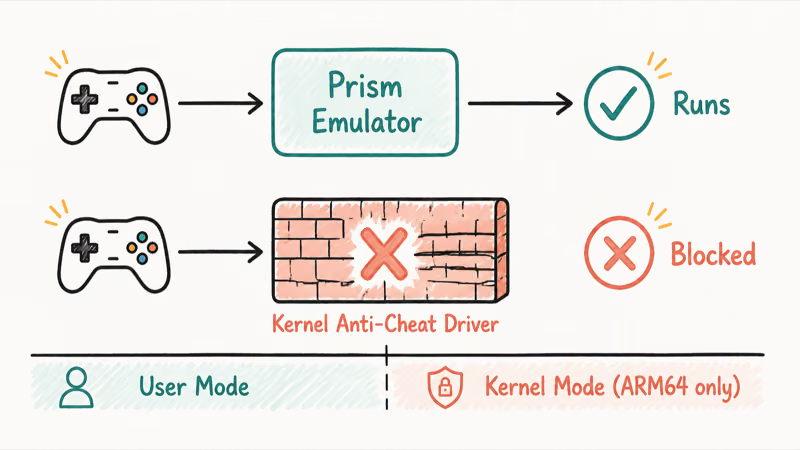
The translation works for most single-player games. What breaks is the security layer under competitive multiplayer titles.
Anti-cheat is the wall. Systems like Easy Anti-Cheat, BattlEye, and Vanguard hook deep into Windows to catch tampering, and most load a driver into the kernel. That kernel driver is what breaks on ARM, because it was built for x64 and nothing on a Snapdragon laptop can translate it. It’s the same limit that trips up productivity software, which is why even whether Photoshop runs on Snapdragon X comes down to ARM-native support, not raw speed.
According to Microsoft’s emulation documentation, emulation “only supports user mode code and doesn’t support drivers. Any kernel mode components must be compiled as Arm64.” That sentence explains most dead launches: the anti-cheat driver never initializes, so the game refuses to start before you ever see a menu, and the failure looks like nothing happened at all.
So you get a clean failure with no error. The launcher updates, the game appears installed, and clicking Play does nothing. There’s no crash dialog and no clue, which is why people blame the chip or their drivers when the wall is the anti-cheat layer.
That’s the signature of an anti-cheat block. It helps to know what a Copilot+ PC is before judging one as a gaming machine.
#Is It Anti-Cheat or a Prism Crash?
Tell these two apart first, because the fixes are completely different. The symptom tells you which lane you’re in.
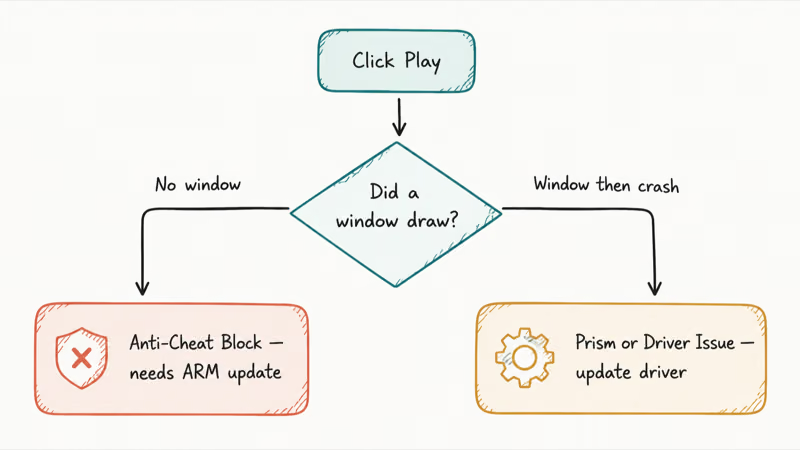
How the two Snapdragon X game failures look
| Symptom | Likely cause | What it means |
|---|---|---|
| Nothing happens on launch, no window | Anti-cheat block | Game needs a developer ARM update |
| Brief window flash, then closes | Anti-cheat block | Same as above |
| Game opens, then crashes mid-load | Prism or driver issue | Update Adreno driver, check AVX support |
| Crash with a graphics or DirectX error | GPU driver or emulation gap | Update via Snapdragon Control Panel |
| Anti-cheat error message by name | Anti-cheat block | Confirm ARM support for that game |
The rule is simple. If the game never draws a window, treat it as anti-cheat. If it gets into a loading screen or main menu and then dies, treat it as an emulation or driver problem, because at that point rendering already started and the anti-cheat already cleared.
A title that flashes and vanishes usually won’t be fixed by graphics settings. The block happens before rendering, so chasing display tweaks is a dead end.
#How to Fix Games Blocked by Anti-Cheat
You can’t force a blocked game open. What you can do is confirm whether the game supports ARM yet, get on the build that enables it, and stop wasting time on titles that haven’t been updated.
Anti-cheat support for ARM does exist now. Epic’s official announcement confirms that Epic Online Services offers Windows on ARM support for all services except the social overlay, which covers Easy Anti-Cheat. The catch is in the same document: developers add support by “implementing EOS SDK 1.19.1 (or any subsequent SDK release).” The platform is ready, but each game ships its own update.
That’s why the experience feels random. Fortnite works because Epic battle-tested the rollout there first, with the announcement noting it went live for Windows on Snapdragon on November 3, 2025. A different Easy Anti-Cheat game on the same laptop can still fail, simply because its studio hasn’t adopted the new SDK. BattlEye and Denuvo have also moved to ARM, as TechRadar reports on Epic’s broader fix for anti-cheat on Snapdragon laptops, but the same per-title rule applies.
#Confirm ARM Support Before You Troubleshoot
Check the game first. The community-run WorksOnWoA compatibility tracker lists thousands of Windows games with a status for each one on ARM, and it’s the fastest way to learn whether a title launches at all. If a game shows as unsupported there, no setting on your laptop changes that.
Then make sure your build is current. Update Windows 11 to the latest version, update the game and its launcher, and restart. An updated game build is what carries the ARM anti-cheat client, so a launcher that hasn’t pulled the latest patch will keep failing even on a supported title.
#How to Fix Games That Crash After Launching
This is the other lane. The game opens, you see a logo or a menu, and then it dies. That points at the emulation layer or the graphics driver, both of which you can actually fix.
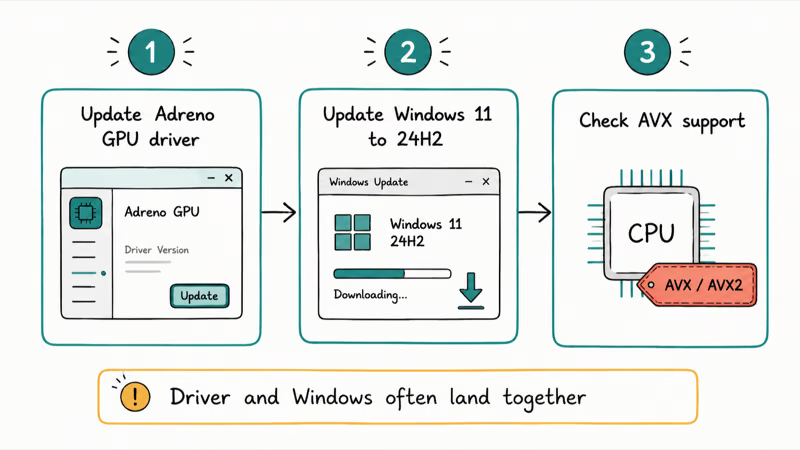
Update the graphics driver first. Qualcomm ships an Adreno GPU driver through the Snapdragon Control Panel, and a fresh driver resolves a large share of mid-game crashes and rendering errors. Microsoft’s Prism emulator, introduced in Windows 11 24H2 per Microsoft’s ARM documentation, is “optimized and tuned specifically for Qualcomm Snapdragon processors,” so keeping both Windows and the GPU driver current isn’t optional for gaming, and the two updates often need to land together before a stubborn title behaves.
Watch for AVX-related crashes too. Many modern x64 games probe for the AVX and AVX2 instruction sets and quit instantly if they’re missing. Prism added emulation for those extensions, but an out-of-date Windows build may not have it. A game that crashes on an older install can start working after a full update.
Driver and Windows updates matter most when a title reaches rendering and then crashes. Chase the driver and the Windows version before you touch in-game settings.
#When a Game Will Never Launch on ARM
Some titles are a dead end for now. A game whose anti-cheat is still x64 kernel-only, with no ARM build from the developer, simply can’t run, because the driver has to load in the kernel and there’s no emulation layer there to fake it. Microsoft’s documentation is blunt on this, confirming that kernel-mode components have to be native ARM64 with no emulation fallback.
So a shooter that hasn’t shipped an ARM anti-cheat client won’t start, period. No driver update, reinstall, or compatibility toggle changes that until the studio acts.
The practical move is to stop fighting these. If a game shows as unsupported on the tracker with no ARM support announced, treat it as off the menu. Gaming is only one slice of the platform, and the Copilot+ PC features list covers what these laptops do well instead.
#Which Games Run on Snapdragon X and Which Don’t
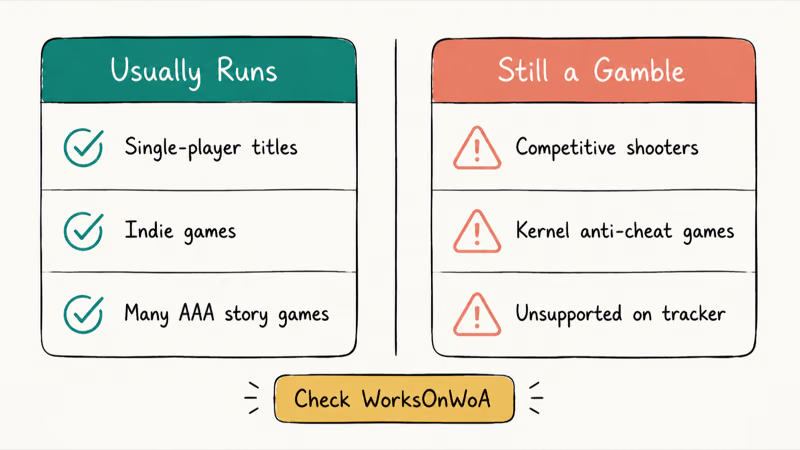
Single-player games are the safe bet. Anything without kernel-level anti-cheat usually runs through Prism, from small indie titles to many big AAA story games, often at playable frame rates on the Snapdragon X Elite once the drivers are current. The ceiling here is performance, not whether the game launches at all, and that’s a very different worry from a game that simply refuses to open. You tune settings, not chase a wall.
The next generation in the Snapdragon X2 Elite explainer widens that ceiling further. If raw power is your deciding factor, the Snapdragon X vs Intel Core Ultra vs AMD Ryzen AI breakdown compares all three.
Competitive multiplayer is the gamble. The catalog is growing and Fortnite proves the path works, but plenty of popular shooters still won’t start, because their developer hasn’t shipped the update yet. It’s per-game, and it changes month to month, so today’s “no” can flip to “yes” the week a studio adopts the new SDK and pushes a patch to its players.
Treat the tracker as your shopping list. Look up any multiplayer game before you buy, because the gap between “Playable” and “Unsupported” is the gap between a working purchase and a refund.
#Bottom Line
Sort the symptom first. If a game does nothing when you click Play, it’s anti-cheat, so confirm the game supports ARM on the WorksOnWoA tracker and get on the latest build. If a game opens and then crashes, update Windows 11 to 24H2 and grab the newest Adreno driver from the Snapdragon Control Panel before touching anything else.
Then sort your library. Single-player titles mostly work today, while competitive games need a one-by-one check before you count on them.
#Frequently Asked Questions
Why does Fortnite launch on my Snapdragon X but other games don’t?
Fortnite was the first game Epic updated with ARM anti-cheat support, going live for Windows on Snapdragon on November 3, 2025. Other Easy Anti-Cheat games need their own developer update before they will launch, even on the same laptop. Until a studio ships that build, the game stays blocked.
Will competitive games ever work on Snapdragon X laptops?
Many will, and the list is growing as developers adopt the updated Epic Online Services SDK and ARM-native anti-cheat. But it depends entirely on each game’s developer, so there is no guarantee any specific title gets updated. Check the WorksOnWoA tracker for the current status of a game you care about.
Can I disable anti-cheat to make a game launch on ARM?
No. Anti-cheat is enforced server-side for online play, so turning it off would lock you out of multiplayer rather than let the game run. The block exists because the anti-cheat driver can’t load on ARM, and that isn’t something a setting on your end can override.
Does updating Windows 11 help with games not launching?
It helps with crashes, not with anti-cheat blocks. Updating to Windows 11 24H2 brings the Prism emulator and AVX instruction emulation, which fixes many games that crash on startup. A game blocked by anti-cheat still needs its own update, so a Windows update alone won’t make it launch.
Is the Snapdragon X chip too weak to run games?
No, the chip is not the bottleneck for most launch failures. The Snapdragon X Elite handles many games through Prism emulation, and the issue is compatibility rather than raw power. Performance varies by title, but a game that refuses to start is being blocked, not overwhelmed.
How do I know if a game uses kernel-level anti-cheat?
Competitive shooters and online battle royales are the usual ones, and many will name their anti-cheat in the launch error or in the store page requirements. The safest check is the WorksOnWoA tracker, which flags titles that fail to launch on ARM. If a game shows as unsupported there, kernel anti-cheat is the most common reason.

Bluetooth Not Working on Snapdragon X? Fixes for 2026
Bluetooth not working on your Snapdragon X Copilot+ PC? Generic audio, mice, and keyboards work, but vendor apps often lack an ARM build. Fixes inside.

Docker Desktop and WSL2 Not Working on Snapdragon X? Fix It
WSL2 runs fine on Snapdragon X, but Docker Desktop ARM is Early Access and throws WSL errors. Use WSL2 plus native ARM64 Ubuntu and Docker Engine.

Does iTunes Work on Snapdragon X? ARM Windows 11 Guide
Yes, iTunes runs on Snapdragon X laptops through Prism emulation, but the Apple Devices app is the smoother route. Here is what to install on ARM.

Does OBS Studio Work on Snapdragon X? ARM64 Build Guide
Yes, OBS Studio has an experimental ARM64 build since version 31.1, but x64 plugins won't load and hardware encoding is missing. Here is what works.