Does Photoshop Run on Snapdragon X? Native ARM Answer
Does Photoshop run on Snapdragon X? Yes, as a native ARM64 build. See which features work, which Adobe apps emulate, and fix the 0xc000007b error.
Quick AnswerYes, Photoshop runs on Snapdragon X laptops as a native ARM64 build, so it launches and edits at full speed without emulation. The main gaps on ARM are import, export, and playback of embedded video layers.
Does Photoshop run on Snapdragon X? Yes, and it runs well, because Photoshop is the one Adobe app with a true native ARM64 build for Windows on ARM. On a Snapdragon X laptop it launches and edits without the emulation tax that slows older software. The catch is small but real: a short list of features is missing on ARM.
This guide draws those lines so you know what you’re buying. The short version: photo work is great, a couple of niche tools are gone, and the rest of Creative Cloud is a mixed bag of native and emulated.
- Photoshop ships as a native ARM64 build for Windows on ARM, so it runs at full speed on Snapdragon X with no emulation penalty
- The main gaps on ARM are import, export, and playback of embedded video layers, plus the Oil Paint filter and the Shake Reduction filter
- Lightroom, Illustrator, Premiere Pro, After Effects, and InDesign also have native ARM64 versions, though some Premiere features did not make the ARM build
- Apps without a native ARM64 build still run through Microsoft’s Prism emulator, which translates x86 and x64 code with a speed and battery cost
- A common 0xc000007b launch error on Snapdragon X traces to a mismatched Creative Cloud install and is usually fixed with the Cleaner Tool plus a clean reinstall
#Does Photoshop Run Natively on Snapdragon X?
Photoshop runs natively on Snapdragon X. It’s one of the few heavyweight desktop apps that shipped a true ARM64 build, which means the chip executes Photoshop’s code directly instead of translating it on the fly. Adobe first released a native Windows on ARM version of Photoshop back in 2021, and that same native build is what installs on today’s Snapdragon X and X2 Elite machines.
Native matters here because the alternative is emulation. On a Snapdragon X laptop, an emulated app runs through a translation layer that costs speed and battery on heavy work. Photoshop skips that layer entirely, so brushes, layers, filters, and exports all run at the chip’s full pace, the same way they would on a comparable Intel or AMD laptop without any translation overhead slowing things down.
Because the native build runs without a translation layer, big brushes, large layered files, and exports stay as responsive as they would on a comparable Intel or AMD machine.
#The Photoshop Features That Are Missing on ARM
A handful of features don’t make it onto the ARM version, and the video-layer tools are the big one. According to Adobe’s release notes as documented by PetaPixel, the unsupported tools include “import, export, and playback of embedded video layers, ‘invite to edit’ workflows, opening or placing U3D files, Oil Paint Filter and Shake Reduction Filter, and others.”
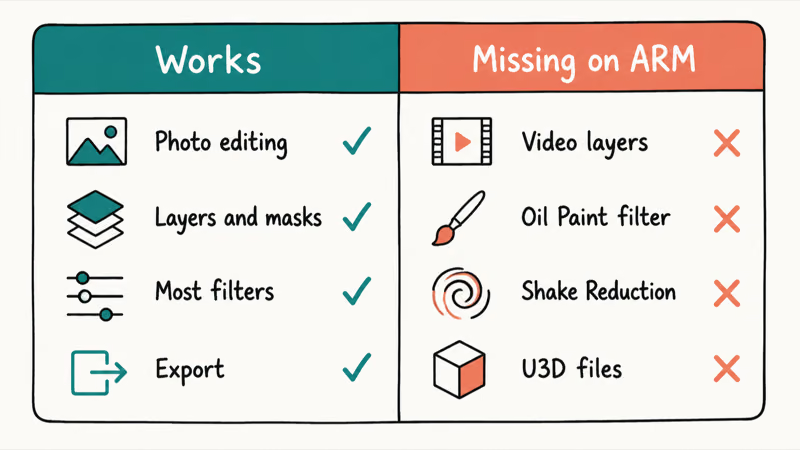
That list has barely changed in years. Treat it as the live state on Snapdragon X, not a gap about to close.
The video-layer gap is the one most people hit. If your workflow leans on the video timeline inside Photoshop, importing video frames to layers, or playing back embedded clips, those exact paths are gone on ARM, with no setting to switch them back on. The 3D tools and legacy filters are niche by comparison, yet the missing Oil Paint and Shake Reduction filters can still catch you mid-edit if you reach for them out of habit.
Here’s the honest part. For mainstream photo editing, retouching, compositing, and design, none of these gaps matter at all. They only bite the small slice of users who do video or 3D work inside Photoshop itself.
The photo-first walkthrough on how to flip an image in Photoshop covers the kind of everyday task that runs perfectly on ARM.
Photoshop on Snapdragon X: native features versus the ARM gaps
| Capability | Status on Snapdragon X |
|---|---|
| Photo editing, retouching, compositing | Native, full speed |
| Layers, masks, smart objects | Native, full speed |
| Most filters and adjustments | Native, full speed |
| Import, export, playback of video layers | Not supported |
| Oil Paint and Shake Reduction filters | Not supported |
| Opening or placing U3D files | Not supported |
#What About the Rest of Creative Cloud on Snapdragon X?
The rest of Creative Cloud is a mix, and that’s the part to plan for before you buy. Lightroom and Illustrator have native ARM64 builds, and Adobe later brought native Windows on ARM support to Premiere Pro, After Effects, and InDesign. So the marquee creative apps mostly run native on Snapdragon X today, not emulated. Everyday Lightroom edits like blurring a background in Lightroom work the same as they do on any laptop.
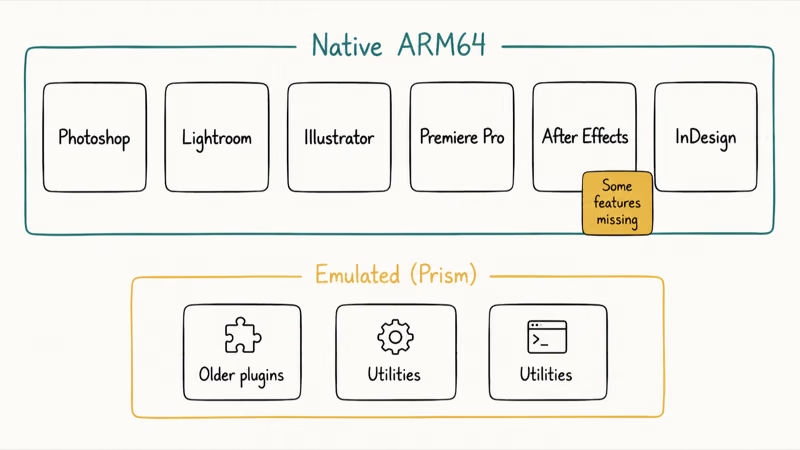
The wrinkle is that not every feature crossed over with the native builds. Adobe shipped native Premiere Pro and After Effects for ARM but left some capabilities out of those first ARM versions, which is normal for a platform transition.
So check before you switch. If you depend on a specific codec, GPU effect, or third-party plugin, confirm it works on ARM first.
Anything without a native ARM64 build still runs through emulation instead. Microsoft’s emulation documentation states that the Prism emulator works by “just-in-time compiling blocks of x86 instructions into Arm64 instructions,” caching those translated blocks so repeat runs are faster, which covers a lot of older creative utilities and plugins but always carries a measurable speed and battery cost on heavy, sustained jobs like long video exports.
Want the full picture beyond Adobe? Our guide to Windows on ARM app compatibility lays out the native, emulated, and broken tiers across the whole ecosystem. For a video-heavy setup, the DaVinci Resolve versus Premiere Pro comparison is worth a read, since Resolve also runs native on ARM.
#Confirming Photoshop Is Running the Native ARM Build
Not sure which build you got? Task Manager settles it.
You can confirm the right build in about ten seconds. Open Task Manager, go to the Details tab, right-click the column header, and turn on the Architecture column. With Photoshop running, find Photoshop.exe and read its architecture value to see whether the chip is running native code or translating it through emulation behind the scenes.
A native install shows Arm64, while an emulated app shows x64 or x86 instead. Microsoft’s emulation documentation confirms that an x64 app under emulation can’t easily tell it’s running on an ARM host, which is exactly why reading the architecture value yourself is the clearest signal you have that the right build landed and Photoshop is using the chip natively rather than translating its code.
See Arm64? You’re done. There’s nothing to fix and you’re getting full speed.
A correctly installed native build reports Arm64 here, which is what you want to see. If yours shows x64, a clean reinstall through Creative Cloud almost always pulls the right build.
#Why Photoshop Runs So Well When Some Apps Struggle
The difference comes down to native versus emulated code. A native ARM64 app like Photoshop is compiled for the chip, so there’s no translation step at all, while an emulated app pays a translation cost on every block of code it runs, even with Prism caching results to soften repeat launches and speed up everything after the first run.
There’s also a wall that emulation never crosses. Microsoft’s documentation states that “emulation only supports user mode code and doesn’t support drivers. Any kernel mode components must be compiled as Arm64.” That’s why a plugin with a kernel-level driver can fail outright on Snapdragon X, while a normal user-space app like Photoshop runs fine.
This split shows up in practice. Native apps behave like they would on any Windows laptop, while emulated tools carry a measurable load on heavy work. That gap is exactly why a native Photoshop matters so much here.
#Fixing the 0xc000007b Launch Error on Snapdragon X
Some Snapdragon X owners hit a launch error before they ever open Photoshop, and the clean-reinstall fix is worth knowing in advance. The error reads “The application was unable to start correctly (0xc000007b).” It usually shows up when Creative Cloud or Photoshop won’t open at all on a Surface Laptop 7 or another ARM device, often right after an update.
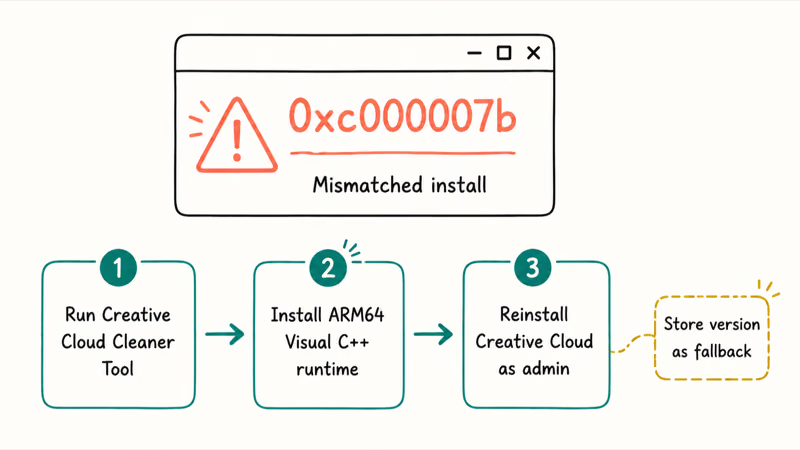
The cause is a mismatched install. According to an Adobe Community thread where Adobe support weighed in, the error stems from the x64 Creative Cloud build not running properly under the Windows on ARM layer, often after an app or Windows update leaves the ARM64 and x64 components out of sync with each other. A missing ARM64 runtime dependency, like the vccorlib140.DLL file that ships with the Visual C++ runtime, is a frequent trigger.
The reliable fix is a clean reinstall. Remove everything with Adobe’s Creative Cloud Cleaner Tool, install the ARM64 build of the Microsoft Visual C++ 2022 Redistributable, then reinstall Creative Cloud as an administrator. Run sfc /scannow first if you suspect deeper corruption.
Still stuck? The Microsoft Store version of Creative Cloud is a workable fallback while Adobe ships a fixed ARM installer.
#Bottom Line
Buy the Snapdragon X laptop if your main creative work is photo editing in Photoshop. The native ARM64 build runs at full speed and only drops a few niche features, none of which touch mainstream retouching, compositing, or design. The one group that should pause is anyone who edits video inside Photoshop, since the embedded video-layer tools are missing on ARM.
If you hit the 0xc000007b error out of the box, don’t return the laptop. Run the Creative Cloud Cleaner Tool, reinstall the ARM64 Visual C++ runtime, and reinstall Creative Cloud as administrator, which clears it for most people.
AI PCs and Copilot+ Laptops
#Frequently Asked Questions
Is Photoshop on Snapdragon X the full version or a cut-down app?
It’s the full desktop Photoshop, not a lite version. The ARM64 build has the same core editing engine, layers, filters, and export options as the Intel and AMD builds. The only differences are a short list of unsupported features, mainly embedded video layers and a couple of legacy filters.
Does Photoshop run faster on Snapdragon X than on an Intel laptop?
It runs at native speed, which is what matters most. Because the ARM64 build skips emulation, Photoshop performs like a normal install rather than a translated app. Raw speed versus a given Intel or AMD laptop depends on the specific chips, but you won’t pay an emulation penalty on Snapdragon X.
Can I edit video in Photoshop on a Snapdragon X laptop?
Not the embedded video-layer workflow. Import, export, and playback of video layers are not supported on the ARM version of Photoshop. For actual video editing, use a native ARM64 video app like Premiere Pro or DaVinci Resolve instead of Photoshop’s timeline.
Do I need to do anything special to get the ARM version of Photoshop?
No. When you install Photoshop through Creative Cloud on a Snapdragon X PC, Adobe delivers the native ARM64 build automatically. You don’t pick an architecture or download a separate installer. Just make sure Windows and Creative Cloud are fully updated first.
Why does Photoshop fail to launch with error 0xc000007b on my Surface Laptop?
That error points to a mismatched or corrupted Creative Cloud install on Windows on ARM, often after an update left ARM64 and x64 components out of sync. Removing everything with the Creative Cloud Cleaner Tool and doing a clean reinstall, plus the ARM64 Visual C++ runtime, fixes it in most cases.
Will the missing Photoshop features ever come to ARM?
Adobe has described some of these gaps as features that may be added in later releases, but the core list has stayed the same for years. Treat the current unsupported tools, especially video layers, as the state of Photoshop on ARM today rather than something to count on arriving soon.
Are other Creative Cloud apps native on Snapdragon X too?
Several are. Lightroom, Illustrator, Premiere Pro, After Effects, and InDesign have native ARM64 builds, so they avoid emulation. Some individual features did not make the first ARM versions, so check any specific codec or plugin you rely on before committing your workflow.

Bluetooth Not Working on Snapdragon X? Fixes for 2026
Bluetooth not working on your Snapdragon X Copilot+ PC? Generic audio, mice, and keyboards work, but vendor apps often lack an ARM build. Fixes inside.

Docker Desktop and WSL2 Not Working on Snapdragon X? Fix It
WSL2 runs fine on Snapdragon X, but Docker Desktop ARM is Early Access and throws WSL errors. Use WSL2 plus native ARM64 Ubuntu and Docker Engine.
Does OBS Studio Work on Snapdragon X? ARM64 Build Guide
Yes, OBS Studio has an experimental ARM64 build since version 31.1, but x64 plugins won't load and hardware encoding is missing. Here is what works.
How to Check if an App Runs on Snapdragon X Before Buying
Vet your must-have apps before buying a Snapdragon X PC: native ARM64, Prism emulation, partial, or blocked. The kernel-driver red flag explained.