Top Apps for Vlog Editing: Elevate Your Content in 2026
Best vlog editing apps for 2026 like InShot, CapCut, LumaFusion, and Adobe Premiere Rush. Free and paid mobile editors for iPhone and Android compared.
Quick AnswerThe best vlog editing apps include InShot for its versatile free features, GoPro Quik for quick edits, and KineMaster for advanced mobile editing. All offer trimming, effects, text overlays, and direct social media export.
Picking the right vlog editor matters more than picking a camera these days. This guide compares nine popular mobile editors on iPhone and Android in 2026, looking at trim speed, watermark rules, 4K export, and the depth of audio tools. Here’s how they stack up by price, skill level, and which ones are worth opening before a Monday upload.
- InShot and CapCut are the top free vlog editing apps, offering trimming, effects, and direct social export at no cost.
- KineMaster and Adobe Premiere Rush provide professional multi-track editing on mobile, with subscriptions starting around $4.99/month.
- LumaFusion is the best iOS-only option for serious editors, available as a one-time purchase with no ongoing subscription fee.
- Most vlog editing apps support 1080p or 4K export, so match the output resolution to your target platform before exporting.
- Beginners should start with iMovie (iOS) or CapCut (Android/iOS) before moving to advanced tools to avoid a steep learning curve.
#Why Use a Mobile Vlog Editing App?
Mobile editors have closed most of the gap with desktop tools. You’ll edit, color-grade, and upload from the same device that shot the footage, which is what makes one-day turnarounds possible.
The reasons people switch away from desktop suites tend to repeat:
- Convenience: Edit directly from the phone or tablet that shot the clip.
- Friendly interfaces: Tap-and-drag controls feel natural for newcomers.
- Speed: Simple timelines mean you can publish the same day.
- Cost: Free tiers cover most beginner needs, and paid tiers undercut desktop NLEs.
When you’re picking an app, the must-have shortlist is the same across creators: trimming, transitions, text overlays, audio tools, and export presets that match TikTok, Reels, or YouTube. For cinematic touches on top of that, our walk-through on how to make video look like film covers grading inside any of the apps below.
#Best Free Vlog Editing Apps
Free doesn’t mean limited anymore. Three of the four apps in this section export at full 1080p with zero watermark on the free tier.
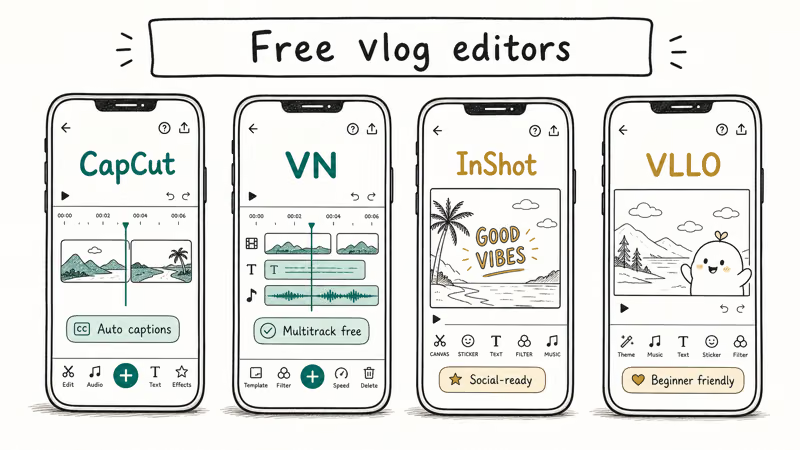
#InShot
InShot is friendly on both Android and iOS, and its free tier covers most short-form needs. Trims, splits, and a wide filter library make it a strong default pick for short-form work.
Key features:
- Trimming, splitting, and merging clips
- Filters, effects, and stickers
- Royalty-free music and sound effects
- HD export with no watermark on free tier
Download InShot for iOS or Download InShot for Android.
#GoPro Quik
Quik is the fastest way to turn a folder of action-cam clips into a watchable montage. GoPro recommends Quik as the companion app for HERO cameras, and its auto-tempo cuts work with handheld phone footage too.
Key features:
- Automatic edits driven by music tempo
- 20+ themes with built-in transitions
- Direct sharing to TikTok, Instagram, and YouTube
Download Quik for iOS or Download Quik for Android.
#Magisto
Magisto leans on AI to assemble cuts for you. It’s handy when you’ve shot 30 minutes of B-roll and don’t want to trim any of it manually.
Key features:
- AI-driven storyboards and rough cuts
- Style and theme presets for common formats
- Royalty-free music library
- Tools tuned for small-business marketing videos
Download Magisto for iOS or Download Magisto for Android.
#CapCut
CapCut is the most-installed free editor right now, and it’s a popular choice for quick TikTok cuts. Multi-track timelines, auto-captions, and a green-screen tool put it ahead of every other free option. If you lean on templates, our CapCut templates roundup covers the most-shared ones.
Key features:
- Multi-track timeline
- Auto-caption generation
- Green-screen effect and chroma key
- No watermark unless you opt into one
Download CapCut for iOS or Download CapCut for Android.
#Best Pro Vlog Editing Apps for Mobile
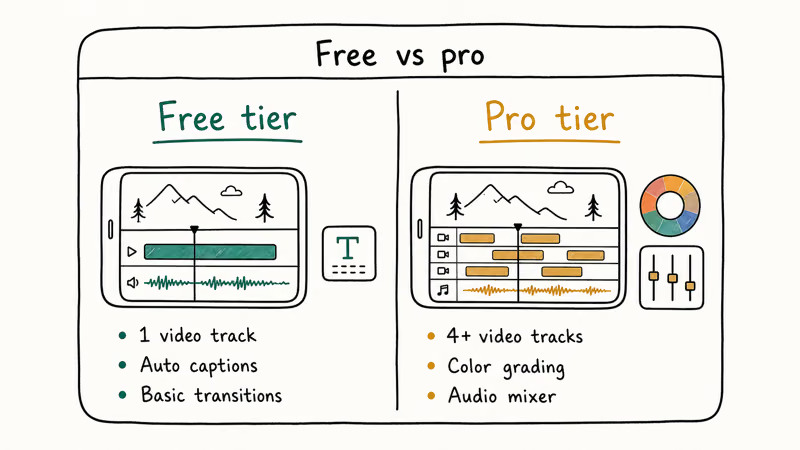
Pro mobile editors charge a subscription or a one-time fee, but they make pro-tier workflows possible without a laptop.
#Adobe Premiere Rush
Adobe Premiere Rush handles multi-track edits and pushes projects to Premiere Pro on desktop. Adobe states that Premiere Rush exports at up to 4K resolution, and it’s one of the few mobile editors that syncs across iPhone, Android, and Mac in real time.
Key features:
- Multi-track video and audio editing
- Color presets and manual color wheels
- Creative Cloud sync between mobile and desktop
- Direct publishing to YouTube, TikTok, and Instagram
Download Premiere Rush for iOS if you need the iPhone version; Adobe has retired or moved the old Android Play listing, so confirm current Android availability before recommending it.
If you’re choosing between this and a desktop NLE, our Davinci Resolve vs Premiere Pro comparison covers the trade-offs.
#LumaFusion
LumaFusion is the closest thing to a desktop NLE on iPad. The one-time purchase model stands out in a subscription-heavy field, and the multi-track timeline handles most weekly-vlog projects without complaint.
Key features:
- 6 video and 6 audio tracks on iPad
- Color grading with scopes and LUTs
- Frame-accurate keyframing
- 4K project support
#KineMaster
KineMaster sits in the middle of the pro lineup. It handles multiple simultaneous video layers on a modern phone, and the voiceover tool is among the easiest of any app in this group. The free tier watermarks the export, so plan on a subscription if you publish regularly.
Key features:
- Multi-layer video editing
- Chroma key (green screen)
- Audio editing and voiceover recording
- Hundreds of effects and transitions in the Asset Store
Our full KineMaster review walks through the chroma-key workflow with sample footage.
Download KineMaster for iOS or Download KineMaster for Android.
#Best Vlog Editing Apps for Beginners
If you’ve never touched a timeline before, start here. These apps trade depth for clarity and won’t overwhelm you on day one.
#iMovie
iMovie ships free on every iPhone and iPad. According to Apple’s iMovie support page, the app supports 4K HDR video on iPhone XS and later, which covers anyone with a phone from the past five years.
Key features:
- Drag-and-drop timeline
- Built-in themes and transitions
- 4K HDR export on supported iPhones
- Tight handoff to Final Cut Pro on macOS
Download iMovie for iOS. Already an iMovie user? Our iMovie aspect ratio guide explains how to format vertical clips for Reels.
#Vlog Star
Vlog Star is built around YouTube workflows. The intro/outro maker, thumbnail creator, and reaction-cam tool feel purpose-built for vloggers who post weekly.
Key features:
- Intro and outro templates
- Thumbnail creator
- Reaction camera with picture-in-picture
- Built-in YouTube SEO suggestions
Download Vlog Star for iOS or Download Vlog Star for Android.
#Specialized Vlog Editing Tools
Some use cases need editors tuned to a single format, and these are the picks worth keeping handy.
#Vertical Video Editors
TikTok and Reels reward editors that frame for 9
from the start. Our vertical video editor roundup covers the picks that crop, caption, and export to vertical without forcing you to fight the timeline.#Wedding Video Editors
Wedding work needs slow ramps, gentle color, and right music timing. Our wedding video editor picks include apps with prebuilt templates and royalty-free wedding scores. For multi-track audio mixing inside short clips, our TikTok multi-sound walkthrough is worth a look too.
#How Should You Choose the Right Vlog Editing App?
Treat the choice like buying a guitar: pick something you’ll open again.
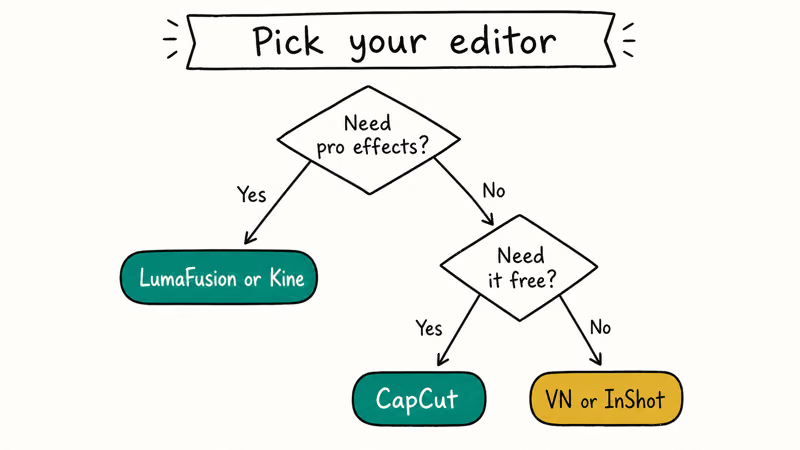
These five questions narrow the field fastest:
- Skill level: Are you on day one, or do you want pro tools?
- Required features: Multi-track? Chroma key? Captions?
- Platform: iOS, Android, or both?
- Budget: Free, subscription, or one-time purchase?
- Output target: TikTok, YouTube, Reels, or all three?
If you’re outgrowing a phone-based workflow, our roundup of free video editing software with no watermark and our iMovie time-lapse tutorial cover the next step up.
#Bottom Line
For most vloggers in 2026, CapCut on a phone, LumaFusion on an iPad, and Adobe Premiere Rush across both form the right ladder. CapCut is the free starting point, LumaFusion is the iPad workhorse for serious creators who don’t want a subscription, and Premiere Rush makes sense the moment you also work in Premiere Pro on desktop. Any of the three can carry a weekly vlog without complaint.
#Frequently Asked Questions
Are free vlog editing apps good enough for professional content?
Yes, in most cases. CapCut, InShot, and iMovie can produce broadcast-quality 1080p video without watermarks. The free tiers do limit you on stock music, premium filters, and 4K export, so heavy creators tend to upgrade after a few months.
What’s the best vlog editing app for beginners on iPhone?
iMovie. It ships pre-installed and uses an Apple-standard drag-and-drop timeline. When you outgrow it, CapCut is the natural next step.
Can you really edit 4K video on a phone?
You can on most flagship phones from the last three years. LumaFusion, Adobe Premiere Rush, and KineMaster all handle 4K timelines, and iMovie exports 4K from an iPhone 8 or later. Older mid-range phones might transcode the footage first or struggle with playback during longer editing sessions.
Do free vlog editing apps add a watermark to your video?
It depends on the app. CapCut and InShot don’t add a watermark on free exports as of early 2026, but KineMaster does unless you subscribe. Always check the export screen for a “remove watermark” toggle before you publish.
Which vlog editing app works on both iPhone and Android?
CapCut, InShot, KineMaster, Adobe Premiere Rush, Magisto, and Vlog Star are all cross-platform. iMovie and LumaFusion are iOS-only.
How long does it take to learn a mobile vlog editing app?
You’ll be comfortable with InShot or CapCut in an afternoon. Pro apps like LumaFusion and Premiere Rush take a couple of weekends because the timeline metaphor and keyframing tools have more depth than the beginner editors.
Should beginners use a templated app or a full timeline editor?
Templates speed up your first three uploads. After that, switch to a timeline editor so you can develop a personal style instead of falling into the same Quik or Magisto preset every week.

Best Laptop for Running LLMs in 2026: Memory Comes First
The best laptop for running LLMs is a memory purchase first. Compare MacBook unified memory against NVIDIA laptop VRAM, and see what each tier really runs.

Pixel 11 vs Pixel 10: What Changed and Who Should Upgrade
Pixel 11 vs Pixel 10: same screen and camera resolution, new Tensor G6, 25W wireless, and Gemini Intelligence. Here is who should actually upgrade.

Best Power Bank for iPad in 2026: Pro, Air, and Mini
Best power bank for iPad in 2026. Compare mAh tiers and USB-C PD wattage for iPad Pro, Air, and mini, plus airline Wh math, cables, and travel tips.

Best Power Bank With Built-In Cable: Top 2026 Picks
Best power bank with built-in cable picks for 2026. Compare single USB-C, multi-connector, and retractable laptop banks, plus airline Wh math.