Snapdragon X vs Intel Core Ultra vs AMD Ryzen AI (2026)
Snapdragon X vs Intel Core Ultra 200V vs AMD Ryzen AI 300 in 2026: NPU TOPS, ARM versus x86 compatibility, battery, and which AI chip fits your laptop.

Quick AnswerPick Snapdragon X for the best battery and always-connected ARM efficiency, Intel Core Ultra 200V for the widest x86 app compatibility, or AMD Ryzen AI 300 for the strongest multi-core work. All three clear Microsoft's 40-TOPS Copilot+ bar, so the decision is battery versus compatibility versus raw cores.
Snapdragon X, Intel Core Ultra 200V, and AMD Ryzen AI 300 are the three chip families that power most Copilot+ laptops in 2026. They all clear the same AI bar, so the real choice isn’t which one is “fastest.” It’s a trade between battery life, app compatibility, and multi-core muscle, and the right pick depends on what you do all day, not the headline TOPS number on the box.
- All three families pass Microsoft’s 40-TOPS Copilot+ requirement, so any of them unlocks Recall, Live Captions, and Studio Effects.
- Snapdragon X uses ARM, which leads on battery and always-connected designs but runs some legacy x86 apps through Prism emulation.
- Intel Core Ultra 200V and AMD Ryzen AI 300 are x86, so they run virtually every Windows app, driver, and anti-cheat tool natively.
- Qualcomm rates the Snapdragon X Hexagon NPU at 45 TOPS; Intel lists up to 48 TOPS and AMD up to 50 TOPS for their NPUs.
- The NPU gap between them is invisible for everyday AI features, so battery and compatibility decide the buy, not TOPS.
#Do All Three Chips Run the Same AI Features?
Yes, and that’s the key starting point. According to the Microsoft Copilot+ PCs developer guide, any chip with an NPU running “more than 40 trillion operations per second (TOPS)” qualifies, and Microsoft explicitly names the Snapdragon X series, the Intel Core Ultra 200V series, and the AMD Ryzen AI 300 series as Copilot+ silicon.
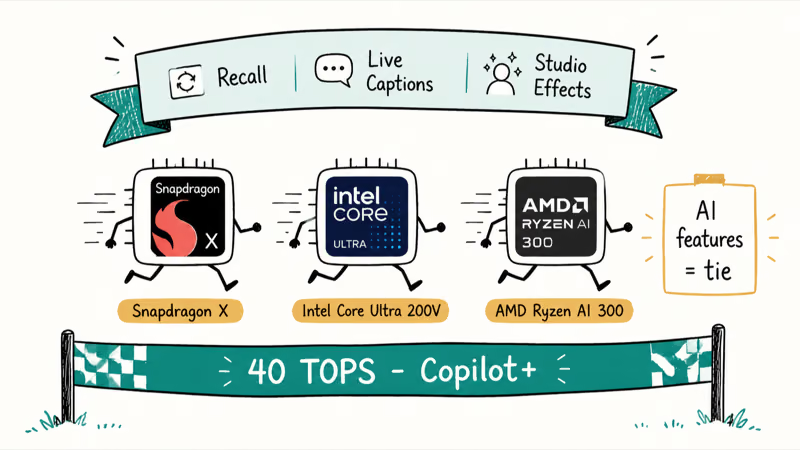
So Recall, Cocreator, Live Captions with translation, and Windows Studio Effects work the same across all three. The on-device AI experience is identical.
That fact reframes the whole comparison. The AI features are a tie, so ignore the marketing race for the biggest NPU. Focus instead on what actually differs day to day: how long the battery lasts, what software runs, and how the chip handles heavy multi-core jobs. Those three axes, not TOPS, are where these families pull apart.
#NPU TOPS: Real Numbers, but They Barely Matter
Here are the published vendor figures, since they get quoted constantly. Qualcomm states that its Hexagon NPU runs at 45 TOPS across the Snapdragon X lineup, Intel lists the Core Ultra 200V NPU at up to 48 TOPS on its flagship, and AMD rates the Ryzen AI 300 NPU at up to 50 TOPS. All three sit comfortably above Microsoft’s 40-TOPS line, which is the only threshold that gates the Copilot+ feature set in the first place.
Now the honest part. Those numbers look like a leaderboard, but in normal use they aren’t one. Background AI tasks like Live Captions, webcam effects, and Windows Hello are light, steady jobs that any 40-plus-TOPS NPU handles without breaking a sweat, so a chip at 50 TOPS doesn’t make your video call smoother than one at 45.
TOPS only matters at the extreme edge, and even there the GPU usually does the heavy lifting. For a normal laptop, treat all three as fast enough.
#Snapdragon X: Battery and Always-Connected ARM
Snapdragon X is the ARM option, and ARM is where the battery advantage lives. According to the Microsoft developer guide, the Snapdragon X Elite is built to use “energy on AI tasks more efficiently than a CPU or GPU resulting in longer device battery life.” That efficiency runs through the whole chip, not just AI work.

It’s why these laptops keep topping battery rankings and why so many ship thin and fanless. Many designs also include an integrated 5G modem for always-connected use, so if you live on battery, start here.
The catch is compatibility. Snapdragon runs ARM-native apps directly and translates older x86 apps through Microsoft’s Prism emulation layer, which handles the vast majority of everyday software but can stumble on kernel-level tools, so a handful of anti-cheat games, legacy VPN clients, and specialized drivers still fail under emulation. Check your must-have apps before you commit.
#Intel and AMD: x86 Compatibility You Can Trust
If Snapdragon’s risk is compatibility, Intel and AMD erase that risk. Both Core Ultra 200V and Ryzen AI 300 use the same x86 architecture Windows has run for decades, so virtually every app, driver, anti-cheat system, and enterprise tool runs natively with no emulation layer in between, and that single fact is why x86 stays the default recommendation for anyone with picky legacy software or business compliance tools they can’t risk breaking.
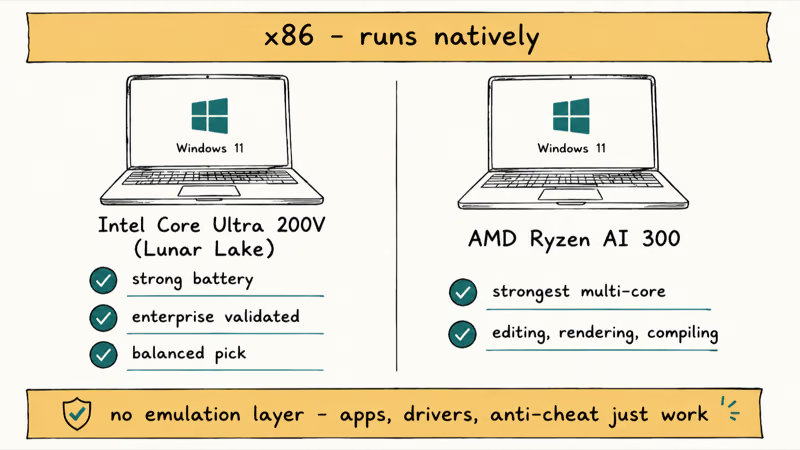
Between the two x86 chips, the split is subtle. Intel Core Ultra 200V, code-named Lunar Lake, is tuned for efficiency and pairs strong battery with broad enterprise validation. It’s the safe, balanced x86 pick.
Looking ahead from Lunar Lake, our explainer on Intel’s Core Ultra Series 3 Panther Lake platform covers the 18A node, NPU upgrade, and x86 compatibility pitch.
AMD Ryzen AI 300 leans the other way, toward cores, and most reviewers find it the strongest of the three for sustained multi-threaded work like video editing, 3D rendering, and code compilation. If your day involves heavy parallel workloads, Ryzen AI is the family that stretches furthest, and you give up only a little of Snapdragon’s battery edge to get it. For an editing-focused take across platforms, our Mac vs PC for video editing breakdown is a useful companion read.
#How the Chip Affects Which AI Software You Can Run
Mostly it doesn’t, with one caveat. Cloud AI tools run in the browser on any of the three, so our guides on how to use Copilot in Windows 11 apply equally to Snapdragon, Intel, and AMD machines. The chip only matters for AI software that runs locally, and there the x86 chips have a small edge today because more local AI apps and drivers ship x86-native first.
#Which AI Chip Should You Buy?
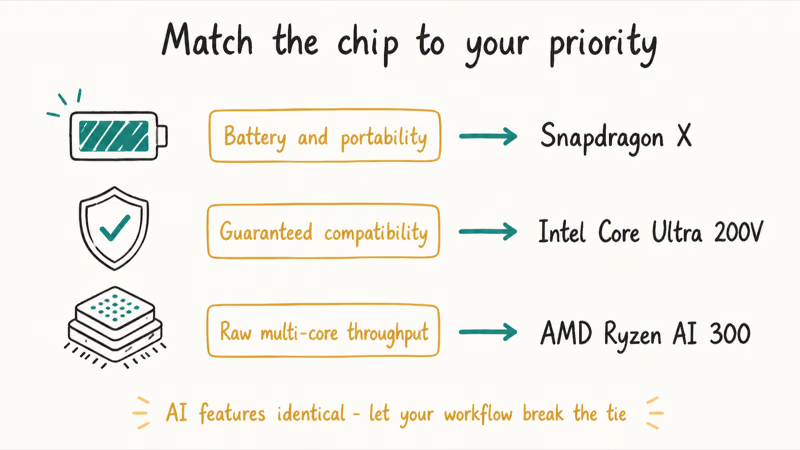
Match the chip to your priority. Battery and portability point to Snapdragon, guaranteed compatibility points to Intel, and raw multi-core throughput points to AMD. None of them is wrong; they’re optimized for different days.
#Snapdragon X
- Best-in-class battery from ARM efficiency
- Many designs include an always-connected 5G modem
- Holds performance well on battery, not just plugged in
- Some x86 apps run through Prism emulation
- Kernel-level anti-cheat, VPN, and drivers can fail
#Intel Core Ultra 200V
- Full native x86 app and driver compatibility
- Strong battery for an x86 chip (Lunar Lake)
- Wide enterprise validation and business support
- Battery trails the best Snapdragon designs
- Multi-core trails AMD on sustained heavy work
#AMD Ryzen AI 300
- Strongest sustained multi-core of the three
- Full native x86 compatibility
- Highest published NPU rating at up to 50 TOPS
- Battery usually trails Snapdragon and Lunar Lake
- Fewer always-connected modem designs
Still unsure the premium is worth it? Our look at AI PC versus a regular laptop covers that question, and once you’ve picked a family, our roundup of the best laptops to buy in 2026 maps specific models to each chip so you can shop by name rather than by spec sheet alone.
#Bottom Line
There’s no single winner here. That’s the honest answer.
Choose Snapdragon X if battery life and a thin, always-connected design top your list and your must-have apps are ARM-friendly. Choose Intel Core Ultra 200V if you want zero compatibility surprises with strong battery in a balanced x86 package that fits neatly into a business fleet.
Choose AMD Ryzen AI 300 if you run heavy multi-core workloads and want the most cores for editing, rendering, or compiling. The AI features are identical on all three, so let your real workflow break the tie. If you want help confirming whether your current machine is even due for replacement, start with our guide on how to check if your PC can run Windows 11.
AI PCs and Copilot+ Laptops
#Frequently Asked Questions
Is Snapdragon X better than Intel and AMD for AI?
Not for the AI features most people use. All three clear the 40-TOPS bar, so Recall and Studio Effects run the same. Snapdragon’s real edge is battery.
Will all my Windows apps work on a Snapdragon laptop?
Most will. ARM-native apps run directly, and Microsoft’s Prism layer emulates older x86 software well enough for everyday programs. The exceptions are kernel-level tools like some anti-cheat games, legacy VPN clients, and specialized drivers, which can fail, so check your critical apps first.
Which chip has the longest battery life?
Snapdragon X laptops generally lead on battery thanks to ARM efficiency, and unlike many x86 designs they tend to hold their performance on battery rather than throttling once you unplug. Intel Core Ultra 200V is the strongest x86 chip for runtime, sitting close behind, while AMD Ryzen AI 300 usually trades some battery life for the extra multi-core power that makes it shine in heavy creative work.
Does a higher TOPS number mean a faster laptop?
No. TOPS measures only NPU throughput, not general speed. CPU, GPU, RAM, and storage decide how fast a laptop actually feels.
Which is best for video editing and rendering?
AMD Ryzen AI 300 is generally the strongest of the three for sustained multi-threaded work like editing and rendering. Intel Core Ultra 200V is a capable runner-up with full compatibility, while Snapdragon X is better suited to lighter, battery-focused use.
Are these chips all Copilot+ certified?
Yes. Microsoft lists the Snapdragon X series, Intel Core Ultra 200V series, and AMD Ryzen AI 300 series as Copilot+ silicon. Each pairs its 40-plus-TOPS NPU with the required 16GB of RAM and 256GB of storage when sold as a Copilot+ PC.

Best Laptop for Running LLMs in 2026: Memory Comes First
The best laptop for running LLMs is a memory purchase first. Compare MacBook unified memory against NVIDIA laptop VRAM, and see what each tier really runs.

How to Run a Local LLM on Windows: A 2026 Setup Guide
Run a local LLM on Windows with LM Studio or Ollama. Pick a model that fits your GPU memory, keep every prompt offline, and skip the monthly bill.

Bluetooth Not Working on Snapdragon X? Fixes for 2026
Bluetooth not working on your Snapdragon X Copilot+ PC? Generic audio, mice, and keyboards work, but vendor apps often lack an ARM build. Fixes inside.

Docker Desktop and WSL2 Not Working on Snapdragon X? Fix It
WSL2 runs fine on Snapdragon X, but Docker Desktop ARM is Early Access and throws WSL errors. Use WSL2 plus native ARM64 Ubuntu and Docker Engine.