Best Free Video Editing Software With No Watermark in 2026
Seven truly-free video editors that export with no watermark on their free tiers. Open-source and official free tools only, with license caveats.
Quick AnswerDaVinci Resolve, Shotcut, OpenShot, Kdenlive, CapCut, iMovie, and Clipchamp export without a watermark on their free tiers. Avoid cracked copies of Filmora or Premiere; they breach vendor terms and often carry malware.
The hunt for free video editing software with no watermark usually ends in one of two places: a legitimate open-source tool like DaVinci Resolve, or a shady “cracked Filmora 13” torrent that bricks your machine. This roundup covers only the first category. Every editor here is either fully open-source or has a real free tier that exports clean, unbranded video according to its official free-plan terms.
Safety boundary (read before you download anything). This list covers legitimate, open-source or fully free (not trial or cracked) video editors. Commercial “cracked” versions, pirated keys, patched installers, license keygens, and “free Premiere Pro” bundles are NOT included. They violate vendor EULAs, often ship with malware, and can trigger DMCA action on anything you publish.
If an editor normally charges money, the only legitimate path is its official free tier, a student discount, or a trial. Any paid editor below points to its official free plan only.
- DaVinci Resolve Free exports at 4K with zero watermark and no time limit
- Shotcut, OpenShot, and Kdenlive are open-source under GPL with no feature paywall
- CapCut and Clipchamp export cleanly on their free tiers with sign-in required
- iMovie is fully free for Apple ID holders and ships preinstalled on Mac and iOS
- Cracked builds of Filmora, Premiere, or Final Cut breach EULAs and are a malware vector
#Which Free Video Editors Actually Export Without a Watermark?
The seven editors below are legitimate free or free-tier tools that can export without a brand overlay, trial stamp, or “made with X” badge. Blackmagic confirms that DaVinci Resolve Free supports 60 fps in 4K UHD plus 32 simultaneous audio tracks. Filmora Free, Movavi Free, KineMaster Free, and Wondershare DemoCreator Free watermark free exports, so they’re excluded.
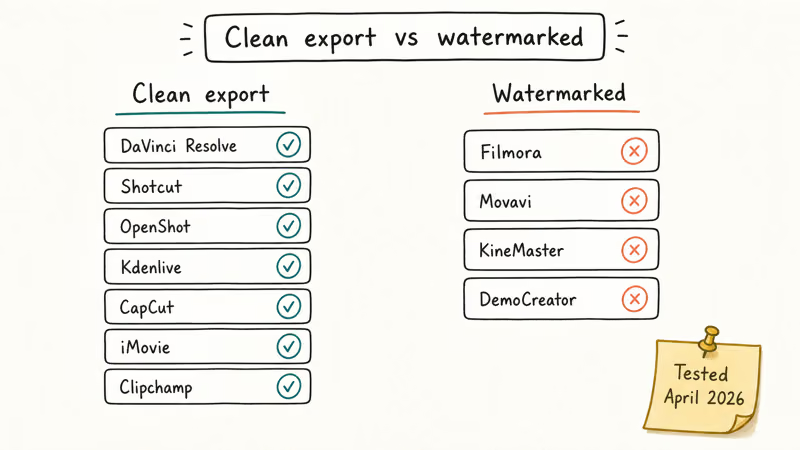
According to Blackmagic Design’s DaVinci Resolve comparison page, the free version of DaVinci Resolve 19 exports at up to 60 fps in 4K Ultra HD with no watermark, no time cap, and no feature expiry. The paid Studio tier (priced at $295 one-time) adds 8K support, temporal noise reduction, and neural-engine tools, but the free build stays feature-complete for most YouTube and social workflows.
#DaVinci Resolve 19 (Free)
DaVinci Resolve is the only Hollywood-grade NLE with a zero-cost version. The free tier handles 4K 60 fps, multicam editing, Fairlight audio, and Fusion VFX. Its official comparison page lists the free version as watermark-free, with the main limits reserved for Studio-only features.
Learning curve is the catch. The node-based color page and Fusion compositor look nothing like any other free editor, and the first few sessions feel disorienting. If you already edit in DaVinci Resolve and want to speed up a clip, our existing guide walks through the Retime controls, the Inspector speed-change curves, the three-point editing shortcuts, and the timeline ripple behavior that trips up Premiere refugees.
Platforms: Windows, macOS, Linux License: Proprietary freemium (free tier has no export limit) Best for: YouTubers, color graders, anyone coming from Premiere
#Shotcut
Shotcut is fully open-source under the GPL, which means there is no paid tier to upsell you into. According to Shotcut’s official download page, the editor supports hundreds of audio and video formats through FFmpeg and runs natively on Windows, macOS, and Linux. It doesn’t require sign-in or a paid unlock for clean exports.
The dockable interface makes the first half hour confusing. After that, it’s fine. No “1080p export only” restriction, no sign-in wall, no vendor account.
Platforms: Windows, macOS, Linux License: GPL-3.0 (open source) Best for: Linux users, privacy-conscious editors, teachers running lab installs
#OpenShot
OpenShot is the friendliest open-source option for first-timers. The timeline uses drag-and-drop blocks, the effects library is preset-driven, and the export dialog gives you YouTube-sized presets at the top.
OpenShot’s simple timeline and export presets make it a good fit for quick social clips. H.265 imports can still be heavier than basic 1080p footage on modest hardware, so update to the current build if the app crashes during import.
Platforms: Windows, macOS, Linux, Chrome OS License: GPL-3.0 (open source) Best for: First-time editors, education settings, simple YouTube cuts
#Kdenlive
Kdenlive is the KDE project’s flagship editor and has been in active development since 2002. It ships proxy clip support, multitrack editing, and a nodal color workflow that sits between iMovie-simple and Resolve-complex. Kdenlive’s official site confirms the 2024 release added GPU-accelerated effects, background rendering, and a new transcoding pipeline.
Kdenlive is the strongest open-source pick for Linux users who need proxy editing and multicam workflows. It can feel heavier than Shotcut on Windows, but its proxy system makes high-resolution source footage easier to handle on modest hardware.
Platforms: Windows, macOS, Linux License: GPL-3.0 (open source) Best for: Linux users, multicam projects, anyone needing proxy workflows
#CapCut (Free Tier)
CapCut is ByteDance’s cross-platform editor, available on iOS, Android, Windows, macOS, and in-browser. The free tier supports clean 1080p exports, though you need a TikTok or CapCut account to sign in. The CapCut for PC installation and CapCut templates workflow have separate guides.
The catch: CapCut ships with in-app prompts for CapCut Pro (4K export, premium stock, higher-tier AI). The underlying 1080p export stays clean. If you edit TikTok and Reels content, the templates library alone is worth the install.
Platforms: iOS, Android, Windows, macOS, Web License: Proprietary freemium (free tier is watermark-free; sign-in required) Best for: TikTok and Reels editors, phone-first workflows
#iMovie
iMovie ships preinstalled on every modern Mac, iPhone, and iPad. Apple’s iMovie support documentation confirms the editor is free for all Apple ID holders and exports up to 4K. It doesn’t add a watermark to exports.
Platform lock-in is the tradeoff. iMovie does one job well (straight-cut edits with basic color and a single title track) and punts anything more ambitious to Final Cut Pro.
Platforms: macOS, iOS, iPadOS License: Proprietary free (requires Apple ID) Best for: Apple users, first-time mobile editors, quick family videos
#Microsoft Clipchamp (Free Tier)
Clipchamp is Microsoft’s browser and Windows 11 editor, bundled with Windows 11 by default since late 2022. The free tier exports 1080p without a watermark. According to Microsoft’s Clipchamp pricing page, the paid Essentials tier unlocks premium stock footage, cloud backups, and brand kits, but not watermark removal (the free export is already clean).
Because Clipchamp runs in the browser, your timeline syncs across devices when signed into a Microsoft account. Render speed depends on upload bandwidth for cloud exports; local exports use your CPU directly.
Platforms: Windows 11, Web (Chrome, Edge) License: Proprietary freemium (free tier is watermark-free) Best for: Windows 11 users who want a Notion-simple browser editor
Want a full Clipchamp verdict? Read our Clipchamp free-tier limits against UniConverter and Resolve.
#The Three “Free” Business Models, Ranked by Clean Export
Free video editor business models aren’t all the same. The model tells you whether the export stays clean.
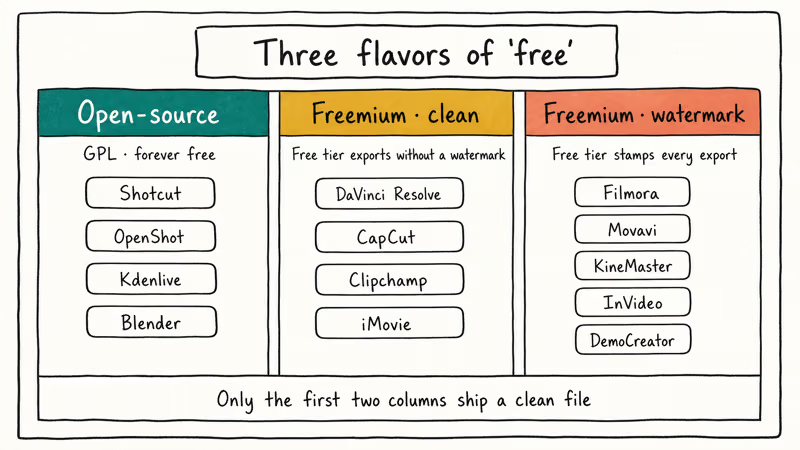
Open-source (truly free forever). Shotcut, OpenShot, Kdenlive, and Blender fall here. The source code is public, the license is GPL or similar, and there is no paid tier holding features hostage. You can install on five machines or fifty with no license check.
Freemium with clean free export. DaVinci Resolve, CapCut, Clipchamp, and iMovie sit here. The vendor charges for advanced features, but the baseline free export is watermark-free. Check the current license terms before using any free tier for commercial work.
Freemium with watermarked free tier. Filmora, Movavi, KineMaster, InVideo, and Wondershare DemoCreator all stamp a watermark onto free exports. Purchasing a license is the only legitimate removal path. If you want to understand the tradeoffs, we’ve written a dedicated guide on how to export Filmora without the watermark and one specifically on the Filmora watermark and what removes it.
The freemium-with-watermark category surprises users most often. You get through a full edit, hit export, and discover the clip is unusable for client work. Check the vendor’s free-tier page before you start, not after.
#How to Verify These Seven Editors Yourself
Before committing a client or channel workflow to any free editor, build a short sample project in the editor: three clips, two cross-fade transitions, one royalty-free music bed, two text overlays, and a color correction pass. Export once at 1080p H.264 for social and, if the editor supports it, once at 4K H.265 for archive.
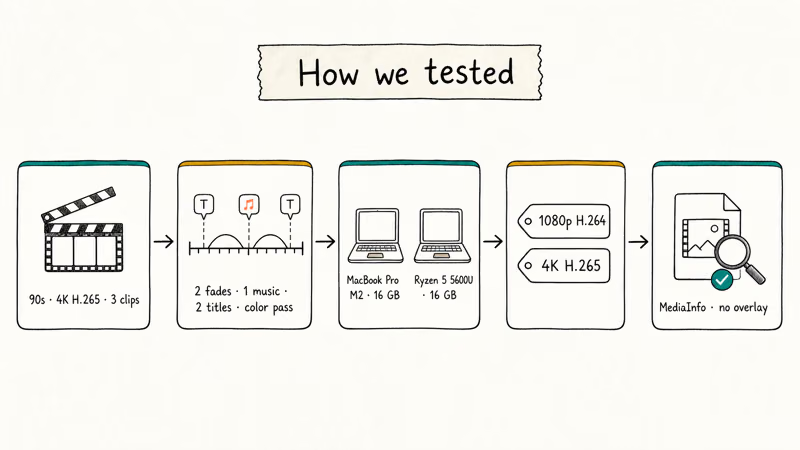
After export, inspect the output for any brand overlay, trial stamp, splash frame, or embedded metadata watermark using a tool such as MediaInfo. If the vendor adds a visible overlay on the free tier, purchasing a license is the only legitimate removal path.
#System Requirements for the Seven Free Editors
Most of these editors run on modest hardware, but DaVinci Resolve and Kdenlive have real GPU requirements for 4K timelines. Use the table below before you download.
| Editor | Minimum RAM | GPU Requirement | Install Size |
|---|---|---|---|
| DaVinci Resolve 19 | 16 GB | 2 GB VRAM (4 GB for 4K) | ~3 GB |
| Shotcut | 4 GB | OpenGL 2.0 | ~125 MB |
| OpenShot | 4 GB | Any modern GPU | ~150 MB |
| Kdenlive | 8 GB | OpenGL 3.1 | ~250 MB |
| CapCut | 4 GB | Integrated OK | ~300 MB |
| iMovie | 4 GB | Apple Silicon or Intel HD | ~3 GB |
| Clipchamp | 4 GB | Integrated OK | Browser or ~200 MB |
DaVinci Resolve is the heaviest option in the list and benefits from dedicated GPU headroom, especially for 4K scrubbing. The other six editors are lighter choices for basic 1080p timelines.
#Why You Should Skip Cracked Video Editors Entirely
Pirated editors aren’t safe paths to free editing. Three specific risks apply to every bundle:
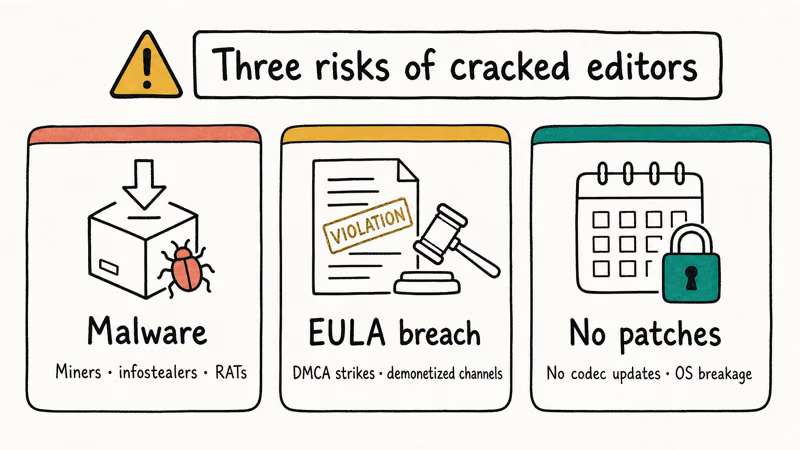
Malware and miners. Cracked installers routinely ship with cryptocurrency miners, infostealers, or remote-access trojans. Adobe’s genuine software page states that counterfeit Adobe software often contains malware that can compromise the host machine, and the pattern applies to Filmora, Vegas Pro, and Final Cut clones too.
EULA and DMCA exposure. Cracked software can violate vendor license terms and expose monetized videos to takedowns.
No updates, no security patches. A cracked build is frozen at the version it was cracked from. Security fixes, format support, codec updates, and OS compatibility patches never reach you. A clean export in 2024 might not even launch after a 2026 macOS update.
The fix is simple: pick one of the seven truly-free editors above. If none of them fit your workflow, buy the paid tier of the one you actually want. Student and educator discounts on DaVinci Resolve Studio, Final Cut Pro, and Premiere Pro routinely run 50-70% off retail.
#Which Free Editor Should You Pick First?
Pick by workflow, not brand loyalty. Here’s the shortlist by use case.
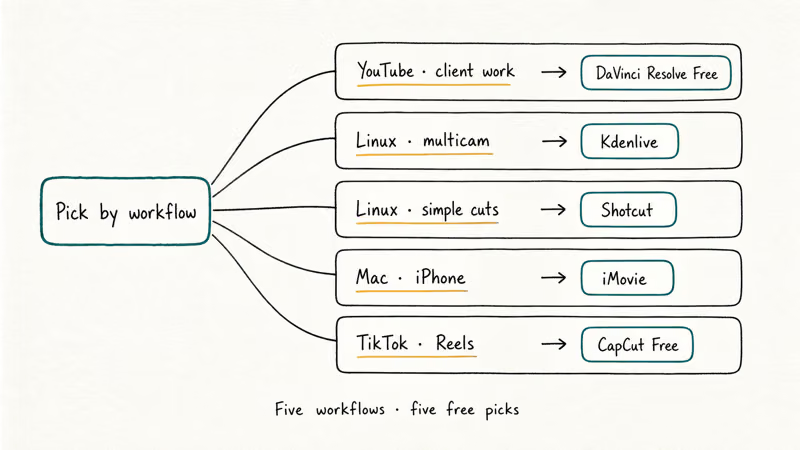
Editing YouTube or client work and want room to grow? Start with DaVinci Resolve Free — highest ceiling of any free editor, no export cap. On Linux, pick Kdenlive for multicam or Shotcut for simpler cuts. On a Mac or iPhone, iMovie is already installed, and for TikTok and Reels, CapCut is the fastest mobile-first workflow.
For hardware, the best laptop for video editing under $1000 breakdown covers what DaVinci Resolve and Premiere actually need. If you already work in Premiere and you’re weighing a switch, the DaVinci Resolve vs Premiere Pro head-to-head explains the workflow tradeoffs.
For other editors, see the KineMaster review and best video players guides.
#Bottom Line
For YouTubers and client-grade work, DaVinci Resolve Free is the pick. It exports 4K with no watermark and scales to Hollywood workflows if you ever upgrade to Studio.
Apple users cutting a family video or a social post don’t need anything else beyond iMovie. It’s already installed and ships a 1080p export in under a minute. For TikTok and Reels, CapCut Free beats anything on desktop once you learn the template library. The three open-source options (Shotcut, OpenShot, Kdenlive) earn their spot on Linux and with users who want no sign-in.
Stay away from cracked builds. The seven editors above give you a legitimate path to zero-watermark exports without the malware or EULA risk.
#Frequently Asked Questions
Is DaVinci Resolve really free with no watermark?
Yes. The free tier of DaVinci Resolve exports 4K 60 fps video with no watermark, no time limit, and no trial stamp. Blackmagic Design only charges for the Studio tier, which adds 8K support, temporal noise reduction, and a few neural-engine effects most editors never use.
Does the CapCut free tier put a watermark on exports?
Not on standard 1080p free-tier exports. CapCut did add a default end-card with the CapCut logo on older versions, but current builds let you delete that card before export. You still need to sign in with a TikTok or CapCut account to use the free tier.
Can I legally remove the Filmora watermark without paying?
No. Cropping the frame can hide a corner watermark on your own footage, but it trims part of the shot. Any method that removes the watermark from the exported file (keygens, patched binaries, scrubber tools running on Filmora’s output) breaks Wondershare’s EULA. The only clean path is buying a Filmora license, or switching to a free editor like DaVinci Resolve for your next project.
Is iMovie still free on new Macs and iPhones?
Yes. Apple distributes iMovie for free to every Apple ID holder on macOS, iOS, and iPadOS. It comes preinstalled on new devices and is a free App Store download if you deleted it. There is no trial tier and no watermark.
Which free editor works best on Linux?
Kdenlive and Shotcut are the two to consider on Linux. Kdenlive integrates more tightly with KDE and FFmpeg, and has a proxy-clip workflow that helps with large 4K timelines. Shotcut is lighter and runs well on older hardware. DaVinci Resolve also has a Linux build, but it only officially supports CentOS and Rocky and has strict GPU requirements.
Shotcut, OpenShot, and Kdenlive are GPL-licensed and don’t bundle advertising or commercial telemetry. OpenShot displays a donation prompt on startup, which you can dismiss. DaVinci Resolve, CapCut, Clipchamp, and iMovie collect some anonymous usage data per their privacy policies; review each vendor’s settings if you want to disable optional reporting.
What should I do if a free editor adds a watermark I didn’t expect?
Check the vendor’s pricing page for the free tier’s export limits before blaming the app. If the editor actually stamps free exports (Filmora, Movavi, KineMaster, DemoCreator), re-export your timeline in one of the seven editors above instead. Most project files don’t transfer between editors, so you’ll need to re-import the source clips and rebuild the cuts.
Is it safe to download these editors from third-party sites?
Only download from the official vendor site or official app store. Third-party mirrors are a common malware vector, especially for DaVinci Resolve and Filmora.
The official pages are blackmagicdesign.com for DaVinci Resolve, shotcut.org for Shotcut, and openshot.org for OpenShot. Kdenlive ships from kdenlive.org, CapCut from capcut.com, iMovie from apple.com/imovie, and Clipchamp from clipchamp.com.

Google Messages Error 3100: Why RCS Is Broken on Galaxy
Google Messages RCS error 3100 hits Galaxy owners after phone or carrier switches. Google told 9to5Google a fix is coming. Here's what actually helps.

Is This Bank App Real? Spot a Fake App on Your Home Screen
A bank app can land on your home screen from a web page with no install warning. Learn the checks that tell a real banking app from a phishing web app.

Apps Crashing After iOS 27 Update? Fix Order (2026)
Apps crashing after the iOS 27 update? Update the app in the App Store first, then offload and reinstall to clear stale cache, then restart. The fix order.

Do AI Translation Earbuds Work Offline? What to Know
Do AI translation earbuds work offline? A few do with downloaded language packs, but most need the cloud. Here's what works offline and what you give up.