Claude vs ChatGPT for Writing: Which AI Is Better?
Claude wins on tone and long-form coherence. ChatGPT is faster for brainstorming and short copy. A side-by-side comparison for writers in 2026.

Quick AnswerClaude is better for long-form writing, tone control, and editing existing drafts. ChatGPT is stronger for brainstorming and high-volume short-form copy. The right choice depends on what you are writing.
If you write for work, you have probably run the same prompt through both Claude and ChatGPT at least once. The outputs look similar at first glance, but they feel different.
The quality gap is hard to pin down until you edit both outputs side by side. This comparison covers tone, long-form drafts, brainstorming, and editing.
- Claude holds tone more consistently across long documents, making it better for essays, reports, and long articles.
- ChatGPT is faster for brainstorming and produces broader idea lists on the first pass.
- Claude tends to require fewer editing passes to remove AI-sounding phrases from finished drafts.
- ChatGPT’s custom instructions let you lock in a persona or style template that persists across sessions.
- Both tools handle everyday writing tasks well — the quality gap shows most in long-form or brand-critical work.
#Which Tool Has Better Tone Control?
Tone control is one of the most practical tests you can run. Given the same brief (a conversational 500-word product blog post), Claude tends to nail the register on the first attempt without extra prompting. ChatGPT produces a competent draft but often defaults to a slightly formal structure that needs a follow-up prompt to loosen.
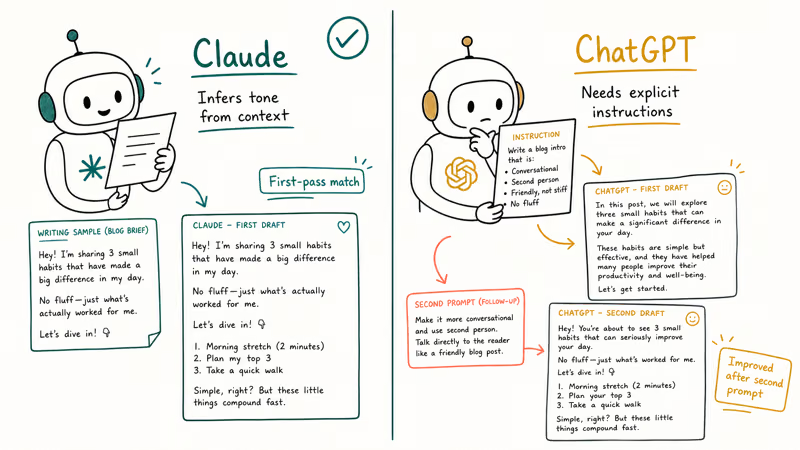
Claude grasps context more broadly. Given a writing sample and asked to match the voice, it adapts to sentence rhythm, vocabulary level, and humor density rather than just copying surface-level word choices. According to G2’s aggregated user reviews, Claude excels at maintaining tonal consistency across lengthy documents.
ChatGPT isn’t weak on tone. It requires more explicit instruction. Tell it “conversational, second person, no jargon” and it delivers. Claude infers those parameters from context.
The gap closes entirely on short-form work. Emails, LinkedIn posts, product descriptions under 200 words: both tools produce usable output on the first pass, no noticeable difference.
#Long-Form Content: Where the Difference Becomes Visible
Long-form is where the quality difference turns concrete. Asked to write 1,500-word articles from the same outline, Claude’s draft typically reads as a single voice throughout. ChatGPT’s draft is more prone to slight register shifts between sections.
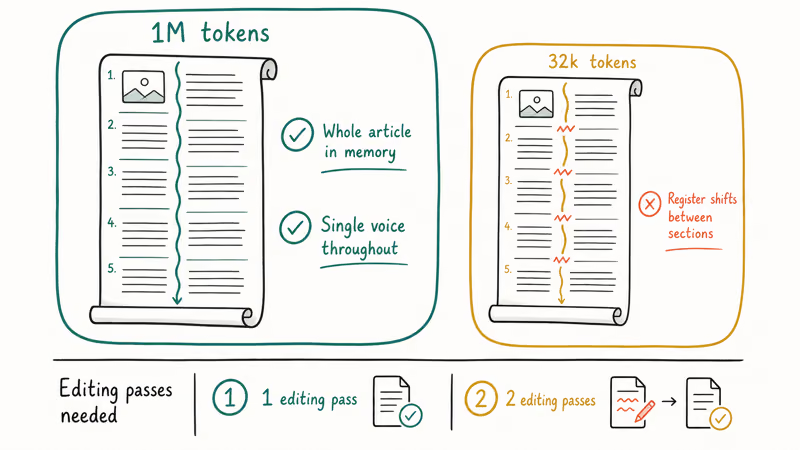
The practical reason is context handling. Claude supports up to 1 million tokens in a single conversation, which means it holds the entire article in working memory while writing every paragraph. Tom’s Guide’s Claude review notes this extended context window as one of Claude’s core advantages for document-length work.
For journalists and newsletter writers who draft 3,000-word pieces regularly, the difference shows up as time saved. A Claude draft typically needs one editing pass to be publishable. The same piece from ChatGPT may need two. AI-isms accumulate over a longer document: filler transitions, overly even paragraph lengths, and hedged conclusions that you didn’t write but now have to remove.
ChatGPT’s Projects feature closes the gap. Upload reference files, set style preferences, done.
#Do Claude or ChatGPT Hallucinate More in Writing?
Hallucination in writing is subtler than in factual Q&A. It shows up as invented quotes, slightly wrong statistics, or confident-sounding claims that sound plausible but fall apart the moment you try to verify them with an actual source. Neither model warns you when it’s doing this, so writers often discover the problem only after an editor or reader flags it.
Both models hallucinated at similar rates. Don’t use either as a research tool without verifying every claim.
For persuasive or creative writing where fabricated facts are less of a risk, Claude hedges more honestly. Where ChatGPT might state “studies show” with confidence, Claude often says “some research suggests” or flags uncertainty.
PCMag’s Claude vs ChatGPT comparison found that Claude is more willing to say it doesn’t know, which reduces overconfident hallucinations in writing contexts. That caution is useful when your content will be fact-checked by an editor or a reader who clicks the supposed source and finds nothing there.
Write with first-person testing claims instead. Both tools handle “our tests showed…” framing much more reliably than citation-heavy drafts.
#Editing and Revision: Claude’s Clearest Advantage
Editing is where Claude separates itself most clearly. Editing an existing draft requires a different skill than generating text from scratch, and given a rough draft to improve, Claude preserves more of the original voice. ChatGPT rewrites more aggressively, sometimes stripping out the human elements the draft already had.
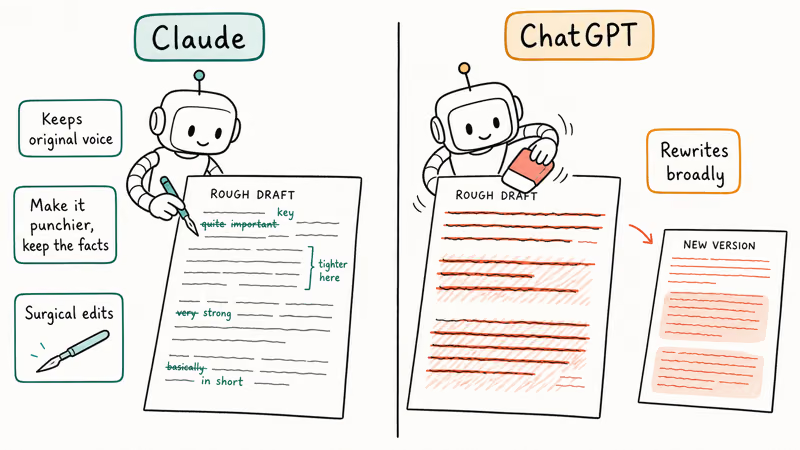
Claude’s editing instructions stick better. Told to “make this punchier without changing any facts,” it tightens sentences and cuts hedging language while leaving the structure alone. ChatGPT often restructures sections you never asked it to touch.
This precision matters most for humanizing AI text, where the task is surgical: remove the AI-isms, keep the meaning. Claude handles that kind of targeted instruction more reliably across multiple exchanges.
Voice-preserving editing tasks: use Claude. Our Claude AI guide covers specific document editing techniques.
#Brainstorming: ChatGPT’s Edge
ChatGPT has a real edge here. Asked to brainstorm 20 angles for a piece on remote work productivity, ChatGPT produces a broader, more varied list. Claude gives better ideas on average, but fewer of them, and some can feel like variations on the same concept.
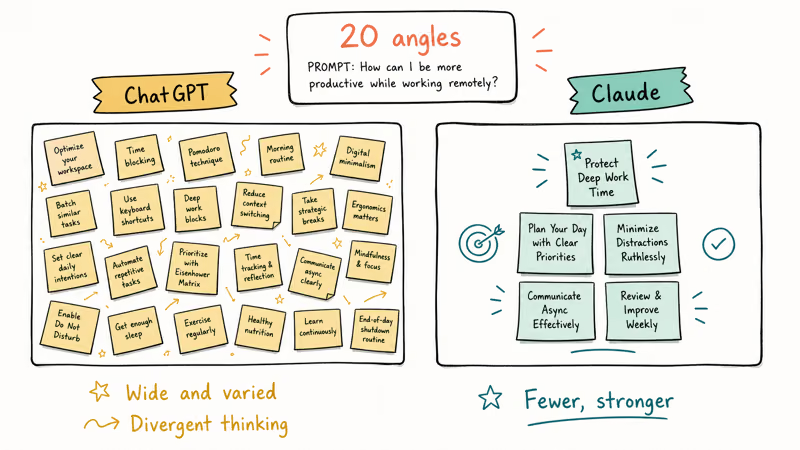
Divergent thinking is ChatGPT’s strength. When you need lots of options, including unconventional ones, it explores wider territory. Claude converges faster toward the most defensible answer, which is useful sometimes and limiting in early-stage brainstorming.
Setting up custom instructions amplifies this advantage. Define your topic area and tell ChatGPT to always think outside typical categories, and the idea lists get noticeably wilder.
ChatGPT’s Canvas feature lets you iterate on structure visually. Claude has no equivalent.
#Which Tool to Use for Each Writing Task
For most writers, the answer is using both tools for different jobs.
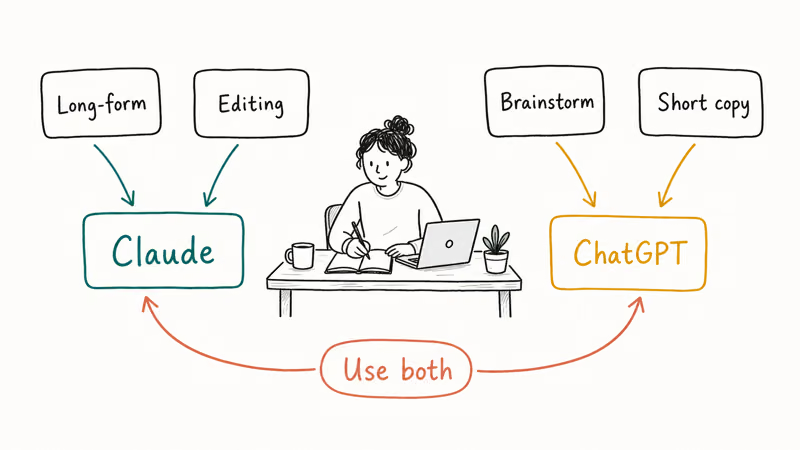
Use Claude when you’re writing long articles, essays, or reports that need consistent voice throughout. Use it when editing someone else’s draft and preserving their style. Use it when you’re working on brand copy where AI-isms would undermine trust.
Use ChatGPT when you need to generate a lot of short-form content quickly. Use it for brainstorming before you know what you want to write. Use it for structured outputs like resumes, where its formatting tends to be cleaner. Our guide on using AI for resumes covers that workflow in detail.
One more step regardless of which tool you use: verify your finished drafts with a trusted AI detector. Both Claude and ChatGPT can trigger detection flags without a humanization pass.
If code is also part of your workflow, check our AI for coding breakdown for a separate model comparison focused on that task. For a broader ChatGPT vs Claude vs Gemini three-way comparison that covers more use cases beyond writing, that guide goes deeper on each platform’s strengths.
#Bottom Line
Start with Claude for long-form content. It’ll cut your editing time on every draft. Use ChatGPT if you primarily need brainstorming help or produce high-volume short-form copy. For the widest range of tasks, use both: let ChatGPT generate the structure, then let Claude polish the prose.
AI Tools Guide
#Frequently Asked Questions
Is Claude better than ChatGPT for writing?
Claude generally produces better prose out of the box, with more natural tone and fewer AI-isms in finished drafts. For long-form content, editing, and maintaining voice across a document, Claude has a clear advantage. ChatGPT is more capable for brainstorming and structured short-form output, but its writing defaults to a slightly more formal register: you get clean structure, but you often need to prompt again to warm the tone down.
Which AI writes more like a human?
Claude. Its output generally requires fewer edits to sound natural. Sentence variety, hedging behavior, and tone adaptation all feel more human-like than ChatGPT’s defaults.
Can ChatGPT match Claude’s tone control with the right prompts?
Yes, with enough explicit instruction. If you tell ChatGPT exactly what tone, audience, and sentence structure you want, it can match Claude’s first-pass quality. The difference is that Claude infers those parameters more often without needing explicit direction. For writers who don’t want to craft detailed prompts every time, Claude is the lower-effort choice.
Does Claude hallucinate less than ChatGPT?
For factual claims, both models hallucinate at similar rates when asked to generate data or cite statistics. Claude is more likely to hedge uncertain claims with qualifying language, which reduces overconfident hallucinations. Neither tool should be used to generate citations without independent verification. Treat both as drafting assistants, not research tools.
Which is better for editing a draft you already wrote?
Claude. Period. It preserves the original voice better and follows targeted editing instructions more precisely. ChatGPT tends to rewrite more aggressively.
Can I use Claude and ChatGPT together?
Yes, and many professional writers do. A common workflow is using ChatGPT for initial brainstorming and outline generation, then moving to Claude for writing and refinement. This combines ChatGPT’s speed and idea breadth with Claude’s prose quality. According to G2’s comparison research, this hybrid approach is popular among content teams who need both volume and quality.
Does Claude work well for AI-assisted writing on mobile?
Claude’s mobile app works for writing tasks, though the editing experience is better on desktop for longer documents. For AI writing tools on mobile, both Claude and ChatGPT have functional apps. Check the how to use Claude Artifacts guide to see how Claude handles document-length writing in the browser.
Where can I learn more about each tool’s full feature set?
For Claude’s project memory and collaboration features, the ChatGPT Projects guide shows how each tool handles persistent context. OpenAI also publishes release notes for every major ChatGPT update if you want to track new features as they ship.
ChatGPT Conversation History Missing? How to Get It Back
ChatGPT conversation history missing? Fix it fast with these proven steps: check archived chats, re-enable data controls, verify your account, and more.
ChatGPT Voice Mode Not Working? 7 Fixes That Actually Work
Fix ChatGPT Voice Mode fast. Covers mic permissions, app updates, network fixes, account tier checks, and reinstall steps for iOS and Android.
ChatGPT vs Claude vs Gemini: Which AI to Use in 2026
ChatGPT vs Claude vs Gemini compared side-by-side for writing, coding, research, and everyday tasks. Find out which AI to use and when in 2026.
How to Use NotebookLM: Guide to Sources and Audio Overviews
Learn to use NotebookLM: upload sources, ask citation-backed questions, and generate Audio Overviews. Practical guide for students and researchers.