iPhone Adaptive Power: How It Works and When to Use It
Learn how iPhone Adaptive Power works, which models support it, what it changes, and when Low Power Mode is still the better battery-saving choice.
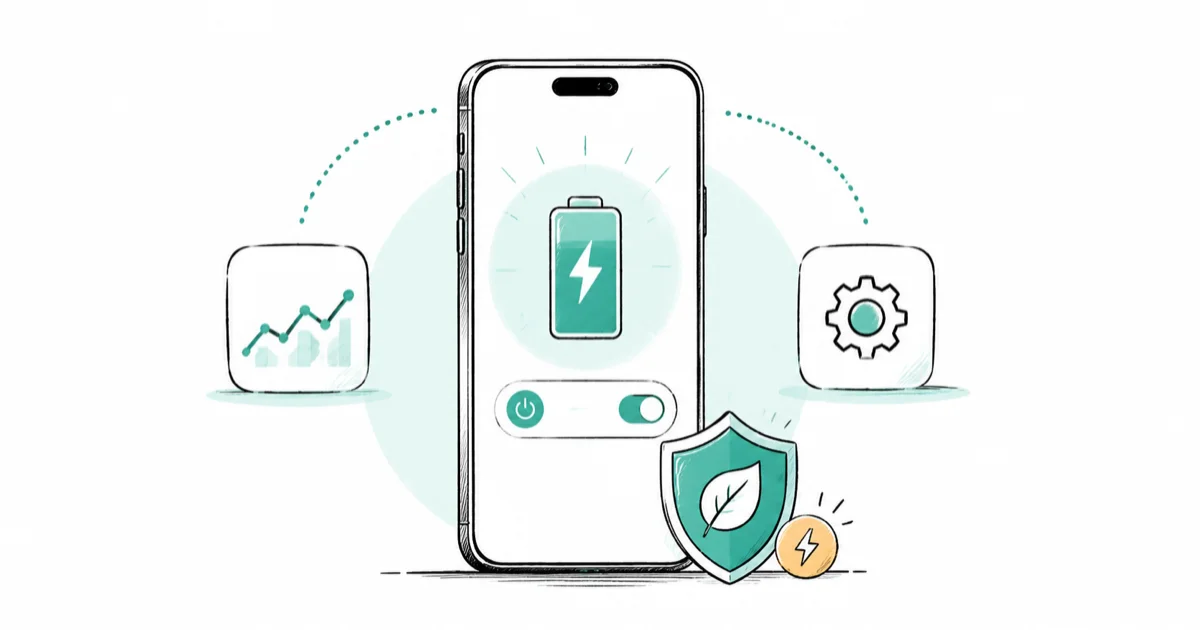
Quick AnswerTurn on Adaptive Power in Settings > Battery > Power Mode. It learns recent usage, makes small adjustments on heavier days, and can enable Low Power Mode at 20%.
iPhone Adaptive Power is an automatic battery mode for heavier-use days. On supported iPhones it watches your recent usage, then makes small adjustments to performance, brightness, and background activity when it predicts you’ll finish the day short of charge.
It isn’t a permanent throttle. Apple leaves demanding camera work and games running in Game Mode alone, and you can switch the feature off whenever you want.
- Adaptive Power works on iPhone 15 Pro and later supported families running iOS 26 or newer
- The feature needs at least seven days to learn your charging habits before it can engage
- It can lower brightness slightly, limit background work, and adjust performance when needed
- Adaptive Power can turn on Low Power Mode automatically when the battery reaches 20%
- Low Power Mode remains the stronger manual choice when you need immediate battery savings
#What Is Adaptive Power on iPhone?
Adaptive Power is a background feature that predicts when your normal routine will leave you short of charge. Rather than applying the same restrictions every time you unplug, it makes limited adjustments only on the days it expects you to need them.
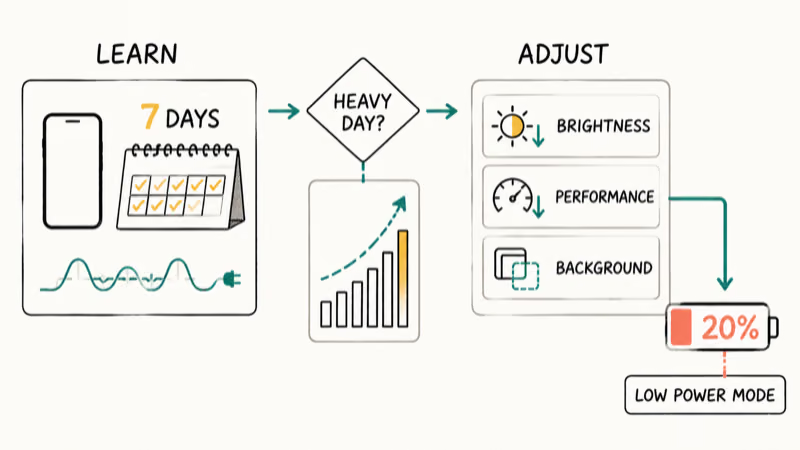
Apple’s Adaptive Power support page states that the feature uses on-device intelligence and needs at least seven days to learn your charging habits. That learning period is why switching it on produces no notification and no visible change on day one.
Adaptive Power isn’t Low Power Mode under another name. It waits, predicts, and changes only what the day seems to require.
So don’t expect a fixed number of extra hours. Battery use moves with screen time, signal quality, apps, camera work, navigation, temperature, and battery health, and Apple publishes no guaranteed percentage gain.
#Which iPhones Support Adaptive Power?
You need iOS 26 or later and an iPhone with the required on-device intelligence hardware. Apple currently lists these supported models:
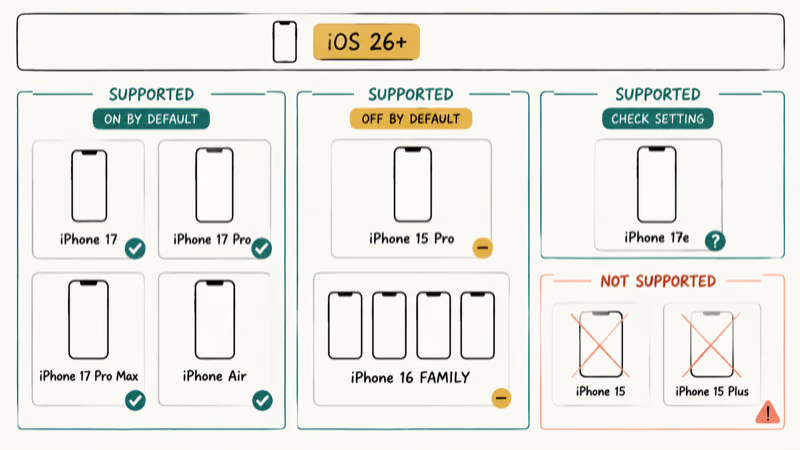
- iPhone 15 Pro and iPhone 15 Pro Max
- Every iPhone 16 model, including iPhone 16e
- Every iPhone 17 model
- iPhone Air
Apple’s battery-drain support guide confirms the same families and the iOS 26 requirement. The standard iPhone 15 and iPhone 15 Plus don’t appear, even though both run iOS 26.
The default state varies by phone. Adaptive Power ships on by default on iPhone 17, iPhone 17 Pro, iPhone 17 Pro Max, and iPhone Air, and off by default on supported iPhone 15 Pro and iPhone 16 models. Apple doesn’t name iPhone 17e in its default-on list, so check the switch rather than assume.
If Settings > Battery shows no Power Mode entry, confirm your exact model under Settings > General > About, then install the latest iOS build for that phone. An unsupported iPhone won’t grow the switch after seven days, because the learning period only starts once the feature exists and is enabled.
#Turn On Adaptive Power and Notifications
The setting takes under a minute to change:
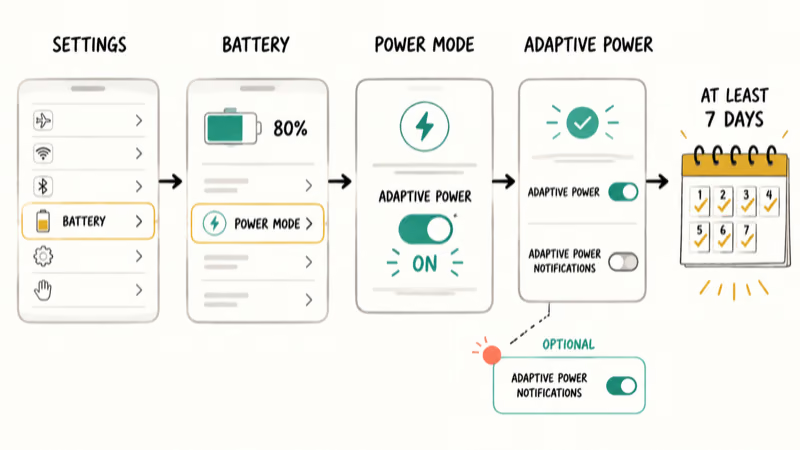
- Open Settings.
- Tap Battery.
- Tap Power Mode.
- Turn on Adaptive Power.
Apple’s current Power Modes user guide confirms that path for iPhone 15 Pro and later supported models. Leave the switch on for at least a week so the phone can learn a usable pattern.
The same screen carries Adaptive Power Notifications, which tells you when the mode engages.
Turning notifications off doesn’t disable the battery feature itself. The mode may never engage on a light-use day, and its adjustments can be subtle enough to miss entirely. Check Settings > Battery for app and system activity before concluding it does nothing.
#The Changes Adaptive Power Can Make
Apple names three adjustments: performance, screen brightness, and background work. It can also trigger Low Power Mode at 20%.
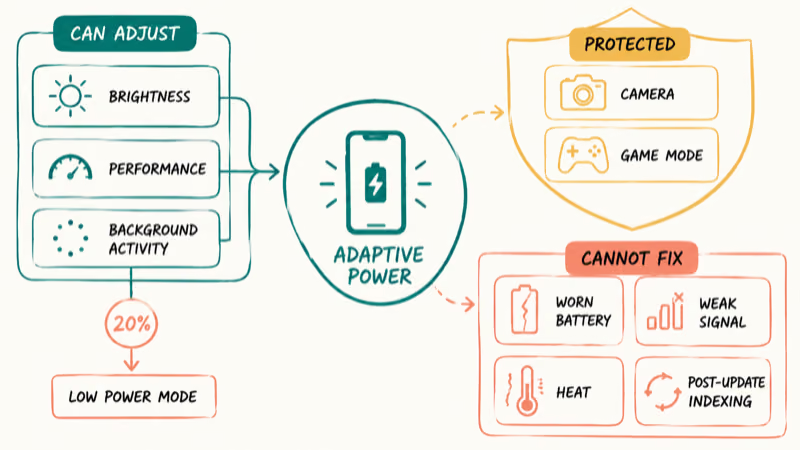
Those actions are deliberately gentler than running Low Power Mode all day. You may notice a slightly dimmer screen or a background task taking longer, while messaging and browsing carry on as usual.
Some work is protected outright. Apple’s dedicated support page confirms that Adaptive Power doesn’t manage performance while you use the camera or play a game with Game Mode active, so a long camera session can still drain the battery fast. The mode won’t slow down the task you chose to prioritize.
It also can’t repair a worn battery, stop a weak cellular signal from burning energy, or finish the background indexing that follows an iOS update. If drain started right after an update, work through our iOS 26 battery drain guide before blaming the mode.
#Adaptive Power Versus Low Power Mode
Use Adaptive Power for automatic, everyday management. Use Low Power Mode for immediate, predictable savings when the battery is already low or you know you’ll be away from a charger.
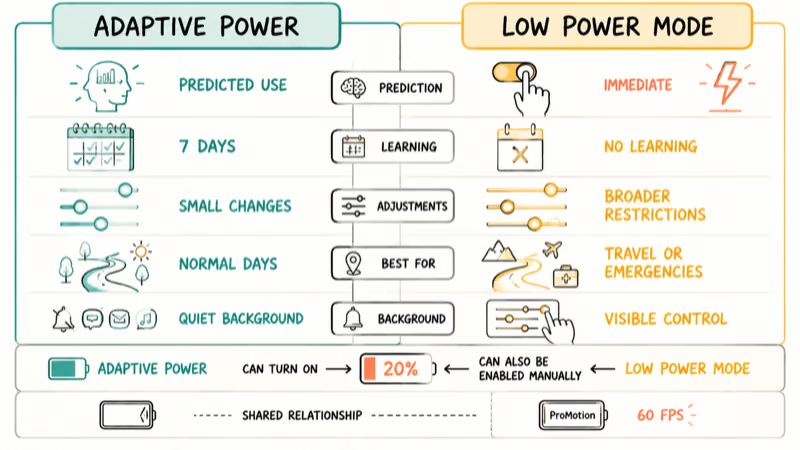
| Feature | Adaptive Power | Low Power Mode |
|---|---|---|
| Starts | When iPhone predicts higher use | When you turn it on or battery reaches 20% |
| Strength | Small, situation-based changes | Broader fixed restrictions |
| Learning | Needs recent usage patterns | No learning period |
| Best for | Longer normal days | Travel, emergencies, low charge |
| Control | Can run quietly in background | Visible battery icon and manual switch |
Low Power Mode reduces or disables more activity, including Mail fetch, Background App Refresh, and some visual effects. On iPhones with ProMotion it also caps the display at 60 frames per second.
Neither choice is permanent. Switch to Low Power Mode before a long flight or commute, when holding charge beats background updates.
#When to Turn Adaptive Power Off
Leave it on unless you can tie a repeatable problem to the feature. A small brightness change or a delayed background sync is an intended tradeoff; constant lag, overheating, or sudden drain points somewhere else.
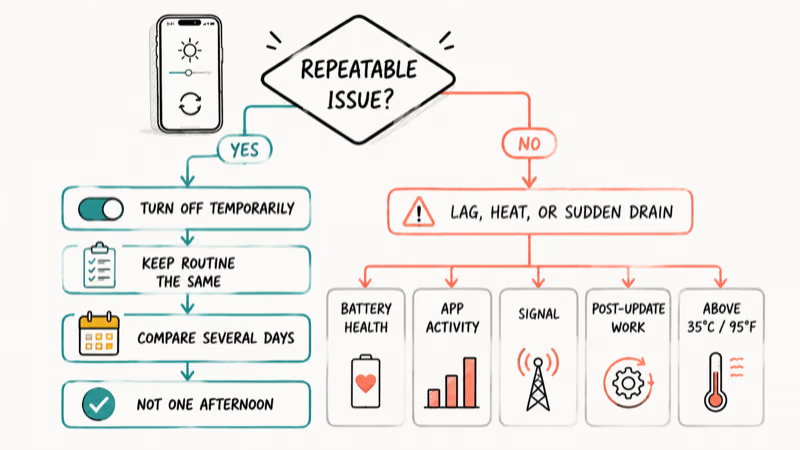
Turn it off temporarily when you need background transfers to finish on a deadline, or when you want to compare behavior across several similar days. Use Settings > Battery > Power Mode, switch Adaptive Power off, and keep the rest of your routine unchanged. One afternoon isn’t enough to judge a feature that learns.
Check battery condition under Settings > Battery > Battery Health on iPhone 15 and later. Our iPhone battery health guide explains maximum capacity and service signals without treating one percentage as the whole diagnosis.
Fast charging and battery health is a separate long-term charging question.
Heat deserves separate attention too. Apple’s battery maintenance guidance recommends avoiding use or charging above 35°C (95°F) because high temperature can permanently reduce battery lifespan. If the phone gets hot while plugged in, use our iPhone overheating while charging checklist.
If the battery still drops quickly after updates finish, review per-app use and signal conditions. The broader iPhone battery dying fast guide covers causes that Adaptive Power can’t solve.
#Bottom Line
Turn on Adaptive Power if you have a supported iPhone and want the phone to manage heavier-use days without running Low Power Mode constantly. Give it at least seven days to learn, and enable notifications if you want proof when it engages.
Use Low Power Mode when you need savings now. If battery life stays poor on light-use days, investigate app activity, post-update work, signal strength, heat, and battery health instead of expecting Adaptive Power to hide a hardware or software problem.
iPhone battery problems
#Frequently Asked Questions
Does Adaptive Power slow down an iPhone?
It can make performance adjustments when it predicts you need more battery life, but it doesn’t apply a permanent slowdown. Apple also excludes maximum-performance camera tasks and games using Game Mode.
Why don’t I see Adaptive Power in Settings?
Your iPhone may be unsupported or still running an older iOS version. The feature requires iOS 26 or later on iPhone 15 Pro, iPhone 15 Pro Max, iPhone 16 models, iPhone 17 models, or iPhone Air. Regular iPhone 15 models don’t get the option.
How long does Adaptive Power take to learn?
Apple says it needs at least seven days to learn charging habits. It may take longer to produce an obvious notification if your daily use stays light and predictable.
Does Adaptive Power turn on Low Power Mode?
Yes. When Adaptive Power is active, it can turn on Low Power Mode automatically at 20% battery. You can still enable Low Power Mode yourself before the battery reaches that level.
Should I leave Adaptive Power on all the time?
For most supported iPhones, yes. It works in the background and only adjusts when the phone predicts a heavier day. Turn it off for a controlled comparison if you suspect it delays a task you rely on.
Is Adaptive Power the same as Optimized Battery Charging?
No. Adaptive Power manages energy use during the day. Optimized Battery Charging and Charge Limit manage how the phone charges to reduce the time its battery spends full, which affects long-term battery wear rather than today’s drain.
Can Adaptive Power fix a degraded battery?
No. Software can reduce energy use, but it can’t restore lost battery capacity. Check Battery Health and arrange service if iOS shows a service warning or the phone shuts down under normal load.

Group Text Not Working on iPhone? 8 Fixes That Work
Group text not working on iPhone? Turn on MMS Messaging and Group Messaging, check iMessage vs SMS routing, and fix mixed Android group chats fast.

Best Power Bank for iPad in 2026: Pro, Air, and Mini
Best power bank for iPad in 2026. Compare mAh tiers and USB-C PD wattage for iPad Pro, Air, and mini, plus airline Wh math, cables, and travel tips.
iPhone 17 Cellular Data Not Working on iOS 26? 9 Fixes
iPhone 17 cellular data still dropping on iOS 26? Apple fixed the launch bug in iOS 26.0.1, but recovery failures persist. Here's the fix ladder.
iPhone Cellular Data Not Working Abroad? eSIM Fixes
Travel eSIM showing no data abroad? Fix iPhone roaming with the data-line check, Data Roaming toggle, APN settings, and network selection steps.