How to Use Claude AI: A 2026 Setup and Feature Guide
Set up Claude on web, desktop, and mobile, then learn the chat basics, Projects, Artifacts, file uploads, and whether the free or Pro plan fits you.
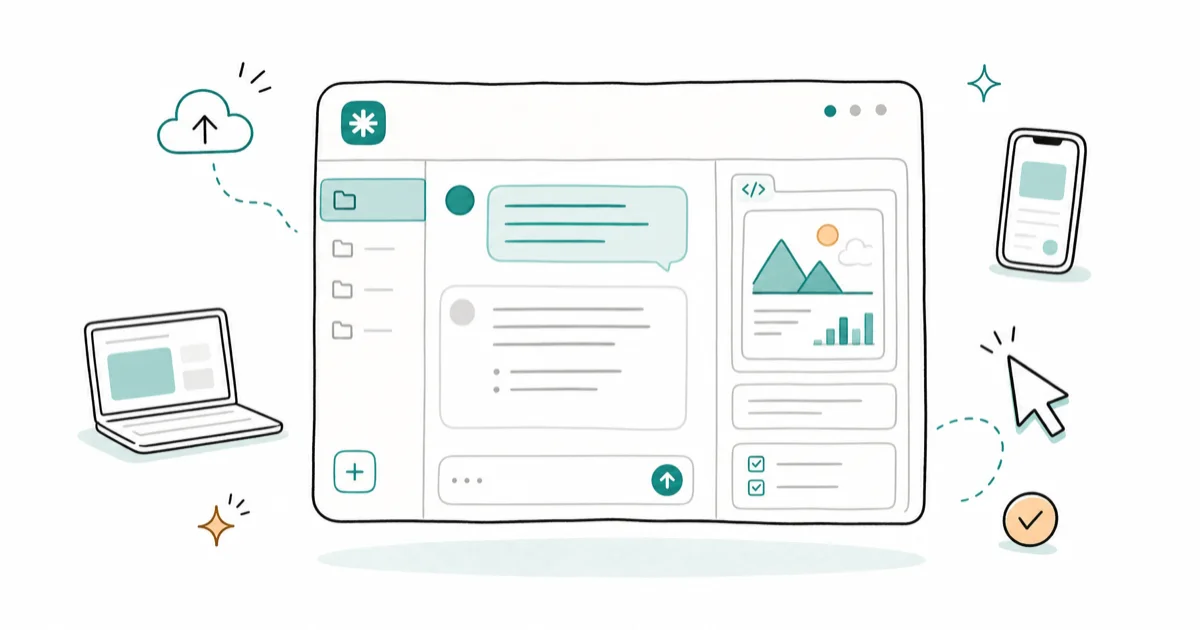
Quick AnswerGo to claude.ai, sign up with Google or email, and type a question. Use Artifacts for a live preview panel and Projects for persistent context.
Claude is Anthropic’s AI chatbot, and most people who try it stop at the chat box. The basic chat is simple to learn, but the web, desktop, mobile, Projects, Artifacts, and file-upload features are what make Claude useful for longer work.
This guide covers account setup on every platform, the chat basics, file uploads, the Artifacts side panel, Projects for persistent context, and the honest free-versus-Pro decision.
- Claude runs on the web at claude.ai, as a Mac and Windows desktop app, and as iOS and Android apps, all tied to one account
- Signing up is free and takes under a minute with a Google account, and no credit card is required for the free plan
- Artifacts open a live preview window to the right of the chat for code, documents, and small web pages, which is the feature most non-coders never trigger
- Projects pin files and instructions to a 200K-token workspace so you stop re-pasting the same context every session
- The free plan covers casual use, while Pro at $20 a month gives roughly five times the usage per session plus priority access during busy hours
#What Is Claude and Where Can You Use It?
Claude is a family of AI models from Anthropic that you talk to in plain language, the same way you’d message a knowledgeable coworker. According to Claude is a series of language models on Wikipedia, the first version launched in March 2023, and the Artifacts feature followed in June 2024. You don’t need to know any of that history to use it. You type a question, Claude answers, and you keep going.
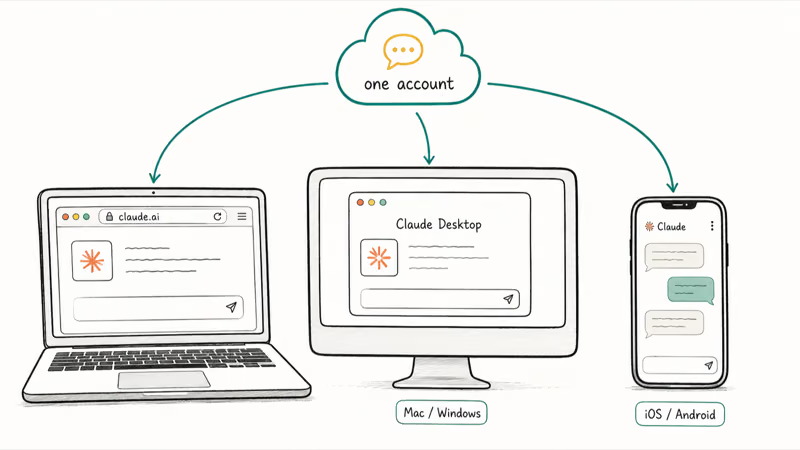
The bigger question for beginners is where to use it. Claude isn’t locked to one device.
You can reach it three ways. Anthropic’s getting-started page lists claude.ai in any web browser, a Claude Desktop download for Mac and Windows, and the Claude app for iOS and Android. All three sign into the same account, so a chat you start on your laptop shows up on your phone a few seconds later.
Pick the web app first. It’s the fastest way to see whether Claude fits your work before you install anything, and every feature in this guide works there.
#Setting Up Your Claude Account and Apps
Open claude.ai in a browser and click Sign up. You can use a Google account or an email address with a password. A free account doesn’t require a credit card; payment details come into play only when you upgrade.
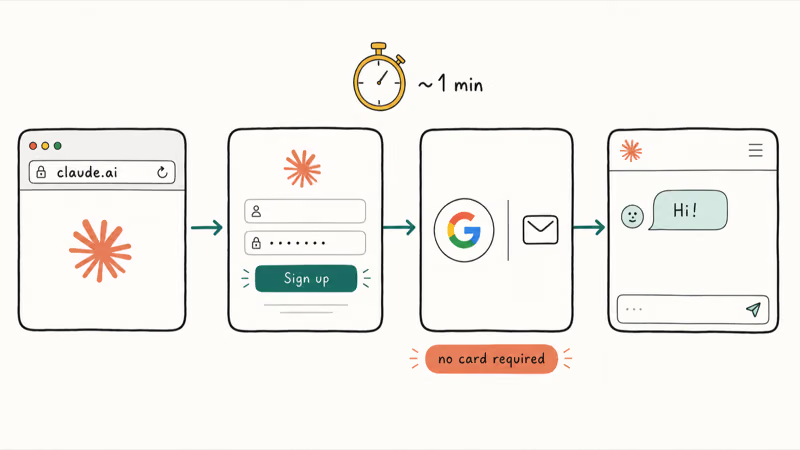
The free plan asks for nothing but an email.
Once you’re in on the web, decide whether you want the apps too. The desktop app behaves like the website but lives in its own window, which helps if you keep Claude open beside other tools all day. The mobile apps add voice input and camera uploads, handy when you want to photograph a receipt or a whiteboard and ask Claude about it on the spot without retyping a thing.
On iPhone, the Claude app sits alongside whatever other AI you already run. If your phone supports Apple Intelligence, Siri can hand certain requests to a chatbot, but the Claude app is its own thing and works on far older hardware. Even devices Apple Intelligence skips run the Claude app fine, since the heavy lifting happens on Anthropic’s servers, not your phone.
A quick iPhone trick: map the Claude app to your Action Button shortcut so one press opens a fresh chat the moment an idea hits.
#The Chat Basics: Prompts, Files, and Follow-Ups
Talking to Claude is the easy part. Type what you want in normal sentences, the way you’d brief a coworker. “Rewrite this email to sound friendlier” works far better than a pile of keywords, because Claude reads context the way a person does and fills the gaps you’d expect a person to fill.
When the first answer isn’t quite right, don’t start over. Reply with a correction, and it adjusts.
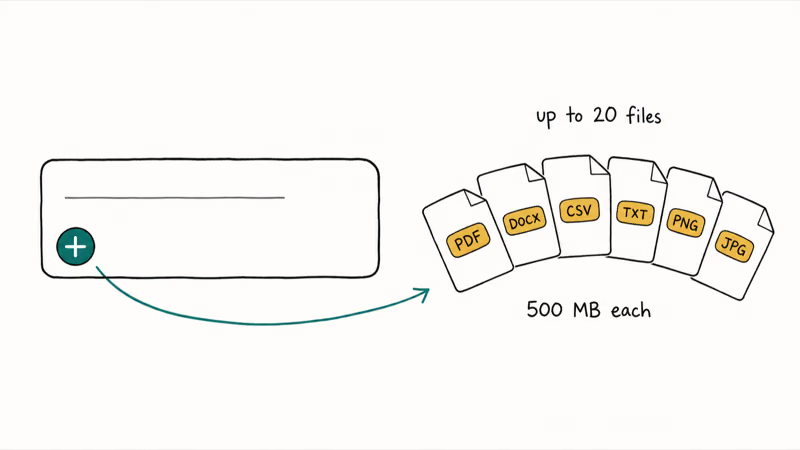
The plus icon in the lower-left of the chat box is where the real power hides. Click it to attach files, or just drag a file straight onto the window.
Claude reads a lot more than text. Anthropic’s file-upload help confirms support for PDF, Word, CSV, and text documents, plus JPEG, PNG, GIF, and WebP images, with a generous 500MB-per-file ceiling and up to 20 files per chat. That’s enough to drop a full report in and ask for a summary, or paste a screenshot of an error message and ask what’s wrong.
File uploads are where Claude shines for studying. Keep reference material like study PDFs or lecture notes? Attach them and ask questions against the actual document instead of trusting Claude’s general memory.
One trap to watch: a scanned or photographed PDF with no real text layer can confuse it. Prefer files with selectable text when you have the choice.
#What Are Claude Artifacts?
Artifacts are the single feature most newcomers miss, because Claude decides when to use them and never announces it. An Artifact is a dedicated window that opens to the right of your chat whenever Claude produces something substantial and standalone, like a document or a small app you can actually click and edit instead of copying out of the chat.
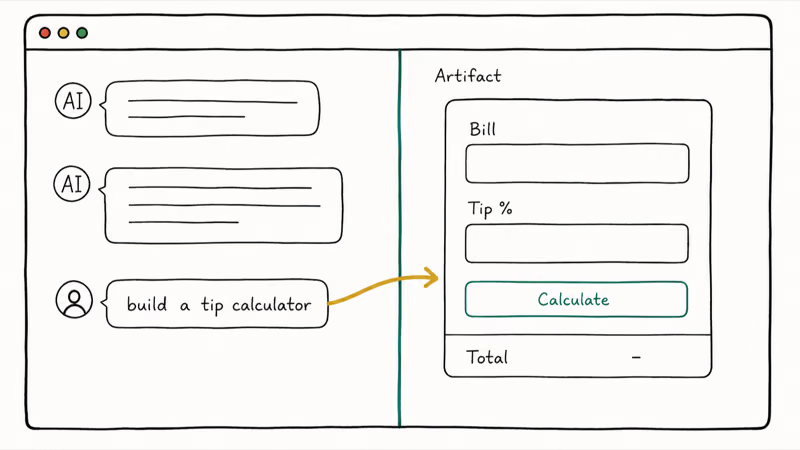
For example, asking Claude to “build a tip calculator web page” can open a panel on the right with a working, clickable calculator instead of only returning code in the chat.
Anthropic’s Artifacts help page states that the feature triggers on content that’s substantial and self-contained, typically over 15 lines. Documents, code snippets, single-page websites, SVG images, flowcharts, and interactive React components all qualify.
Why does this matter for non-coders? Because you don’t have to write code to benefit. Ask for a polished one-page resume, a meal-plan table, or a simple budgeting tool, and you get a live, editable artifact instead of text you’d have to copy and reformat. You can keep refining it by chatting, and the panel updates in place.
#Using Claude Projects for Persistent Context
A Project is a workspace that pins files and instructions to a set of chats so Claude stops forgetting what you told it last week. You build one once, then open it whenever you need that same context loaded.
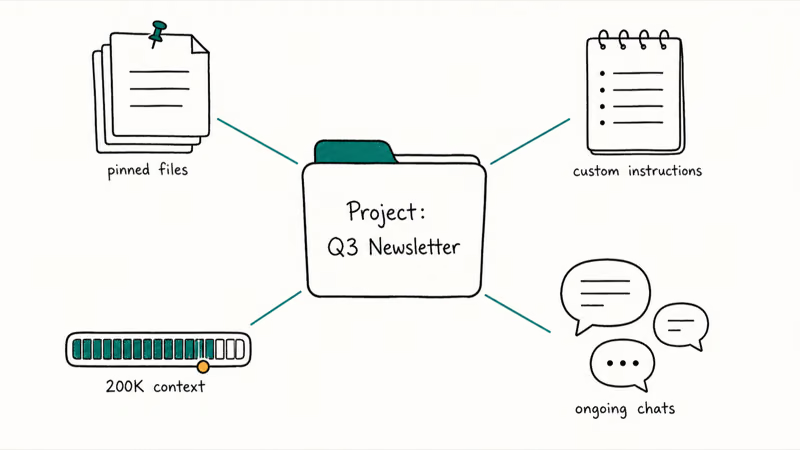
In its Projects announcement, Anthropic confirms that each project includes a 200K context window, roughly the length of a 500-page book, with custom instructions you write per project to set a tone or a role. Upload your style guide, a codebase, or past work once, and every chat inside the Project sees it. No re-pasting.
You’ll recognize the shape if you’ve used ChatGPT Projects or Google’s Gemini Gems. Claude’s twist is the tight pairing with Artifacts.
Naming keeps Projects useful. Name each one for a concrete job, not a broad bucket. “Q3 newsletter drafts” beats “Marketing,” because the broad label slowly drifts back into the same cluttered chat list you were trying to escape, holding a dozen unrelated conversations under one vague title that helps nobody find anything fast.
For a step-by-step on knowledge bases, custom instructions, and when a Project beats a plain chat, follow our Claude Projects knowledge-base and custom-instructions walkthrough.
#Claude Free vs Pro: Picking Your Plan
The free plan is more capable than most people expect. You get the chat, file uploads, Artifacts, and a daily allowance that covers casual use without a credit card. For trying Claude out and running a few tasks a day, free is plenty.
The ceiling is usage, not features. Heavy days hit a cap, and busy hours can slow you down.
Anthropic’s Pro plan page describes Pro at $20 a month US as giving at least five times the usage per session compared to free, plus priority access during high-traffic periods and access to Projects and knowledge bases. Limits are measured by message length, attached files, and conversation length rather than a fixed daily count, so your real allowance shifts with how heavy your prompts run.
Above Pro sits Max, in two tiers for people who push Claude hard all day. It removes the practical limits most users will never reach. Skip it unless you hit Pro’s caps every single day.
#Bottom Line
Start free on claude.ai, sign in with Google, and spend a week using the chat plus the plus-icon file upload before you think about paying. The two features worth learning early are Artifacts, the live preview panel for code, docs, and small web pages, and Projects, the 200K-context workspace that stops you re-pasting the same brief. Both work on the free plan.
If you hit the rate limit more than a couple of times a day, or you live inside Projects and Artifacts, Pro at $20 a month is the upgrade to make. Skip Max unless even Pro’s limits feel tight daily.
AI Tools Guide
#Frequently Asked Questions
Is Claude AI free to use?
Yes. The free plan covers the chat, file uploads, Artifacts, and a daily usage allowance, and it doesn’t ask for a credit card. You’ll hit a cap on heavy days and may be slowed during peak hours, but for casual use the free tier is enough to decide whether Claude fits your workflow.
What is the difference between Claude Artifacts and Projects?
Artifacts and Projects solve different problems. An Artifact is a single piece of output, like a working web page or a formatted document, that opens in a side panel for one task. A Project is a persistent workspace that holds files, instructions, and many chats together, so the context follows you across sessions. Use Artifacts for what you’re building right now, and Projects for the context you reuse.
Can I use Claude on my iPhone or Android phone?
Yes. Anthropic publishes a Claude app for both iOS and Android, signed into the same account as the web and desktop versions. Chats sync across all of them within seconds.
What file types can I upload to Claude?
Claude accepts PDF, Word, CSV, and text documents, plus JPEG, PNG, GIF, and WebP images. In the chat interface the limit is 500MB per file and up to 20 files per conversation. Files with real, selectable text work best, so a scanned or photographed PDF with no text layer can give weaker results.
Is Claude Pro worth $20 a month?
It’s worth it once the free plan’s cap gets in your way. Pro gives at least five times the per-session usage, skips the queue during busy hours, and unlocks Projects and knowledge bases. Stay free if you only dip in a few times a day.
How is Claude different from ChatGPT?
Both are AI chatbots you talk to in plain language, and both have a projects-style workspace and a free tier. Claude’s standout is Artifacts, the live preview panel that turns code and documents into something you can see and edit beside the chat. ChatGPT has a larger third-party plugin ecosystem and a public store of custom assistants. Which one wins depends on whether you value the Artifacts workflow or the broader marketplace more.
Do I need a credit card to sign up for Claude?
No. Creating a free Claude account needs only an email address or a Google login, with no payment details. A card comes into play only when you choose to upgrade to Pro or Max.
ChatGPT Conversation History Missing? How to Get It Back
ChatGPT conversation history missing? Fix it fast with these proven steps: check archived chats, re-enable data controls, verify your account, and more.
ChatGPT Voice Mode Not Working? 7 Fixes That Actually Work
Fix ChatGPT Voice Mode fast. Covers mic permissions, app updates, network fixes, account tier checks, and reinstall steps for iOS and Android.
ChatGPT vs Claude vs Gemini: Which AI to Use in 2026
ChatGPT vs Claude vs Gemini compared side-by-side for writing, coding, research, and everyday tasks. Find out which AI to use and when in 2026.

Claude vs ChatGPT for Writing: Which AI Is Better?
Claude wins on tone and long-form coherence. ChatGPT is faster for brainstorming and short copy. A side-by-side comparison for writers in 2026.