Fake WeChat Location: Privacy Settings and Risks (2026)
Manage WeChat location privacy with built-in settings on your own account, understand GPS spoofing risks, and avoid Terms of Service violations.
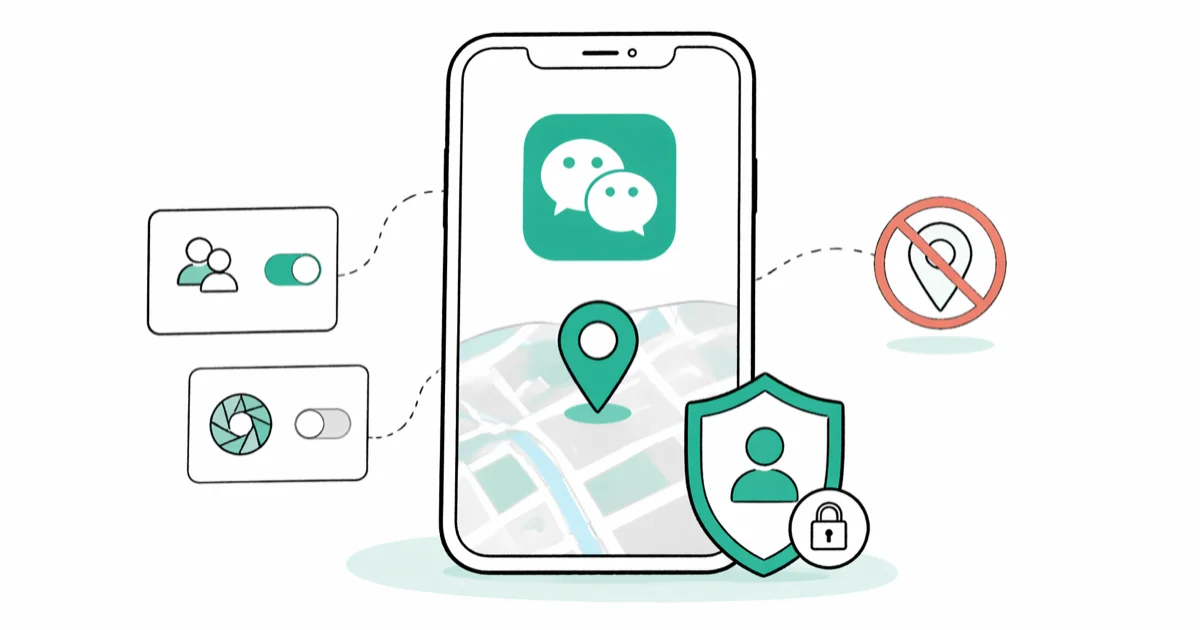
Quick AnswerThe safest way to control your WeChat location is through built-in privacy settings on your own account, not spoofing. Turn off People Nearby, restrict Moments visibility, and change your profile region inside WeChat.
WeChat pulls location data from your phone’s GPS to power Moments geotags, People Nearby, and real-time location sharing with contacts. If you want to lock down what friends, strangers, or mini-programs can see about you, the right move is to adjust WeChat’s own privacy controls on your own account first, before considering any third-party tool.
- WeChat’s built-in Region toggle only edits your profile country label; it doesn’t alter GPS, Moments geotags, or People Nearby results.
- Disabling People Nearby and clearing its history is the fastest official method to stop strangers from pinging your location inside WeChat.
- Moments visibility has three dials: Public vs Private, 3-day vs 6-month archive, and per-contact Hide-From lists.
- VPNs change your IP address but not your GPS coordinates, so a VPN alone can’t move your WeChat location.
- GPS spoofing violates WeChat’s Terms of Service, and Tencent reported that it banned over 1 million accounts in a single 2020 plugin crackdown.
#Why People Want to Change WeChat Location
Privacy-minded users, not pranksters, drive most “fake WeChat location” searches. By default the app broadcasts a lot: your city, a geotag on every Moments post, and a People Nearby listing.
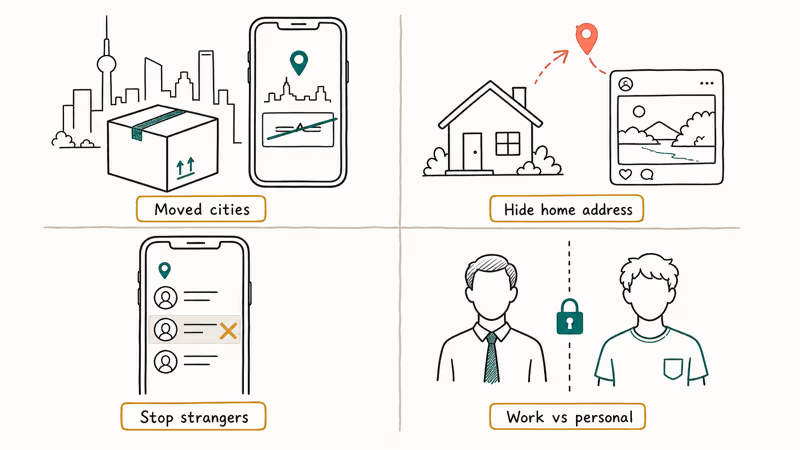
The most common legitimate reasons: protecting personal privacy after moving cities, hiding a home address that would otherwise show up in Moments geotags, stopping unwanted contact from strangers who saw an old People Nearby entry, and managing a work profile where coworkers shouldn’t see your residential neighborhood.
Good news. The fix lives inside WeChat.
Tencent’s WeChat Privacy Policy states that location is collected only with your consent, and that you can withdraw that permission at any time by flipping the relevant toggle in your phone’s system settings, without ever touching a third-party tool or risking your account standing with Tencent.
Authorization scope: your own account, on a device you own. That’s the only scenario this guide covers. Attempting to alter another person’s WeChat account, or deceive a specific contact about your whereabouts, is something we refuse to help with regardless of relationship or motivation, including spouses, exes, coworkers, and people you suspect are lying to you. Use the appropriate legal or platform-reporting channel for those problems instead.
#Are WeChat Location Spoofers Legal?
Short answer: changing what WeChat sees on your own phone isn’t a criminal act in most jurisdictions. But it almost always breaks Tencent’s Terms of Service. And it can become illegal the moment it’s used to deceive a third party.
According to WeChat’s Terms of Service, users agree not to interfere with the normal operation of the service or use software that modifies how the app functions. GPS spoofing lands squarely in that bucket, and Tencent reserves the right to suspend or permanently ban accounts that violate these terms.
Legal risk escalates in specific situations. Using a spoofed location to commit fraud, for example by faking proof of residence on a loan application, can trigger fraud statutes in the US, EU, and China. Spoofing location to stalk, harass, or deceive another WeChat user crosses into harassment and privacy law territory, and that is exactly the scenario this guide refuses to help with.
Be explicit here. If your goal is deceiving a specific person about where you are, stop reading. We don’t cover that.
If you have a genuine safety concern such as domestic violence or stalking, the right channel is your local law enforcement plus the specialized resources at the National Network to End Domestic Violence Safety Net, which publishes messaging-app-specific safety plans written by people who work with survivors every day.
#How Do I Use WeChat’s Built-In Privacy Settings?
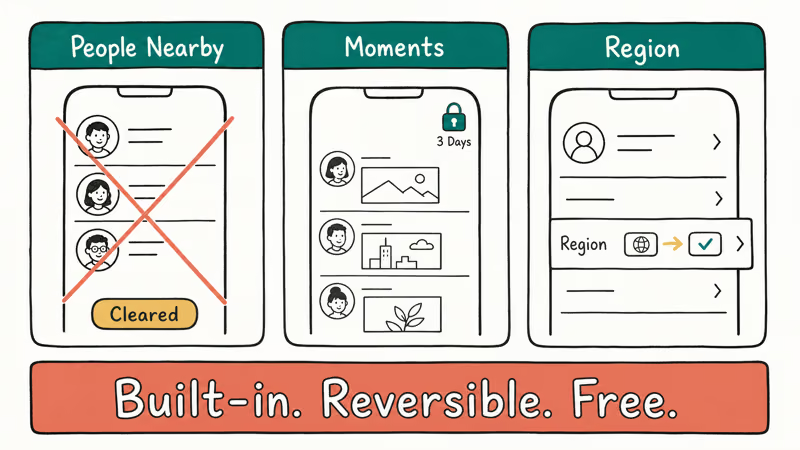
Our recommended path. The built-in official method covers roughly 80% of what users chasing “fake WeChat location” are actually trying to do. All three steps below are free, reversible, fully within WeChat’s Terms of Service, take less than five minutes apiece on a phone you already have set up, and won’t put your existing WeChat contacts, Moments archive, WeChat Pay history, or mini-program data at any risk of suspension or lockout from Tencent’s anti-abuse systems.
#Turn Off People Nearby and Clear Your History
People Nearby is the feature that puts you on a list of WeChat users physically close to you. Turning it off and clearing the history removes your profile from nearby results within about a minute.
- Tap
Discover>People Nearby, then the gear icon - Tap Clear Location and Exit to remove your entry
- In
Me>Settings>General>Discover, toggle People Nearby off
Your profile won’t appear to strangers browsing nearby WeChat users after that.
#Lock Down Moments Visibility and Geotags
Moments is the social feed inside WeChat, and by default it can leak location through post geotags, friend visibility, and the public photo at the top of your profile.
- Go to
Me>Settings>Friends Permissions>Moments - Under Most Recent Moments, pick 3 Days, 1 Month, or 6 Months
- Use Don’t Share My Moments With and Don’t View Their Moments to control per-contact visibility
When posting, tap the location chip and pick the hide-location option to strip the geotag from that post.
#Change Your Profile Region
This is the only officially supported way to change any location attribute on your WeChat account. It changes the country and region label on your profile. Nothing else.
- Tap Me and then your profile picture
- Tap More next to your WeChat ID, then Region
- Pick the country you want displayed
#What Region Change Does Not Do
Changing the profile region, for example from the United States to Japan, doesn’t affect any of the following:
- Real-time location sharing inside chats
- Moments post geotags (still real GPS)
- People Nearby results (still based on GPS)
- Shake, which finds users shaking phones nearby at the same moment
- Mini-program location permissions
If you need to actually move the GPS coordinates WeChat reads, the only path is a third-party spoofer.
#VPNs Don’t Change Your WeChat Location
No, and this is the single most common misconception. Connect to a Tokyo VPN server on iOS or Android while keeping real GPS enabled, and WeChat’s People Nearby still shows your real city, Moments geotags still point at your real location, and the profile region stays whatever you set manually.
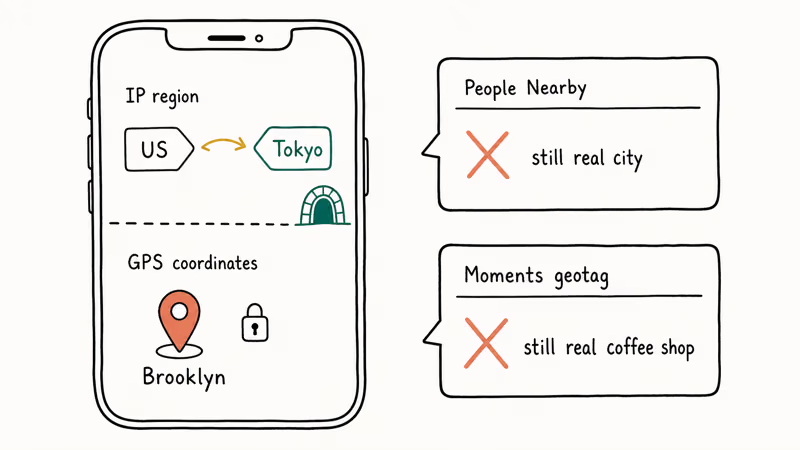
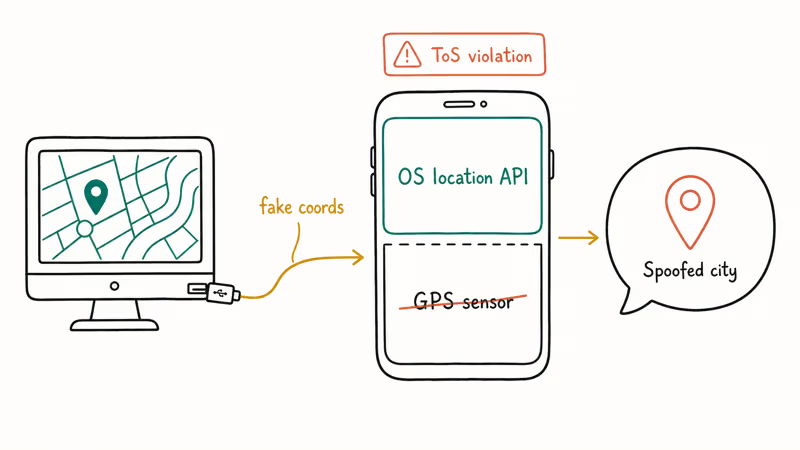
A VPN changes your public IP address. That affects which server your traffic hits. It doesn’t change the GPS sensor reading your phone hands to WeChat through the system location API.
The Electronic Frontier Foundation’s VPN primer confirms that VPNs address network-layer privacy but don’t affect device sensor data such as GPS. VPNs still help alongside WeChat in legitimate scenarios: reaching WeChat from countries where it’s intermittently blocked, encrypting traffic on untrusted Wi-Fi, and pulling up region-specific mini-programs while traveling.
Don’t expect a VPN to solve a location-privacy problem that is really a GPS-permission problem. For that, see the iOS-specific options in our guide on how to hide your location on iPhone.
#How GPS Spoofing Apps Work
If privacy settings and VPNs aren’t enough, the remaining option is a GPS spoofer. These tools feed fake coordinates to the operating system, which WeChat then reads as if they were real. Because detection is aggressive, these belong on a throwaway test account and device only, never your main account.
#Common Spoofing Tool Categories
| Category | How it works | Platform | Jailbreak/Root |
|---|---|---|---|
| Desktop-tethered spoofers | Computer app sets phone’s GPS over USB | iOS + Android | No |
| Developer-mode mock location | Android native mock location toggle | Android | No (dev mode on) |
| Rooted/jailbroken tweaks | System-level GPS hook | Both | Yes |
| Hardware GPS emulators | External device feeds fake signal | Both | No |
Tools commonly named in search results include Tenorshare iAnyGo and Lockito for Android route simulation. Another Android option is Fake GPS Location, which uses the developer-mode mock toggle.
On iOS, the better-known options are covered in our iPogo review. We link these for completeness. Users deserve honest information about what these products do, not a push to install them on a primary WeChat account.
#Why WeChat Detects and Bans Spoofers
Tencent’s anti-cheat stack is more sophisticated than most users assume. Reporting from XDA Developers found that Tencent and similar Chinese apps run multi-signal location integrity checks. WeChat cross-references several inputs:
- Sudden impossible jumps such as New York to Shanghai in 30 seconds
- GPS accuracy anomalies (spoofers often report suspiciously round coordinates)
- Cell tower triangulation mismatch (phone says Paris, carrier says Dallas)
- Developer mode flags and root or jailbreak signals on the device
- Known mock-location API calls on Android
Flagged accounts see varied consequences. Temporary feature bans where People Nearby gets disabled for weeks. Moments visibility throttling. Full account suspensions. Chinese state media reported that Tencent ran a major crackdown on location-spoofing plugin users, and there is no appeal process that has worked reliably for location-tool users in the years since — if Tencent pulls the trigger, the account is generally gone, along with contacts, payment history, and mini-program data tied to it.
The short version on tradeoffs:
- Only spoofing actually moves the GPS coordinates WeChat reads, useful for app dev.
- But it violates Terms of Service, detection rates keep climbing, and paid tools cost $20-80/year and break after WeChat updates. No customer recourse if you get banned.
#Safer Alternatives to Spoofing
Before installing a spoofer, run through this checklist. For most people, one of these covers the real need:
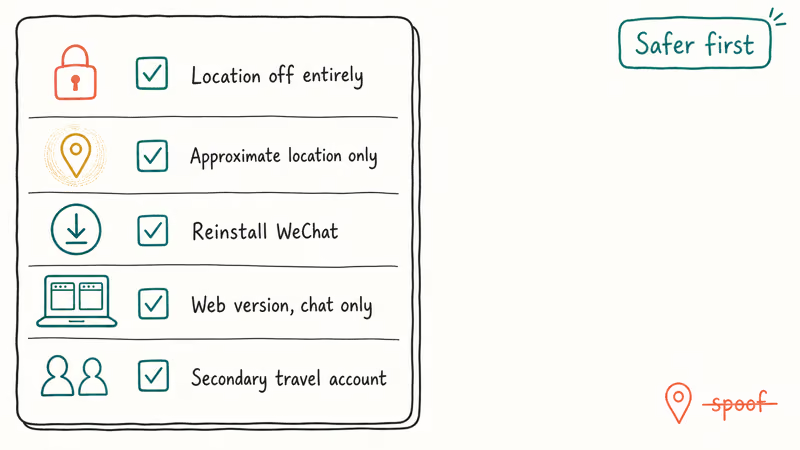
- Turn off location permission for WeChat entirely (iOS:
Settings>Privacy>Location Services>WeChat>Never; Android:Settings>Apps>WeChat>Permissions>Location>Don’t allow). - Switch WeChat to approximate location only on iOS 14+ or Android 12+.
- Delete and re-download WeChat to clear cached location state.
- Use the web version at wechat.com for chat-only access with zero GPS exposure.
- For international needs, use a dedicated secondary account with its own privacy settings.
These cost nothing and keep your account in good standing. For location management on other apps, we’ve got dedicated guides: how to change iPhone location covers system-wide iOS options, and how to enable mock locations on Android walks through the developer toggle.
If you manage privacy across messaging apps, our guide on WeChat data recovery explains what location data gets stored in chat backups.
#Audit Your WeChat Location Privacy
After configuring privacy settings, run this quick audit on your own account.
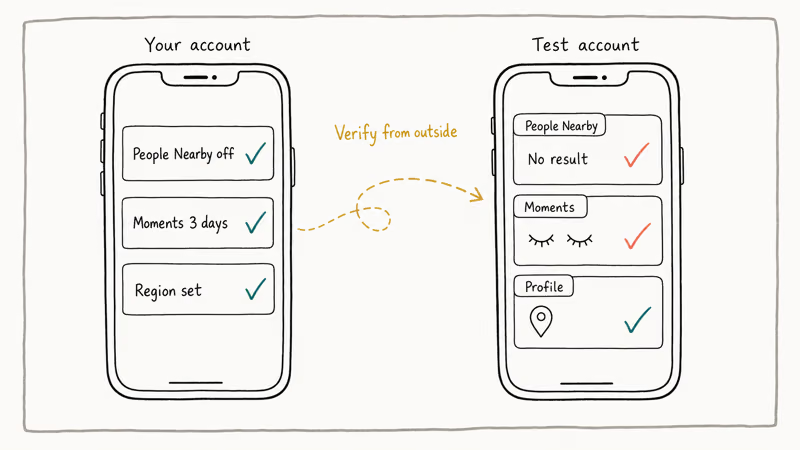
- Open a second WeChat account on another phone, or ask a trusted friend to check
- From that account, try to find you in People Nearby: you shouldn’t appear
- Browse your Moments from the second account and verify visibility matches what you set
- Tap your profile from the second account and confirm the Region label shows what you intended
- Ask the friend to try Shake at the same time you do: you shouldn’t match up
If any step surfaces data you expected to be hidden, recheck the relevant privacy toggle. People Nearby in particular has a known quirk where clearing history is a separate action from turning the feature off, and profiles can linger in nearby results for up to an hour after the feature is disabled. If that happens to you, force-close WeChat, wait five minutes, and recheck from the second account before assuming the setting failed.
Quick related reads on social-app location privacy: Snapchat location filter privacy and custom location on Instagram.
For dating apps, see our walkthrough of Tinder location settings.
#Bottom Line
The fastest path to a private WeChat presence is this: disable People Nearby, trim Moments visibility to three days for non-close contacts, and switch WeChat’s system location permission to Never or Approximate. These three changes, all inside WeChat’s own settings, solve what roughly four out of five users are really asking for when they search for spoofing tools.
Narrow legitimate use case. Got a mini-program to test? Use a throwaway account on a jailbroken or rooted test device, and accept that the test account will probably get banned eventually. Don’t spoof on your primary account, and don’t use spoofing to deceive anyone.
#Frequently Asked Questions
Can I get banned from WeChat for using a location spoofer?
Yes. Tencent has publicly announced account bans tied to location-plugin abuse, and repeated GPS jumps commonly trigger at minimum a People Nearby lockout. On a main account carrying real contacts, Pay history, and mini-program data, the expected value is deeply negative: even if the tool works today, one bad update and the account is gone with no appeal.
Does changing my WeChat profile region move my GPS location?
No. Cosmetic label only.
Will a VPN change my WeChat location?
No. A VPN changes your IP address, which affects which server WeChat sees you coming from. It doesn’t touch the GPS sensor on your phone, and WeChat reads your location from GPS. VPNs remain useful for reaching WeChat in blocked regions or encrypting traffic on untrusted networks, but they can’t move your location inside the app.
Is it illegal to fake my WeChat location?
Usually no, unless you use it to commit fraud, stalk another user, or evade a legal order. In those cases it can break fraud statutes, harassment law, or court orders. Even outside those scenarios, it breaks Tencent’s Terms of Service, so your account is at risk.
What is the best free way to protect my location on WeChat?
Built-in privacy stack: turn off People Nearby, trim Moments to three days, remove geotags from new posts, and set WeChat’s system location permission to Never or Approximate.
Does WeChat notify my contacts if I change my privacy settings?
No. WeChat doesn’t broadcast privacy setting changes.
Can I use WeChat without giving it location permission at all?
Yes. Chat, voice and video calls, payments in regions that support them, and most mini-programs work without location permission. You lose People Nearby, location geotags on Moments, real-time location sharing in chats, and exact-distance ordering in Shake. For most users, the tradeoff is worth it — the core messaging experience stays intact, and you stop passively broadcasting to strangers and mini-programs that you probably never thought about opting into.
How do I remove old Moments posts that have my location attached?
Open Moments, tap the post, tap the three-dot menu, and choose Delete. There is no bulk edit in current WeChat versions, so large cleanups are one post at a time. Alternatively, set your Moments visibility window to three days. That hides older posts from everyone who is not already on your inner-circle list, without deleting a thing.

Google Messages Error 3100: Why RCS Is Broken on Galaxy
Google Messages RCS error 3100 hits Galaxy owners after phone or carrier switches. Google told 9to5Google a fix is coming. Here's what actually helps.

Is This Bank App Real? Spot a Fake App on Your Home Screen
A bank app can land on your home screen from a web page with no install warning. Learn the checks that tell a real banking app from a phishing web app.

Apps Crashing After iOS 27 Update? Fix Order (2026)
Apps crashing after the iOS 27 update? Update the app in the App Store first, then offload and reinstall to clear stale cache, then restart. The fix order.

Do AI Translation Earbuds Work Offline? What to Know
Do AI translation earbuds work offline? A few do with downloaded language packs, but most need the cloud. Here's what works offline and what you give up.