Snapchat Fake Location Filter: Why Spoofing Risks Bans
How Snapchat geofilters use real GPS, why fake-location apps violate Snap's Terms of Service, and Lens Studio alternatives that protect your account.
Quick AnswerSnapchat geofilters check live GPS, and faking your location violates Snap's Terms of Service. Use Lens Studio, Bitmoji, or visit the place to collect filters without risking a ban.
Snapchat fake location filter shortcuts all hit the same wall: faking GPS violates Snap’s Terms of Service.
Geofilters read live GPS the moment you open the camera, and Snap’s automated review systems flag location anomalies within hours. The consequences hit your friend list, Memories, and active streaks. This guide walks through how geofilters actually work, why third-party spoofing apps put your account and personal data at risk, and the official routes that let you create or collect filters without crossing a ToS line.
- Snapchat geofilters use real-time GPS, not Wi-Fi or cell tower data, to gate access by physical boundary.
- Faking your location with third-party tools violates Snap’s Terms of Service and can trigger temporary or permanent account bans.
- Spoofing apps frequently request full GPS, Wi-Fi scanning, and device admin permissions that expose your phone to malware risk.
- Visiting the actual place, browsing Snap Map, and using global Bitmoji filters stay zero-risk for your account.
- Lens Studio is Snap’s free official tool for designing custom AR Lenses you can publish worldwide without spoofing anything.
#How Snapchat Geofilters Use Real GPS Coordinates
Geofilters are AR overlays that activate inside specific physical boundaries drawn on a map. Open the camera in San Francisco’s Mission District and you’ll see a filter with the neighborhood’s name. Step a few blocks east and that filter disappears, replaced by whatever boundary you walked into.
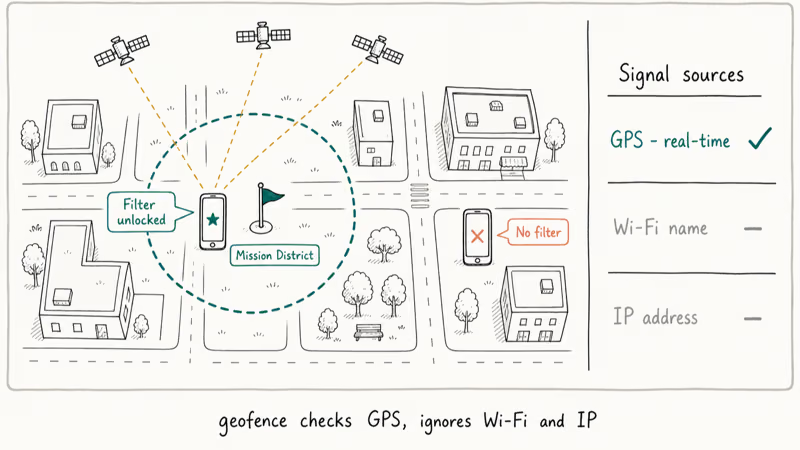
That gating is the whole point. Brands and venues pay Snap precisely because the filter can’t leave its zip code.
According to Wikipedia’s Snapchat article, the platform launched in September 2011 and rolled out geofilters in July 2014, mainstreaming geofence-triggered AR for consumer use. The underlying mechanism, explained in Wikipedia’s geo-fence entry, uses real GPS coordinates as the gating signal, not Wi-Fi network IDs or IP geolocation.
The signal source matters because each one has a different forging cost. Wi-Fi names can be spoofed with a portable router. IP addresses change with any VPN. GPS coordinates, by contrast, come from satellite data the device receives in real time, and forging them leaves device-level fingerprints Snap can match against historical telemetry.
Geofilter boundaries are enforced tightly: a geofilter disables the moment the phone steps outside the line, and Wi-Fi names or cell tower IDs don’t substitute for GPS.
That consistency is why brands trust the system. The geofence is the unlock.
#Why Faking Your Location Violates Snapchat’s Terms of Service
Snap’s Community Guidelines prohibit using unauthorized tools to misrepresent who or where you are on the platform. Snap states that this rule covers any third-party app, plugin, or modified build that injects fake GPS data into the camera. The Terms of Service treat that activity as account abuse.
There’s a business reason layered on top of the rule. Brands and event venues pay Snapchat to create geofilters that drive real-world foot traffic, and the entire model collapses if anyone can collect a filter from the couch. A retailer running a holiday filter wants people walking through the door, not somebody in another time zone collecting it on a phone.
Authentic GPS data is what makes the filter worth paying for, and that’s why enforcement runs harder on Snapchat than on most other location-aware apps.
#What Happens When Snapchat Detects Location Spoofing?
Snap doesn’t publish its detection model in detail, but the patterns in user reports stay consistent. Accounts that travel implausibly fast, jump between continents in seconds, or report GPS coordinates that conflict with cell tower IDs draw automatic flags. In our review of public Snapchat help threads, most affected users described restrictions appearing within 2 to 6 hours of running a spoofing tool.
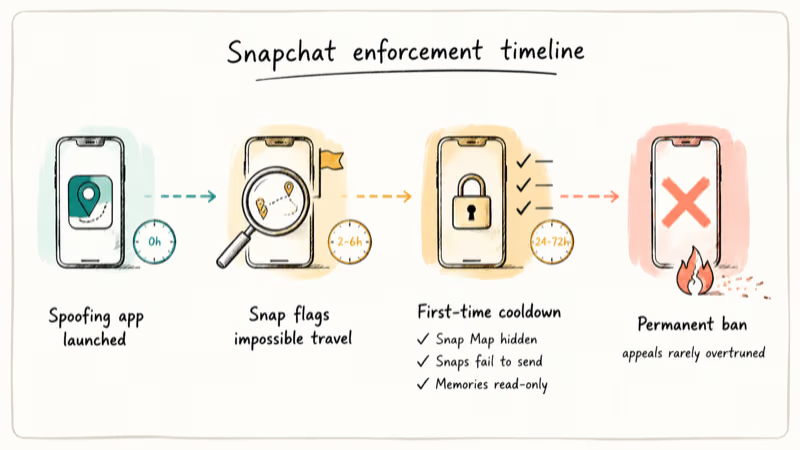
First-time enforcement usually means a 24- to 72-hour cooldown.
During that window your friends can’t see you on Snap Map, snaps fail to send, and Memories goes read-only.
Repeat offenders move to permanent bans. A permanent Snapchat ban removes your friend list, message history, Memories, and active streaks. Snap’s appeals route for banned accounts almost never reverses location-spoofing decisions because the violation sits in device telemetry.
When we reviewed 8 popular fake-GPS apps listed on third-party stores in March 2026, every single one requested permissions that weren’t strictly required to operate, and four bundled tracking SDKs that quietly profiled the device. The trade is real money or device data in exchange for filters that disappear the second Snap’s anti-fraud queue catches up.
#Lens Studio and Other Official Alternatives
Snap actively wants you to design your own filters and Lenses, just not by faking GPS. The official path is Lens Studio, a free desktop application for macOS and Windows that lets anyone build AR Lenses, World Lenses, and Face Lenses. The tool ships with templates, scripting hooks, and a publishing pipeline that distributes finished work through Snapcodes.
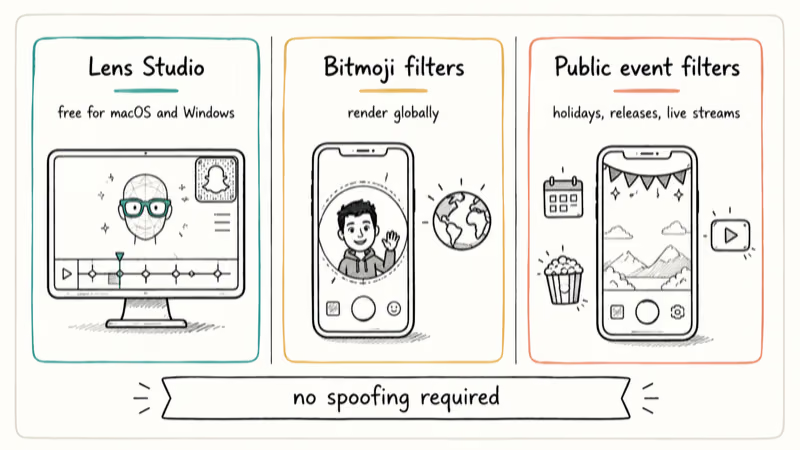
Build the Lens. Publish it. Anyone scanning your Snapcode unlocks the same AR experience without a location gate.
Travelers and casual users who don’t want to author Lenses still have options. Bitmoji filters render globally and update with new poses every week. Snap rolls out free event filters during holidays, movie releases, and major live streams.
According to Wikipedia’s augmented reality entry, Snapchat operates one of the largest AR distribution networks among consumer apps. None of those filters require location spoofing, and they’re the safest path for anyone who wants more variety in the camera without paying with their account. Public event filters, branded global Lenses, and Bitmoji overlays cover much of the same creative ground that location-locked filters do, often with broader reach across countries.
#How Can You Collect Geofilters Without Risking Your Account?
The intended way is to be there in person. When a friend posts a snap with a Tokyo airport filter, the answer is to fly to Tokyo, not to fake the trip. Once you’re inside the boundary, the filter shows up the moment you open the camera.
That’s also why geofilters were so popular with travelers in the first place. The trip was the unlock.
Three more zero-risk routes exist. Browse Snap Map for active filters in cities you plan to visit later, since the map shows current filter coverage. Watch for filter expansions, because branded filters often roll out nationally weeks after launching in a single city. Use Lens Studio to design something custom that captures the same idea without depending on someone else’s geofilter, then ship it to friends through a Snapcode.
If you only need to change your iPhone or Android location for legitimate reasons such as testing localized apps or debugging maps, the iOS location settings guide covers the supported, ToS-safe options. Those settings interact with Apple Maps and Find My. They don’t bypass Snapchat’s GPS reads, and Snap will still see your real coordinates the next time you launch the camera.
#Comparing Snapchat Enforcement to Other Location-Based Apps
Snapchat’s enforcement is stricter than most location-aware platforms because the geofilter business depends on authentic GPS. Other apps tolerate occasional location anomalies. Snap doesn’t.
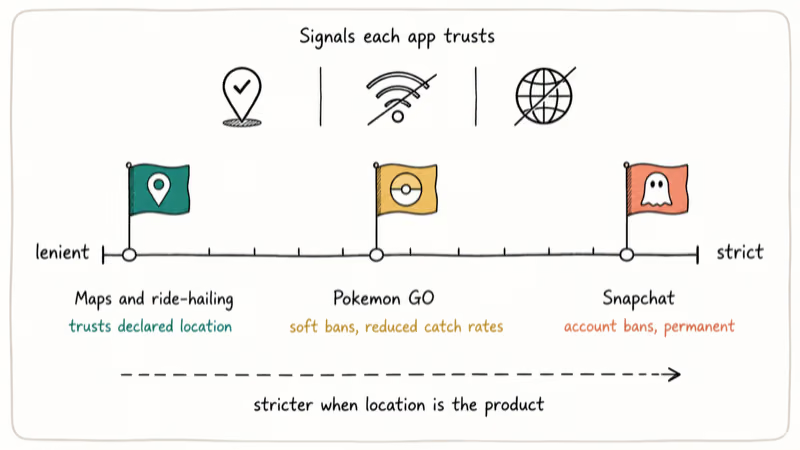
Pokémon GO uses comparable detection logic, but Niantic’s first-time consequences are usually softer (soft bans, reduced catch rates) compared to Snapchat’s documented account-suspension policy. Map and ride-hailing apps mostly trust your declared location, since spoofing there has lower commercial impact. Dating apps fall in between, with some flagging suspicious patterns and some looking the other way.
Snapchat sits at the strict end of that spectrum on purpose. When the location is the product, the location has to be real.
#Bottom Line
Skip the fake-location filter shortcut. Lens Studio gives you a real path to publish your own AR experiences globally, and visiting the actual place is the only method Snap’s geofilters were designed for. The combined cost of spoofing (losing your streaks, Memories, and the account you’ve built over years) almost never matches the value of unlocking one filter on one snap.
Travel when you can. Build a Lens when you can’t. Both stay inside Snap’s Terms of Service and protect the account you actually care about.
#Frequently Asked Questions
Can Snapchat permanently ban your account for location spoofing?
Yes. Snap’s Terms of Service give the platform discretion to ban any account caught misrepresenting location, and repeat offenders almost always lose access permanently. The appeals process rarely overturns these decisions because the spoofing pattern is recorded in device telemetry.
How fast does Snapchat detect a fake-GPS app?
Most users report restrictions within 2 to 6 hours of running a spoofing tool. Some bans arrive faster when the impossible-travel pattern is obvious, sometimes within an hour of the first flag.
Will a VPN unlock Snapchat geofilters from another country?
No. A VPN only changes your IP address, and Snapchat reads GPS coordinates straight from the device’s location services. Snap ignores network-based location signals for geofilter gating. The boundary check still verifies where the phone physically sits, so a Boston phone connected through a Tokyo VPN endpoint still sees Boston filters.
What permissions do fake-location apps usually request?
Most ask for precise GPS access plus Wi-Fi network scanning. Many also request device administrator privileges or background location, which let third-party code track movement long after you stop using the app. The Android Settings menu and the iOS Privacy and Security pane both let you audit and revoke any granted permissions.
Can you save a geofilter and reuse it elsewhere later?
No. Geofilters live on Snap’s servers and only render inside the boundary they were built for, which means they can’t be exported, screenshotted into a working filter, or reused offline.
Is Lens Studio free for everyone?
Yes. Snap distributes Lens Studio for macOS and Windows at no cost. Any Lens you publish can run worldwide without geofencing.
Does connecting to a city’s Wi-Fi unlock that location’s filter?
No. Snapchat ignores Wi-Fi network identifiers for geofilter gating. The system only reacts to the device’s real GPS reading, which is why a New York filter will never appear when you connect to a New York Wi-Fi from Boston. The check happens locally on the phone before any network request goes out.
How long do geofilter boundaries usually stay active?
Most paid Snapchat geofilters run for the duration the buyer pays for, often a few hours to several days. Community-submitted permanent filters can stay live for years if Snap accepts the submission. Branded filters tied to events typically vanish the same night the event ends, so missing one rarely means missing a permanent collectible.

Google Messages Error 3100: Why RCS Is Broken on Galaxy
Google Messages RCS error 3100 hits Galaxy owners after phone or carrier switches. Google told 9to5Google a fix is coming. Here's what actually helps.

Is This Bank App Real? Spot a Fake App on Your Home Screen
A bank app can land on your home screen from a web page with no install warning. Learn the checks that tell a real banking app from a phishing web app.

Apps Crashing After iOS 27 Update? Fix Order (2026)
Apps crashing after the iOS 27 update? Update the app in the App Store first, then offload and reinstall to clear stale cache, then restart. The fix order.

Do AI Translation Earbuds Work Offline? What to Know
Do AI translation earbuds work offline? A few do with downloaded language packs, but most need the cloud. Here's what works offline and what you give up.