Mock Location App on Android: Developer Testing Guide (2026)
How mock location apps work on Android, how to enable them via Developer Options for app testing, and which tools respect Niantic and bank app ToS.
Quick AnswerA mock location app feeds a fake GPS coordinate to the Android location stack so you can test geofenced features on apps you own. Android 6.0 and above supports it through the Select mock location app setting in Developer Options. It is a developer tool, not a way around Pokémon GO or Uber detection.
A mock location app overrides Android’s GPS provider so apps you build or test see a coordinate you choose. On Android 6.0 and above it’s a supported developer feature, available through the Select mock location app setting in Developer Options.
The legitimate goal is to verify geofenced features on apps you own without driving across town for every test. This guide covers the developer setup, what each tool is good for, and the apps where you absolutely shouldn’t point one.
- Android 6.0 and above supports mock location through the Select mock location app setting in Developer Options
- Lockito and GPS JoyStick are the two cleanest options for QA work on a device you own or with explicit authorization to test
- Pokémon GO, Pokémon Sleep, Wizards Unite, Uber, and most banking apps detect mock signals and treat them as ToS violations
- Apps marketing covert spoofing, including NirvanaCo and GPS Emulator, are off limits for any consumer app you don’t control
- iPhone has no equivalent feature; iOS testing uses Xcode location simulation over USB instead
#What a Mock Location App Does on Android
A mock location app registers itself with Android’s location framework as a fake GPS provider. Once you select it in Developer Options, every location request from any app on the device routes through your tool instead of the real GNSS chip. Android Studio’s emulator uses the same plumbing for its built-in location simulator, which is why it has been a stable, supported developer feature since Android 6.0 (Marshmallow).
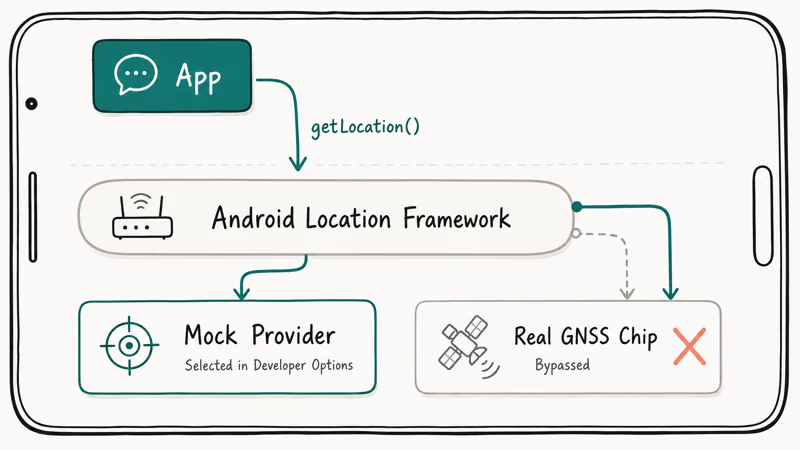
The concrete use cases are narrow on purpose.
App developers test geofences, location-triggered notifications, or distance calculations without driving across town. QA engineers replay GPS traces from production crash logs to reproduce reported bugs in staging builds. Privacy-conscious users on their own device, on their own account, want to report a generic city-level position to apps they have permission to control.
None of those involve cheating in a multiplayer game or evading anti-fraud at a bank.
According to the Android 6.0+ mock location runtime permissions documentation, the platform exposes mock location as a debugging API and expects apps that handle sensitive data to detect it.
That detection is the part most casual users miss.
#How Do You Enable Mock Location on Android?
The setup runs through Developer Options and takes about three minutes on a stock Android 15 device. The path is the same across recent Samsung and Pixel builds, with only minor menu-label differences noted below.
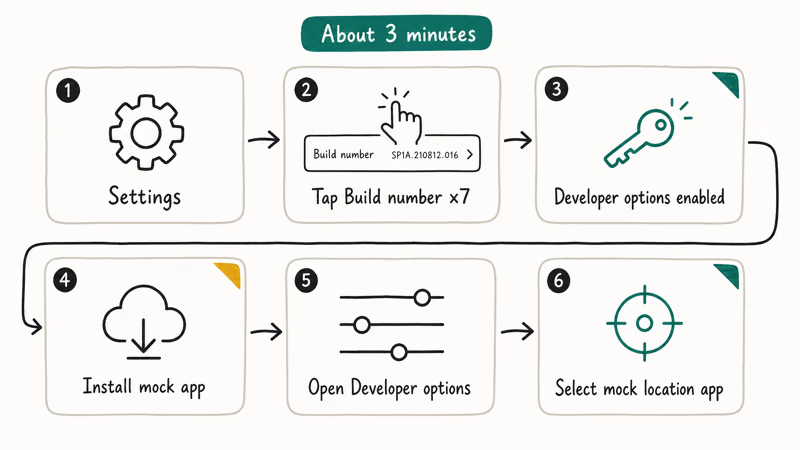
- Open Settings and go to About phone (or About device on Samsung).
- Tap Build number seven times. Android pops a “You are now a developer!” toast.
- Back out to the main Settings list. A new Developer options entry appears under System (Pixel) or Settings root (Samsung One UI 6).
- Open Developer options and scroll to the Debugging section.
- Install the mock location app you plan to use from Google Play first, then come back to Developer options.
- Tap Select mock location app and pick your tool from the list.
If your tool isn’t in the picker, it hasn’t requested the right permission in its manifest. Reinstall it or pick a different app. Google’s Android source documentation covers the underlying ACCESS_MOCK_LOCATION permission, and well-written developer apps declare it correctly.
You can verify the mock is active using adb shell dumpsys location from a connected workstation. The output lists the active mock provider by package name and the last fix it reported. This is the reliable way to confirm the device hasn’t silently fallen back to real GPS when the screen locks, and to read the exact lat/lon the system is handing to apps.
#Mock Location Apps Safe for Legitimate Testing
Two apps stand out for QA and developer work. Neither pretends to bypass anti-cheat. Both follow Google Play’s developer policy on mock locations, and both make the developer-tool framing obvious in their listings.
#Lockito (Android, free with optional one-time IAP)
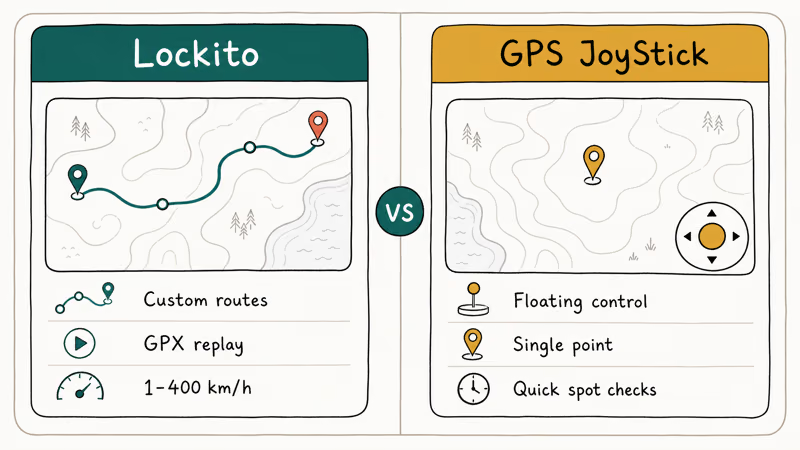
Lockito feeds the mock location API directly, supports custom routes drawn on a map, and lets you tune speed plus altitude and accuracy radius. The free tier caps each session at 30 minutes; a one-time in-app purchase removes the cap.
The thing that makes Lockito a developer tool rather than a spoofer is the route editor. You can save GPX files, replay them across builds of an internal app, and capture exactly what the location stack reports for a given path. That makes it useful for reproducing geofence bugs, such as a boundary that misses re-entries when a path crosses a polygon at low speed.
Our Lockito review covers the route editor and IAP details in depth.
Lockito’s developer is explicit on the Play Store listing. Don’t use it with apps that prohibit mock locations in their ToS. Treat that as a hard rule.
#GPS JoyStick (Android, free with ads)
GPS JoyStick is the lighter option when you only need a fixed point or a manually steered position. The interface is a floating joystick over the map, which is convenient for ad-hoc QA passes on simple “is the user inside the polygon” checks. It uses the same Android mock location API and shows up correctly in the Developer Options picker.
Different shape of tool, different use case.
It works well for a courier-tracking proof-of-concept, where you only need to nudge a single point across distance thresholds and watch the updates fire. For that kind of quick check, the joystick model is faster than drawing a full route in Lockito.
#Apps to Avoid for Any Consumer App You Don’t Control
A separate cluster of apps markets itself around bypassing detection on consumer apps.
NirvanaCo GPS Emulator and a handful of clones promise “undetectable” Pokémon GO spoofing, dating-app tricks, or Uber zone tricks. These are off limits for our purposes for two clear reasons.
First, every production app on that list (Pokémon GO, Tinder, Uber, banking apps) prohibits mock locations in its Terms of Service, so using a tool to evade that detection violates the contract you accepted when you signed up. Second, “undetectable” claims age fast: Niantic’s Play Integrity checks have caught wave after wave of these tools, and accounts get banned in batches.
If a tool’s marketing copy talks about evading bans rather than testing apps you own, it’s the wrong tool for this guide.
#Why Does Pokémon GO Ban Mock Location Use?
Niantic treats GPS spoofing as cheating across all its games. According to the Niantic Player Guidelines, using tools or techniques to falsify your location (spoofing) is one of the listed violations alongside using modified or unofficial software.
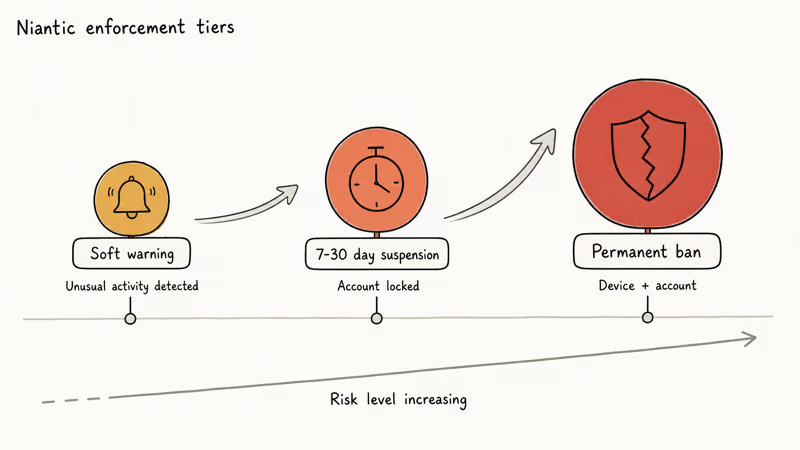
The same enforcement model applies across Niantic’s portfolio.
This includes Pokémon Sleep and the now-discontinued Wizards Unite. A ban on one account often propagates to the others tied to the same device or login. Niantic also bans the underlying device, not just the account, which is why a fresh sign-up on the same phone usually gets caught faster than the original account ever was.
Detection has only gotten stricter since 2022. Modern Niantic anti-cheat combines Google’s Play Integrity attestation with server-side movement analysis. Players who get flagged commonly describe three escalation tiers:
- A soft warning (“we’ve detected unusual activity”)
- A 7- to 30-day suspension
- A permanent ban after repeated detection
None of these is worth the risk for a game.
If you’re reading this because you wanted to play Pokémon GO from your couch, the honest answer is straightforward: that path violates Niantic’s ToS, and we are not going to walk you through it. Our fake GPS for Android guide covers the same boundary in more detail.
#Mock Location on iPhone: Why It Doesn’t Exist
iOS doesn’t expose a mock location API to third-party apps, full stop. The closest legitimate equivalent is Xcode’s built-in location simulator, which connects over USB and feeds a fake GPS fix to apps you build and run from Xcode.
This is the same mechanism Apple documents in Xcode’s “Simulating Location” guide.
There is no Android Studio-style “select a mock app on the device” toggle on iOS, and there won’t be one. Apps that claim to spoof iPhone GPS without a desktop connection either require a full jailbreak (which voids your warranty and breaks security guarantees) or are paid desktop tools that re-implement the Xcode debug protocol over a USB cable.
For testing apps you own, the desktop-plus-Xcode path is the only sanctioned approach.
If you want more background on adjacent paths:
- Our location spoofer overview covers why other paths fail.
- Our Android emulator for iOS overview covers cloud-streaming options if you actually need to run Android code paths on iPhone hardware.
- Our fake GPS on iOS guide walks through the Xcode setup specifically.
#How Production Apps Catch Mock Locations
Detection isn’t a single check. Production apps with real anti-fraud teams stack four to six signals and reject the location request if any one of them fails. The methods below are the ones documented and used most widely.
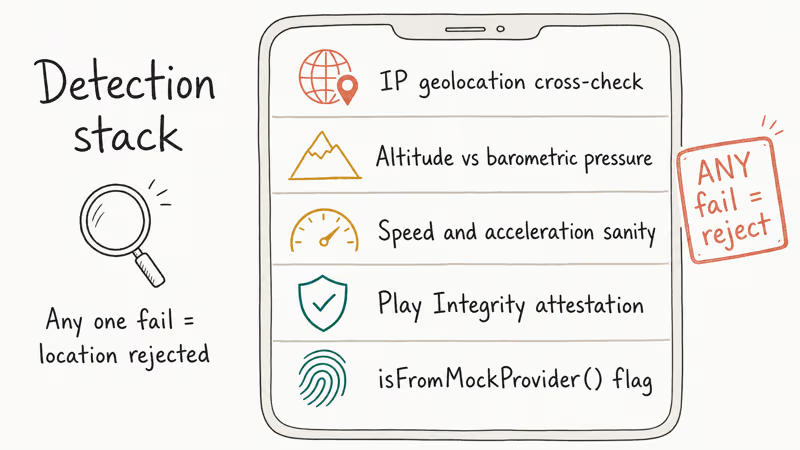
Modern production apps test for these signals routinely:
- The
isFromMockProvider()API call. Any Android location object exposes this directly. Apps that ignore it are uncommon today. - Play Integrity attestation. Google’s Play Integrity API verifies the device, app binary, and Play Store install path. Mock location use frequently fails the
MEETS_DEVICE_INTEGRITYcheck. - Speed and acceleration sanity. Two GPS fixes 200 km apart five seconds apart trigger an obvious flag. Even Lockito’s path editor can’t fake the accelerometer alongside GPS.
- Altitude and barometric pressure. Phones with barometers cross-check GPS altitude against pressure readings. A spoof to a coastal city while the barometer reads mountain pressure is a clean detection signal.
- IP geolocation cross-check. A GPS position in Tokyo with a US-based IP address is the easiest to detect of all.
Google recommends that location-sensitive apps use Play Integrity plus on-device sanity checks. Most banking apps, ride-share apps, and games published in 2024 or later follow that guidance.
Older apps may miss one or two signals, but the trend has been one-way in the direction of more detection, not less.
#Bottom Line
For Android developer and QA work on apps you build or have permission to test, install Lockito for route-based scenarios and GPS JoyStick for quick fixed-point checks. Both run through Android’s Select mock location app setting in Developer Options and respect the platform’s developer contract.
Don’t point either of them at Pokémon GO, Pokémon Sleep, Uber, or any banking app on an account you care about. Play Integrity and ToS detection both will catch you, and the bans aren’t negotiable. For iOS testing, Xcode’s location simulator over USB is the only sanctioned path.
#Frequently Asked Questions
Is using a mock location app legal?
Yes. The apps themselves are legal Android developer tooling.
How you use them is the part that can become a legal issue.
Using a mock location to defraud a business, breach an explicit ToS contract, or misrepresent your location for financial gain may run into fraud or contract laws depending on your country and the platform. Most consumer apps spell out the rule already: spoofing the GPS of a paid service usually voids the contract you signed. The legality of the tool and the legality of how you use it are different questions.
Does mock location work on Android without Developer Options?
No. Android requires the provider to be flagged in Developer Options on 6.0 and above.
Will Lockito or GPS JoyStick get me banned in Pokémon GO?
Yes, if you use them with Pokémon GO. Niantic’s Play Integrity checks and movement-pattern analysis treat any mock location use as a violation under the Trainer Guidelines, regardless of which app produced the fake fix. Both Lockito’s and GPS JoyStick’s developers explicitly state on their store listings that the tools aren’t intended for Pokémon GO.
Can I use a mock location app for app development without Google Play?
You can. The mock location API is part of AOSP and works on devices that ship without Google Play, including most internal-test ROMs. Without Google Play your apps won’t have Play Integrity to call against, but the mock detection APIs (isFromMockProvider(), location source flags) work exactly the same. A privacy ROM like GrapheneOS behaves the same way the stock AOSP build does for these APIs.
What is the difference between a mock location app and Android Studio’s emulator location?
Android Studio’s emulator location feeds the simulated device. A mock location app feeds a real physical phone. They use the same underlying API.
Why do banking apps refuse to run when I have a mock location app installed?
Many banking apps run a Play Integrity check at launch. Even with the mock app idle, its presence in the Select mock location app slot or its ACCESS_MOCK_LOCATION permission can flip the integrity check to a fail.
The cleanest fix during testing is a separate test device that doesn’t have your banking apps installed. Some apps also block on the broader “developer mode is enabled” signal, so turning Developer Options off (not just clearing the mock slot) is sometimes required.
How do I turn off mock location after testing?
Open Developer options, scroll to Select mock location app, and tap Nothing.
Reboot to be safe. The Android location stack switches back to the real GPS provider immediately. For long-term cleanup, uninstall the mock app entirely so it can’t be re-enabled accidentally.

Pixel 11 vs Pixel 10: What Changed and Who Should Upgrade
Pixel 11 vs Pixel 10: same screen and camera resolution, new Tensor G6, 25W wireless, and Gemini Intelligence. Here is who should actually upgrade.

Verizon Not Receiving Texts? How to Fix It in 9 Steps
Verizon not receiving texts? Fix it in 9 steps: check Message Blocking in My Verizon, reset network settings, deregister iMessage, and call support.
Pixel Battery Drain: What Google's July Fix Really Covers
Google marked the Pixel idle battery drain bug fixed in July, but only some phones got the patch. Here is who is covered, who is not, and what to try.
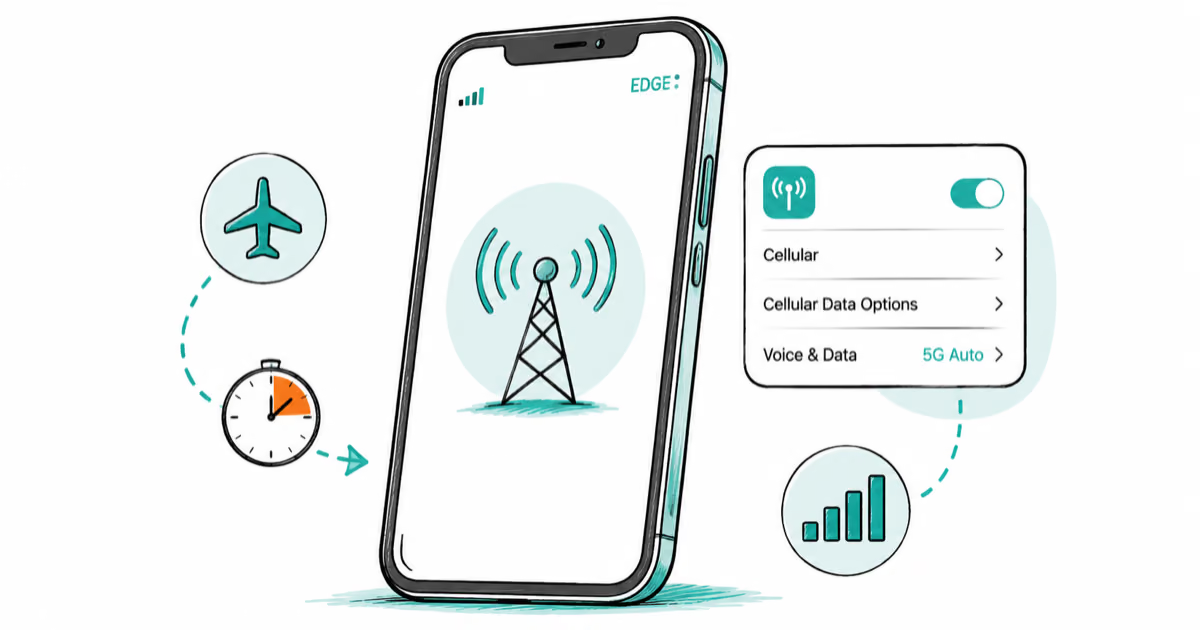
iPhone Stuck on EDGE? How to Get 5G or LTE Back (2026)
iPhone stuck on EDGE with crawling data? Here's why the E icon appears, which settings force 5G or LTE back, and when the problem is your carrier.