Lockito Review: Best GPS Simulator App for Android in 2026
Lockito is an Android GPS simulator using the mock location API. No root needed on Android 6.0+. Setup, ToS limits, and alternatives for 2026.
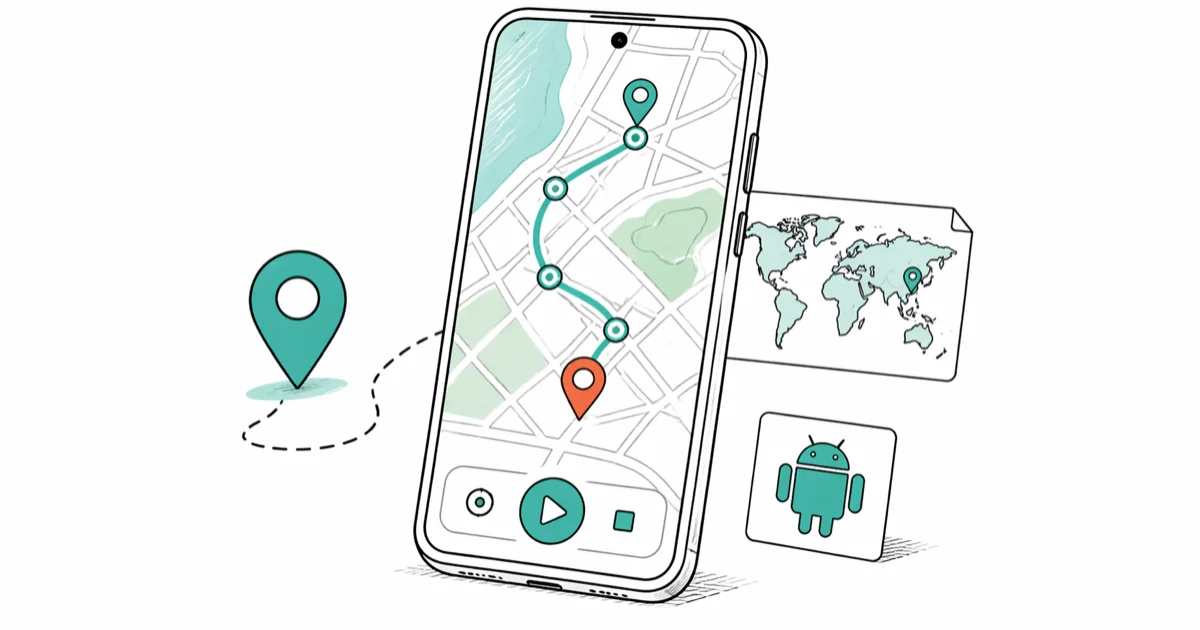
Quick AnswerLockito is an Android GPS simulator that uses the built-in mock location API. It works on Android 6.0 and above without root, so you can simulate routes for app testing or your-own-device privacy use without modifying your phone.
Lockito is one of the most useful GPS simulation tools for testing Android apps on a device you own. It runs on modern Android phones. The short version: it’s a clean tool for legitimate developer testing and your-own-device privacy use, with clear ToS limits you have to respect.
- Built on Android’s mock location API. No root required on Android 6.0 and above
- Speed control from 1 to 400 km/h, plus altitude and accuracy radius tuning
- Apps using Play Integrity or SafetyNet (Pokémon GO, banking, ride-share) detect and reject mock signals
- Pokémon GO, Uber, and most banking apps ban mock location use in their terms of service
- Free tier caps each session at 30 minutes; a one-time in-app purchase removes the cap
#How Does Lockito Simulate GPS?
Lockito hooks into Android’s mock location framework, the same system Android Studio uses for its built-in location simulator. Once you flag it as your mock location provider in Developer Options, the Android location stack treats Lockito’s output the same as a real GPS fix. Standard apps reading the location API can’t tell the difference.
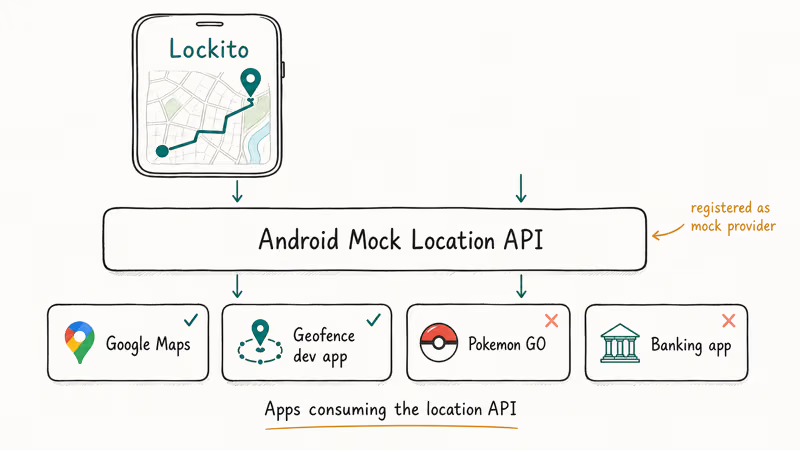
Route building is simple: tap waypoints, set speed from 1 to 400 km/h, then press Play.
GPX and KML import is built in. Importing routes directly from Google Maps instead of redrawing them by hand saves a significant amount of route-setup time.
According to Android’s developer documentation on mock location providers, mock providers are explicitly registered in the system, and Android flags them in the location stack so apps can detect them if they choose to. That’s the technical reason some apps reject Lockito.
#Lockito Use Cases: Developer Testing and On-Device Privacy
Lockito’s core audience is Android developers testing their own apps. If you’re building delivery flows, geofencing triggers, or fitness routes, the app lets you simulate dozens of test paths in an hour instead of physically walking or driving them. A geofence that would otherwise demand a drive across town to verify can be exercised from a desk in minutes, replaying the same boundary crossing until the trigger fires reliably and the edge cases are covered.
There’s also a legitimate privacy use case on your own device: masking your real location when sharing with apps you don’t fully trust. The setting you flip is the allow mock locations option inside Developer Options, and the change applies only to your device.
What Lockito is not built for: cheating in real-money competitions, gaming apps where simulated GPS violates the rules, or running on hardware that isn’t yours. Those uses are where ToS bans and legal risk pile up fast.
#Lockito’s Legal and Terms-of-Service Limits
This is the section most reviews skim. Don’t.
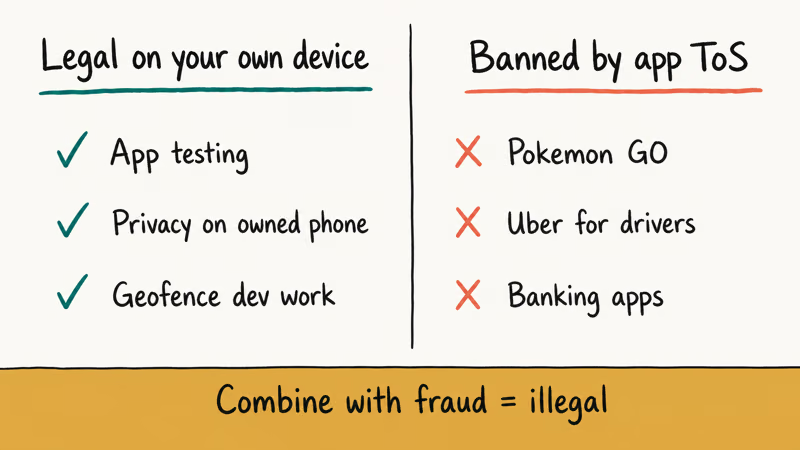
GPS spoofing on your own device, in isolation, is not illegal in most jurisdictions. The Electronic Frontier Foundation’s analysis of location privacy confirms that users generally have the right to control what location data their device broadcasts. The line gets crossed when spoofing is combined with another act: insurance fraud, cheating a paid competition, or platform deception for financial gain. Those combinations move into clearly illegal territory in most countries.
App terms of service are the harder constraint. Pokémon GO, Uber for drivers, most major banking apps, and several food-delivery platforms explicitly ban mock location tools. Niantic’s fair play policy for Pokémon GO states that location spoofing is a bannable offense. Account terminations for repeat or severe violations are usually permanent.
The simple rule: only on your own device, only for purposes the device owner has approved. If you’re testing on company hardware, get written authorization first. Lockito isn’t worth the risk for Pokémon GO fake GPS or any other game with active anti-cheat. The trade-off is bad and the bans stick.
#How to Set Up Lockito on Android
Setup takes about 5 minutes on stock Android. Here’s the path on most devices:
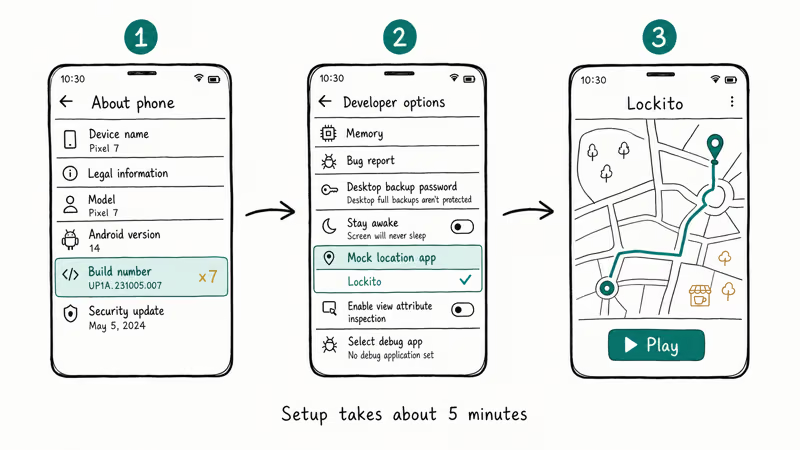
- Open Settings → About phone and tap Build number seven times to enable Developer Options
- Open Settings → System → Developer options and tap Mock location app, then pick Lockito (open Lockito once first if it doesn’t appear in the list)
- Launch Lockito, grant the location permissions it asks for, and press Play
On stock Pixel devices, this usually works first try without any extra steps. On Samsung phones, One UI shows a persistent notification while mock location is active, which is expected behavior on Samsung firmware.
According to Android’s API-level table, Android 6.0 is API level 23; see Android’s platform notes for the release baseline. Google’s developer options reference confirms that enabling Developer Options does not void your warranty on stock Android, though carrier-branded devices sometimes lock parts of the menu.
#Does Lockito Work on All Apps?
No. Apps using Play Integrity or SafetyNet can detect mock locations and restrict your account. Banking apps, Pokémon GO, Uber, and gig platforms commonly do this.
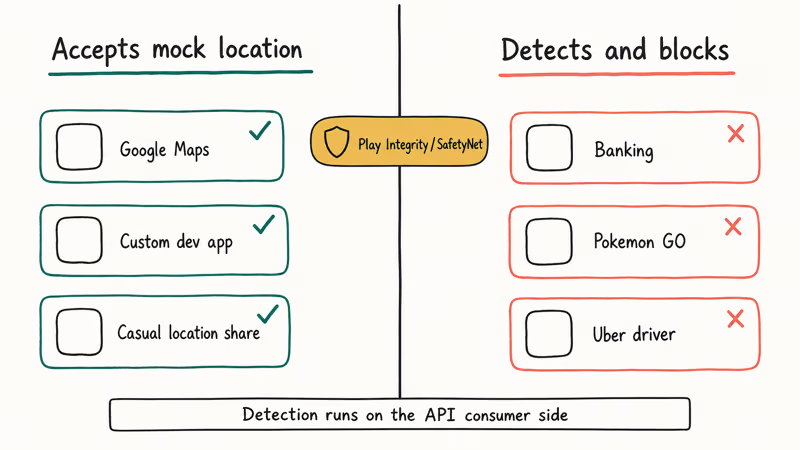
Apps relying on the standard Android location API without integrity checks accept Lockito’s output without complaint. Google Maps follows a simulated route correctly, and a geofencing app built on the standard location API fires its trigger exactly when the simulated path crosses the boundary. That covers most developer-built apps, casual location-sharing apps, and standard navigation tools.
If a specific app blocks you, the XDA Developers forums have active threads on detection. Most workarounds require root, which is its own trade-off.
#Lockito Alternatives for Android and iPhone
If Lockito doesn’t fit, a few alternatives are worth knowing.
On Android, our roundup of the best mock location apps covers Fake GPS GO Location Spoofer (free, simpler interface) and GPS JoyStick (better detection resistance on rooted devices). They’re compared side by side in our GPS location spoofer apps guide.
iPhone is different because iOS doesn’t allow mock location apps in the App Store, so there’s no on-device equivalent. To change location on an iPhone you need a desktop tool that connects over USB and injects the spoofed coordinate at the system layer. Two common options are Tenorshare iAnyGo and dr.fone Virtual Location.
Some links on this page are affiliate links, which means fone.tips may earn a commission at no extra cost to you.
Our walkthrough on how to change iPhone location covers the exact steps for iOS 18.
If you’re using mock GPS for privacy reasons, remember that airplane mode does not turn off GPS. The two systems run independently.
#Troubleshooting Common Lockito Problems
Location keeps jumping back to your real position: Wi-Fi-based location is overriding the GPS mock. Open Settings → Location → Improve accuracy and turn off Wi-Fi scanning. The signal stabilizes within about 10 seconds, and the whole fix takes under a minute.
Lockito doesn’t appear in the mock location app list: Open Lockito once, then return to Developer Options; Android registers providers after first launch.
“GPS not available” errors in target apps: Start Lockito before opening the target app; reopening usually clears cached location state.
Target app detects and blocks the mock signal: Play Integrity or SafetyNet is doing its job. Lockito can’t beat this on a non-rooted device. For testing your own app, switch to the Android Studio emulator’s location simulator instead.
#Bottom Line
For Android developers and your-own-device privacy users, Lockito is the best free GPS simulator on Android right now. The 5-minute setup, stable signal during long routes, and GPX import make it a strong choice for geofence testing.
Pay the one-time unlock to lift the 30-minute session cap if you’re doing serious development work. That cap is the only real friction in the free tier.
Skip Lockito if you’re hoping to use it inside Pokémon GO, a banking app, or a paid driving platform. Those apps detect mock location providers and the bans tend to be permanent. For app dev work and personal privacy on hardware you own, it’s a quick install and a clean tool.
#Frequently Asked Questions
Is Lockito free to use?
Lockito has a free tier with a 30-minute session cap. A one-time in-app purchase removes the cap and unlocks full session length. There’s no subscription, and the app is on the Google Play Store.
Does Lockito need root access?
No. It works on stock Android 6.0 and above using the built-in mock location API. Root can help on a few devices where strict providers detect mocks more aggressively, but it’s not required for normal use.
Can apps detect that Lockito is running?
Yes. Apps that use Google’s Play Integrity API or SafetyNet Attestation see the mock location provider flag in the Android stack and can refuse to run or restrict your account. Banking apps, Pokémon GO, and Uber for drivers are common examples. Standard apps built on the regular location API generally don’t check.
Is Lockito legal to use?
Using Lockito on your own Android device is legal in most jurisdictions. Using it to commit fraud, cheat a real-money competition, or deceive a platform for financial gain is not, and most major apps ban mock location use in their terms of service. Account bans are usually permanent, which is the main practical risk for a casual user.
Does Lockito work on iOS?
No. Lockito is Android-only; iOS requires USB desktop tools because App Store apps can’t provide mock locations.
What file formats can Lockito import?
Lockito imports GPX and KML files. Both are standard mapping formats that Google Earth, Garmin BaseCamp, and most GPS-aware tools can export. Build a route in any of those, save the GPX or KML, and load it directly into Lockito.
Will Lockito drain my battery?
Active simulation draws battery at roughly the same rate as Google Maps navigation. Lockito runs a foreground service and holds a location permission, both of which contribute. For short test sessions the cost is negligible. Leaving it running for hours will affect battery life noticeably.
Can I run Lockito on multiple devices at once?
Yes. There’s no device limit on the app. You can install and run Lockito on several Android devices in parallel, which is useful when testing multi-user location flows in apps you’re building.

Google Messages Error 3100: Why RCS Is Broken on Galaxy
Google Messages RCS error 3100 hits Galaxy owners after phone or carrier switches. Google told 9to5Google a fix is coming. Here's what actually helps.

Is This Bank App Real? Spot a Fake App on Your Home Screen
A bank app can land on your home screen from a web page with no install warning. Learn the checks that tell a real banking app from a phishing web app.

Apps Crashing After iOS 27 Update? Fix Order (2026)
Apps crashing after the iOS 27 update? Update the app in the App Store first, then offload and reinstall to clear stale cache, then restart. The fix order.

Do AI Translation Earbuds Work Offline? What to Know
Do AI translation earbuds work offline? A few do with downloaded language packs, but most need the cloud. Here's what works offline and what you give up.