Windows on ARM App Compatibility: What Runs in 2026
Windows on ARM app compatibility in 2026: most apps run native or via Prism emulation. What still fails: kernel anti-cheat, drivers, and some VPN clients.

Quick AnswerMost everyday apps run on Windows on ARM in 2026. Office, browsers, and creative tools are native ARM64. Older x86 and x64 apps run through the Prism emulator with a battery and speed cost. What still fails: kernel-level anti-cheat, hardware lacking ARM64 drivers, and some VPN and virtualization clients.
Windows on ARM app compatibility is a solved problem for most people in 2026, but not all. Office, browsers, and the big creative tools run as native ARM64. Older x86 and x64 apps run through Microsoft’s Prism emulator. The real gaps are narrow and specific: kernel-level anti-cheat, hardware without ARM64 drivers, and a handful of VPN and virtualization clients.
This guide draws those lines clearly so you know what you’re buying. The old “nothing runs on ARM” complaint is mostly retired now.
- Most everyday apps run on Windows on ARM, either as native ARM64 or through the Prism emulator
- Prism in Windows 11 24H2 emulates x86 and x64 apps and added AVX and AVX2 support for more demanding software
- Emulated apps carry a battery and speed cost versus native ARM64 builds, since translation takes extra work
- Drivers can’t be emulated: any kernel-mode component must be built as native ARM64 or the device fails
- The biggest holdouts are kernel-level anti-cheat games, niche USB hardware, and some VPN and virtualization clients
#How Does Prism Emulation Work?
Prism is the translation layer that lets x86 and x64 apps run on ARM chips. According to Microsoft’s emulation documentation, Prism is “the new emulator included with Windows 11 24H2,” and it just-in-time compiles blocks of x86 instructions into ARM64 instructions, caching the results so repeat runs are faster.
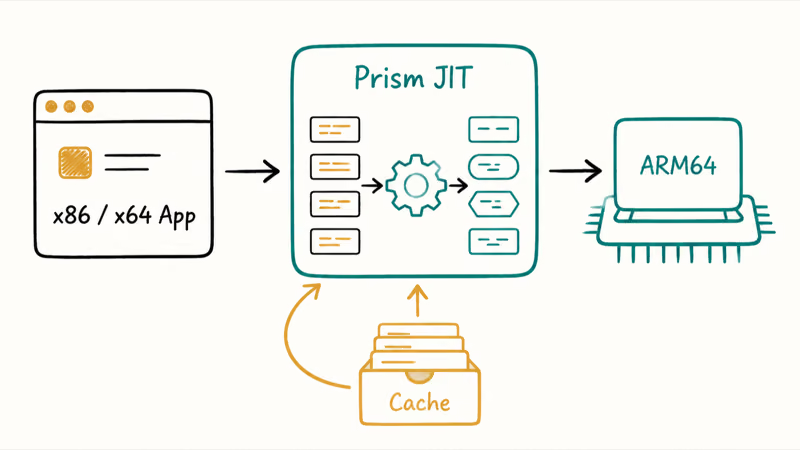
The 24H2 version closed a real gap. Microsoft states that Prism added support for AVX and AVX2 plus other x86 instruction extensions in 24H2, which means software that needs those features now runs under emulation when it didn’t before. That added coverage matters for some creative and engineering apps that lean on those instruction sets.
Emulation isn’t free, though. For light work the gap is small. For heavy work it’s noticeable, which is why native matters.
#The Real Cost of Running Apps Through Emulation
Emulation is a tax, not a wall. Apps run, but slower and hungrier for battery than native ones. The slowdown comes from translating each block of x86 instructions into ARM64 before the chip can execute it, even with Prism caching the results to soften repeat runs and reduce the cost on second launch.
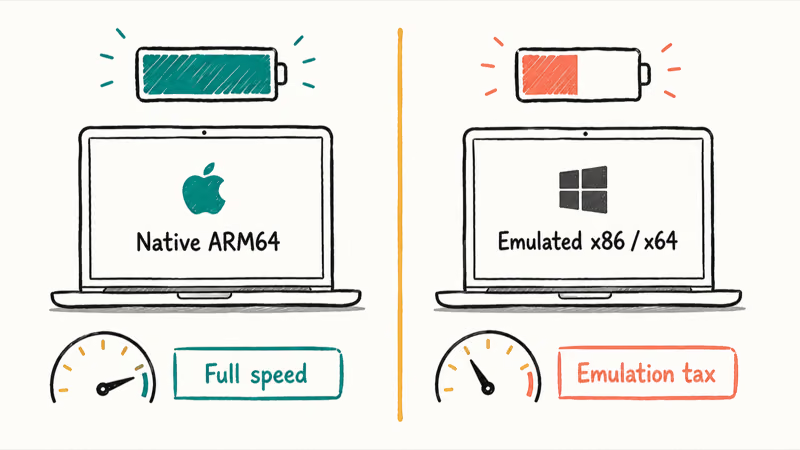
For everyday work like email and browsing, you won’t feel it. The penalty shows up on heavy, sustained workloads: large compiles, video exports, or older games.
#The Apps That Run Native on Windows ARM
The apps most people use daily are native ARM64 in 2026. That includes Microsoft Office, the major browsers like Chrome and Edge, Spotify, Zoom, and the big cloud-storage clients. Adobe shipped native ARM64 versions of its flagship creative apps, and DaVinci Resolve runs native too.
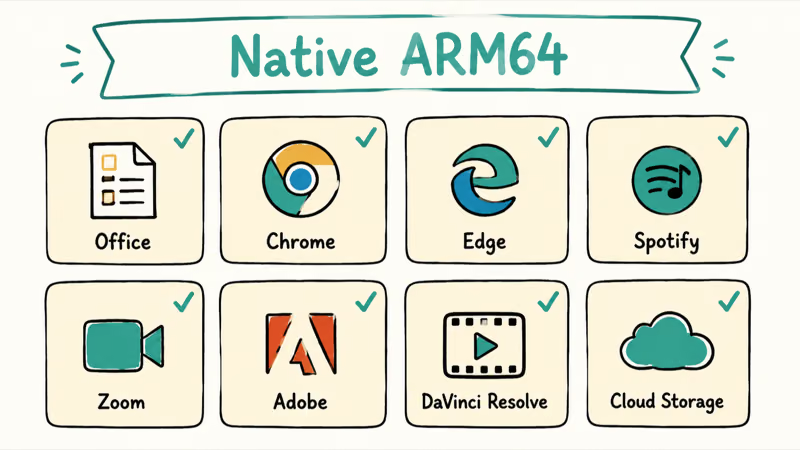
Native means full speed and full battery life, with no translation penalty. Native ARM64 apps don’t need Prism, so they avoid the slowdown and battery cost that emulated x86 and x64 apps can carry.
If an app is native, ARM is a non-issue. The interesting cases are the ones that aren’t, and the AI PC vs regular laptop comparison covers where the real differences land.
#The Apps That Still Fail on Windows ARM
This is the honest part. A few categories still break, and they break hard because of how they’re built. The common thread is drivers, which emulation simply can’t touch.
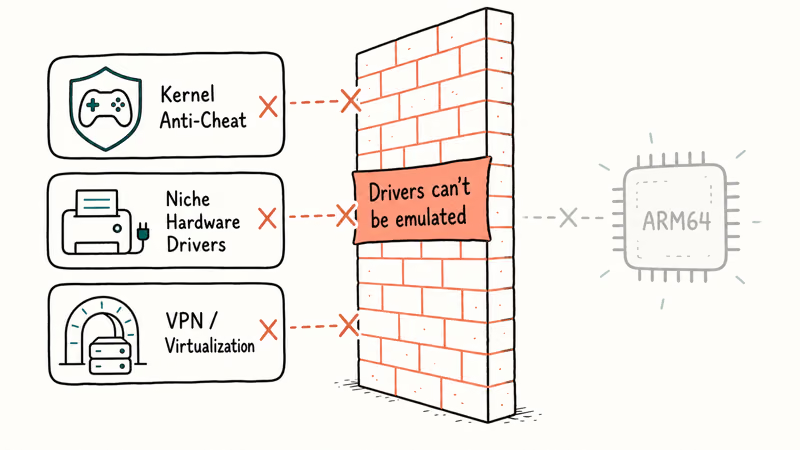
Kernel-level anti-cheat is the biggest one for gamers. Microsoft states plainly that “emulation only supports user mode code and doesn’t support drivers,” and many competitive games ship anti-cheat that loads as a kernel-mode driver. If that driver isn’t compiled as ARM64, the game won’t launch. Some vendors, including Epic with its anti-cheat tooling, have started shipping ARM support, but coverage is uneven.
Hardware without ARM64 drivers is the second gap. Microsoft’s Windows ARM-based PCs FAQ confirms that peripherals only work if their drivers are built into Windows or the maker has released ARM64 drivers. So niche printers, scanners, audio interfaces, and capture cards can simply fail.
#Why VPN and Virtualization Clients Break
VPN and virtualization clients are the third gap. They trip on the same rule. These tools install low-level network or hypervisor drivers, which must be native ARM64 to load.
A few corporate VPN clients and older virtualization tools still don’t ship ARM64 drivers, so they fail to connect. Consumer VPNs fare better, while failures cluster around enterprise clients that need low-level drivers.
The fix is always the same. The vendor has to ship a native ARM64 driver. No emulation trick gets around it.
#Should You Buy a Windows ARM Laptop?
For most users, yes, the compatibility story is good enough. If you live in Office, a browser, and mainstream creative apps, you’ll never notice you’re on ARM. The battery life of a Snapdragon X machine is a real win, and the Snapdragon vs Intel vs AMD comparison breaks down where each chip lands.
The buyers who should pause are competitive gamers tied to a specific anti-cheat title, anyone with a niche peripheral that lacks ARM64 drivers, and IT-managed users on a corporate VPN that hasn’t gone native. Check those specific apps before you commit. The guide on whether you need an AI PC digs into that buying call further.
Developers who want their own software to run native can follow Microsoft’s guide to adding ARM support, which is the fastest way to drop the emulation tax.
For the wider picture on what an ARM-based AI PC unlocks, see the guide to what a Copilot+ PC is and the rundown of what an NPU actually does.
#Fixing Specific Apps and Devices on Snapdragon X
When one tool misbehaves on a Snapdragon X machine, the cause usually traces back to the driver and emulation rules above. For creative and streaming work, check whether OBS Studio runs on Snapdragon X and how music production holds up on Snapdragon X before you commit a workflow to it.
Hardware and connectivity each have their own fix guides. A printer that won’t work on Snapdragon X and Bluetooth dropping on Snapdragon X both come down to one question: does an ARM64 driver exist?
Developers and power users hit the deepest gaps. The walkthroughs cover Docker Desktop and WSL2 on Snapdragon X and why some VPNs fail on Snapdragon X, both blocked by the same driver wall.
Still deciding? Learn how to check if an app runs on Snapdragon X before you buy.
#Bottom Line
Buy a Windows on ARM laptop if your daily apps are mainstream, because Office, browsers, and the big creative suites are native ARM64 and the Prism emulator covers nearly everything else. Hold off if you depend on a kernel-level anti-cheat game, a niche peripheral without ARM64 drivers, or a corporate VPN that hasn’t gone native, since those still fail. Verify your three or four must-have apps before you buy.
AI PCs and Copilot+ Laptops
#Frequently Asked Questions
Can you run x86 apps on Windows ARM?
Yes. Windows 11 on ARM runs x86 and x64 apps through the Prism emulator. Most run fine, though slower and hungrier for battery than native versions.
What is Prism on Windows ARM?
Prism is Microsoft’s emulator included with Windows 11 24H2. It compiles x86 and x64 instructions into ARM64 instructions just in time and caches the results. The 24H2 version also added AVX and AVX2 support, which let more demanding apps run under emulation.
Why don’t some games work on Windows ARM?
Many competitive games use anti-cheat that loads as a kernel-mode driver, and emulation can’t run drivers. If the anti-cheat isn’t compiled as native ARM64, the game won’t launch. Some vendors have started shipping ARM support, but it’s not universal yet.
Do printers and scanners work on Windows ARM?
They work only if the driver is built into Windows or the maker released an ARM64 driver. Mainstream printers usually work, but niche peripherals like specialty scanners, audio interfaces, and capture cards can fail. Check the maker’s site for an ARM64 driver before you rely on the device, since there’s no emulation fallback for hardware drivers.
Is Windows on ARM slower than Intel or AMD?
Native ARM64 apps run at full speed with no penalty. Emulated x86 and x64 apps run slower because the translation takes extra work, and they use more battery too. For everyday tasks the difference is small, but heavy emulated workloads show the cost.
Will my VPN work on a Windows ARM laptop?
Many consumer VPNs work, but some corporate clients install low-level drivers that must be native ARM64. Check with your provider or IT team first.
How much battery does emulation cost on Windows ARM?
Emulated apps use more battery than native ones because translating instructions takes extra cycles. The penalty is small for light tasks and larger for heavy workloads. Sticking to native ARM64 apps where they exist keeps battery life at its best.

Best Laptop for Running LLMs in 2026: Memory Comes First
The best laptop for running LLMs is a memory purchase first. Compare MacBook unified memory against NVIDIA laptop VRAM, and see what each tier really runs.

How to Run a Local LLM on Windows: A 2026 Setup Guide
Run a local LLM on Windows with LM Studio or Ollama. Pick a model that fits your GPU memory, keep every prompt offline, and skip the monthly bill.

Bluetooth Not Working on Snapdragon X? Fixes for 2026
Bluetooth not working on your Snapdragon X Copilot+ PC? Generic audio, mice, and keyboards work, but vendor apps often lack an ARM build. Fixes inside.

Docker Desktop and WSL2 Not Working on Snapdragon X? Fix It
WSL2 runs fine on Snapdragon X, but Docker Desktop ARM is Early Access and throws WSL errors. Use WSL2 plus native ARM64 Ubuntu and Docker Engine.