What Is a Copilot+ PC? The Microsoft Certification Explained
A Copilot+ PC is a Microsoft cert: 40-TOPS NPU, 16GB RAM, 256GB storage. That bar unlocks Recall, Studio Effects, Cocreator, and Live Captions.

Quick AnswerA Copilot+ PC is a Microsoft certification for Windows 11 laptops with an NPU rated 40 TOPS or higher, 16GB of RAM, and 256GB of storage. Clearing that bar unlocks on-device AI features like Recall, Studio Effects, Cocreator, and Live Captions with translation.
A Copilot+ PC is a Microsoft certification, not a brand of laptop. It’s a label Microsoft grants to Windows 11 machines that clear a specific hardware bar, and clearing that bar is what unlocks a short list of on-device AI features. This guide spells out the exact spec gate and which features actually depend on it.
Think of it less like “Intel Inside” and more like a minimum-requirements stamp. The hardware checks out, so the features turn on.
- Copilot+ is a Microsoft certification, not a product line or a single chip
- The spec gate is an NPU rated 40 TOPS or higher, 16GB of RAM, and 256GB of storage, on Windows 11 24H2 or newer
- Clearing the bar unlocks Recall, Windows Studio Effects, Cocreator in Paint, and Live Captions with translation
- Recall also needs at least 256GB of storage with 50GB free to run
- Snapdragon, Intel Core Ultra 200V, and AMD Ryzen AI 300 chips can all meet the bar
#The Exact Spec Gate
The certification has a fixed floor. Microsoft’s Copilot+ PCs and Windows PCs differences page states that a Copilot+ PC needs at least 40 TOPS, 16GB of RAM, and 256GB of storage, on Windows 11 version 24H2 or newer.
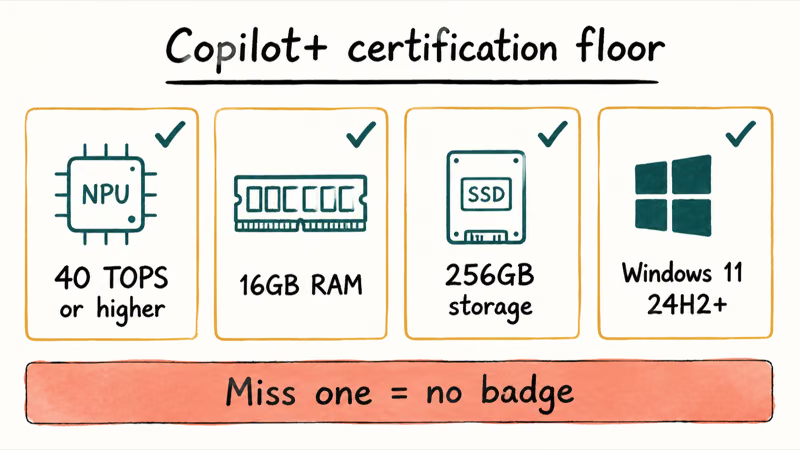
Every number there is a hard requirement, not a recommendation. Miss any one of them, and the machine doesn’t get the badge, no matter how fast its CPU or GPU is. The 40-TOPS NPU is the part that trips up most laptops, because plenty of recent chips have a smaller NPU.
Microsoft’s Copilot+ PCs developer guide confirms that the NPU must perform more than 40 trillion operations per second to qualify, restating the same threshold from the developer side.
#What the Certification Actually Unlocks
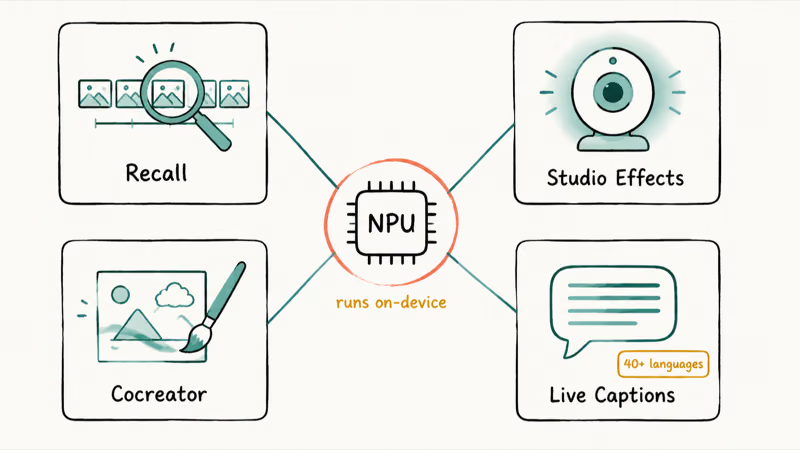
The badge isn’t decorative. It gates a specific set of features that run locally on the NPU instead of in the cloud.
#Recall
Recall builds a searchable timeline of what you’ve seen on your PC, so you can find a document, email, or web page by describing it in plain language. It runs on-device. According to Microsoft, Recall needs at least 256GB of storage with 50GB free to operate, which lines up with the certification’s storage floor.
#Windows Studio Effects
These are the camera and mic enhancements for video calls: background blur, intelligent lighting, gaze correction, and voice clarity. The NPU runs them continuously without hammering your battery, which is the whole reason they live on the NPU rather than the CPU.
#Cocreator in Paint
Cocreator turns a sketch plus a text prompt into a finished image in real time as you draw. It’s the most visible “wow” feature.
#Live Captions with translation
On-device speech recognition produces captions and can translate audio from 40-plus languages into English, even offline. As Tom’s Guide reported when these tools debuted, Live Captions translation is one of the four headline Copilot+ features alongside Recall, Cocreator, and Studio Effects.
#How Is This Different From Plain Copilot?
This is the part people mix up most. Copilot, the assistant, runs on any Windows 11 PC because it lives mostly in the cloud. The Copilot+ certification is about on-device features that need local hardware.
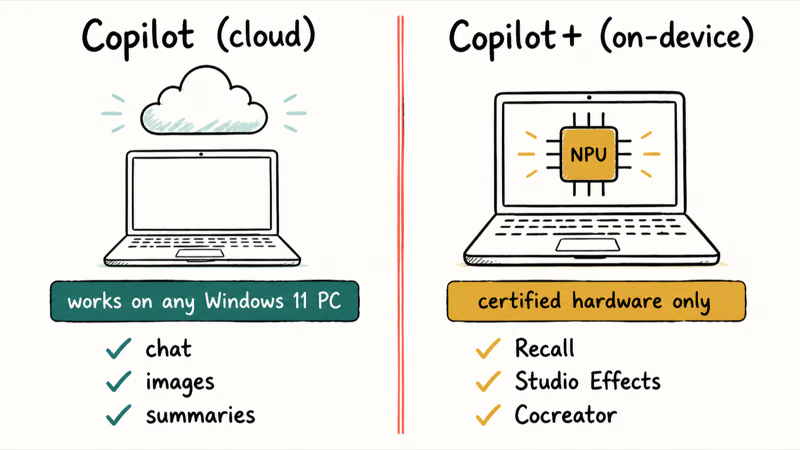
Plain Copilot on a standard Windows 11 laptop still gives you the cloud assistant surface: chat, image, and summarization tools. Recall and the other on-device Copilot+ features sit behind the certified hardware gate. The split is clean: cloud Copilot for everyone, on-device Copilot+ features only for certified hardware. For the everyday assistant side, see the guide on how to use Copilot in Windows 11.
#Which Chips Earn the Badge?
Three silicon families can clear the bar today. Qualcomm’s Snapdragon X line launched the first wave of Copilot+ PCs, and Microsoft later expanded the program to Intel and AMD.
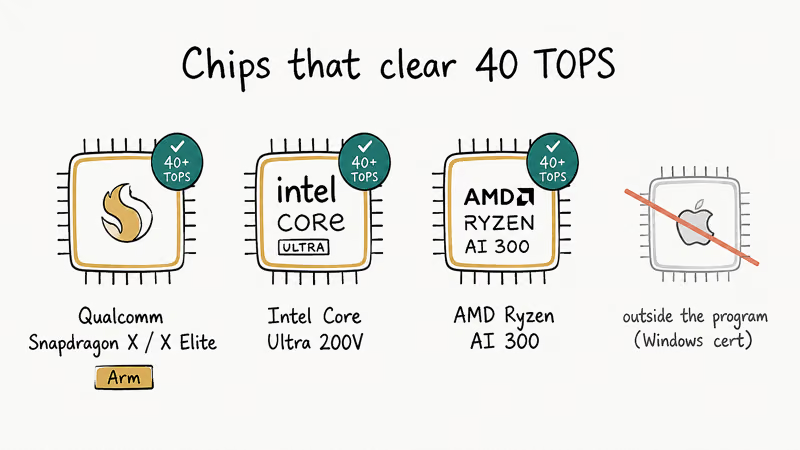
- Qualcomm Snapdragon X / X Elite (Arm-based)
- Intel Core Ultra 200V series
- AMD Ryzen AI 300 series
Microsoft’s developer guide lists named devices across all three, including Surface Laptop and Surface Pro Copilot+ models. Apple’s M-series Macs have their own capable Neural Engine, but they sit outside this program because Copilot+ is a Windows certification. The MacBook vs Copilot+ PC comparison digs into that. If you’re cross-shopping the Windows chips, the Snapdragon X vs Intel Core Ultra vs AMD Ryzen AI breakdown helps.
#Deciding Whether to Pay the Premium
Buy one if you specifically want Recall, real-time captions, or the camera effects. Those features really do need the certified hardware, and there’s no way to bolt them onto an older machine.
Don’t pay the premium just for the badge if you mainly use cloud Copilot for chat and writing. That works fine on any standard Windows 11 PC, and the money is often better spent elsewhere.
#Where to Read More Before You Choose
Still on the fence? The do you need an AI PC guide walks through the buying decision step by step.
The broader what is an AI PC explainer covers how the loose “AI PC” label compares to this stricter certification, which is worth understanding before you trust any sticker on a laptop box.
#Bottom Line
If you want the on-device features, buy a certified Copilot+ PC and confirm the NPU is rated 40 TOPS, not just “AI-ready.” If you don’t, a standard Windows 11 laptop already runs cloud Copilot, so skip the premium and put the savings into RAM, storage, or a better screen.
AI PCs and Copilot+ Laptops
#Frequently Asked Questions
What does the ”+” in Copilot+ mean?
It marks the certified, on-device tier.
Plain Copilot is the cloud assistant available to everyone with Windows 11, while Copilot+ adds the local AI features that only run on qualifying hardware. The plus sign is shorthand for “this machine cleared the bar.”
Can I upgrade my PC to become a Copilot+ PC?
No. The NPU is built into the processor, not a card you can add later.
Does a Copilot+ PC need an internet connection?
Some features work offline and some don’t. On-device tools like Live Captions translation and Cocreator can run without a connection, but the cloud Copilot assistant still needs internet to answer questions.
Is Recall turned on by default?
No, Recall is opt-in.
Microsoft added authentication and encryption around it after early privacy concerns, so you decide whether to enable it. It also needs at least 256GB of storage with 50GB free to run, in line with the certification’s storage floor.
Are all Copilot+ PCs Arm-based?
Not anymore.
The first wave used Qualcomm’s Arm-based Snapdragon X chips, but Microsoft later expanded the program to Intel Core Ultra 200V and AMD Ryzen AI 300 silicon, both of which are x86. Any of the three can meet the certification, so the Arm-only assumption from the launch period no longer holds.
Will my older Windows 11 laptop get these features?
Probably not the on-device ones. Without a 40-TOPS NPU, features like Recall and Studio Effects stay locked, though your laptop can still use the cloud Copilot assistant like any other Windows 11 PC.

Best Laptop for Running LLMs in 2026: Memory Comes First
The best laptop for running LLMs is a memory purchase first. Compare MacBook unified memory against NVIDIA laptop VRAM, and see what each tier really runs.

How to Run a Local LLM on Windows: A 2026 Setup Guide
Run a local LLM on Windows with LM Studio or Ollama. Pick a model that fits your GPU memory, keep every prompt offline, and skip the monthly bill.

Bluetooth Not Working on Snapdragon X? Fixes for 2026
Bluetooth not working on your Snapdragon X Copilot+ PC? Generic audio, mice, and keyboards work, but vendor apps often lack an ARM build. Fixes inside.

Docker Desktop and WSL2 Not Working on Snapdragon X? Fix It
WSL2 runs fine on Snapdragon X, but Docker Desktop ARM is Early Access and throws WSL errors. Use WSL2 plus native ARM64 Ubuntu and Docker Engine.