VPN Not Working on Snapdragon X? Why It Fails, How to Fix
Your VPN won't install or connect on a Snapdragon X Copilot Plus PC because Windows on ARM can't emulate the network driver. Here are the fixes that work.

Quick AnswerMost VPN clients fail on Snapdragon X because they install an x86 network driver, and Windows on ARM emulates user-mode apps only, not drivers. The fix is a native ARM64 VPN app, an OpenVPN or WireGuard config, or the built-in Windows client.
VPN not working on your Snapdragon X laptop? Most VPN clients install a network driver, and Windows on ARM can’t emulate drivers, so the app either refuses to install or connects to nothing. The fix is a native ARM64 app, a manual OpenVPN or WireGuard config, or the VPN client built into Windows.
- Windows on ARM emulates user-mode apps only, so any VPN that ships an x86 kernel driver fails on Snapdragon X.
- The two symptoms are an installer that errors out, or an app that installs but connects to nothing.
- A native ARM64 VPN app is the cleanest fix. Mullvad shipped one in February 2025; check any provider’s download page for an ARM64 build.
- The built-in Windows VPN client needs zero third-party drivers and works on day one.
- OpenVPN and WireGuard both have ARM64 Windows builds you point at a manual config file.
#Why Does My VPN Fail on Snapdragon X?
The root cause is a driver, not your settings. Most full VPN clients don’t just route traffic at the app level. They install a low-level network adapter, a TUN or TAP driver, that hooks into the Windows networking stack and, on a normal Intel or AMD laptop, that x86 driver loads fine. On a Snapdragon X machine it can’t.
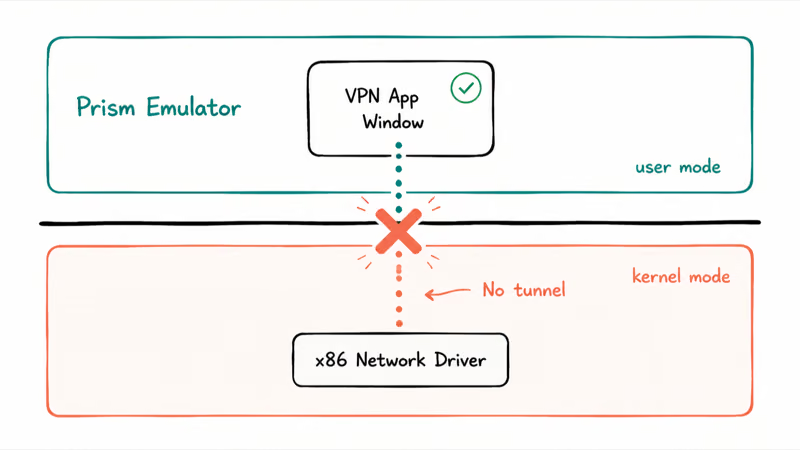
Here’s the part that trips everyone up. Windows on ARM runs older x86 and x64 apps through an emulator called Prism, so a lot of legacy software just works. The emulator stops at the kernel.
According to Microsoft’s documentation on how emulation works on Arm, “emulation only supports user mode code and doesn’t support drivers. Any kernel mode components must be compiled as Arm64.” That one sentence explains your whole problem. A VPN app has two layers: the window you click, which runs in user-mode, and the network driver that moves your traffic, which is kernel-mode. Prism runs the first layer fine, but it can’t load the second.
No driver, no tunnel. That’s the whole story.
#What the Failure Actually Looks Like
The symptom depends on how the app’s installer is built. Here’s how to read what you’re seeing.
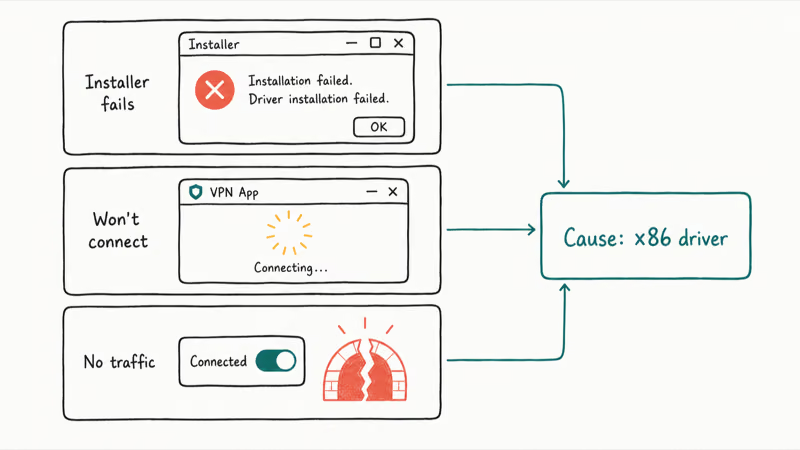
| Symptom | What’s happening |
|---|---|
| Installer fails or shows an unsupported-CPU error | Setup tries to load an x86 driver the ARM kernel rejects, so it aborts |
| App installs but won’t connect | The interface runs under emulation, but the network driver never loads, so no tunnel forms |
| Connects but no traffic routes | The virtual adapter is half-installed and Windows won’t send packets through it |
If you saw any of those on your Copilot Plus PC, you didn’t do anything wrong. The app was never built for the chip. This is the same gap covered in our guide to Windows on ARM app compatibility, where VPNs and anti-cheat tools are the usual holdouts. It’s also the exact reason a printer can stop working on Snapdragon X: the driver, again.
#Which VPNs Have a Native ARM64 Windows App?
A native ARM64 app sidesteps the driver problem, because the driver is compiled for the chip. A growing handful of providers now ship one. Check the vendor’s own download page for an ARM64 build before you subscribe.
A direct example is Mullvad. Mullvad’s Windows on ARM announcement states that “the Mullvad VPN app is now available for users running Windows on ARM,” and confirms that “the Windows on ARM app supports Windows 10 and 11 for users of ARM64 computers.” That went live on February 7, 2025.
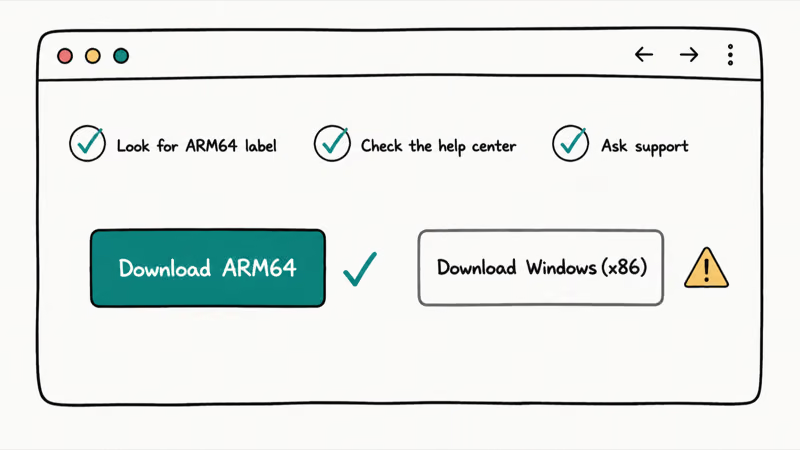
Other big names, including NordVPN and ExpressVPN, have publicized ARM Windows support too. They aren’t listed here as guaranteed-native for one reason: ARM support gets added, renamed, and occasionally rolled back, and the only source of truth is the vendor’s current download page. Before you pay, do this:
- Go to the provider’s Windows download page.
- Look for a download labeled ARM64, ARM, or Windows on Arm.
- If you only see a generic “Windows” installer, check their help center for an ARM article, or ask support whether the app is native ARM64.
The practical split is simple: a native ARM64 build can load the driver Windows on ARM needs, while an emulated x86 client can’t. If your provider has a native app, use it. If it doesn’t, the next two methods don’t depend on the provider’s full desktop app.
#How to Set Up OpenVPN or WireGuard on ARM Windows
Both OpenVPN and WireGuard publish ARM64 Windows builds, and both load a properly signed ARM64 driver. So they install cleanly on Snapdragon X. The catch is that you bring your own config file instead of clicking one button.
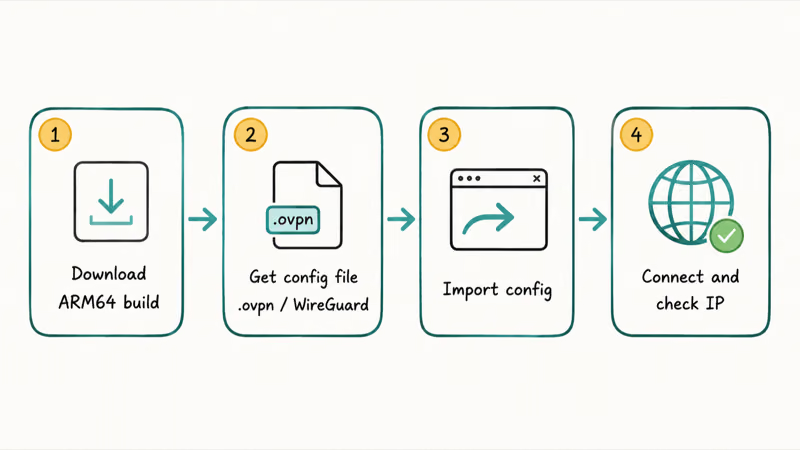
This route works when your VPN provider supports manual configs, which most privacy-focused ones do. The flow:
- Download the ARM64 build of the OpenVPN GUI or the WireGuard app from the official project site.
- Get the config file from your provider. For OpenVPN that’s a
.ovpnfile. For WireGuard it’s a short text config with your keys and the server endpoint. - Import the config into the app.
- Connect, then confirm your IP changed and there’s no DNS leak.
Either way, you get a real ARM64 driver, which is exactly what the stock client couldn’t give you. The manual config route asks for ten minutes of setup, but it’s a one-time cost.
#WireGuard or OpenVPN: Which Is Better on Snapdragon X
WireGuard tends to be smoother on ARM. It’s lighter and reconnects faster after sleep, which matters on a laptop you open and close all day. The ARM64 build avoids the x86 driver problem and can import a provider config directly. OpenVPN is the more universal pick if your provider only hands out .ovpn files, and our WireGuard vs OpenVPN breakdown has the full side-by-side.
#Using the Built-In Windows VPN Client as a Fallback
Windows has a VPN client built in, and it needs no third-party driver at all. It uses the networking stack that already ships with ARM Windows, so there’s nothing to fail at install time. This is the fallback that always works, as long as your provider supports a standard protocol like IKEv2 or L2TP.
According to Microsoft’s guide to connecting to a VPN in Windows, you add a connection through Settings, choose Windows (built-in) as the provider, enter the server address, and pick the VPN type your provider uses. The steps:
- Open Settings, then go to Network & internet > VPN.
- Select Add VPN.
- Set VPN provider to Windows (built-in).
- Name the connection, enter the server address, and choose the VPN type and sign-in info.
- Save, then connect from the VPN page or the network flyout.
You’ll need a few details from your provider: the server address, the protocol, and your credentials or a pre-shared key. Not every consumer VPN hands those out, but business VPNs and privacy providers almost always do.
The downside is honest. You lose the app’s extras like a kill switch or auto-server-picking. The upside is it connects on a Snapdragon X without any driver drama, which matters most if your only goal is privacy on a network you don’t trust, like the cafe Wi-Fi we cover in do you need a VPN on public Wi-Fi.
#Bottom Line
Skip the troubleshooting rabbit hole and go straight to a native ARM64 app. If your provider has one on its download page, install it and you’re done. No native app? Set up WireGuard with a manual config for a real ARM64 driver.
Keep the built-in Windows VPN client as your no-driver fallback for anything that speaks IKEv2 or L2TP. Don’t keep reinstalling the same emulated x86 client and expecting a different result, because the chip rejects its driver every time. New to these machines? Our explainer on what a Copilot Plus PC is covers why the ARM chip behaves this way.
AI PCs and Copilot+ Laptops
#Frequently Asked Questions
Why does my VPN installer fail on a Snapdragon X laptop?
The installer is trying to load an x86 network driver that the ARM64 kernel won’t accept. Windows on ARM runs x86 apps through emulation, but it doesn’t emulate drivers, so the setup aborts before it finishes. You need a VPN with a native ARM64 build instead.
Is the problem the Snapdragon chip or my Windows version?
It’s the architecture, not a bug. Any Copilot Plus PC running Windows on ARM has the same limit: kernel-mode drivers must be ARM64-native. Updating Windows won’t fix an x86-only VPN client, because the gap is in how the app was compiled, not in your OS build.
Will a free VPN work on Windows on ARM?
Only if it has a native ARM64 app or supports manual OpenVPN and WireGuard configs. Many free VPNs ship x86-only clients that fail the same way paid ones do. There are also real safety trade-offs with free services, which we cover in our look at free VPN risks before you install one.
Can I just use the VPN through Microsoft Edge or a browser extension?
A browser extension VPN runs as user-mode code, so it usually loads on ARM Windows, but it only protects browser traffic. Apps outside the browser still use your real connection. For full-device coverage you still need a native app, a manual config, or the built-in Windows client.
Does the built-in Windows VPN client slow down my connection?
Not noticeably in most cases. It uses protocols like IKEv2 that are efficient on modern hardware. You give up app conveniences like a kill switch and one-tap server switching, but raw speed is fine for browsing, email, and video.
How do I check whether a VPN download is the ARM64 version?
Look at the download label on the provider’s site. A native build says “ARM64,” “ARM,” or “Windows on Arm.” If you only see a single generic “Windows” installer, check the help center or ask support whether the app is compiled for ARM64. Don’t assume the standard download is native, because most still aren’t.
Is using a VPN on a work laptop allowed?
That depends on your employer’s policy. A VPN is a legitimate privacy and security tool, and many companies require one for remote access. On a managed work device, check with your IT team first, since some setups already route you through a corporate VPN and a second client can conflict with it.

Bluetooth Not Working on Snapdragon X? Fixes for 2026
Bluetooth not working on your Snapdragon X Copilot+ PC? Generic audio, mice, and keyboards work, but vendor apps often lack an ARM build. Fixes inside.

Docker Desktop and WSL2 Not Working on Snapdragon X? Fix It
WSL2 runs fine on Snapdragon X, but Docker Desktop ARM is Early Access and throws WSL errors. Use WSL2 plus native ARM64 Ubuntu and Docker Engine.

Does OBS Studio Work on Snapdragon X? ARM64 Build Guide
Yes, OBS Studio has an experimental ARM64 build since version 31.1, but x64 plugins won't load and hardware encoding is missing. Here is what works.
Does Photoshop Run on Snapdragon X? Native ARM Answer
Does Photoshop run on Snapdragon X? Yes, as a native ARM64 build. See which features work, which Adobe apps emulate, and fix the 0xc000007b error.