What Does an NPU Actually Do? The Honest Answer for 2026
What does an NPU actually do? It runs background AI like webcam effects, noise removal, and Live Captions, not your local LLM. An honest 2026 breakdown.

Quick AnswerAn NPU runs light, always-on AI tasks efficiently: webcam background blur, noise suppression, Windows Hello face sign-in, and Live Captions. It does not run your local large language model. That heavy work falls to the GPU.
An NPU, the neural processing unit on a modern AI PC, runs small AI tasks in the background while sipping power. It handles your webcam background blur, microphone noise removal, face sign-in, and Live Captions. What it almost never does is the thing people assume: run a local chatbot or image model. That job goes to the GPU.
So the honest answer is twofold. The NPU does real work, but it’s quiet, invisible work. Outside a short list of features, your NPU spends most of the day doing nothing at all.
- An NPU runs light, always-on AI like webcam effects, noise suppression, and face sign-in while using very little power
- It does NOT run your local large language model; that heavy work falls to the GPU and its memory
- Microsoft’s Copilot+ tier needs an NPU rated at least 40 TOPS plus 16GB RAM and 256GB storage
- The NPU sits idle most of the day unless an app or Windows feature is actively built to target it
- A January 2026 Windows update fixed a bug that kept some NPUs powered during idle, draining battery for no benefit
#The Background AI the NPU Handles Daily
On a typical workday, the NPU handles a handful of background AI chores. The biggest one is Windows Studio Effects, the bundle of webcam tricks that blur your background, correct your gaze, and steady the framing during video calls. According to Microsoft’s Copilot+ PCs differences page, Studio Effects runs “intelligent lighting, gaze correction, and voice clarity” on the device using the NPU.
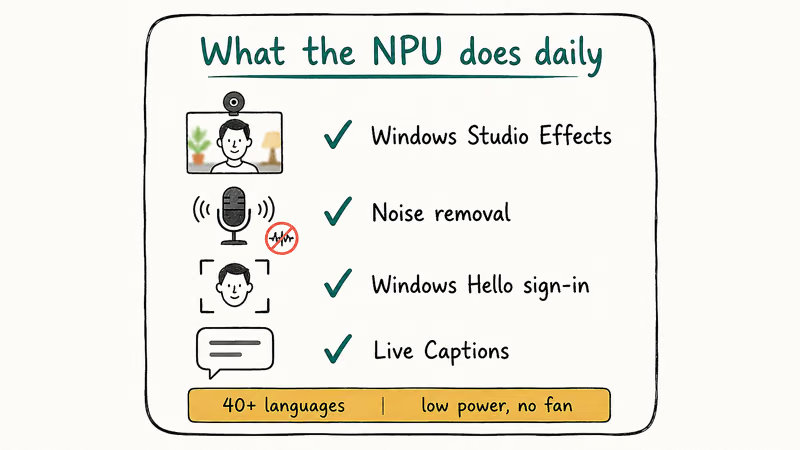
That same chip cleans up your microphone audio. It also powers Live Captions, which Microsoft states can translate live or recorded audio from over 40 languages into English captions, all on the device. None of this spins up the fan.
Face sign-in leans on the NPU too. Windows Hello uses neural inference to match your face. Microsoft’s Enhanced Sign-in Security documentation confirms that the face-matching algorithm is isolated in a protected, virtualization-based environment so the biometric data stays locked away from the rest of Windows. For everyday Windows use, the NPU’s visible jobs are still a short list: Studio Effects, Live Captions, and Hello face sign-in.
#Why the NPU Was Built for Efficiency
The NPU is built for efficiency per watt, not raw speed. It chews through low-precision math, often 8-bit integer (INT8) operations, which is the kind of math neural networks use for inference. Doing that math on a dedicated chip costs a fraction of the power the CPU or GPU would burn on the same task.
That design choice is what makes always-on AI practical. You can blur your call background for an hour without the battery sliding.
The trade-off is a hard ceiling. An NPU rated 40 or 50 TOPS is fast for its slice of work, but it was never meant to run a 7-billion-parameter model. It does small things efficiently, full stop.
Want to understand how these chips split up the labor? Our breakdown of NPU vs GPU vs CPU walks through which chip handles which job and why each one matters for AI work on a modern PC.
#Does the NPU Run Your Local AI Model?
No, and this is the single biggest myth about AI PCs. When you run a chatbot or image generator on your own machine with a tool like Ollama or LM Studio, the GPU does the heavy lifting, not the NPU. The model lives in GPU memory and the GPU compute cores grind through it.
XDA’s reporting on AI PCs puts it plainly. Their feature on whether the NPU is doing anything for you found that for most people the NPU sits unused unless a specific app targets it, while general AI work still routes to the GPU. General Copilot chat is cloud-backed rather than proof that the local NPU is running the model.
If running models offline is your real goal, you’re shopping for GPU memory, not NPU TOPS. The NPU helps with the small, efficient stuff. It’s not the engine for serious local inference.
#Why the NPU Sits Idle Most of the Day
Most of the time, the NPU does nothing. That’s the uncomfortable truth. When you’re not on a video call, not using Live Captions, and not running an app built to target the NPU, the chip is parked. Windows even added an NPU column to Task Manager so you can watch it sit at zero between supported tasks.
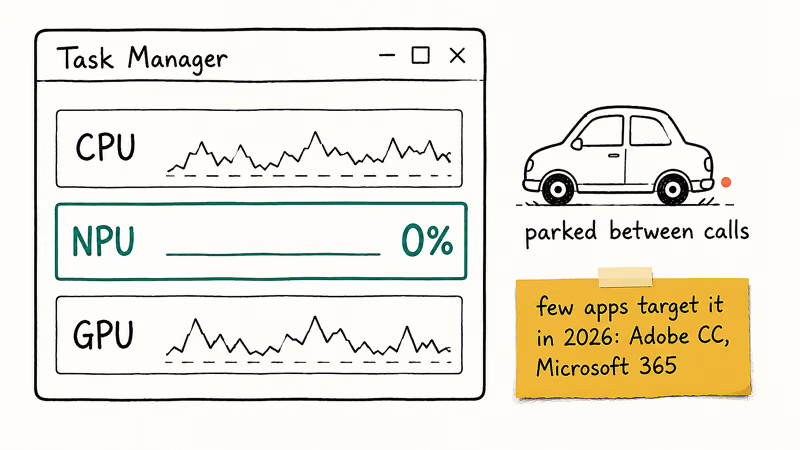
The software catch-up is slow. Only a short list of apps, including parts of Adobe Creative Cloud and Microsoft 365, actively offload work to the NPU as of 2026. Everything else ignores it.
Idle time also caused a real bug. PCWorld reported that Microsoft’s January 2026 KB5074109 update fixed an issue where some NPUs stayed powered during idle and quietly drained battery for no benefit. For a stretch, the NPU was costing battery without doing anything useful. The fix shipped, and the chip now powers down properly when there’s no AI work to do.
#How an NPU Compares to Cloud AI
The NPU’s advantage over cloud AI is privacy and latency, not horsepower. Because the work happens on the device, your webcam feed and your captions never leave the laptop. There’s no round trip to a server, so effects apply instantly even with no internet.
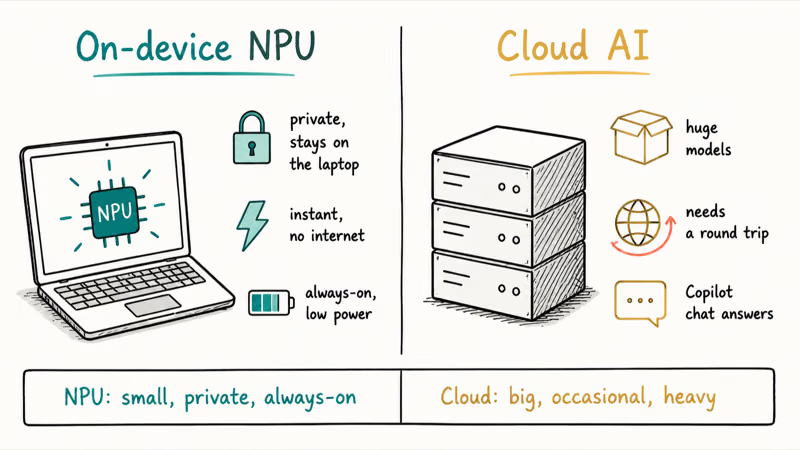
Cloud AI still wins on scale. A data-center GPU cluster runs models far larger than anything a laptop NPU could touch, which is why Copilot’s chat answers come from the cloud, not your NPU. If you want the full tour of what the on-device tier unlocks, see our guide to what a Copilot+ PC actually is and the breakdown of what TOPS means on an AI PC.
The clean way to think about it: the NPU is for small, private, always-on tasks. The cloud is for big, occasional, heavy ones.
#Do You Even Need an NPU?
For most people, the NPU is a nice-to-have, not a reason to buy. If you live on video calls, the Studio Effects and noise removal alone can justify it, and the all-day battery while those run is a real, measurable win. Skip those features and you may never touch the chip.
The honest buyer’s question isn’t “do I want an NPU,” it’s “do I use the features the NPU powers.” Our piece on whether you need an AI PC digs into that decision, and our AI PC vs regular laptop comparison shows where the gap is real versus marketing.
#Bottom Line
Buy an AI PC for the NPU only if you live on video calls or expect to use Live Captions and on-device face sign-in daily, because those are the features the chip clearly improves day to day. Don’t buy one expecting to run local AI models, that’s a GPU job, and the NPU will mostly sit idle while you wait for software to catch up. Pick the machine for the work you actually do, not the sticker on the lid.
AI PCs and Copilot+ Laptops
#Frequently Asked Questions
What does an NPU do on a laptop?
An NPU runs light AI tasks on the device, like webcam background blur, microphone noise removal, face sign-in through Windows Hello, and Live Captions. It does this work efficiently in the background without draining much battery. It’s not designed to run large local AI models.
Does the NPU run ChatGPT or local AI models?
No. Cloud chatbots like ChatGPT run on remote servers, and when you run a local model with a tool like Ollama, the GPU does the heavy work, not the NPU. The NPU handles small, efficient AI tasks, while large language models need GPU memory and compute.
Is the NPU faster than the GPU?
Not for heavy work. The NPU is faster per watt on small AI math, but the GPU has far more raw power for big models.
Why does my NPU show 0% usage in Task Manager?
Because the NPU only works when an app or Windows feature actively targets it. When you’re not on a video call, not using Live Captions, and not running NPU-aware software, the chip sits idle. That’s normal in 2026, since few apps offload work to the NPU yet.
How many TOPS does an NPU need?
Microsoft’s Copilot+ tier sets the bar at an NPU capable of at least 40 TOPS, paired with 16GB of RAM and 256GB of storage. An NPU below 40 TOPS still counts as an NPU, but it won’t unlock the on-device Copilot+ exclusives like Recall, Cocreator, or Studio Effects.
Does an NPU help battery life?
It can, by running background AI cheaply instead of waking the power-hungry CPU or GPU. A January 2026 Windows update also fixed an idle-drain bug.
What apps actually use the NPU in 2026?
Only a short list so far, including parts of Adobe Creative Cloud and Microsoft 365, plus Windows features like Studio Effects, Live Captions, and Recall. Most everyday apps don’t target the NPU yet, which is why it spends so much time idle.

Best Laptop for Running LLMs in 2026: Memory Comes First
The best laptop for running LLMs is a memory purchase first. Compare MacBook unified memory against NVIDIA laptop VRAM, and see what each tier really runs.

How to Run a Local LLM on Windows: A 2026 Setup Guide
Run a local LLM on Windows with LM Studio or Ollama. Pick a model that fits your GPU memory, keep every prompt offline, and skip the monthly bill.

Bluetooth Not Working on Snapdragon X? Fixes for 2026
Bluetooth not working on your Snapdragon X Copilot+ PC? Generic audio, mice, and keyboards work, but vendor apps often lack an ARM build. Fixes inside.

Docker Desktop and WSL2 Not Working on Snapdragon X? Fix It
WSL2 runs fine on Snapdragon X, but Docker Desktop ARM is Early Access and throws WSL errors. Use WSL2 plus native ARM64 Ubuntu and Docker Engine.