Vulkan Run Time Libraries: What It Is and How to Remove It
Vulkan Run Time Libraries shows up after a GPU driver install. Here's what it does, why it's safe, and how to remove it the right way on Windows.

Quick AnswerVulkan Run Time Libraries is a graphics library installed automatically by your GPU driver from NVIDIA, AMD, or Intel. It's safe, takes only a few megabytes, and lets modern games render with lower CPU overhead than DirectX. Removing it usually breaks Vulkan-based games, and the next driver update reinstalls it.
You opened Settings > Apps and spotted “Vulkan Run Time Libraries” sitting there. You don’t remember installing it. Short version: it ships with your graphics driver bundle.
- Vulkan Run Time Libraries (also called VulkanRT) is a graphics API runtime that ships with NVIDIA, AMD, and Intel GPU drivers.
- It’s not malware. The Windows entry appears because your GPU vendor’s installer bundles it, not because you downloaded anything.
- DOOM Eternal, Red Dead Redemption 2, No Man’s Sky, and Rainbow Six Siege all use Vulkan to keep CPU overhead lower than DirectX 11.
- Uninstalling Vulkan does free a few megabytes but breaks Vulkan-only games until you reinstall the GPU driver.
- The next graphics driver update will reinstall Vulkan automatically, so manual removal rarely sticks.
#What Is Vulkan Run Time Libraries?
Vulkan Run Time Libraries is the Windows-side runtime for Vulkan, a low-overhead graphics and compute API used by modern games, GPU benchmarks, and some creative apps. The runtime itself is a small set of .dll files plus a configuration JSON that lets installed games talk to your GPU through the Vulkan loader.
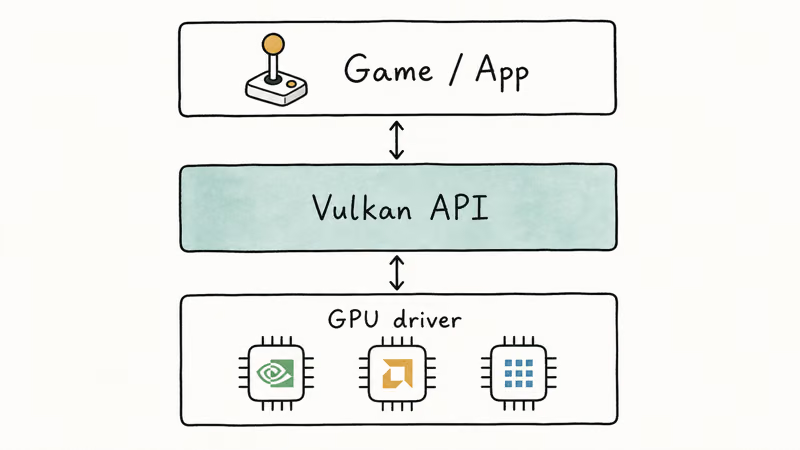
According to the Khronos Group’s Vulkan 1.0 announcement, the specification launched on February 16, 2016 with same-day driver support from NVIDIA, AMD, and Intel. Every major GPU vendor has shipped Vulkan as part of their Windows driver package since then, which is why you’ll see the entry on virtually any PC with a recent graphics card.
Wikipedia’s Vulkan article confirms that the API now runs on Windows, Linux, Android, macOS through MoltenVK, and the Nintendo Switch. On Windows, the runtime is what makes that cross-platform support work without you having to install anything by hand.
If your program list shows multiple entries like “Vulkan Run Time Libraries 1.1.73” or “Vulkan Run Time Libraries 1.2.x”, that’s normal. Older NVIDIA driver versions left previous runtimes in place during upgrades, which is why a single PC sometimes shows four or five copies. The fone.tips deep-dive on what VulkanRT actually is covers the version sprawl in more detail and explains why older entries are safe to remove first.
#Vulkan vs. DirectX: A Quick Comparison
Most Windows games default to DirectX. Vulkan is the cross-platform alternative, and it usually wins on CPU-bound systems because it spreads draw call work across multiple cores.
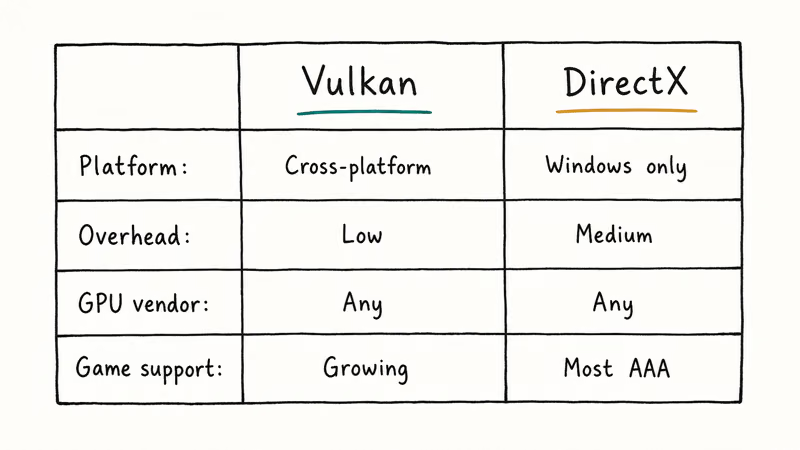
| Feature | Vulkan | DirectX 12 | OpenGL |
|---|---|---|---|
| Platforms | Windows, Linux, Android, macOS, Switch | Windows, Xbox | Windows, Linux, macOS |
| CPU overhead | Lowest | Low | High |
| Multi-thread support | Native | Native | Limited |
| Year released | 2016 | 2015 | 1992 |
| Maintained by | Khronos Group | Microsoft | Khronos Group |
DOOM Eternal is Vulkan-only, so removing Vulkan can stop it from launching.
#Why Your GPU Driver Installs Vulkan Automatically
When you install or update a graphics driver from NVIDIA, AMD, or Intel, the installer drops the Vulkan loader and runtime libraries into C:\Windows\System32. From your point of view, you didn’t add anything — the driver did.
NVIDIA’s Vulkan driver page confirms that GeForce drivers ship with Vulkan support enabled by default. AMD’s GPUOpen Vulkan documentation states that all current Radeon graphics cards include Vulkan in the Adrenalin software bundle, and Intel does the same with its Arc and Iris Xe drivers.
The trigger is the GPU driver, not the games.
When the bundle goes wrong, you’ll often see related errors like no AMD graphics driver is installed or NVIDIA Control Panel keeps closing. Reinstalling the driver fixes both the panel issue and any orphaned Vulkan files in one step.
#Is Vulkan Run Time Libraries Safe to Keep?
Short answer: yes. The Vulkan runtime is signed by your GPU vendor, and the file paths come straight from the official driver installer. There’s no plausible way for malware to masquerade as Vulkan unless your driver source itself was compromised.
A few honest caveats:
- Disk space is trivial. The runtime takes about 1 to 3 MB on disk. There’s no storage reason to remove it.
- It doesn’t run in the background. Vulkan is a library, not a service. Open Task Manager and you won’t find a Vulkan process eating CPU.
- Multiple entries are ugly but harmless. If you see five Vulkan Run Time Libraries entries with different version numbers, that’s old NVIDIA installer behavior, not malware. You can safely uninstall the older versions and keep the newest one.
Intel integrated graphics can receive Vulkan through current Intel drivers too.
If a security tool flags VulkanRT as suspicious, that’s almost always a false positive caused by the runtime’s low-level GPU access rights. The same fone.tips troubleshooting guide for unsecapp.exe covers a similar pattern: legitimate Windows components flagged because they look unusual.
#How to Remove Vulkan If You Need To
You shouldn’t normally have to. But if you’re cleaning up an old GPU driver, switching cards, or running a script that fails when it sees a stale runtime, removal is straightforward.
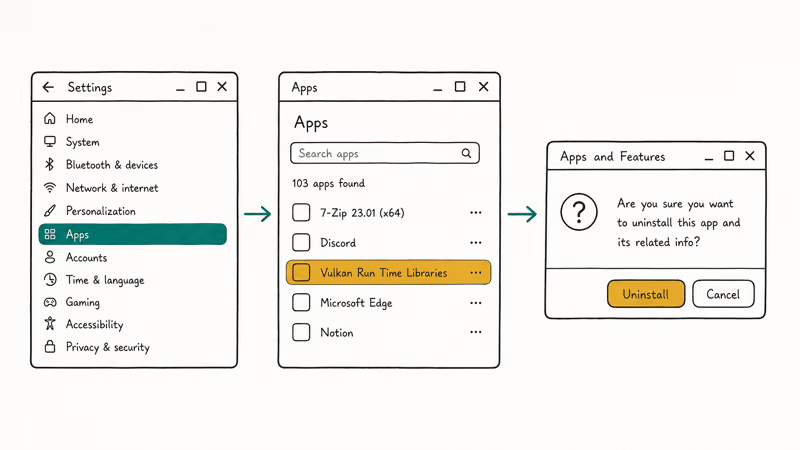
The cleanest path is the Settings app route on Windows 10 and Windows 11:
- Press Windows + I to open Settings.
- Go to
Apps>Installedapps (Windows 11) orApps>Apps &features (Windows 10). - Type “Vulkan” into the search box.
- For each Vulkan Run Time Libraries entry, click the three-dot menu and pick Uninstall.
Microsoft’s Windows app uninstall guide recommends this Settings path because it removes registry entries that the legacy Control Panel sometimes leaves behind.
On older Windows builds, the legacy appwiz.cpl route still works the same way.
After removing the runtime, restart your PC. If you plan to keep playing Vulkan-based games, run a clean GPU driver install (DDU plus a fresh installer from NVIDIA, AMD, or Intel) so the runtime gets re-deployed. Skip that step and games like DOOM Eternal won’t launch.
If your removal attempt also broke driver functionality, you may run into related issues like .NET Runtime Optimization Service high CPU or a thread stuck in device driver blue screen. Both have standard fixes that don’t require touching Vulkan again.
#Which PC Games and Apps Use Vulkan
Vulkan adoption has grown well beyond DOOM. As of 2026, the games and tools most likely to lean on the runtime include:

- id Software titles: DOOM (2016), DOOM Eternal, Wolfenstein II, Wolfenstein: Youngblood. DOOM Eternal is Vulkan-only.
- Sony first-party PC ports: Detroit: Become Human and Heavy Rain ship with Vulkan as the only renderer.
- Open-world games: Red Dead Redemption 2 and No Man’s Sky let you pick Vulkan or DirectX in the launcher.
- Multiplayer shooters: Rainbow Six Siege added a Vulkan renderer in 2020 and now treats it as the recommended choice for 8-core and 16-core CPUs.
- Source 2 engine: Dota 2 and Counter-Strike 2 support a Vulkan launch flag for Linux and Windows.
- Emulators: yuzu, Ryujinx, RPCS3, and Cemu all default to Vulkan when available because the API maps cleanly to the original console GPUs.
Red Dead Redemption 2 lets players choose DirectX 12 or Vulkan in the launcher. Vulkan often helps CPU-limited systems because the API can spread graphics work across multiple cores more efficiently than older renderer paths.
If you tinker with driver tools, it’s worth pairing this article with the fone.tips Driver Talent review, which covers when third-party driver updaters help versus when they break Vulkan installs.
#Bottom Line
Leave Vulkan Run Time Libraries alone unless you’re rebuilding a graphics driver stack on purpose. The runtime is small, signed by your GPU vendor, and required by enough modern games that uninstalling it usually creates more work than it saves. If you do remove it, schedule a clean GPU driver reinstall in the same session so DOOM Eternal, Rainbow Six Siege, and the emulator scene keep launching the next time you boot.
#Frequently Asked Questions
Is Vulkan Run Time Libraries a virus?
No. The runtime is signed by your GPU vendor and installed by the driver. If a security tool flags it, that’s a false positive on the runtime’s low-level GPU access rights.
Why do I see multiple Vulkan Run Time Libraries entries?
Older NVIDIA driver installers left previous runtimes in place during upgrades, which is why you’ll sometimes see four or five Vulkan entries with different version numbers. You can uninstall the older entries and keep only the latest one without breaking anything.
Will removing Vulkan speed up my PC?
No. The runtime doesn’t run in the background, doesn’t show up in Task Manager, and uses about 1 to 3 MB of disk space. Removing it has no measurable effect on boot time, RAM use, or game performance, and it only blocks Vulkan-based games from launching.
Does Vulkan Run Time Libraries work without a dedicated GPU?
Yes. Intel’s integrated graphics support Vulkan, and the runtime ships with current Intel drivers.
Can I update Vulkan separately from my GPU driver?
Khronos provides a Vulkan SDK for developers, but normal users shouldn’t install it. The runtime version is tied to the GPU driver, so the right way to update is to install the latest NVIDIA, AMD, or Intel driver. The driver installer always ships with a matching Vulkan runtime, so you don’t need a separate update step.
Is Vulkan better than DirectX 12?
It depends on the game. Vulkan tends to do better on CPU-limited systems and on Linux through Proton. DirectX 12 is often more polished on Windows because Microsoft co-develops it with the same studios that ship the games. For most gamers, the answer is to use whichever the game’s launcher recommends, and if both options appear in the menu, try Vulkan first on multi-core CPUs and fall back to DX12 only if you see crashes.
Should I disable Vulkan to fix game crashes?
Only as a last step. If a specific game crashes in Vulkan mode, switching its renderer to DirectX in the launcher is faster than uninstalling the runtime. If the crashes started after a Windows or driver update, a clean reinstall of the GPU driver fixes most Vulkan loader problems without touching the apps list.

Best Laptop for Running LLMs in 2026: Memory Comes First
The best laptop for running LLMs is a memory purchase first. Compare MacBook unified memory against NVIDIA laptop VRAM, and see what each tier really runs.

How to Run a Local LLM on Windows: A 2026 Setup Guide
Run a local LLM on Windows with LM Studio or Ollama. Pick a model that fits your GPU memory, keep every prompt offline, and skip the monthly bill.

Bluetooth Not Working on Snapdragon X? Fixes for 2026
Bluetooth not working on your Snapdragon X Copilot+ PC? Generic audio, mice, and keyboards work, but vendor apps often lack an ARM build. Fixes inside.

Docker Desktop and WSL2 Not Working on Snapdragon X? Fix It
WSL2 runs fine on Snapdragon X, but Docker Desktop ARM is Early Access and throws WSL errors. Use WSL2 plus native ARM64 Ubuntu and Docker Engine.