How to Fix "Payment Revision Needed" on Amazon in 2026
Fix the Amazon "Payment Revision Needed" error in under 5 minutes. Update the card on the order, retry the charge, and learn what triggers the block.
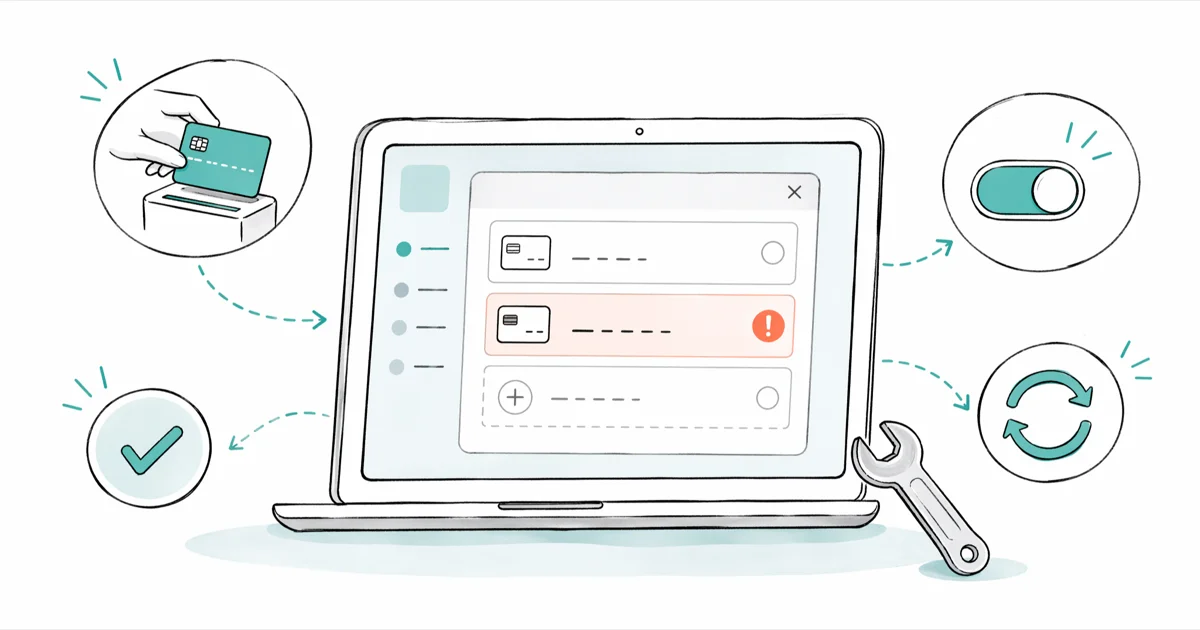
Quick AnswerThe "Payment Revision Needed" error means Amazon could not charge your saved card. Open Your Orders, click the affected order, choose "Change payment method," and either re-enter the card or pick a different one.
Amazon’s “Payment Revision Needed” stops a placed order from shipping until you fix the charge. It usually traces back to an expired card, a bank fraud block, or a billing address that doesn’t match the issuer’s records.
- Open Your Orders, click “Change payment method” on the flagged order, and resubmit with a different or refreshed card to clear the error in under 5 minutes.
- Amazon holds the unpaid order for roughly 7 days before auto-canceling, with reminder emails at the 3-day and 1-day marks per Amazon’s own warning copy.
- Expired cards, billing-address mismatches, and silent bank fraud blocks cover most ordinary cases.
- The Amazon mobile app sometimes caches the failed state, so if the error sticks after you update the card, switch to a desktop browser at amazon.com to confirm the order moved to “Processing.”
- Real Amazon notifications never include payment links sent by SMS; treat any “payment revision” text with a clickable URL as a phishing attempt.
#How to Fix Payment Revision Needed on Amazon
The fastest path is updating the card on the order itself, not in your saved Wallet. Updating Wallet alone leaves the existing order pointing at the old, declined card.
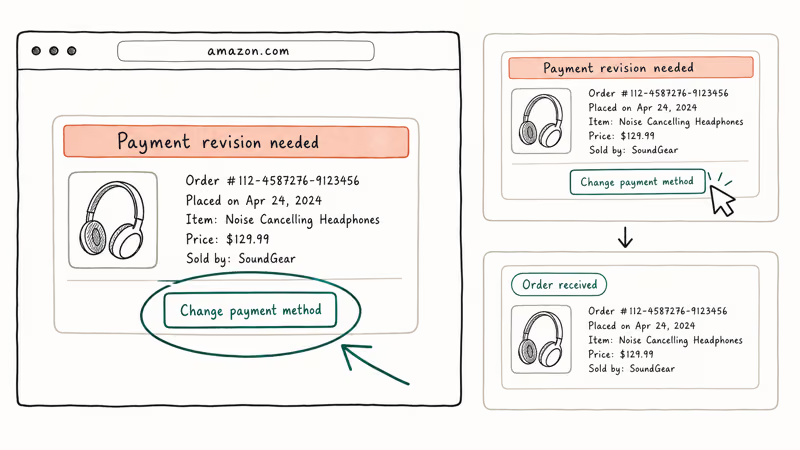
- Sign in at amazon.com on a desktop browser.
- Click “Returns & Orders” in the upper-right.
- Locate the order tagged with the red “Payment revision needed” notice.
- Click “Change payment method” (sometimes labeled “Revise payment”).
- Pick a different card on file, add a new card, or re-enter the existing card with a fresh expiration date and CVV.
- Click “Continue” to retry the charge.
After you switch to a working payment method, wait for Amazon to retry the charge.
If the “Change payment method” button is missing, the order has likely already been canceled. Check your inbox for a cancellation email and place a new order with the working card.
#Why Does Amazon Show “Payment Revision Needed”?
Amazon shows this warning when its billing system tries to charge your saved card and the issuer rejects the authorization. The rejection usually has one of five causes.
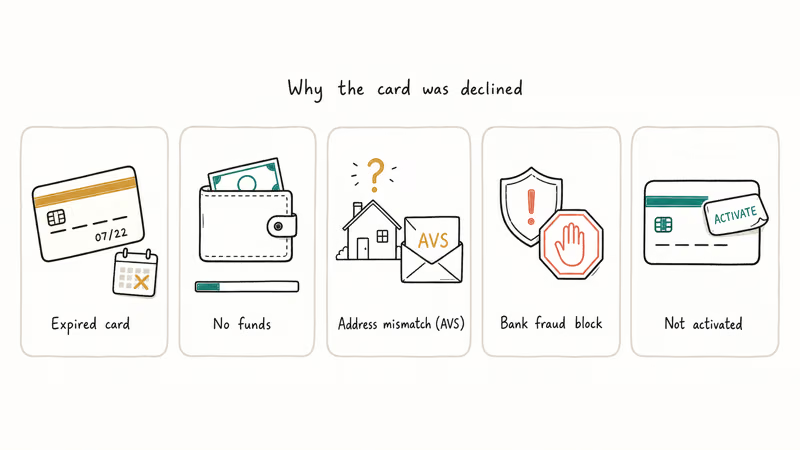
Expired card. This is one of the most common triggers. The card on the order is past its printed expiration date, so the issuer rejects every authorization. Replacement cards typically arrive in the mail with a new expiration date and a new CVV, and Amazon won’t auto-update the saved card for you.
Insufficient funds or no available credit. Debit cards need real balance. Credit cards need available credit, not just a high limit. Pending holds from gas stations, hotels, or other merchants can reduce the available balance enough to push an Amazon order over the limit.
Billing address mismatch. Card issuers run an Address Verification System check on most online charges. According to Wikipedia’s AVS reference, the system compares the numeric portions of 2 fields — street number and ZIP — against the address on file with the issuer, and a mismatch routinely causes a soft decline even when the card has funds. “Apt 4B” versus “Apartment 4B” and an outdated ZIP after a move both qualify.
Bank fraud protection. Issuers flag charges that look unusual: a first-time Amazon order, an unusually large purchase, or a billing IP in a new country. Banks sometimes decline silently with no SMS alert.
Card not yet activated. Activate replacement cards first.
#What to Do When the Error Won’t Go Away
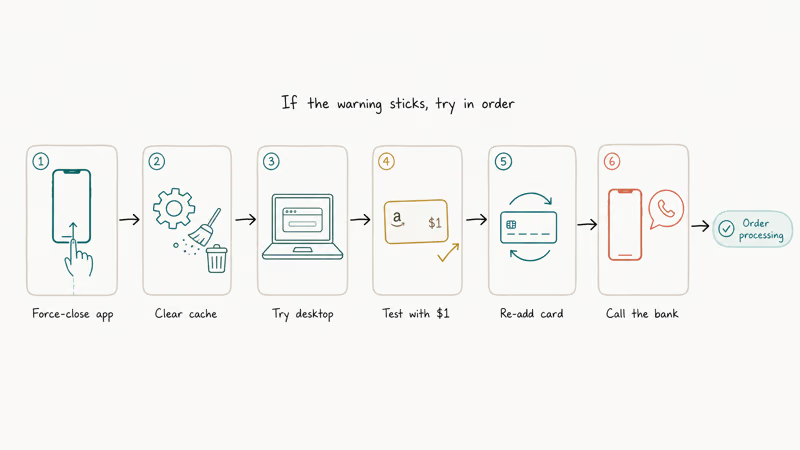
Sometimes the warning sticks even after a fresh card. Try these moves in order.
-
Force-close and reopen the Amazon app. On iPhone, swipe up from the bottom and flick the Amazon card off-screen. On Android, tap the square nav button and swipe Amazon away. Reopen the app and reload Your Orders. A cached error state often resolves at this step.
-
Clear the Amazon app cache (Android) or reinstall (iPhone). On Android:
Settings>Apps>Amazon Shopping>Storage>Clear Cache. iOS doesn’t expose a cache control, so deleting and reinstalling does the same job. Sign back in afterward. -
Switch to a desktop browser. The mobile app can cache an old failed state after you update the card. If the order shows “Processing” on desktop, the charge succeeded. The app catches up later.
-
Test the card with a $1 Amazon gift card reload. Buy a $1 Amazon gift card balance reload using the same card. If the dollar charge clears, the card is fine and the issue is Amazon’s system not propagating the update. If the dollar charge fails, the issue is the card or the issuer.
-
Remove the card entirely, then add it back.
Wallet>Your Payments> select the card > Remove. Add the card again with the current address and CVV. Return to the order and select the freshly added card. -
Call the number on the back of the card. Ask the agent specifically whether they declined a recent charge from “Amazon” or “AMZN Mktp.” Issuers sometimes block silently without sending an alert. Ask them to whitelist Amazon for the next 24 hours.
If your Amazon account is on hold for any other reason, the payment warning may be a downstream symptom. Clear the account hold first, then the charge will go through on the next retry.
#How Long Does Amazon Hold the Order?
Amazon gives you about 7 days from the first failed authorization before the order auto-cancels. The clock starts on the day Amazon emails the “Payment revision needed” notice. Reminder emails go out roughly 3 days and 1 day before cancellation.
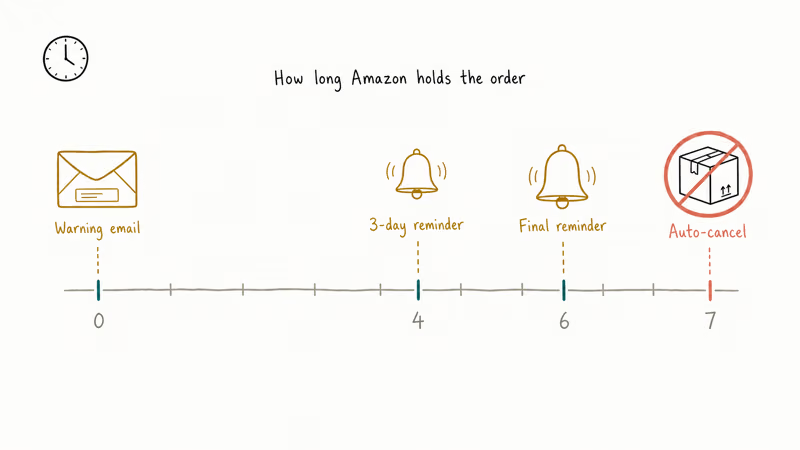
During the hold window, the order sits in limbo. Amazon won’t ship, and the issuer won’t actually charge the card until the next authorization succeeds.
For limited-stock deals, lightning sales, or holiday gifts, don’t wait the full week. Stock can sell out, and the auto-cancel forces you to place a new order at whatever price the listing shows that day.
#Spotting Fake “Payment Revision” Scam Texts
Phishing texts that imitate this Amazon warning have been a steady scam vector. According to the FTC’s 2025 consumer alert on Amazon refund scam texts, scam SMS impersonating Amazon climbed sharply in 2025, and the same playbook is now showing up in fake “payment revision” lures.
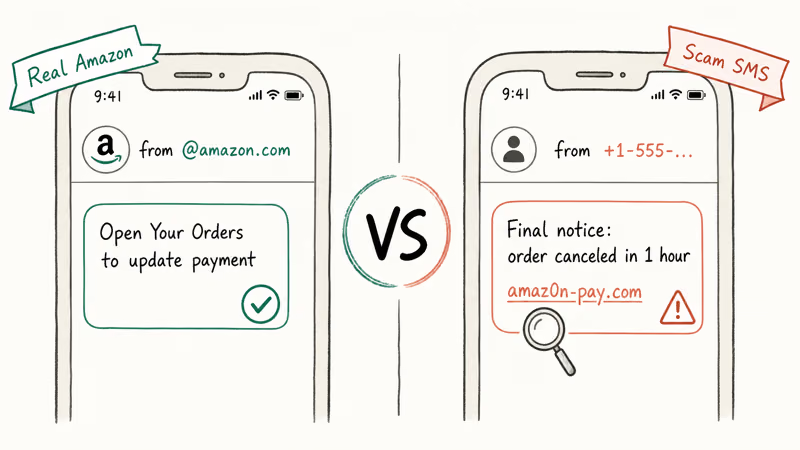
A real Amazon notification:
- Comes from an
@amazon.comemail address, not a random short code or phone number. - Tells you to log in at amazon.com and check Your Orders. It doesn’t include a clickable “fix payment” link inside the message body.
- Never asks for your full card number, CVV, online banking password, or two-factor code.
A scam text or email typically:
- Uses urgency: “Order will be canceled in 1 hour” or “Final notice.”
- Includes a shortened or look-alike link such as
amaz0n-pay.comor abit.lyURL. - Asks you to download a “support app” or share your bank login.
Consumer Reports states that 1 in 4 U.S. adults reported losing money to a phishing or impersonation scam in the past year, per their scam protection guide, and impersonation of major retailers like Amazon ranks at the top. Treat unexpected payment-issue texts with the same skepticism you’d apply to a stranger asking for your bank login at the door.
If you get a suspicious message, delete it. Open the Amazon app or amazon.com directly and confirm the order status from Your Orders. Forward phishing emails to stop-spoofing@amazon.com and report scam texts to 7726 (SPAM) for U.S. carriers.
If you wrestle with payment problems on other platforms too, we cover changing the payment method on iPhone and updating DoorDash payment methods.
For App Store-side issues, our guide on payment not completed on App Store walks through the same retry pattern.
#Preventing Future Payment Errors
Trim your Amazon Wallet every couple of months. Open Account & Lists > Your Payments and delete any card that’s expired, replaced, or tied to a closed bank account. Stale cards are a common cause of “payment revision needed” notices on otherwise healthy accounts. While you’re there, scan the addresses linked to each card and confirm none of them point to an old apartment, outdated ZIP, or billing line your bank no longer recognizes.
Add a backup card. For Subscribe & Save and digital orders, Amazon can sometimes fall back to a secondary payment method automatically when the primary fails, which keeps recurring orders moving even after a card cancels.
Set a calendar reminder two months before each card’s expiration date. That gives you time to receive, activate, and update the replacement everywhere it matters: Amazon, Prime, recurring subscriptions, and any digital wallets. Keeping Amazon courtesy credits or gift card balance topped up gives small orders a fallback when a card fails.
When you move or change banks, update the billing address on every Amazon-saved card the same week. AVS mismatches are another common cause of “Payment revision needed” after expired cards.
For other Amazon-side fixes, see our guides on Amazon profile links and Amazon archived orders.
If the storefront stalls first, our walkthrough on the Amazon app not working covers cache resets and sign-in loops.
#Bottom Line
Open the order, click “Change payment method,” replace the card with a current one, and retry. That sequence addresses the most common payment-revision causes. Expired cards, AVS-blocked addresses, and silent bank declines cover most remaining cases.
If the warning sticks on the app after the fix, hop to desktop and confirm the order moved to “Processing.” When nothing else works, call the number on the back of the card and ask the bank to whitelist Amazon for 24 hours.
#Frequently Asked Questions
How long do I have to fix payment revision needed on Amazon?
Roughly 7 days. Miss the window and you’ll need to reorder.
Will Amazon charge me twice if I update my payment method?
No. Only the successful authorization turns into a real charge. Pending authorization holds from prior failed attempts drop off your statement within 3-7 business days, depending on the issuer’s batch schedule, and your bank can confirm which line item is the final settled charge if multiple show up at once.
Can I use Amazon gift card balance to fix this error?
Yes. After clicking “Change payment method,” select your gift card balance as the payment source. This is a clean workaround if a card keeps getting declined.
You can top up gift card balance with a different card, or buy physical Amazon gift cards at most U.S. grocery chains and pharmacies.
Why does the error keep coming back after I update my card?
Two usual suspects: the issuer is still declining, or the Amazon app cached the old failed state. Call the bank and ask if they’re blocking Amazon. Then clear the app cache on Android or reinstall on iPhone, and confirm the order status on a desktop browser.
Does payment revision needed mean my Amazon account is suspended?
No. The warning is scoped to one order.
Your account stays active, and you can place new orders with any working payment method. Account-level holds look different and surface their own banner. If your whole Amazon account is actually on hold, expect a separate notification and a different fix path.
Can I cancel an order that shows payment revision needed?
Yes. From Your Orders, click “Cancel items” on the affected order. Canceled orders never charge the card. Cancel and reorder if you’d rather start fresh than troubleshoot the existing order.
What if I already received the item but still see the error?
This happens occasionally with digital downloads or items that ship before the final authorization clears. Amazon will keep retrying the charge until it succeeds or the order ages out. Update the card to avoid the order being sent to collections, and contact Amazon customer service if the charge amount looks wrong.
Is the “payment revision needed” text message from Amazon real?
Almost never. Amazon doesn’t send payment-revision links by SMS. Open the app or amazon.com directly and check Your Orders.
Don’t click links in the text. Report scam SMS to 7726 (SPAM) and forward phishing emails to stop-spoofing@amazon.com.

Google Messages Error 3100: Why RCS Is Broken on Galaxy
Google Messages RCS error 3100 hits Galaxy owners after phone or carrier switches. Google told 9to5Google a fix is coming. Here's what actually helps.

Is This Bank App Real? Spot a Fake App on Your Home Screen
A bank app can land on your home screen from a web page with no install warning. Learn the checks that tell a real banking app from a phishing web app.

Apps Crashing After iOS 27 Update? Fix Order (2026)
Apps crashing after the iOS 27 update? Update the app in the App Store first, then offload and reinstall to clear stale cache, then restart. The fix order.

Do AI Translation Earbuds Work Offline? What to Know
Do AI translation earbuds work offline? A few do with downloaded language packs, but most need the cloud. Here's what works offline and what you give up.