How to Recover a Hacked Instagram Account (2026 Guide)
Locked out of your own Instagram? Use the official hacked-account flow, including when the email was changed, then secure it so it cannot happen again.
Quick AnswerIf your own Instagram is hacked, go to the login screen, tap Get help logging in, and follow the account-was-hacked flow, which can verify you with a video selfie even if the attacker changed your email. Once you regain access, change your password and turn on two-factor authentication.
This guide is for recovering an Instagram account that belongs to you. If you’ve been locked out, seen your email changed, or watched your account post spam you didn’t write, Instagram has an official recovery flow that can verify your identity and hand the account back, even when an attacker swapped your email. Speed matters, so the sooner you act, the better your odds.
Accessing an account you don’t own is illegal, so everything here covers your own account through official channels only.
- Check your email first for an Instagram message about a changed login, since it often holds a revert this change link
- The official Get help logging in flow can verify you with a video selfie even after a hacker changes your email
- Never pay a third-party recovery service, because Instagram never charges a fee and most of these are scams
- After you regain access, set a unique password and turn on app-based two-factor authentication right away
- Report any impersonator account a hacker created using your name or photos through Instagram’s official reporting tools
#How Do You Know Your Instagram Was Hacked?
The clearest sign is being locked out with a password you know is correct. Beyond that, watch for an email from Instagram saying your email address or password was changed, when you made no such change.
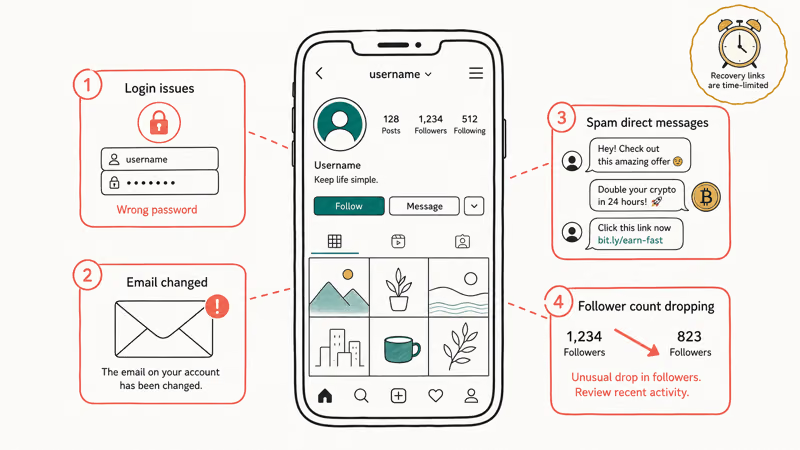
Other tells are subtler. Friends mention DMs you never sent, usually crypto or giveaway spam, or your bio and profile photo change on their own while followers quietly disappear.
If any of these match, treat it as urgent. The revert links in Instagram’s emails are time-limited.
#The First Hour: Acting Fast After a Hack
Start in your email inbox, not the app. When an attacker changes your login details, Instagram emails the original address to flag it, and that message is your fastest route back.
According to Instagram’s hacked account help, if you get an email that your address was changed, you may be able to undo it with the revert this change option inside that message. Act before it expires, because these links are time-limited.
While you’re here, check whether your device itself is compromised, since a hacked phone can hand over codes as fast as you set them. Our guide to telling if your phone is hacked covers the warning signs. If you simply forgot the password and weren’t breached, our note on a forgotten Instagram password is the gentler path.
#How Does Instagram’s Official Recovery Flow Work?
When the revert link is gone, the in-app recovery flow takes over. On the login screen, tap Get help logging in below the Log In button, enter your username, email, or phone number, and tap Next.
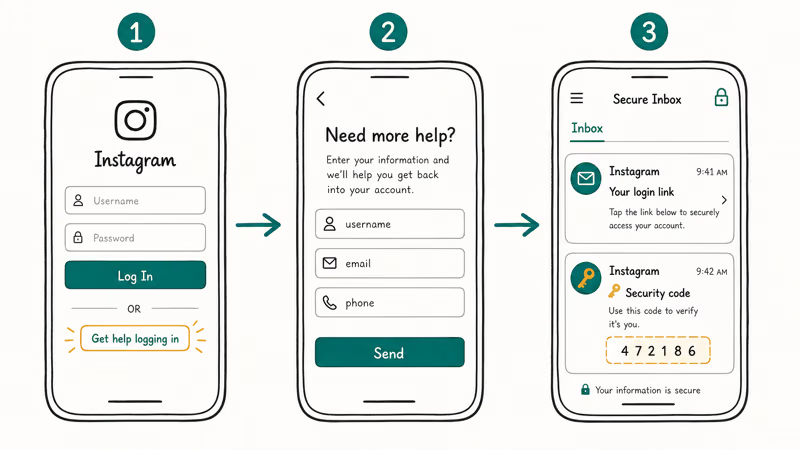
Instagram’s help center states that you then tap Need more help? and follow the on-screen steps to request a login link or a security code. Enter a secure email address only you can access, since that’s where the recovery instructions land.
This path asks for the email or phone number used at sign-up and the device type, such as iPhone or Android. Providing the original sign-up email moves the request along faster than guessing at recent details. If the app keeps throwing a security checkpoint at you, our note on the challenge required Instagram error explains what that screen wants.
#What to Do When the Hacker Changed Your Email
This is the hardest case, and it’s exactly what the video-selfie verification exists for. With both your password and email changed, the reset emails go to the attacker, so you need another way to prove you’re the owner.
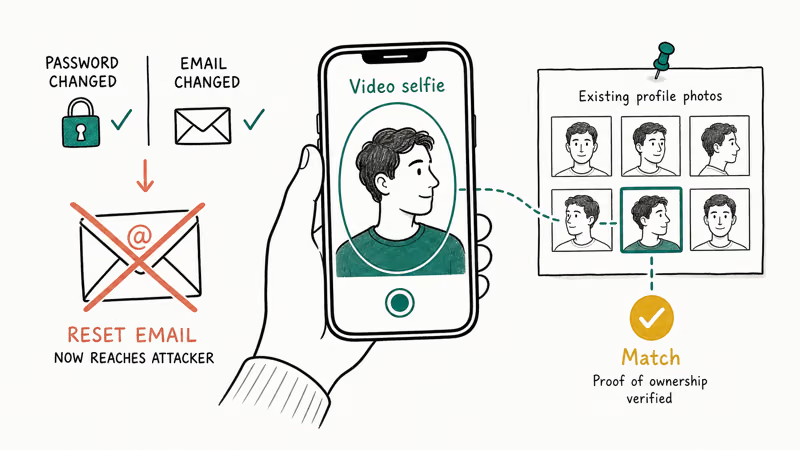
Go to the dedicated portal at instagram.com/hacked and choose the compromised-account option. Instagram may then ask for a short video selfie it matches against photos already on the account.
Provide the original email or phone number, the device you signed up on, and any other detail it requests. The verification isn’t instant, so submit accurate information once and watch the secure email you supplied for next steps rather than spamming new requests.
#Locking It Down So It Can’t Happen Again
Recovery is only half the job. The reason most accounts get hacked twice is that nothing changes after the first time, so harden the account the moment you’re back in.
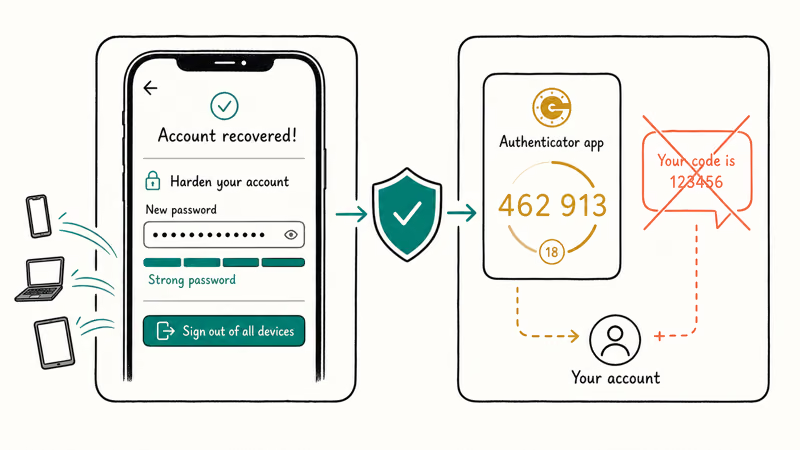
Set a new, unique password first. The FTC’s hacked-account guidance says to create a strong password that is hard to guess, and to sign out of every device so anyone still logged in elsewhere is kicked out. You can read the full FTC recovery advice for the rest of the checklist.
Then turn on two-factor authentication, and choose the app-based kind. The FTC’s two-factor authentication guide notes that SMS codes are the least secure option and recommends an authenticator app or security key instead.
Our pick of the best 2FA authenticator app walks through the setup, and the same hardening applies to your other logins, as our guide to securing your Google account explains.
One more thing: ignore anyone in your DMs or search results offering paid recovery. As Tom’s Guide reports in its Instagram phishing coverage, attackers change your password and email, then charge you to get the account back with no guarantee, just like ransomware. Instagram never charges to recover an account.
#Reporting Impersonators and Damage Control
Sometimes the attacker spins up a fake account using your name and photos to scam your followers. Report it. Instagram’s impersonation reporting tools let you flag a copycat account even from a second account if yours is still locked.
Warn your contacts too. A quick story or message from a friend’s account telling people not to click links you supposedly sent can stop the scam from spreading while you recover. If a hacker also tampered with your message history, our note on recovering deleted Instagram messages covers what’s salvageable. And if your notifications went silent during the chaos, our fix for Instagram notifications not working gets the alerts flowing again.
#Bottom Line
Move fast and stay inside Instagram’s official channels. Check your email for the revert this change link first, and if it’s gone, use the account-was-hacked flow at instagram.com/hacked, where a video selfie can verify you even after the attacker swapped your email. Never pay a third-party recovery service, because those are scams. Once you’re back in, the real fix is hardening, so set a unique password and turn on app-based two-factor authentication immediately.
#Frequently Asked Questions
How do I know if my Instagram account was hacked?
You can’t log in with the right password, or you get an Instagram email about a login change you never made.
How do I recover my Instagram if the hacker changed my email?
Go to instagram.com/hacked and choose the account-was-hacked option. Because the reset emails now go to the attacker, Instagram verifies you another way, often with a video selfie it matches against photos on the account, plus your original sign-up details.
What is the Instagram video selfie verification?
It’s a short video where you turn your head so Instagram can confirm you match the person in the account’s photos.
Can Instagram support help me get my account back?
Yes. The Get help logging in flow and the instagram.com/hacked portal are Instagram’s official support paths, and both send recovery instructions to a secure email you control once your identity checks out.
Should I pay a service to recover my hacked account?
No. Instagram never charges a fee to recover an account, and paid recovery services in DMs or search results are almost always scams. They take your money, your credentials, or both, and leave you worse off.
How do I stop my Instagram from being hacked again?
Set a unique password of 12 to 15 characters, turn on app-based two-factor authentication, and review your linked devices and connected apps. Removing any login you don’t recognize closes the door the attacker came through, and an authenticator app beats SMS codes that a SIM-swap can intercept, so it’s the single best preventive step you can take after recovery.

Google Messages Error 3100: Why RCS Is Broken on Galaxy
Google Messages RCS error 3100 hits Galaxy owners after phone or carrier switches. Google told 9to5Google a fix is coming. Here's what actually helps.

Is This Bank App Real? Spot a Fake App on Your Home Screen
A bank app can land on your home screen from a web page with no install warning. Learn the checks that tell a real banking app from a phishing web app.

Apps Crashing After iOS 27 Update? Fix Order (2026)
Apps crashing after the iOS 27 update? Update the app in the App Store first, then offload and reinstall to clear stale cache, then restart. The fix order.

Do AI Translation Earbuds Work Offline? What to Know
Do AI translation earbuds work offline? A few do with downloaded language packs, but most need the cloud. Here's what works offline and what you give up.