Passkey vs Password vs 2FA: Which Is Safest in 2026?
Passkey vs password vs 2FA in 2026: who wins on phishing resistance, who wins on recovery, and whether passkeys finally replace your authenticator app.
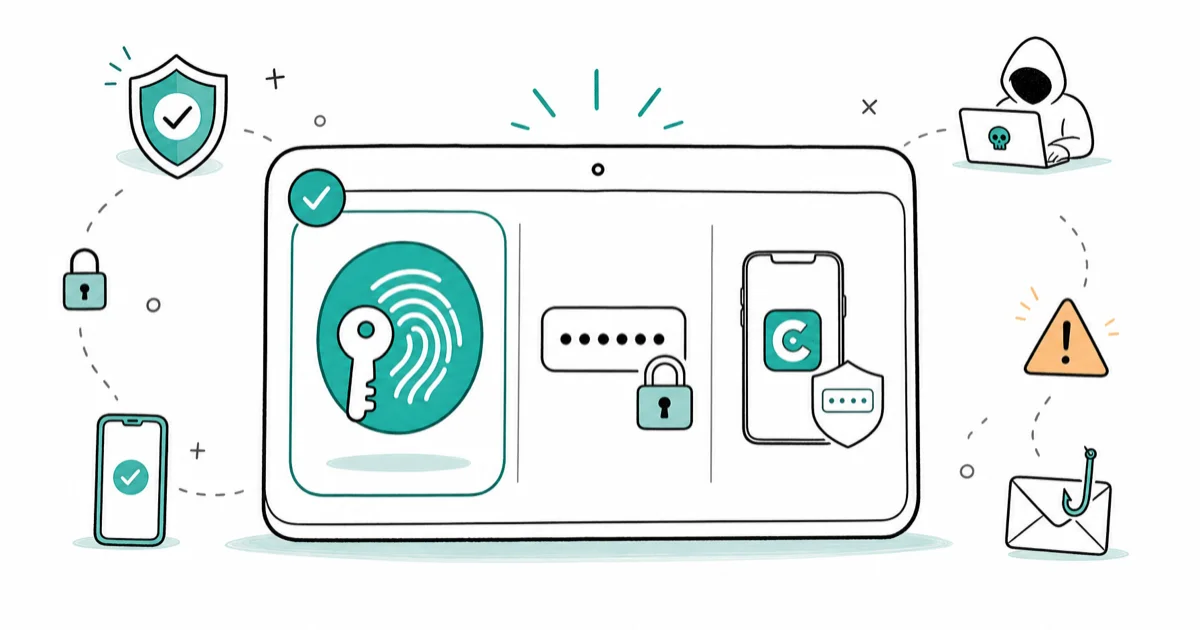
Quick AnswerPasskeys are the safest because they can't be phished or stolen from a breach. A password plus authenticator-app 2FA is next-best. Treat SMS 2FA as a last resort.
Passkey vs password vs 2FA is the question Apple, Google, and Microsoft are pushing in front of every sign-in screen in 2026. The short version: passkeys defeat phishing in a way that passwords and most 2FA methods can’t, but the right answer depends on which accounts you’re protecting and which fallback you keep on hand.
- Passkeys are domain-bound cryptographic credentials, so a fake login page can’t trigger them the way it can intercept a typed password or a TOTP code
- A passkey covers both factors in one motion: device possession plus a biometric or PIN, no separate code needed
- SMS 2FA still beats a bare password but loses to SIM-swap attacks and real-time phishing kits; treat it as a last resort on critical accounts
- Apple’s passkeys support documentation states passkeys are designed to be both more convenient and more secure than passwords across Apple and non-Apple devices in proximity
- Set up passkeys on at least 2 devices per account so a lost or broken phone doesn’t lock you out of email or banking
#How a Passkey, a Password, and 2FA Actually Differ
A password is a shared secret you and the service both know. Anyone who learns it can log in from anywhere. The design hasn’t aged well: replayable, reusable, breach-prone.
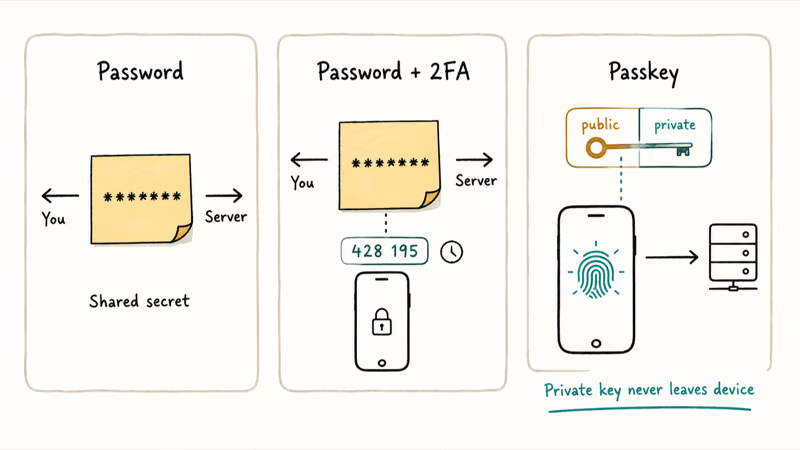
Two-factor authentication layers a second factor on top of that password. The second factor can be a six-digit code from an authenticator app, an SMS message, a push notification, or a tap on a hardware security key. Two-factor still depends on the password as factor one, so a leaked or phished password is already half the battle for an attacker.
A credential that already leaked needs rotating before any second factor matters, so check how to tell if your email is on the dark web first.
A passkey replaces the password entirely. According to Apple’s passkeys support documentation, passkeys “are designed to provide websites and apps a passwordless sign-in experience that is both more convenient and more secure” and work across Apple devices plus non-Apple devices in physical proximity.
Under the hood, the passkey is a public-private keypair generated by your device. The private key never leaves the device, and you unlock it with a fingerprint, face scan, or PIN. As Bitwarden’s passkeys vs 2FA explainer puts it, passkeys replace the password with a public-key cryptographic exchange while 2FA adds a second factor on top of the password.
The practical difference is who holds the secret. With a password, the service holds a full copy. With a passkey, the service only sees the public half, which is useless on its own to an attacker who steals the database.
#Ranking the Methods From Strongest to Weakest
Ranked from strongest to weakest in 2026:
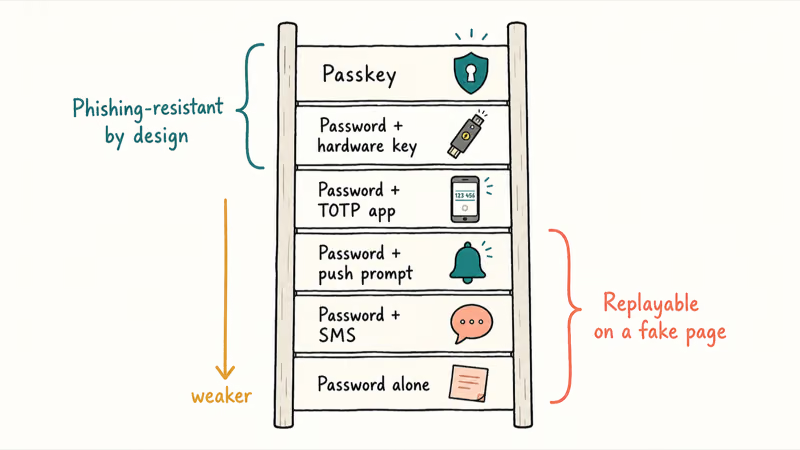
- Passkey
- Password plus hardware security key (FIDO2 USB or NFC token)
- Password plus authenticator-app TOTP code
- Password plus push-approval notification
- Password plus SMS code
- Password alone
The top of this list is phishing-resistant by design. A passkey or hardware key checks the website’s origin before it’ll sign anything. The bottom isn’t. A user who types a TOTP code into a fake login page has just handed it to the attacker, and real-time phishing kits forward that code within seconds.
Across major accounts like Microsoft, Google, and Apple ID, passkey sign-in adds roughly one extra tap versus saved-password autofill, while TOTP sign-in still requires app-switching and the same 30-second code-entry race.
PCWorld takes a more cautious view. As reported in their 2FA vs passkeys verdict, the two methods address different threats, with passkeys winning on convenience and cost. Where passkeys are fully supported, the comparison becomes one-sided.
If your only choice on a given account is between SMS and an authenticator app, take the authenticator app every time. SMS travels over a carrier network where SIM-swap fraud is widespread, port-out scams take minutes, and the attacker doesn’t need physical access to your device. A TOTP code generated locally on your phone never touches a carrier, never lives in transit, and stays useless to anyone who didn’t enroll the seed on a real device.
#How Does a Passkey Stop Phishing Attacks That Beat 2FA?
The mechanism is domain binding. When you create a passkey for google.com, your device records the origin as part of the credential. Sign-in pages that don’t exactly match that origin can’t summon the passkey. Even a lookalike domain that swaps a letter or hides under a punycode trick fails the check before any biometric prompt appears.
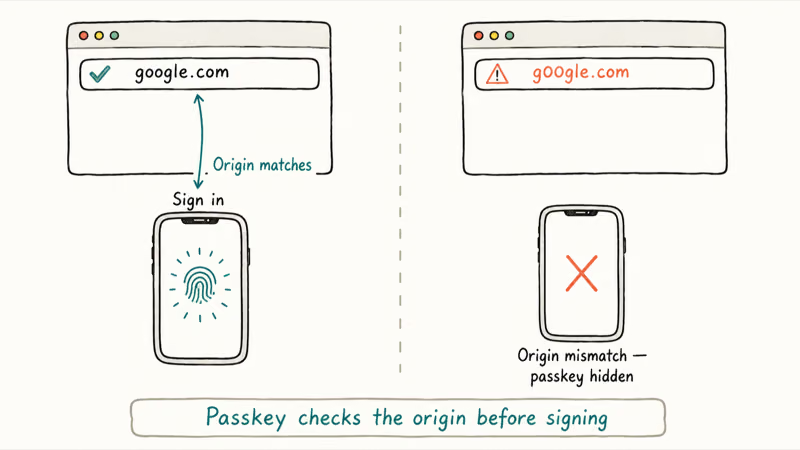
The FIDO Alliance’s passkey overview confirms that passkeys are “phishing resistant and secure by design. They inherently help reduce attacks from cybercriminals such as phishing, credential stuffing, and other remote attacks.”
This is a structural property, not a configuration option. There’s no setting to disable it. There’s no UX path that exposes the credential to a wrong-origin page.
Enrolling a passkey on a second device (for example, adding a Pixel to a Google account already set up on an iPhone) usually takes under 90 seconds. The bigger point is phishing resistance: a lookalike sign-in page won’t even surface the passkey prompt, because the domain mismatch breaks the credential lookup before any biometric check runs. A TOTP code typed into that same lookalike page would be captured instantly.
Push-based 2FA fails differently. Attackers spam prompts at 3 AM until a half-asleep tap clears one. Passkeys ignore it.
If you’ve already been targeted, the recovery playbook in what to do when an account gets hacked starts with rotating the password and pulling active sessions. Once that’s done, the next step in 2026 should be enabling a passkey so the same phishing kit can’t work twice.
#Do Passkeys Replace 2FA, or Should You Use Both?
For services that fully support passkeys, the passkey already gives you both factors in one motion. Device possession (something you have) plus biometric or PIN (something you are or know). You don’t need a separate authenticator code or SMS step on top.
Most services skip the extra prompt automatically when you sign in with a passkey. That doesn’t mean you delete your existing 2FA, though.
Two reasons to keep it.
First, passkey rollout is uneven. Your bank, your utility, your kid’s school portal, and plenty of smaller services still require a password and a second factor. For those, the right secondary factor is an authenticator app, not a bitwarden-stored TOTP shortcut or worse, SMS.
Second, recovery matters. A passkey is bound to a device. Lose the phone and the passkey alone won’t get you back in. Enroll passkeys on at least 2 devices so one acts as a backup.
1Password’s coverage of passkeys vs TOTP frames the upgrade clearly. TOTP codes are 30-second secrets that can still be intercepted on a fake page, while a passkey’s private key never leaves your device. That’s why people who switch usually keep TOTP for legacy services but stop relying on it where a passkey is available.
If a phishing attempt has already burned a password recovery for an old account like Instagram, follow our guide to set up a passkey on iPhone during the next sign-in so the same attack vector closes.
#When Authenticator Apps and SMS 2FA Still Matter
Three scenarios call for keeping your existing 2FA on.
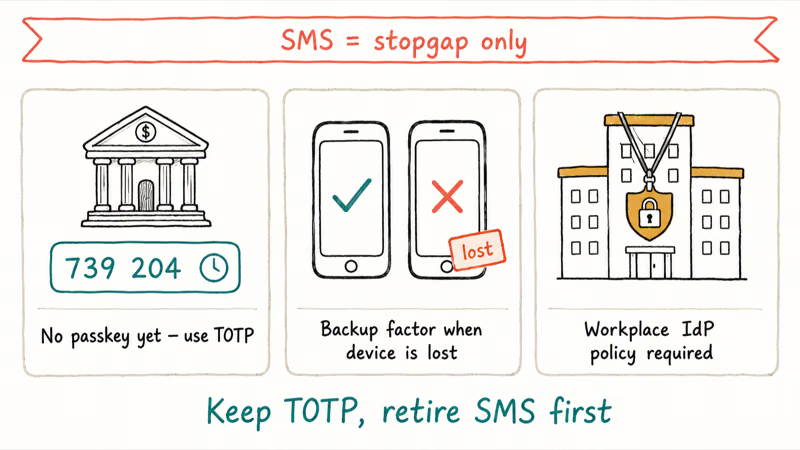
- Accounts that don’t support passkeys yet. Most banks, many small-business SaaS tools, and a long tail of older accounts are still password-plus-TOTP only. Use a dedicated authenticator app rather than SMS wherever possible.
- Backup factor on critical accounts. Even after passkeys are enabled on Apple ID, Google, and Microsoft, leave a TOTP enrolled as a fallback. Lose your phone, and that backup is what gets you signed in on a borrowed device.
- Workplace systems with admin-set policies. If your employer requires 2FA on a corporate identity provider, you can’t opt out. More enterprise IdPs added passkey support during 2025-2026.
SMS 2FA is the option to retire first. The phone number itself is widely indexed across the web, as our piece on how phone numbers leak online explains. Once an attacker has the number, a SIM-swap or carrier port-out follows, and the SMS code arrives in their hands instead of yours. SIM-swap fraud is illegal under federal wire-fraud statutes, but prosecutions arrive too late to recover drained accounts.
WhatsApp accounts get hijacked the same way. The warning signs in spot signs your WhatsApp account is hijacked almost always start with a missed SMS code.
The one place SMS still beats nothing is on legacy services that offer no other option. Even there, treat it as a stopgap.
#Practical Setup: Where to Turn on Passkeys First
Priority order for 2026, ranked by blast radius if compromised:
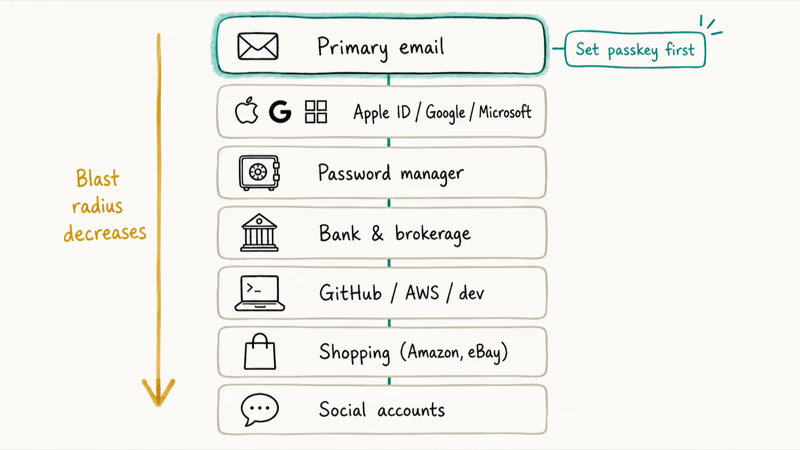
- Your primary email account. Every password reset for every other service flows through it. Set a passkey first.
- Apple ID, Google account, or Microsoft account. As stated in Google’s passkey support page, you can sign in with a fingerprint, face scan, or phone screen lock and PIN, and Google confirms that 1 setup carries across most of its services.
- Password manager. Whatever stores your passwords becomes the highest-value target if breached.
- Banking and brokerage. Many added passkey support during 2025-2026; check the security settings panel.
- GitHub, AWS, and developer accounts.
- Shopping accounts with saved payment methods (Amazon, eBay).
- Social accounts with two-factor enabled.
For each, register the passkey on at least 2 devices. On Apple, recover a forgotten Keychain password before turning on iCloud Keychain passkey sync so you don’t lose access to existing entries.
On Android, if Google has popped a re-authenticate a Google account on Android notification, finish that first; passkey setup needs a clean session.
Don’t sync passkeys to one cloud only. Enroll on both Apple and Google sides if you use both ecosystems.
#Bottom Line
Turn on a passkey for every account that supports one, starting with your primary email and your Apple ID, Google account, or Microsoft account. Enroll a second device for each so a lost phone doesn’t lock you out.
Keep an authenticator app (not SMS) on the accounts that still require a TOTP code, and treat SMS 2FA as a stopgap to retire as soon as a passkey or TOTP path becomes available.
Stop treating “password plus 2FA” as the gold standard once a passkey is on offer. The passkey is the upgrade, not a parallel option.
#Frequently Asked Questions
Is a passkey safer than a password with 2FA?
Yes, on accounts that fully support passkeys. The passkey is domain-bound, so a fake page can’t trigger it, and the private key never leaves your device. A password plus TOTP can still be defeated by real-time phishing kits that capture both factors on a lookalike site.
Do passkeys replace two-factor authentication entirely?
For services that fully support them, yes. A passkey already combines device possession and biometric (or PIN) — that’s two factors. Keep TOTP enrolled as a backup recovery method, not as a daily step.
What happens to my passkey if I lose my phone?
It depends on where the passkey lives. Apple ID, Google account, and Microsoft account passkeys sync through their respective clouds, so signing in on a new device restores access after you verify your identity. If the passkey was device-bound only, you need a second enrolled device or a backup recovery code to recover the account.
Can a passkey be phished or stolen?
Not from a phishing page. Realistic risks are device theft with a known PIN, or compromise of the syncing cloud account.
Is SMS 2FA still safe to use in 2026?
SMS 2FA beats a bare password but loses to SIM-swap attacks and real-time phishing. Use it only when nothing else is on offer. On any account holding money, identity, or password-reset capability, replace SMS with an authenticator app or, better, a passkey.
Does using a password manager for passkeys reduce security?
It makes the password manager account a high-value target. Protect that account hardest: a long unique master password, a passkey if supported, and a hardware key as backup. Treat your password manager as the single most important account you own.
Can I use a passkey on a device that isn’t my own?
Yes. Scan a QR code from the other device, then approve with your phone’s biometric. The passkey never leaves your phone.
Should I delete my old passwords once a passkey is set?
Not immediately. Keep the password as a fallback for the first few weeks. Then check the account’s security log for any reset attempts. If sign-in is stable on the passkey and the service supports it, switch the account to passkey-only or set a very long random password and store it offline.

Is This Bank App Real? Spot a Fake App on Your Home Screen
A bank app can land on your home screen from a web page with no install warning. Learn the checks that tell a real banking app from a phishing web app.

Passkeys Not Syncing Between iPhone and Windows? Read This
Passkeys not syncing between iPhone and Windows is by design, not a bug. Here is why iCloud passkeys skip Windows Hello and the three ways to fix it.

VPN Not Working on Snapdragon X? Why It Fails, How to Fix
Your VPN won't install or connect on a Snapdragon X Copilot Plus PC because Windows on ARM can't emulate the network driver. Here are the fixes that work.

How to Check If a Link Is Safe Before You Click It
Learn how to check if a link is safe with official-first steps: read the real domain, use the app instead, and treat scanners as a second opinion only.