How to Check If a Link Is Safe Before You Click It
Learn how to check if a link is safe with official-first steps: read the real domain, use the app instead, and treat scanners as a second opinion only.
Quick AnswerThe safest check is often not to check the link at all. Open the official app or a bookmarked website instead, and treat a mismatched domain or a warning as a stop sign.
Learning how to check if a link is safe starts with a counterintuitive idea: the best check is usually to skip the link entirely. If a text claims to be from your bank, open the bank’s app or type the address yourself. When you must inspect a link, read the real domain first and treat scanners as a second opinion. This guide protects your own accounts and devices only.
- The safest move is to ignore the link and reach the company through its official app or a bookmark you saved yourself.
- Read the real domain in the URL, not the display text, because scammers hide a fake address behind a button that says something trustworthy.
- A browser warning or a “https” padlock alone proves nothing about safety, since scam sites can use both.
- Link scanners like Google Safe Browsing give a useful second opinion, but a clean result is not a promise the link is safe.
- If you already clicked, close the page, change the relevant password from a different device, and run a scan if you downloaded anything.
#Can You Check If a Link Is Safe Without Clicking It?
Yes, and you should. The whole point is to learn enough about a link to decide before you ever open it. Most of that information lives in the URL itself and in how the message arrived.
Start with the source. A link you didn’t expect, arriving with urgency about a package, a payment, or a locked account, deserves suspicion no matter who it claims to be from. According to CISA’s phishing guidance, you should not follow links in unsolicited messages, and if you need to verify a request, you should reach the company through contact details you already have rather than anything in the message.
On a computer, hover over the link without clicking to see the real destination at the bottom of the window. On a phone, press and hold the link until a preview appears, then read it carefully and cancel out instead of opening it. That single habit catches most fakes.
#Read the Domain, Not Just the Button Text
The text you see and the address you go to are two different things. A button reading “Verify your account” can point anywhere.
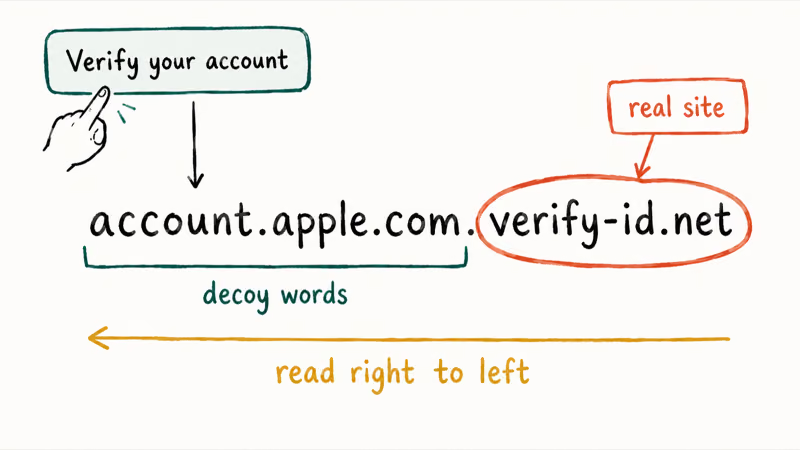
Read the domain from right to left. The real site name is the part just before the first single slash, so in account.apple.com.verify-id.net, the actual domain is verify-id.net, not Apple. Scammers stack trusted words on the left to fool a quick glance.
Watch for lookalikes too. According to CISA’s guidance, attackers often register addresses that closely resemble a real company by changing or dropping a few characters, so paypa1.com with a number one, or bank-secure-login.com, should stop you cold.
Don’t trust the padlock. The little “https” lock only means traffic is encrypted, not that the site is honest, because anyone, including a scammer, can get a certificate for free. A padlock on a lookalike domain is still a trap. For the same reasons phishing emails are convincing, see our guide on how to spot a phishing email, which covers the sender-address tricks that pair with these link tricks.
#Use the Official App or Website Instead of the Link
Here’s the move that beats every checker. Instead of inspecting a suspicious link, go around it. Open the company’s official app, or type its web address yourself, or use a bookmark you saved earlier.
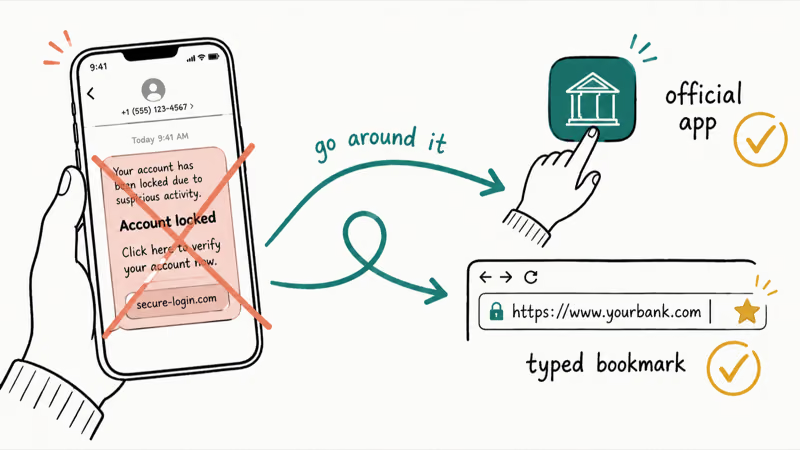
This works because the scam depends on you using their link. A real bank alert, a real delivery notice, a real account warning will all show up inside the official app or your real account when you log in directly. If the message is genuine, you’ll see the same notice there. If it isn’t, you’ve lost nothing.
Call, don’t tap, when money is involved. For card alerts, call the number on the card and check the official app. Don’t use message links or numbers.
#Handle Short Links and QR Codes With Extra Care
Shortened links and QR codes hide their destination by design, which makes them a favorite for scams. You can’t read a domain you can’t see, so you need a way to reveal it first.
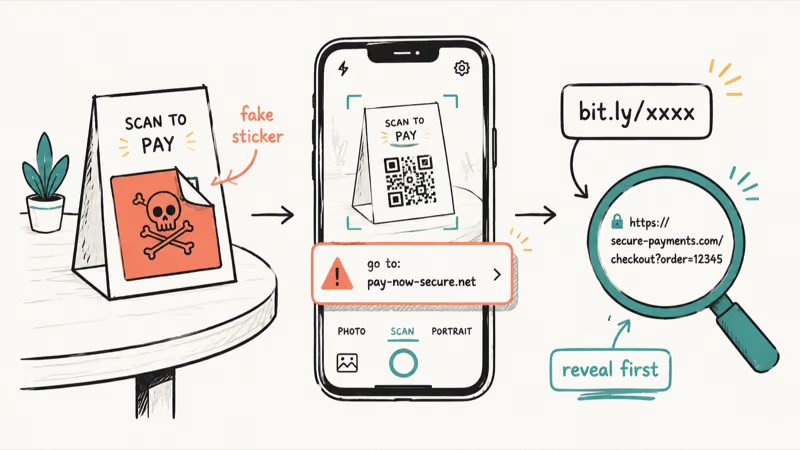
For a short link, use a link-expander or your phone’s long-press preview to see where it actually resolves before you commit. Many phone cameras now show the full URL when they detect a QR code, so read that preview and judge the domain the same way you would any other link.
QR codes deserve extra caution. A sticker placed over a real code on a parking meter or a restaurant table can route you to a fake payment page, so when a QR code asks for a login or payment, close it and go to the official app instead. Smishing texts use these same tricks, and our guide on how to protect yourself from smishing covers the mobile-specific versions in depth.
#Use Link Scanners as a Second Opinion
Scanners help, but only as backup. After you’ve read the domain and judged the source, a reputable scanner can add evidence, though it should never override your own caution or replace going to the official site.
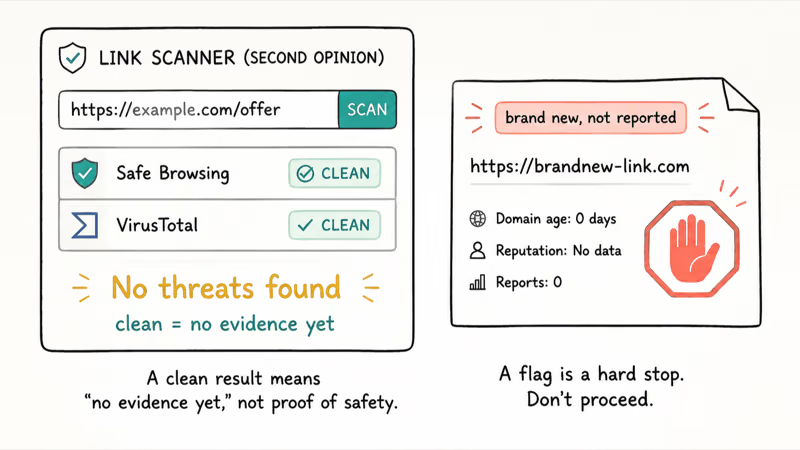
Two tools are worth knowing. According to Google’s Safe Browsing site status, you can paste a URL and see whether Google currently flags it as dangerous, while VirusTotal checks a URL against dozens of security engines at once. Both are free and neither asks you to visit the suspect page.
Read the results honestly. A “no threats found” result is not a clean bill of health, because brand-new scam sites often haven’t been reported yet. That delay is the exact gap scammers exploit. So treat a flag as a hard stop, and a clean result as “no evidence yet.”
#What If You Already Clicked the Link?
Mistakes happen, and acting fast limits the damage. The right steps depend on what you did after clicking, but the order is always the same: stop, secure, then scan.
First, close the page without entering anything. If you only opened the link and typed nothing, you’re usually fine, so just close the tab and delete the message.
If you entered a password, change it now from a different, trusted device, and update any other account that shared that password. Turn on two-factor authentication while you’re there, since our guides on creating a strong password and the best 2FA authenticator apps both help lock the account down.
Did you download a file or install an app from the link? Run a security scan and remove it. Our guide on how to tell if your phone is hacked walks through the warning signs to watch for over the next few days, since a malicious download can keep working long after you close the page.
#Bottom Line
The safest check often isn’t a checker at all. Go to the official app or a typed, bookmarked website instead of the link, because that single habit defeats the entire scam.
When you must inspect a link, read the real domain right to left, ignore the padlock, and treat warnings and lookalike addresses as stop signs. Use Google Safe Browsing or VirusTotal as a second opinion, but never as proof of safety. And if you already clicked, close the page, change your password from a clean device, and scan anything you downloaded.
#Frequently Asked Questions
Can I check a link safely without clicking it?
Yes. On a computer, hover over the link to see its real destination, and on a phone, press and hold it to preview the URL, then cancel. The safest option is to skip the link and use the official app.
What part of a URL should I inspect first?
Read the domain, which is the name just before the first single slash. Read it from right to left, because scammers stack trusted words like “apple” or “bank” on the left to disguise a fake address such as apple.com.login-verify.net, where the real site is login-verify.net.
Are link scanners always accurate?
No, and this is the part people get wrong most often. Tools like Google Safe Browsing and VirusTotal are useful, but a clean result only means no threat has been reported to them yet, and the freshest scam links, set up hours ago for a single campaign, simply haven’t been catalogued. So treat a flag as a hard stop, and a clean result as “no evidence yet,” never as a guarantee.
What should I do if I already clicked a suspicious link?
Close the page first. If you typed nothing, you’re usually fine. If you entered a password, change it from a separate trusted device and turn on two-factor authentication, and if you downloaded anything, run a security scan and delete the file.
Should I trust a shortened link from a known contact?
Be careful even then. A friend’s account can be hacked, or their phone could be infected and sending links automatically, so a shortened or unexpected link still deserves the same preview you’d give a stranger’s. If anything about the message feels off, the wording, the timing, or the fact that they rarely send links, reach out through a different channel and confirm they actually meant to send it before you tap.
Which official source should I trust first?
Trust the company’s own app or website, reached directly rather than through the link. For broader guidance on recognizing and reporting scams, government resources like CISA and the FTC are reliable starting points, and they never ask you to act through a link someone sent you.

Is This Bank App Real? Spot a Fake App on Your Home Screen
A bank app can land on your home screen from a web page with no install warning. Learn the checks that tell a real banking app from a phishing web app.

Passkeys Not Syncing Between iPhone and Windows? Read This
Passkeys not syncing between iPhone and Windows is by design, not a bug. Here is why iCloud passkeys skip Windows Hello and the three ways to fix it.

VPN Not Working on Snapdragon X? Why It Fails, How to Fix
Your VPN won't install or connect on a Snapdragon X Copilot Plus PC because Windows on ARM can't emulate the network driver. Here are the fixes that work.
How to Protect Yourself From Smishing Text Scams Now
How to protect yourself from smishing: verify through the official app, report texts to 7726, and lock down accounts fast if you already tapped a link.