Verizon Not Receiving Texts? How to Fix It in 9 Steps
Verizon not receiving texts? Fix it in 9 steps: check Message Blocking in My Verizon, reset network settings, deregister iMessage, and call support.

Quick AnswerCheck Message Blocking in My Verizon first, since a block silently swallows incoming texts. Then toggle Airplane Mode, reset network settings, and deregister iMessage if you switched from an iPhone.
Verizon not receiving texts hides behind a healthy-looking phone. Your bars are full, calls connect, and every message you send lands instantly, yet nothing arrives back. Apply these fixes only to your own phone and Verizon account.
- A number sitting on your My Verizon block list produces no error and no notification on either end, so an accidental block from months ago goes unnoticed indefinitely.
- My Verizon carries a second, separate control that blocks texts sent from email addresses and internet domains, and it catches banks, pharmacies and schools along with the spam.
- Sending working while receiving fails points at the account or the routing layer rather than the radio, because weak signal degrades both directions at once.
- A network settings reset clears saved Wi-Fi passwords, Bluetooth pairings and VPN profiles, but it doesn’t delete the text messages already stored on your phone.
- If you moved from an iPhone to Android, Apple can still hold your number in the iMessage directory, and no Verizon-side fix works until that registration is cleared.
#Why Are Verizon Texts Not Coming Through?
Verizon text delivery breaks in two very different places, and telling them apart saves an hour of pointless resets. Account-side failures stop the message before it ever reaches your handset. Device-side failures happen after it arrives.
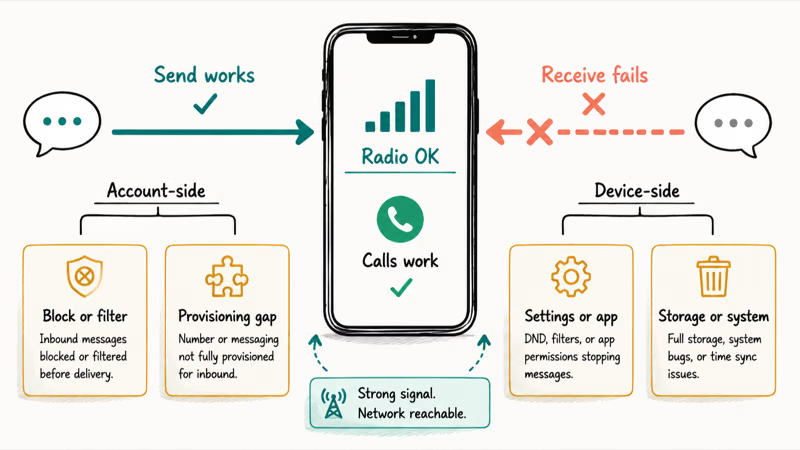
The direction of the failure is your best diagnostic. If you can send but not receive, your radio is fine, because an unregistered or weak connection would break outgoing messages first. That one-way pattern points at a block, a filter, or a provisioning gap on the line itself. Verizon’s own community forums carry repeated threads with that exact symptom in the title.
Verizon recommends working through the account-level checks in its texting support FAQs before you start changing handset settings, and that ordering matters on this carrier.
Blocking interfaces differ by carrier. Hit the same problem on T-Mobile and the block list lives somewhere else entirely.
#Check Message Blocking and Spam Filters in My Verizon
Start in My Verizon, not in your phone’s settings app. Blocks live at the account level, so they survive reboots, SIM swaps, factory resets and even a brand-new handset.
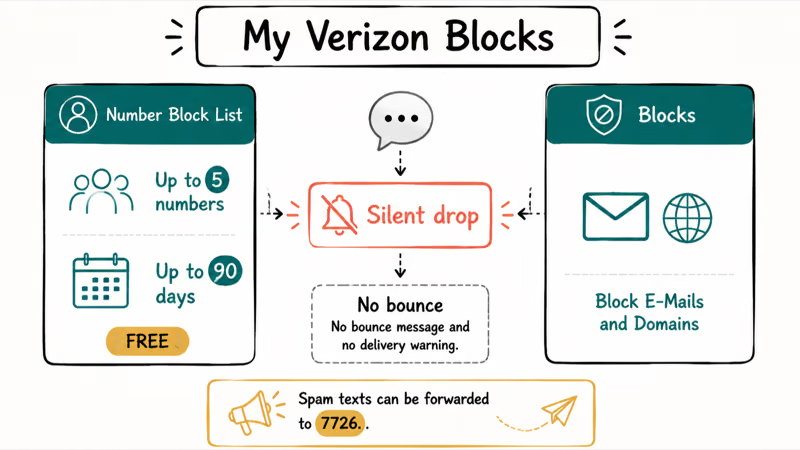
According to Verizon’s block and unblock FAQs, you can block calls and messages from up to 5 phone numbers for free for up to 90 days in My Verizon. A blocked number generates no bounce message and no delivery warning, so neither you nor the sender gets any signal that the text was dropped. Anyone with account access can add one, which is how old blocks outlive the argument that caused them.
The Blocks page carries a second control that has nothing to do with that five-number list. On the My Verizon website, go to My Plans & Services, open Blocks, then open Block E-Mails and Domains. Anything routed through an email-to-text gateway gets dropped there, and legitimate senders use that path constantly: pharmacies, school alert systems, alarm monitoring and some banks.
Verizon’s spam text guidance states that you should forward an unwanted message to 7726 and delete it immediately, and Verizon then replies asking for the From address of the message.
That reporting loop doubles as a diagnostic. Short-code traffic and person-to-person texts travel different routes, so if your verification code texts are the only ones missing while normal conversations arrive, filtering is the more likely culprit than a number block. The reverse pattern, where one specific person never gets through, almost always resolves to the block list.
You can review and remove existing blocks from the same Add or Remove Spam Blocks page in My Verizon. Clear anything you don’t recognize, then send yourself a test message from the blocked source before moving on.
#Confirm Verizon Network Status and Provisioning
An outage takes calls and data down with messaging, and it takes them down for the whole neighborhood. A provisioning gap looks nothing like that: voice and data behave normally while messaging alone stays broken, usually starting right after a plan change, a line transfer or a SIM swap. Prepaid-to-postpaid moves and mid-cycle plan swaps are the two most common triggers for a half-provisioned line.
How the symptom pattern separates an outage from a provisioning gap
| What you observe | What it points to |
|---|---|
| Calls, data and texts all failing across your area | Network outage |
| Only messaging broken, starting after a plan or SIM change | Provisioning gap on the line |
| Only certain senders missing | Block or spam filter |
| Only iPhone senders missing | iMessage still holding your number |
Verizon recommends confirming that the line is active and that messaging is attached to your plan after any service change.
#Reset the Network Connection and Reseat the SIM
Work up this ladder in order, because each step costs more than the one before it. Toggle Airplane Mode on, wait thirty seconds, then toggle it off to force a fresh registration with Verizon’s network.
If that doesn’t help, reset network settings. On Android, that’s under Settings, System, Reset options. On iPhone, it’s under Settings, General, Transfer or Reset iPhone, Reset. The reset wipes saved Wi-Fi passwords, Bluetooth pairings and VPN profiles, but your stored messages, photos and apps stay untouched.
Power the phone down before reseating the SIM. A card slightly out of position can pass voice while dropping messaging. If a card error appears afterward, SIM card errors have separate causes.
Skip the message-center trick you’ll find on forums. The message center number is carrier-specific, and typing in a value you found in a thread about a different network breaks outgoing texts too. Ask Verizon support to confirm the message center number for your line instead of guessing at one.
When all of that fails, escalate and be specific. Ask for a messaging-provisioning re-push and a full block-list audit. Vague requests get vague troubleshooting scripts.
#Is Your Number Still Registered With iMessage?
Apple keeps a directory of numbers that belong to iMessage. Leave an iPhone without deregistering, and Apple keeps routing messages from iPhone senders into that directory, where your Android phone never sees them. Verizon delivers nothing because nothing was ever handed to Verizon.
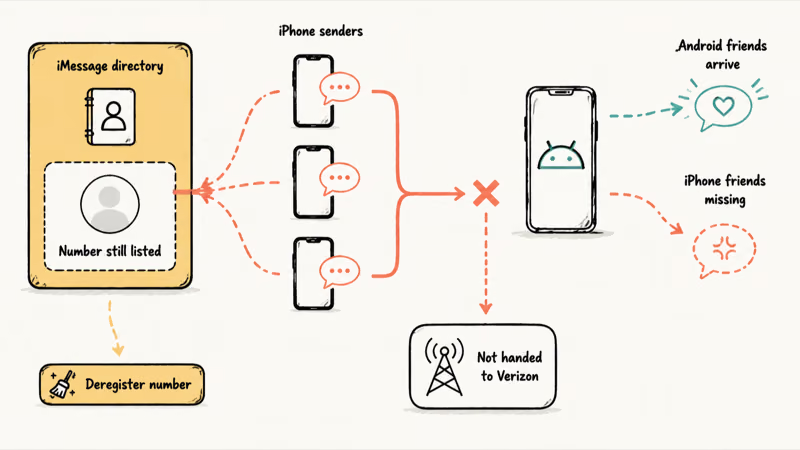
The tell is precise: texts from Android friends arrive, texts from iPhone friends never do. Apple documents these failure cases on its messaging support page.
The full walkthrough belongs elsewhere, so if this matches your symptom, work through Android not receiving texts for the deregistration steps. Still on Apple hardware with the same complaint? The device-side toggles for iPhone not receiving texts cover Focus modes and the iMessage switch itself.
#Rule Out RCS and Third-Party Messaging Apps
RCS chat features ride on top of SMS rather than replacing it, and a stalled RCS registration can leave incoming messages queued in a state your app never resolves. Turning chat features off temporarily forces everything back down to plain SMS, which is a fast way to prove whether the protocol layer is at fault.
Check which app actually holds the default SMS role, too. Installing a second messaging app quietly reassigns that role on Android, and the app you’re staring at may simply not be the one receiving your texts.
Storage matters more than most people expect. A phone with no free space can fail to write incoming messages at all, and the failure is silent. Deeper protocol faults sit outside this guide, so if the problem survives a chat-features toggle, RCS messages not sending goes further into that layer.
#Boosting a Weak Verizon Signal Indoors
Hardware only enters this conversation once the account is clean. A booster does nothing about a Message Blocking entry or an iMessage registration, so reach for one only when the real problem really is weak indoor coverage: one or two bars at home, delayed messages that eventually arrive in bursts, calls that drop in the same room every time.
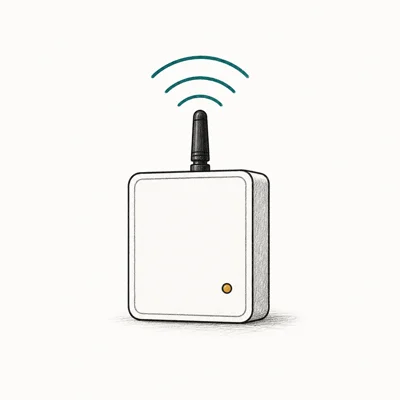
That residual case is real, though. Thick walls, metal siding and basements attenuate the mid-band and low-band spectrum Verizon uses, and a booster pulls the outdoor signal in and rebroadcasts it inside.
- Covers a whole home or apartment, not just one room
- Works on every US carrier at once (Verizon, AT&T, T-Mobile)
- FCC-approved and self-installable in under an hour
Last updated on Jun 13, 2026
As an Amazon Associate fone.tips earns from qualifying purchases. Prices and availability on Amazon are accurate as of the date above and subject to change.
#Bottom Line
Work the Verizon account before you work the phone. The most common cause of texts that never arrive while sending still works is an account-level block, either a number on the My Verizon block list or the separate email and domain toggle catching a legitimate sender.
Check that first, confirm network status second, then start resetting the handset.
Clear the iMessage registration before anything else if you switched to Android from an iPhone, because no Verizon-side fix helps while Apple still routes your number. Escalate when all nine steps fail, and ask specifically for a messaging-provisioning re-push plus a full block-list audit. A signal booster is the answer only when the real problem is weak indoor coverage, never when the message is dropped upstream.
#Frequently Asked Questions
Why can I send texts on Verizon but not receive them?
One-way failure almost always means the message is being stopped before it reaches your phone. Your radio has to be working for outgoing texts to send at all, which rules out signal and registration problems. Check the My Verizon block list and the email and domain block first, then confirm messaging is provisioned on the line.
Does Verizon block texts from email addresses by default?
No. It’s a setting on the My Verizon Blocks page that someone with account access has to turn on, and it stays on until it’s turned off. The trouble is that it applies to every email-to-text sender at once, so alarm systems, pharmacies and school alerts get dropped alongside the spam it was meant to stop.
Why am I not getting verification code texts on Verizon?
Verification codes arrive over short codes rather than regular phone numbers, so they follow a separate delivery path with its own filtering. If ordinary conversations arrive normally and only codes go missing, spam filtering is the likelier cause than a number block. Apple hardware adds its own variables to this, which iPhone verification codes covers in detail.
Will resetting network settings delete my text messages?
No. The reset clears saved Wi-Fi passwords, Bluetooth pairings, VPN configurations and mobile network preferences, and nothing else. Your stored conversations, photos and apps come through untouched.
Why do I only miss texts from iPhone users?
That pattern points at iMessage rather than at Verizon. Apple’s directory still lists your number as an iMessage number, so iPhone senders route messages through Apple’s servers instead of sending an SMS. Deregistering the number on Apple’s side fixes it, and no carrier-level change will.
How do I check if Verizon has a network outage in my area?
Verizon publishes a network status checker tied to your address, and the My Verizon app surfaces outage notices for your line. A genuine outage takes voice and data down with messaging, so if your calls and browsing work normally, an outage isn’t the explanation.
Can a full inbox stop new texts from arriving?
Yes, though it shows up differently than people expect. A phone with no free storage can fail to write an incoming message to disk, and the failure is silent rather than announced. Clear a gigabyte or two and send yourself a test message before assuming the network is at fault.
What should I ask Verizon support to check?
Ask for three specific things instead of describing the symptom and waiting. Request a messaging-provisioning re-push on the line, a full audit of the account block list including email and domain blocks, and confirmation of the correct message center number for your line. Those three cover the account-side causes a representative can fix but the account portal won’t always show you.

Pixel 11 vs Pixel 10: What Changed and Who Should Upgrade
Pixel 11 vs Pixel 10: same screen and camera resolution, new Tensor G6, 25W wireless, and Gemini Intelligence. Here is who should actually upgrade.
Pixel Battery Drain: What Google's July Fix Really Covers
Google marked the Pixel idle battery drain bug fixed in July, but only some phones got the patch. Here is who is covered, who is not, and what to try.
iPhone Stuck on EDGE? How to Get 5G or LTE Back (2026)
iPhone stuck on EDGE with crawling data? Here's why the E icon appears, which settings force 5G or LTE back, and when the problem is your carrier.
Best Power Bank for Samsung Galaxy (2026): 4 Top Picks
Best power bank for Samsung Galaxy in 2026, with USB-C PD and PPS picks matched to each model’s 25W or 45W wired charging ceiling for daily top-ups.