What Is End-to-End Encryption and Why Does It Matter?
End-to-end encryption means only you and the recipient can read a message, not even the app's company. Here's how it works and what it can't protect.
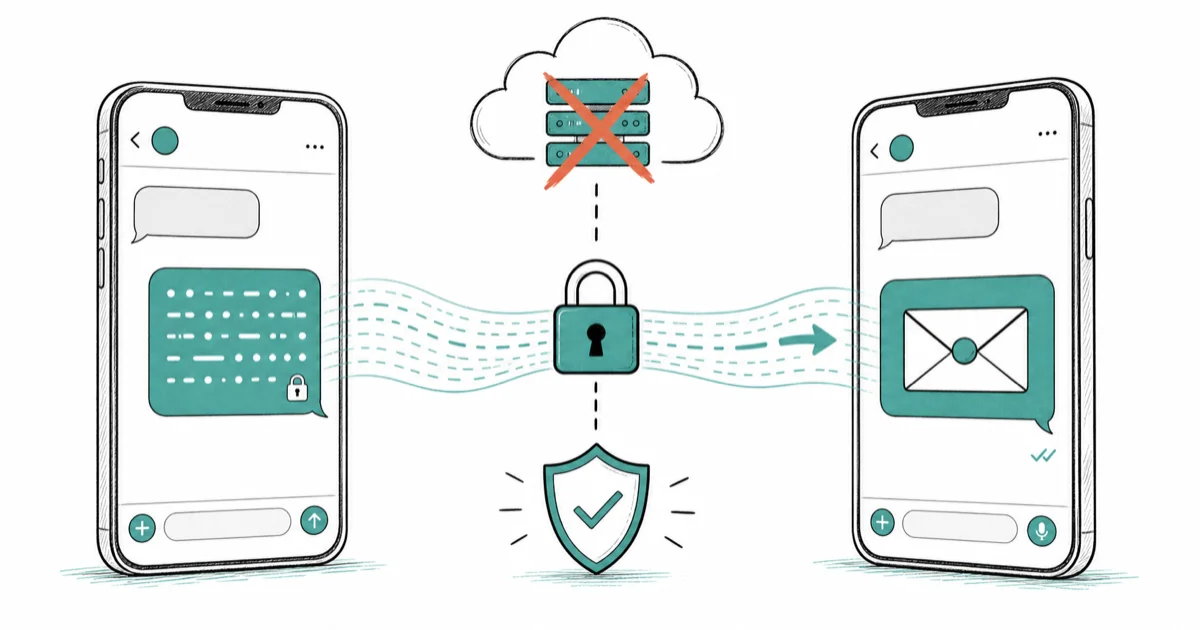
Quick AnswerEnd-to-end encryption scrambles a message on your device and only unscrambles it on the recipient's device, so no one in between, including the service provider, can read it. It is stronger than encryption in transit, but it does not hide who you talk to or protect a phone that's already compromised.
End-to-end encryption is the security feature that decides whether your private messages are truly private or just locked in a box the app company keeps a key to. It scrambles your message so only you and the person you’re talking to can read it, with no one in between, not even the service, able to peek. This guide maps how it works across messaging and cloud services, what it protects, and what it leaves exposed.
- End-to-end encryption means only the sender and recipient can read a message, not the service provider
- It’s stronger than “encryption in transit,” where the company can still decrypt your data on its servers
- iMessage, WhatsApp, and Signal use it by default, while some services make it optional
- It does not hide who you talk to, or protect a phone that’s already infected with spyware
- Losing your encryption keys can mean losing access to the encrypted data, by design
#What Does End-to-End Encryption Actually Mean?
End-to-end encryption, often shortened to E2EE, scrambles a message on your device before it leaves and only unscrambles it on the recipient’s device. In between, it’s unreadable gibberish to anyone who intercepts it.
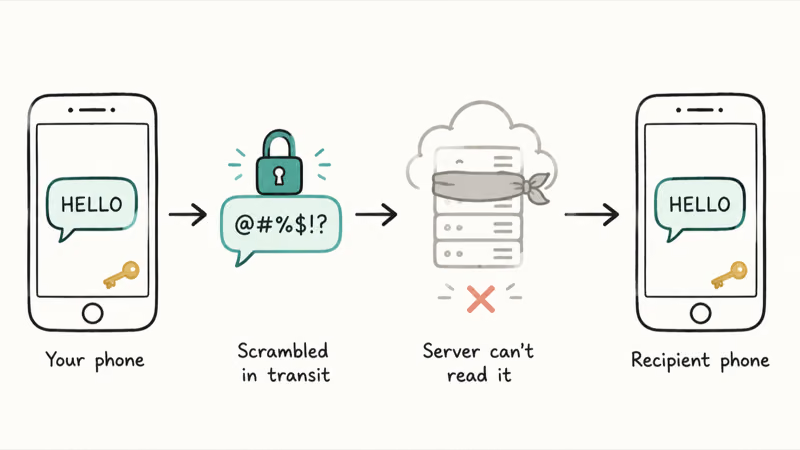
The crucial part is who holds the keys. Only your device and the recipient’s have them, so the service literally can’t read it.
That’s a sharp contrast to most online services. The encryption keys never sit on a central server, which means a hacker who breaches that server, or a government that demands the data, comes up empty-handed. The message stays locked unless they have one of the two devices.
#How It Differs From Encryption in Transit
This distinction trips most people up. Encryption in transit protects your data only while it travels to the company’s servers.
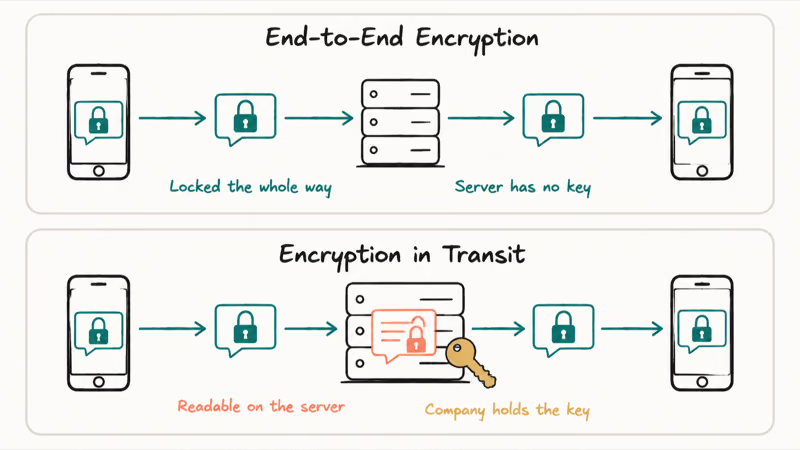
Once it reaches those servers, the company can decrypt it. They hold the keys, so they can read, scan, or hand over your content. Fine for convenience, weaker for privacy.
End-to-end encryption removes that middle gap entirely. The data stays encrypted the whole way, so the company never holds a readable copy. The guide on protecting your accounts covers the everyday habits that pair with it.
#Which Apps and Services Use It
The good news is that the most popular messaging apps now use it by default. iMessage, WhatsApp, and Signal all encrypt your chats end-to-end automatically, with no setup required. Signal’s open protocol documentation is the technical basis that several of these apps build on.
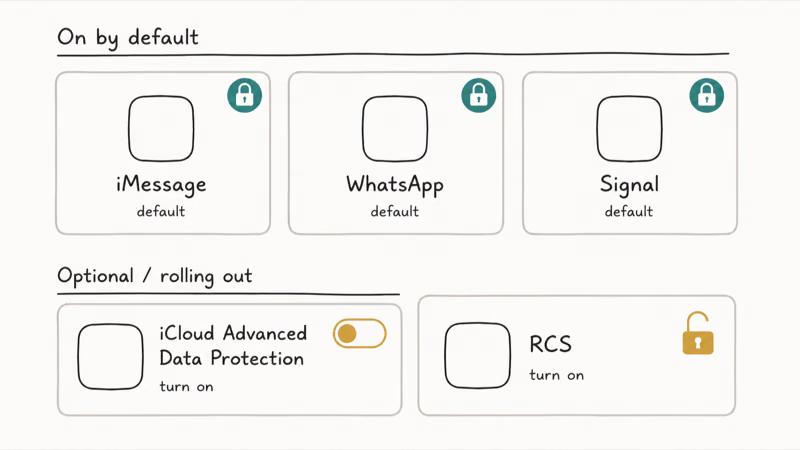
Some services make it optional or partial. Apple’s iCloud offers Advanced Data Protection, which you turn on to extend E2EE across far more of your data. According to Apple, this is its “highest level of cloud data security”: Apple’s iCloud data security overview confirms that with it enabled, your “trusted devices retain sole access to the encryption keys.”
Other platforms are catching up. RCS is rolling out end-to-end encryption gradually, so the encryption status of RCS depends on both carriers.
#What End-to-End Encryption Cannot Protect
This is the part people most often misunderstand, and it’s critical. E2EE protects the contents of your messages, but it doesn’t make you anonymous or invincible.
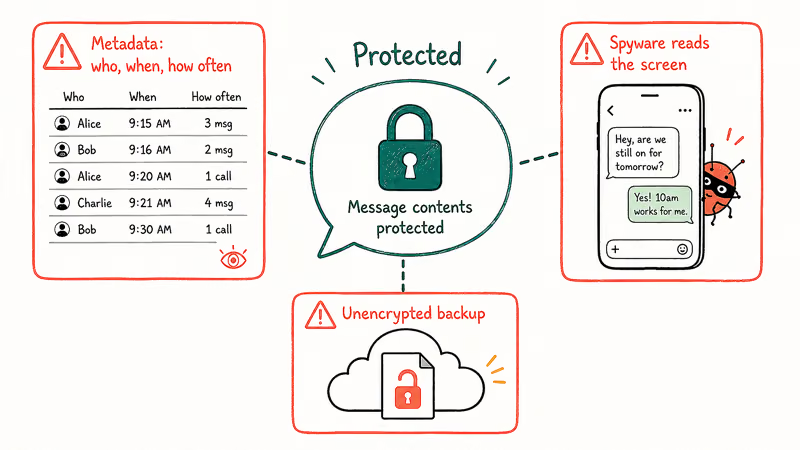
It doesn’t hide metadata, meaning who you talked to, when, and how often. The service can still see that you and a contact exchanged 50 messages last Tuesday, even if it can’t read a word of them. For some threat models, that pattern alone reveals plenty.
It also can’t protect a device that’s already compromised. If spyware sits on your phone reading the screen, encryption is useless, because the message is decrypted right in front of the malware. That’s why checking for signs your phone may be hacked matters as much as picking an encrypted app. And it won’t help if you back up plaintext messages to an unencrypted cloud.
#Should You Turn It On Where It’s Optional?
When E2EE is a toggle rather than a default, the answer is almost always yes. The privacy gain is real, and for most people the trade-offs are minor.
The main catch is account recovery. Because the company can’t read your encrypted data, it also can’t help you recover it if you lose your password and keys, so you take on full responsibility for your recovery codes. Guard those like the keys to a safe.
For sensitive data, that trade is worth it. Turning on Apple’s Advanced Data Protection, or using an encrypted password manager, hardens the things that matter most. The comparison of a strong password manager shows how the same end-to-end principle protects your logins, and a VPN on public Wi-Fi adds a complementary layer for the network itself.
#How to Tell If Your Chat Is Actually Encrypted
Knowing a service supports E2EE is one thing; confirming a specific chat is encrypted is another. Most apps give you a visible signal once you know where to look.
iMessage uses blue bubbles for iMessage chats and green bubbles when a conversation falls back to SMS or MMS. The lesson is to watch the cues. Signal labels every chat as encrypted, WhatsApp shows an encryption notice, and on iPhone a blue bubble signals when iMessage’s protection applies.
For maximum certainty, the privacy-focused Electronic Frontier Foundation recommends verifying safety numbers in apps like Signal. Comparing safety numbers checks that both devices see the same conversation identity. It’s overkill for casual chats, but reassuring for truly sensitive ones.
#Bottom Line
End-to-end encryption is one of the most important privacy tools you have, and for messaging it’s worth treating as a baseline expectation, since iMessage, WhatsApp, and Signal all provide it by default. Where it’s optional, like Apple’s Advanced Data Protection, turning it on is usually the right call, as long as you safeguard your recovery keys, because the company can’t bail you out if you lose them.
Just keep its limits in mind. It hides what you say, not who you say it to, and it can’t save a phone that’s already infected. Treat it as a powerful layer, not a magic shield.
#Frequently Asked Questions
What does end-to-end encryption mean in simple terms?
A message is scrambled on your device and only unscrambled on the recipient’s. Nobody in between can read it.
Is end-to-end encryption the same as a secure HTTPS connection?
No, they’re different layers. HTTPS protects data in transit to a server, but the server can still decrypt it. End-to-end encryption keeps it scrambled even there.
Which messaging apps are end-to-end encrypted by default?
iMessage, WhatsApp, and Signal all encrypt every conversation automatically, with nothing to turn on. Some other apps offer it only in special “secret” chat modes, so confirm whether your app encrypts all messages or just some, because the difference between always-on and opt-in encryption is exactly the gap a casual user would never notice until it mattered.
Can the company still read my end-to-end encrypted messages?
No. The company never holds the keys, so it can’t read your messages even if compelled to. That’s the core difference from transit-only encryption.
Does end-to-end encryption hide who I’m talking to?
No. It encrypts the contents of your messages, but not the metadata, meaning the service can still see who you contacted, when, and how often. If hiding your contacts and patterns matters to your situation, encryption alone isn’t enough, and you’d need additional privacy tools.
What happens if I lose my encryption keys?
You may permanently lose access to the encrypted data, by design. Because no one else holds the keys, including the service provider, there’s no one who can recover it for you. This is why services with optional end-to-end encryption stress saving your recovery codes carefully before you turn it on.

Is This Bank App Real? Spot a Fake App on Your Home Screen
A bank app can land on your home screen from a web page with no install warning. Learn the checks that tell a real banking app from a phishing web app.

Passkeys Not Syncing Between iPhone and Windows? Read This
Passkeys not syncing between iPhone and Windows is by design, not a bug. Here is why iCloud passkeys skip Windows Hello and the three ways to fix it.

VPN Not Working on Snapdragon X? Why It Fails, How to Fix
Your VPN won't install or connect on a Snapdragon X Copilot Plus PC because Windows on ARM can't emulate the network driver. Here are the fixes that work.

How to Check If a Link Is Safe Before You Click It
Learn how to check if a link is safe with official-first steps: read the real domain, use the app instead, and treat scanners as a second opinion only.