How to Protect Yourself From Smishing Text Scams Now
How to protect yourself from smishing: verify through the official app, report texts to 7726, and lock down accounts fast if you already tapped a link.
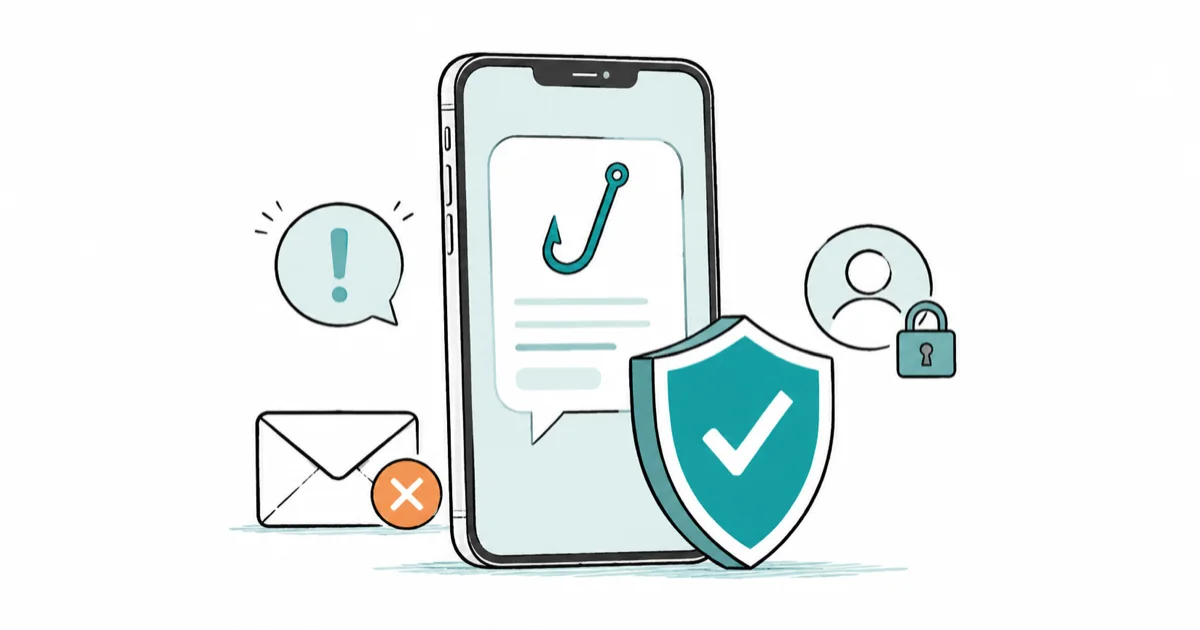
Quick AnswerNever tap a link in an unexpected text. Verify the claim through the official app or a number you already trust, then report the message to 7726 and delete it.
How to protect yourself from smishing comes down to one rule: never act on a text link, no matter how urgent it sounds. Verify the claim through the official app or a number you already trust, then report and delete the message. This guide defends your own phone and accounts only.
- Smishing is phishing by text, and it works because a small phone screen hides the fake link behind an urgent, believable message.
- Never tap the link. Open the official app or call the number on your bank card to check whether the claim is real.
- Report the scam by forwarding the text to 7726, which spells SPAM, so your carrier can block similar messages.
- If you already tapped a link and entered details, change that password from another device and turn on two-factor authentication right away.
- A password manager and passkeys cut your risk sharply, since they won’t auto-fill a credential into a lookalike site.
#What Is Smishing and Why Is It So Convincing?
Smishing is phishing delivered by SMS or other phone messages. The word blends “SMS” and “phishing.” The goal is the same as any phishing attack.
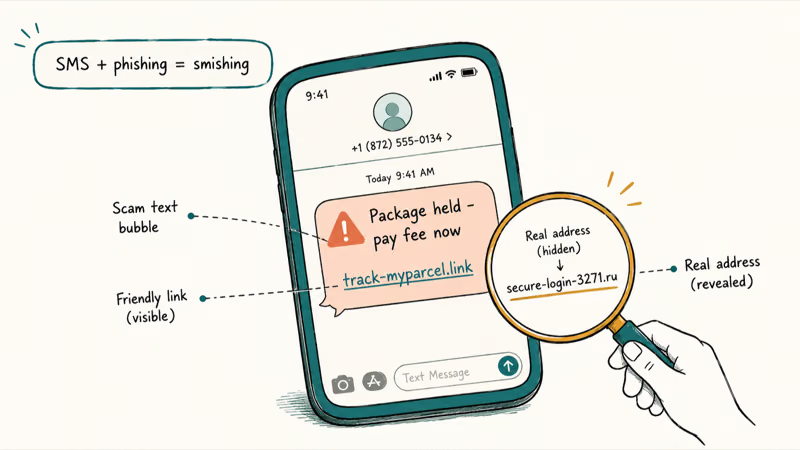
It works better on phones than email does on a computer. A text is short, it feels personal, and the small screen hides the real web address behind a tidy-looking link. Add a dose of urgency, a missed package, a locked account, an unpaid toll, and your thumb moves before your judgment catches up.
The most common lures impersonate a bank, a delivery service, or a government agency. According to the FCC’s smishing guidance, you should never click links, reply, or call numbers you don’t recognize in these texts, and if a message claims to be from a company, you should check your own bill or the company’s official website and contact them separately to confirm. Our breakdown of the USPS text scam shows exactly how one of these delivery lures is built.
#Do Not Tap the Link: Verify Through the Official App or Website
The single habit that defeats smishing is refusing to use the link. Go around it every time, because the entire scam depends on you tapping what they sent.
This matters most when the text claims your banking app needs updating, since that page may try to install a lookalike app rather than just steal a password. Our guide to the fake bank app scam covers what that install looks like.
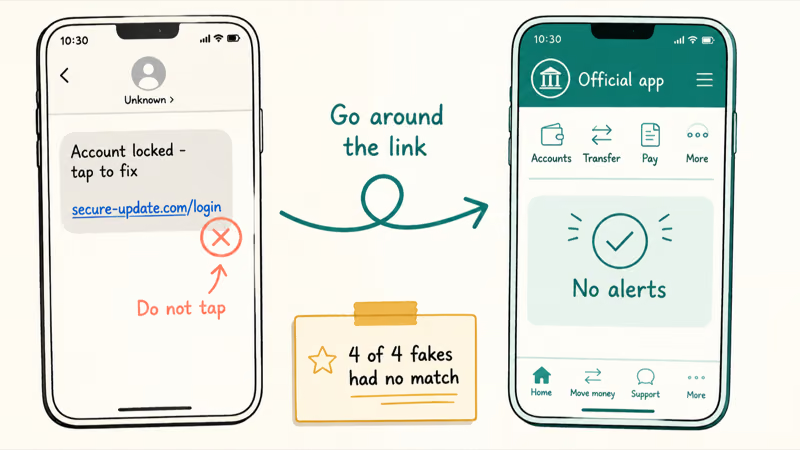
If a text says your bank account is locked, open your banking app directly or type the bank’s address yourself. If it claims a package needs a fee, open the carrier’s official app and check tracking there. A real alert shows up inside your real account; a fake one has nothing behind it.
A fake alert usually has no matching notice inside the genuine account. Check the official app or website first; if the same alert is missing there, treat the text as suspicious.
Call the printed number when money is at stake. The number on the back of your card or on a real statement is trustworthy; the one in the text is not. If you want to inspect a link before deciding, our guide on how to check if a link is safe covers reading the real domain without ever opening it.
#Report and Block Smishing Texts on iPhone and Android
Reporting a scam text takes seconds and helps everyone. Your carrier uses these reports to block the numbers behind a campaign.
Forward the message to 7726 first. According to the FTC’s spam-text guidance, copying a suspicious text and forwarding it to 7726, the digits that spell SPAM, helps your wireless provider spot and block similar messages, and you can also use the report-junk option built into your messaging app. After reporting, delete the text so you don’t tap it later by mistake.
Block and filter, too. According to Apple’s guide to blocking and reporting messages, you can tap the sender at the top of the conversation and choose Block this Caller, turn on Screen Unknown Senders so messages from numbers you don’t know land in a separate filter, and use Delete and Report Junk to send the report straight to Apple and, depending on your carrier, to them as well.
On Android, open the message, tap the menu, and choose Block and report spam. Our guide on whether replying to a text can get you hacked explains why even a reply is risky.
#What If You Already Tapped a Smishing Link?
If you clicked, don’t panic, but move quickly. What you do next depends entirely on whether you only opened the page or actually entered information, so be honest with yourself about which it was.
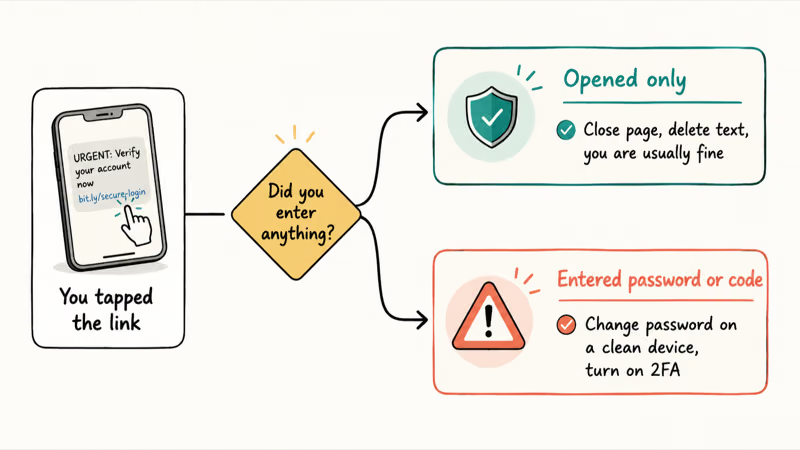
Opened the link but typed nothing? You’re usually fine. Close the page, don’t enter anything, and delete the message.
If you entered a password or a verification code, treat that account as compromised. Change the password immediately from a separate, trusted device, then change it anywhere else you reused it. According to CISA’s phishing guidance, attackers move fast once they have a credential, so speed matters here, and turning on two-factor authentication closes the door even if they already have the password.
#Lock Down Accounts, Cards, and Passwords After Exposure
When you’ve handed over real information, shift from cleanup to lockdown. The order matters: secure logins first, then money, then the device itself.
Start with the exposed account and any that share its password, changing each one and enabling two-factor authentication. Our guides on creating a strong password and the best 2FA authenticator apps make this faster, and a password manager helps because it refuses to auto-fill your login into a lookalike domain, which quietly blocks many smishing attempts before they start.
Call your bank if you entered card or payment details, so they can watch for fraud or reissue the card. Finally, if you installed an app or downloaded a file from the link, run a security scan and remove it, and our guide on how to tell if your phone is hacked lists the symptoms to watch for in the days after.
#Reduce Future Scam Texts Without Missing Real Alerts
You can cut the flow of scam texts without silencing the legitimate ones you actually need. The aim is fewer junk messages, not a phone that swallows your real two-factor codes and delivery updates.
Filter unknown senders on your phone, register your number with your carrier’s spam tools, and keep reporting the junk that gets through to 7726. Each report trains the filters that protect the whole network.
Protect your number itself. Don’t post it publicly, be careful which apps and sites you hand it to, and skip those “enter your number to see results” prompts. A number that scammers never get is the one they can never target, which is the cheapest defense of all.
#Bottom Line
Treat every urgent text link as untrusted until you verify it another way. Never tap what the message sent.
Report the text to 7726 and delete it. If you already entered credentials or payment details, move straight to lockdown: change the password from a clean device, turn on two-factor authentication, call your bank if money was involved, and scan your phone if you installed anything.
#Frequently Asked Questions
What is smishing, and how is it different from normal spam?
Smishing is a scam text designed to steal your money or logins, while ordinary spam is usually just unwanted marketing. The difference is intent: a smishing text wants you to tap a malicious link or hand over a password, often by pretending to be your bank, a courier, or a government agency and adding a sense of urgency to rush you past your better judgment.
How can I verify a text message without tapping the link?
Go to the source directly. Open the company’s official app, or call the number on your bank card. If the alert is real, you’ll see the same notice there.
Should I reply STOP to a suspicious text?
No, and this is a common mistake. Replying STOP works for a real marketing list you signed up for, but to a scammer the same reply does the opposite of what you want: it confirms a real person reads texts at your number, which often brings even more scam messages. For any unknown sender, don’t reply at all. Forward it to 7726 and delete it instead.
What should I do if I already tapped a smishing link?
Close the page first. If you typed nothing, you’re usually fine. If you entered a password or code, change it from a separate trusted device, turn on two-factor authentication, and call your bank if you shared payment details.
Where should I report smishing texts in the US?
Forward the message to 7726, which spells SPAM, so your carrier can act on it. Beyond that, you can report scams directly to the FTC at ReportFraud.ftc.gov, and nearly every messaging app now has a built-in option to flag a message as junk or spam, so use whichever path is closest to hand and report through more than one if the scam was convincing.
Which official source should I trust first?
Trust the real company, reached through its own app or a number you already have, before anything in the text. For general guidance, government resources like the FTC, FCC, and CISA are reliable, and none of them will ever ask you to act through a link a stranger sent you.

Is This Bank App Real? Spot a Fake App on Your Home Screen
A bank app can land on your home screen from a web page with no install warning. Learn the checks that tell a real banking app from a phishing web app.

Passkeys Not Syncing Between iPhone and Windows? Read This
Passkeys not syncing between iPhone and Windows is by design, not a bug. Here is why iCloud passkeys skip Windows Hello and the three ways to fix it.

VPN Not Working on Snapdragon X? Why It Fails, How to Fix
Your VPN won't install or connect on a Snapdragon X Copilot Plus PC because Windows on ARM can't emulate the network driver. Here are the fixes that work.

How to Check If a Link Is Safe Before You Click It
Learn how to check if a link is safe with official-first steps: read the real domain, use the app instead, and treat scanners as a second opinion only.