Group Text Not Working on iPhone? 8 Fixes That Work
Group text not working on iPhone? Turn on MMS Messaging and Group Messaging, check iMessage vs SMS routing, and fix mixed Android group chats fast.

Quick AnswerIn Settings, open Messages and turn on both MMS Messaging and Group Messaging, since a group text with any Android member sends as MMS. If those switches are missing, your carrier plan does not include Group MMS.
A group text not working on iPhone while your one-to-one messages send and arrive normally is one of the odder faults in Messages. The thread stalls, replies land in the wrong place, or nothing appears until someone asks why you ignored the plan. Group threads and single texts don’t travel the same road, and your iPhone quietly picks between three different group formats depending on who sits in the conversation.
- Both MMS Messaging and Group Messaging must be on in Settings before a group text with any non-Apple number can send
- A group containing even one Android number sends as group MMS instead of iMessage, which turns the entire thread green
- Group MMS rides the cellular network, so a Wi-Fi-only iPhone keeps sending iMessages while group texts silently fail
- Replies arriving as separate one-to-one messages mean the thread fell back to group SMS rather than group MMS
- A missing MMS Messaging switch is a carrier plan without Group MMS support, not an iOS bug you can fix in Settings
#Why Is Your iPhone Group Text Not Working?
A single text has one recipient and one route. A group thread has several recipients, so your iPhone has to choose a format that every member can actually receive. That choice happens automatically, and it shifts as your network, your settings, and the membership of the thread change. When the chosen format doesn’t match what your handset or your plan supports, the group breaks while every other conversation keeps working normally.
That’s why the fix almost never lives inside the thread itself. It sits two screens away in Settings, where the switches that authorize group formats live.
Missing every text, not only the group ones, points somewhere else entirely. A dead SIM, a carrier hold, a full storage volume, or a stuck iMessage activation blocks all inbound messages regardless of recipient count, and the fuller diagnostic for an iPhone not receiving texts covers that ground properly. Come back to this page once your single texts land reliably again.
According to Apple’s messaging support page, send and receive faults begin with the network, the number, and the service itself. Group threads add a fourth variable: the message type.
#Turn On MMS Messaging and Group Messaging
Two separate switches decide whether your iPhone can send a group message to a number that isn’t on iMessage, and both need to be on. MMS Messaging authorizes multi-recipient and picture messages across the carrier network. Group Messaging keeps replies bound to the thread instead of scattering them back as private one-to-one texts.
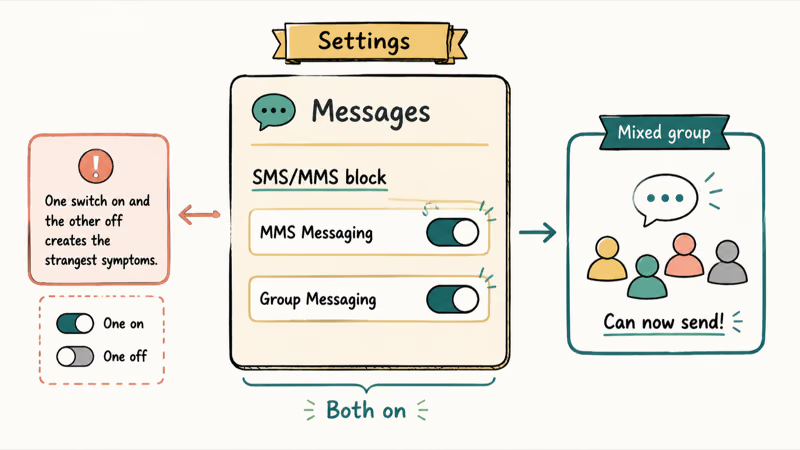
- Open Settings, scroll down, and tap Messages.
- Scroll to the SMS/MMS block partway down the screen.
- Turn on MMS Messaging.
- Turn on Group Messaging, which sits directly beneath it.
- Close Messages completely, reopen it, and send a fresh message into the broken thread.
Apple’s group messaging documentation states that MMS Messaging has to be on before a group MMS can leave your phone at all. Toggling a switch off, waiting a few seconds, and turning it back on is worth doing even when both already read as on, because the setting can show as enabled in the interface while the carrier side of that entitlement has gone stale.
One switch on and the other off produces the strangest symptoms of the lot, and that mismatch is the single most common cause.
#Group iMessage vs Group MMS vs Group SMS
Every symptom in this article resolves to the same root: the wrong one of three group formats got picked. Learning to read which format a live thread is currently using takes about five seconds and tells you immediately whether the problem sits in your settings, your signal, or your plan. The formats aren’t interchangeable, and each one carries different requirements.
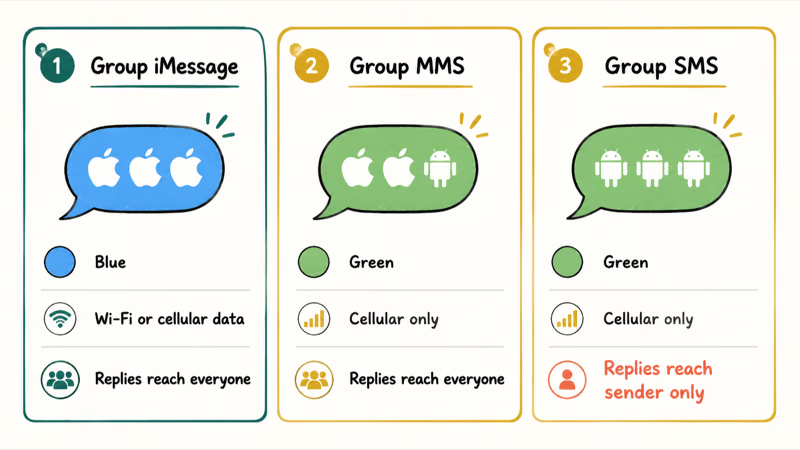
How the three iPhone group formats differ in membership, colour, routing, and reply behaviour
| Format | Who’s in it | Bubble | Travels over | Replies reach |
|---|---|---|---|---|
| Group iMessage | Everyone on an Apple device with iMessage on | Blue | Wi-Fi or cellular data | Everyone in the thread |
| Group MMS | At least one non-Apple number | Green | Cellular only | Everyone in the thread |
| Group SMS | Fallback when Group MMS isn’t available | Green | Cellular only | The sender only |
According to Apple’s group messaging guide, the Messages app chooses between these types automatically, based on your settings, your network connection, and your carrier plan.
Read the bubble colour first. Blue means the thread is a group iMessage and every member is on an Apple device, so a failure there is an iMessage or data problem rather than a group problem. Green means the thread dropped to MMS or SMS, and the two green formats behave very differently from each other. A green bubble carrying the Sent as SMS via server status is a separate case with its own explanation.
Threads also change type mid-life when a member switches phones or turns iMessage off. Knowing how to switch a text to iMessage helps once everyone is back on Apple hardware.
#What Happens When One Member Uses Android?
One non-Apple number in the group takes the whole thread down to MMS, and that behaviour is expected rather than broken. iMessage only runs between Apple devices, so the moment a single member can’t receive an iMessage, Messages falls back to a format every member can read. The thread turns green for everyone, including the members who are on iPhones talking to other iPhones. Nobody in the group did anything wrong, and no setting on your phone reverses it.
What you lose in the downgrade is real: typing indicators, read receipts, high-resolution photos and video, message effects, editing, and unsending all belong to iMessage alone.
Cross-platform group failures are common enough that carrier and manufacturer forums carry dedicated threads about them. Samsung’s community forum hosts a marked-solved discussion of group texts failing between platforms, which confirms the fault sits in the mixed-membership format rather than in any single handset. RCS changes some of this picture on newer devices, and RCS messages not sending covers that protocol on its own terms.
Treat a green group as normal, then judge it by whether messages arrive, not by colour.
#Fix Replies That Split Into Separate Threads
Replies arriving as individual one-to-one messages instead of returning to the group is the signature of group SMS. In that format your phone sends the same text to each recipient separately, so each reply comes back as its own private conversation and nobody sees anyone else’s response. The group looks intact on your screen while behaving as a mailing list. This almost always means Group Messaging is off, or Group MMS isn’t available on the line.
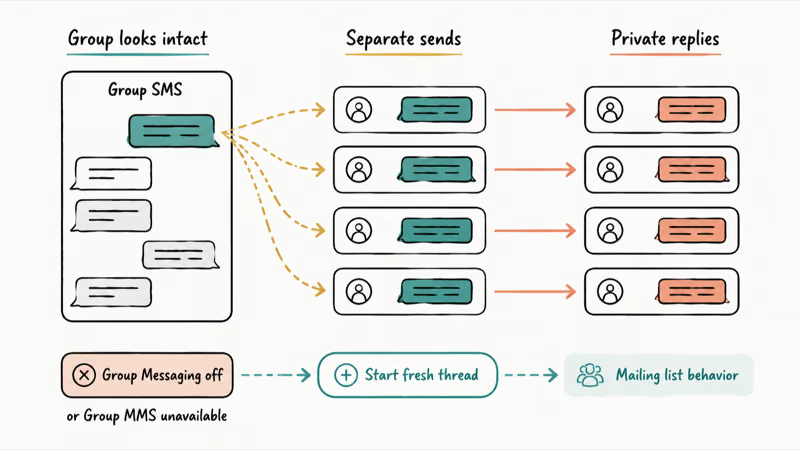
Turn Group Messaging on first, then send a new message rather than replying inside the damaged thread, since the old thread can keep its original routing.
Members whose replies never arrive at all are a different question from members whose replies arrive in the wrong place. When a specific person’s messages stop landing while the rest of the group works, the per-message status is the better clue, and iMessage doesn’t say Delivered walks through what those statuses actually indicate. Apple’s own discussion forums carry repeated reports of group chat messages not arriving on iPhone while individual texts continue to work.
#Reset the Connection and Rebuild the Group
Work up this ladder in order, and stop as soon as the thread recovers.
- Force close Messages and reopen it.
- Toggle Airplane Mode on for ten seconds, then off, to re-register on the carrier network.
- Restart the iPhone.
- Install any pending iOS update, since messaging regressions get patched in point releases.
- Go to Settings, General, Transfer or Reset iPhone, then Reset, and choose Reset Network Settings.
- Rebuild the group as a genuine last resort.
Resetting network settings clears the stored carrier and connection state that group MMS depends on, and it’s the step that resolves threads which survived every toggle. The trade is that saved Wi-Fi passwords, VPN configurations, and paired cellular settings get erased, though your messages, photos, and apps stay untouched. If iMessage itself refuses to activate afterwards, iMessage not working covers that recovery path.
Rebuilding means asking another member to start a fresh thread with everyone included, since a long-running group can carry stale routing. Note that you’ll lose the conversation history, and the mechanics of how to add people to a group text sit in their own guide.
#When the Carrier Plan Is the Real Limit
Some readers work through every guide and reach the same wall: there’s no MMS Messaging switch in Settings at all. Don’t treat the absent switch as a hidden menu or assume a reset will restore it; Apple directs you to the carrier instead.
Apple states that if you don’t see an option to turn on MMS Messaging, contact your carrier to check whether the plan supports Group MMS, in Apple’s group messaging guide.
Ask the carrier specifically whether Group MMS is provisioned on your line, rather than asking whether texting works, because basic SMS can be active while group MMS is not. Prepaid plans, business lines, data-only plans, and recently ported numbers are the usual places this gap appears. Carrier-side delivery faults have their own patterns, and carrier text delivery problems shows what those look like from the subscriber’s end.
#Bottom Line
Check the two switches before anything else. Settings, Messages, and confirm both MMS Messaging and Group Messaging are on.
That single step resolves the large majority of iPhone group-text failures, because any group holding one non-Apple number sends as MMS rather than iMessage, and MMS needs both switches plus a live cellular connection. If those switches aren’t there at all, stop troubleshooting the handset, because the plan doesn’t carry Group MMS and only the carrier can add it.
Reserve leaving and rebuilding the group for the case where everyone else in the thread is fine and only your device is out of sync, since rebuilding costs you the thread history.
#Frequently Asked Questions
Why do my group texts show up as separate messages?
Your thread is running as group SMS rather than group MMS. In that format each recipient gets an individual copy, so every reply returns as its own private conversation instead of reaching the group. Turn on Group Messaging in Settings, Messages, then start a fresh thread rather than replying in the broken one.
What’s the difference between a group iMessage and a group MMS?
A group iMessage runs between Apple devices only, shows blue bubbles, and travels over Wi-Fi or cellular data. A group MMS appears once any non-Apple number joins, shows green bubbles, and needs a cellular connection plus carrier support. The iMessage version carries typing indicators, read receipts, full-resolution media, and message effects, while the MMS version drops all of them and compresses attachments.
Why is there no MMS Messaging option in my Messages settings?
Because your carrier plan doesn’t include Group MMS, iOS never draws the switch. Apple’s guidance is to contact the carrier about adding Group MMS support to the line rather than continuing to search the Settings app. This is the most misdiagnosed case in the whole topic, and no reset, update, or restore creates a toggle that the plan doesn’t entitle.
Do group texts need cellular data, or does Wi-Fi work?
It depends entirely on which format the thread is using. A group iMessage works fine over Wi-Fi alone, but a group MMS travels on the cellular network and fails without it. That’s why a mixed group can break in a basement or on a plane while your all-Apple threads keep flowing normally.
Why does one Android person turn the whole group green?
iMessage only works between Apple devices, so a single non-Apple number forces the entire thread to a format everyone can receive. Messages downgrades the whole group rather than splitting it, which turns the bubbles green for every member including the iPhone users. Nothing is broken and no setting on your side changes it back.
Will leaving and rejoining a group text fix it?
Sometimes, though it’s a last resort rather than an early step. Leaving works only on all-Apple group iMessages with more than two other people, and you can’t leave a green MMS or SMS group at all. Rebuilding from scratch through another member is usually the more reliable move, and it costs you the conversation history.
Can someone be silently removed from a group thread?
Yes, and it’s a frequent source of confusion when someone insists they’re being ignored. In an all-Apple group iMessage, any member can remove another, and the removed person keeps seeing the old thread without receiving new messages. Green MMS and SMS groups have no removal mechanism at all, so a member missing from one of those has a delivery problem instead.
Does resetting network settings delete my group conversations?
No, your messages, photos, apps, and accounts all survive the reset untouched. What gets erased is network state: saved Wi-Fi passwords, VPN and APN configurations, and paired Bluetooth devices. Reconnecting to your home and work networks afterwards takes a few minutes, which is the whole cost of the step.
Mac mini M6 vs M5 Pro: Which Model Should You Buy?
Mac mini M6 vs M5 Pro compared on price, memory, ports, displays, and real workloads. Find the better 2026 Mac mini for your desk and budget.
Apple Siri Settlement: Who Qualifies and How to Claim
Apple's $250 million Siri settlement covers iPhone 15 Pro and iPhone 16 models bought June 2024 to March 2025. See who qualifies and how claims work.
iOS 26.6.1 Security Update: What Apple Fixed and Who Gets It
Apple released iOS 26.6.1 on August 17 with 29 security fixes, including an IPSec interception bug. See what it patches, who gets it, and how to update.
iPhone Adaptive Power: How It Works and When to Use It
Learn how iPhone Adaptive Power works, which models support it, what it changes, and when Low Power Mode is still the better battery-saving choice.