How to Tell If Your Email Is on the Dark Web (2026)
Google's Dark Web Report shut down in Feb 2026. Here's how to check if your email is exposed using free tools that still work, plus what to do next.
Quick AnswerRun your email through Have I Been Pwned, then cross-check with Mozilla Firefox Monitor. If either flags a breach that included a password, change that password everywhere and turn on multi-factor authentication. Google's free Dark Web Report was retired on February 16, 2026.
The free tools changed in 2026. Google retired its Dark Web Report on February 16, and Norton’s free LifeLock email scan went with it. Three replacements still work, and the decision flow below covers when to use each one.
- Google’s Dark Web Report stopped scanning on January 15, 2026, and was fully removed on February 16, 2026, taking the most popular free monitoring tool out of the market
- Have I Been Pwned is the practical replacement: it indexes billions of breached records, the lookup is hashed and query-only, and the free “Notify me when I get pwned” alert covers continuous monitoring
- An exposed email address on its own is low-severity; the urgency jumps when the breach also included a password, phone number, or government identifier
- Even paid services can’t guarantee 100% dark web coverage, and any service that claims it can remove your email from the dark web is overpromising
- A password manager plus multi-factor authentication or a passkey neutralizes most of the risk that comes with an exposed email address
#What Dark Web Email Exposure Actually Means
“On the dark web” almost always means your email appeared in a data breach that was later sold, traded, or dumped on a forum that lives on Tor or I2P infrastructure. The breach happened at a company you signed up with, not on your phone. Attackers use those addresses for credential stuffing, targeted phishing, and account takeover attempts.
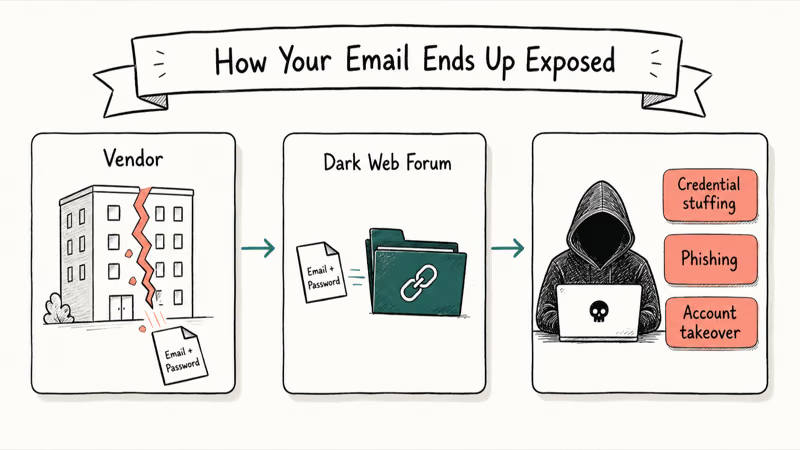
An exposed email is not the same as an inbox compromise. Your Gmail is not necessarily being read right now. What changes is the math on every account where you used that email, especially if you reused the password.
If your email surfaces alongside a phone number, smishing attempts spike too. Our walkthrough on whether you can get hacked by replying to a text covers that escalation.
Active misuse looks different from historical exposure: password reset emails you didn’t trigger, login alerts from countries you’ve never visited, contacts asking about strange links, or recovery options changing on you. Read those the same way you would a notification from WhatsApp suggesting your account is hacked, and lock the account down before doing anything else.
#How Do You Check If Your Email Is on the Dark Web?
You can’t search the dark web yourself in any safe or legal way. What you can do is check whether your email appears in the aggregated breach datasets researchers and security vendors maintain. The service hashes your email, compares it to a breach index, and returns the list of incidents.
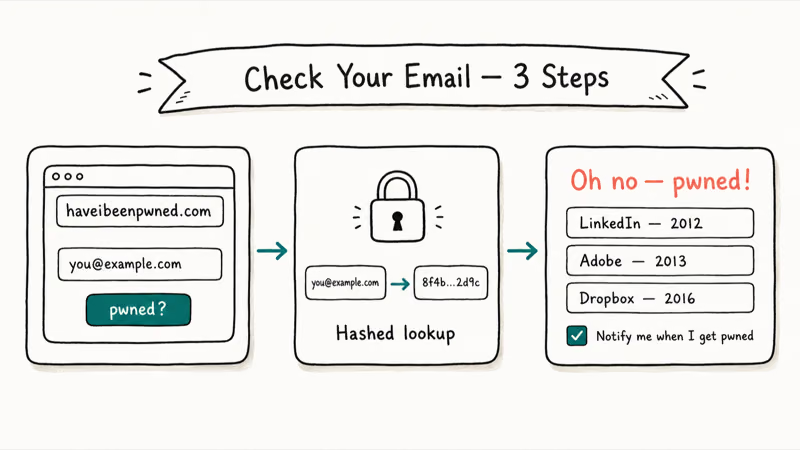
Start with Have I Been Pwned. Its homepage states that 17 billion pwned accounts are now indexed in the Have I Been Pwned database, drawn from breach data going back to 2007. It’s the most widely used free checker, security researcher Troy Hunt runs it independently of any antivirus vendor, and a clean result here is the single fastest signal that your address hasn’t surfaced in a known public breach yet.
Type your email, hit “pwned?”, and read the result. A green “Good news, no pwnage found!” means your address isn’t in the indexed dataset. A red “Oh no, pwned!” lists each breach with the year and what fields were exposed.
Scroll down and click “Notify me when I get pwned.” Confirm via a link, and HIBP sends a free alert the next time your address appears in a newly indexed breach. That converts a one-time scan into ongoing monitoring at zero cost.
Two cross-checks are worth running:
- Mozilla Firefox Monitor: free, Firefox account required, powered by the same HIBP dataset. Confirms HIBP returned what it should have.
- Your password manager’s breach report: 1Password Watchtower, Bitwarden, and Apple Passwords on iOS 17+ run hashed-credential checks against your saved logins. They catch HIBP exposures plus password reuse.
If any check flags a breach with a password, rotate that password everywhere you reused it before continuing.
#Free Dark Web Email Checkers That Still Work in 2026
The free landscape contracted hard in early 2026. Google’s free dark web monitoring and Norton’s free LifeLock email scan both disappeared inside a six-week window. According to Bleeping Computer’s coverage, the Google feature launched in 2023, went free in 2024, and was retired in February 2026. Here is what is still free and trustworthy as of May 2026:
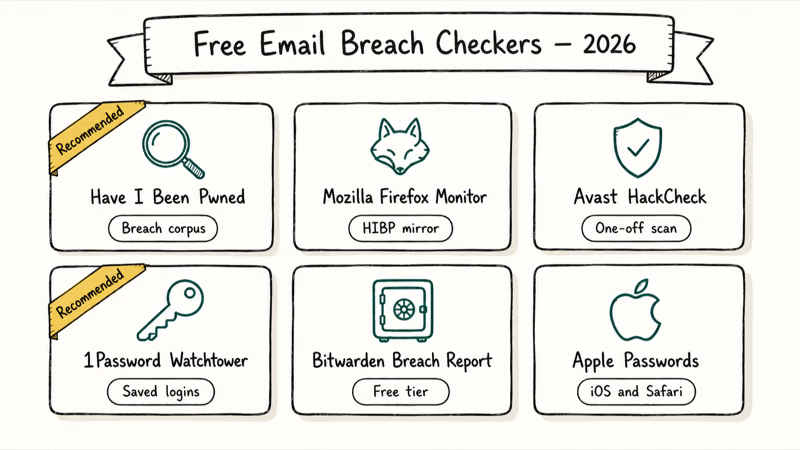
| Service | What it checks | Continuous monitoring? | Notes |
|---|---|---|---|
| Have I Been Pwned | Email against breach corpus + Pwned Passwords | Yes, via free “Notify me” alerts | Maintained by Troy Hunt since 2013. Query-only, hashed, transparent. |
| Mozilla Firefox Monitor | Same dataset as HIBP | Yes, via Firefox account alerts | Useful if you already live inside Firefox; results mirror HIBP. |
| Avast HackCheck | Email against breach corpus | One-off scans | Can index some breaches faster than HIBP; sometimes lags HIBP on older ones. |
| 1Password Watchtower | Saved logins against HIBP + password reuse | Yes, runs continuously inside the app | Requires 1Password subscription, but the breach check itself is free for subscribers. |
| Bitwarden Data Breach Report | Saved logins against HIBP | Yes | Works on the free Bitwarden tier. |
| Apple Passwords (iOS 17+ / Safari) | Saved logins against breach lists | Yes, runs in the background | Lives in Settings > Passwords > Security Recommendations. |
Proton’s walkthrough on checking dark web exposure confirms that this shortlist works: HIBP as primary, password-manager Watchtower features as the layered cross-check.
Older email addresses tend to appear in more breaches than newly created ones, which tracks the age-of-address pattern HIBP warns about. Firefox Monitor draws on the same dataset, so its numbers match HIBP. A non-HIBP checker like Avast HackCheck can occasionally flag incidents HIBP has not yet indexed, which is why a cross-check is worth running once.
#How Serious Is the Exposure?
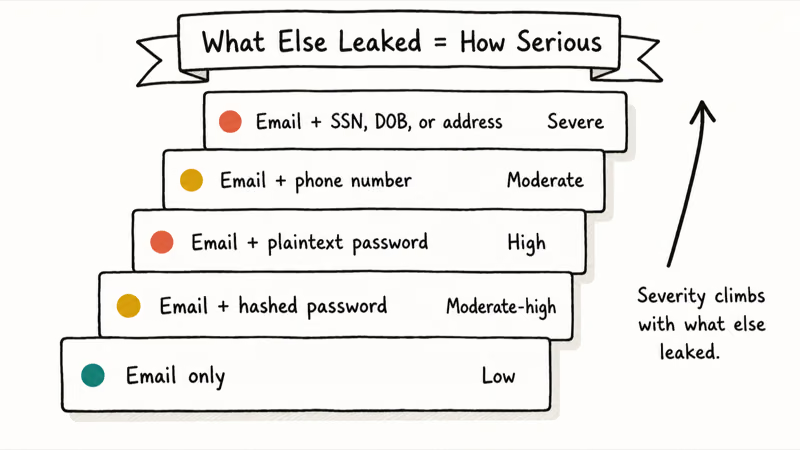
Treat the result as a severity tier, not a yes/no. The biggest variable is what else accompanied your email in the breach.
| Exposure type | Severity | Why |
|---|---|---|
| Email address only | Low | Email is a public identifier you share routinely. Spam and targeted phishing increase, but no credential is actionable. |
| Email + password (hashed) | Moderate to high | Hashed passwords can be cracked, especially older algorithms. Risk multiplies on every site where you reused the password. |
| Email + password (plaintext) | High | Treat every account that ever used this pair as compromised until passwords are rotated. |
| Email + phone number | Moderate | Enables SIM-swap targeting and smishing. Watch for the phone cloning warning signs we cover separately. |
| Email + Social Security number, DOB, or full address | Severe | Identity-theft starter kit. Credit freezes and paid monitoring become rational here. |
Recent breaches matter more than old ones. A 2024 marketing-list dump with email-only fields is annoying; a 2026 breach with a freshly hashed password from a service you still use is an active incident. Use the breach date HIBP shows alongside each entry to triage.
Norton’s documentation on dark web monitoring states that no monitoring service can scan every corner of the dark web. A green result is a “no known exposure” verdict, not a guarantee of safety. The right mental model is “exposure is a baseline assumption, and your job is to make it cheap to weaponize.”
#Your Response Sequence If HIBP Flags a Breach
The response sequence is the same whether HIBP flagged one breach or twenty.
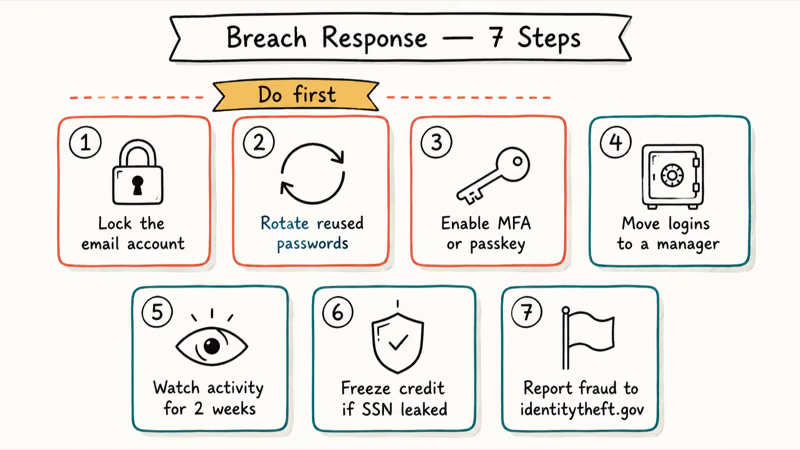
- Lock down the email account itself first. If an attacker controls your inbox, every account with a “forgot password” link routed to it falls next. Sign out other sessions, rotate the password, and confirm recovery options. Our Gmail account recovery walkthrough covers the takeover-recovery side.
If the breach already became a full inbox takeover, follow our email account recovery checklist after a hack before rotating other passwords.
- Change any password that appeared in the breach, everywhere you used it. The same password on Spotify and your bank stops being a Spotify problem the moment Spotify shows up in HIBP.
- Turn on multi-factor authentication or a passkey for high-value accounts. Email, bank, password manager, and the account that owns your phone number top the list. A passkey is materially harder to phish than an SMS code.
- Move every login into a password manager. This is the only durable fix for password reuse.
- Watch the email account’s activity log for two weeks. Gmail and Outlook expose recent device and IP history. Unfamiliar locations are a stronger signal than the breach itself.
- If high-severity fields were in the breach, freeze your credit. Equifax, Experian, and TransUnion let you place a free freeze online.
- Report actual fraud. In the U.S., that means
identitytheft.govand the FTC.
Sibling account-takeover incidents follow the same shape. If a Discord or social account flagged the breach, our Discord account hacked recovery guide shows the platform-specific flow.
#Preventing Future Exposure
You can’t prevent every future breach, because the breach happens at the vendor, not on your end. What you can do is shrink the blast radius so the next exposure doesn’t become a real incident.
- Use a password manager and unique passwords everywhere. Password reuse is the single largest amplifier of breach risk. Killing it kills credential stuffing as an attack vector.
- Default to passkeys where supported. Google, Apple, Microsoft, and a growing list of consumer services now ship passkey support. Passkeys never appear in breach dumps because there is no shared secret to leak.
- Use email aliases for low-trust signups. Apple’s Hide My Email, SimpleLogin, and Firefox Relay give every signup a unique throwaway address. Our iPhone privacy settings checklist walks through the Apple side of this.
- Shrink your public footprint. Removing your personal info from data broker sites leaves a future breach with fewer details to attach to your name.
- Verify suspicious incoming email before acting. A free reverse email lookup check is enough to spot the obvious phishing attempts that follow a breach.
- Reassess paid monitoring annually. Free covers email, password, and breach alerts. Paid extends to SSN, financial accounts, and credit headers. Buy paid only when your exposure profile actually needs that surface.
#Bottom Line
Run your email through Have I Been Pwned right now, turn on “Notify me when I get pwned,” and add Mozilla Firefox Monitor as a second-source confirmation. If anything HIBP flags includes a password, rotate that password everywhere you reused it, starting with the email account itself, then enable multi-factor authentication or a passkey on every high-value login.
Paid dark web monitoring earns its fee only when a breach exposed your Social Security number, date of birth, or full phone number. At that point Norton 360 with LifeLock, Aura, and Bitdefender Digital Identity Protection extend coverage to credit headers and financial-account surveillance that no free tool provides. Below that threshold, the free stack is enough.
Skip any service that promises removal from the dark web. No vendor can scrub the data.
#Frequently Asked Questions
How do I check if my email is on the dark web for free?
Open haveibeenpwned.com, enter your email, and read the result. Sign up for the free “Notify me when I get pwned” alert. Cross-check once with Mozilla Firefox Monitor or Avast HackCheck to catch indexing delays.
Is Have I Been Pwned safe to use with my real email?
Yes. The lookup hashes your email locally and compares the hash against the breach corpus, so your address is never typed into a dark web forum, sold, or used to seed spam. Troy Hunt has run the service transparently since 2013, and password managers like 1Password, Bitwarden, and Apple Passwords all build directly on top of the HIBP API.
What happened to Google’s dark web report?
Google retired the feature. Scanning stopped on January 15, 2026, and the service was fully removed on February 16, 2026. Google said the alerts were not actionable enough and now points users to Security Checkup and Google Password Manager.
Can I remove my email from the dark web?
No. The data replicates across many independent servers outside most jurisdictions, so no legitimate service can promise removal.
Should I be worried if only my email address was exposed?
Slightly. Email-only exposure raises spam and phishing volume but gives attackers nothing to log in with. Severity climbs only when the breach included a password, phone number, or government identifier.
How often should I check whether my email is on the dark web?
Once manually to baseline yourself, then rely on the free “Notify me” alert plus your password manager’s continuous breach report.
Does a VPN protect my email from ending up on the dark web?
No. A VPN hides your network traffic, but breaches happen at the vendor’s side where your email is stored. VPNs reduce a different risk surface and are not a substitute for password hygiene or breach monitoring.
What is the difference between a free dark web scan and paid monitoring?
Free scans check your email against indexed breach datasets and alert you on new breaches. Paid monitoring extends to phone numbers, SSNs, financial accounts, and credit headers, and usually bundles identity-theft insurance.

Is This Bank App Real? Spot a Fake App on Your Home Screen
A bank app can land on your home screen from a web page with no install warning. Learn the checks that tell a real banking app from a phishing web app.

Passkeys Not Syncing Between iPhone and Windows? Read This
Passkeys not syncing between iPhone and Windows is by design, not a bug. Here is why iCloud passkeys skip Windows Hello and the three ways to fix it.

VPN Not Working on Snapdragon X? Why It Fails, How to Fix
Your VPN won't install or connect on a Snapdragon X Copilot Plus PC because Windows on ARM can't emulate the network driver. Here are the fixes that work.

How to Check If a Link Is Safe Before You Click It
Learn how to check if a link is safe with official-first steps: read the real domain, use the app instead, and treat scanners as a second opinion only.