How to Spot a Fake Website: 10 Key Red Flags (2026)
Learn how to spot a fake website with 10 red flags, from domain tricks and fake padlocks to missing policies and risky payment demands, before you pay.
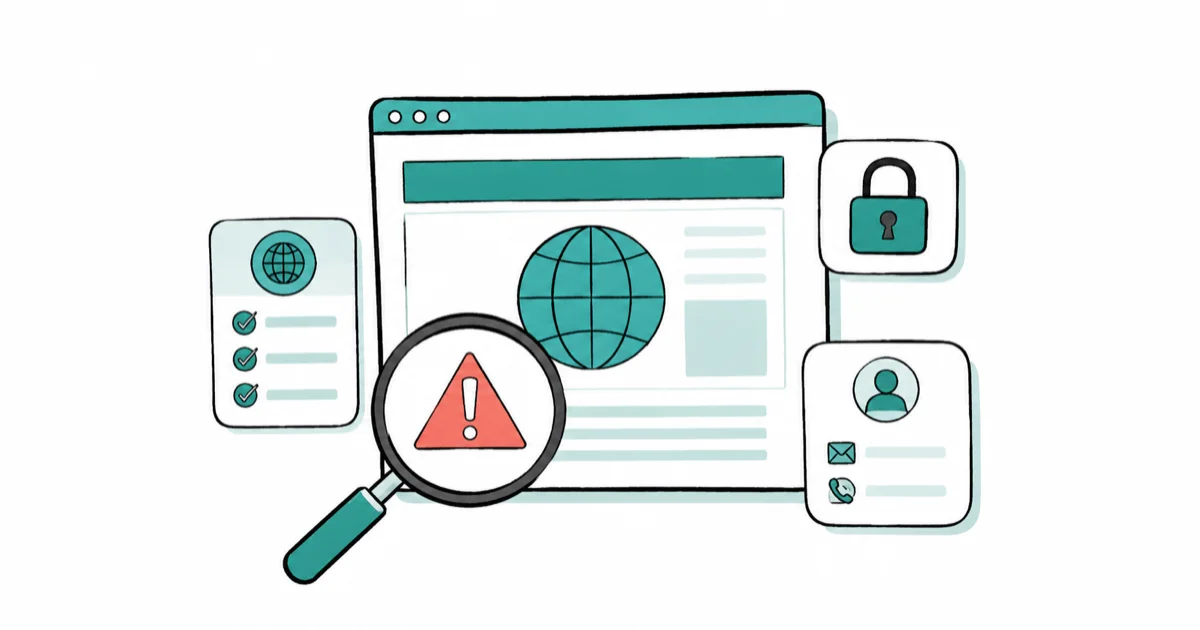
Quick AnswerCheck the exact domain for misspellings and odd extensions, look for real contact details and policies, and search the site name with the word scam or review. A padlock alone does not prove a site is safe, since scammers can get one too.
Knowing how to spot a fake website is the difference between a good deal and a stolen card number. Scammers clone real stores down to the logo, buy a padlock icon, and run cheap ads, so the old advice to “look for the lock” is no longer enough. The clearest giveaways are usually the domain, the payment demands, and what a quick search turns up.
- The domain name is the single most reliable tell, scammers use misspellings, extra words, and odd extensions like tescos-sales.com
- A padlock and https only mean the connection is encrypted, not that the site is honest, since scammers encrypt their sites too
- Searching the site name with the word scam or review surfaces other victims fast
- Demands to pay only by gift card, wire transfer, crypto, or a payment app are a near-certain scam
- A credit card gives you chargeback rights that gift cards and wire transfers never will
The checks below are quick. Run them in order and bail the moment two or more raise a flag.
#Why Fake Websites Are So Hard to Spot
Fake sites have gotten convincing. A scammer can copy a real store’s design, images, and product list, then host it on a domain that looks almost right. According to the UK’s NCSC online-shopping guidance, criminals “duplicate the design of a legitimate website” and use a “deceptive website domain” such as www.tescos-sales.com in place of the real one.
The trick works because you’re rarely looking closely. An ad promises a deep discount, the page looks familiar, and you focus on the deal rather than the address bar, often on a phone where the full URL is half-hidden anyway. By the time anything feels off, the card number is already typed in and the order placed.
That’s why a single check almost never catches a good fake. Glance at a few signals together, since any one in isolation can be faked.
#How Do You Check the URL and Domain?
Start with the address bar. The domain is the hardest thing for a scammer to get exactly right, so read it from right to left and check the real brand name sits in the correct spot.
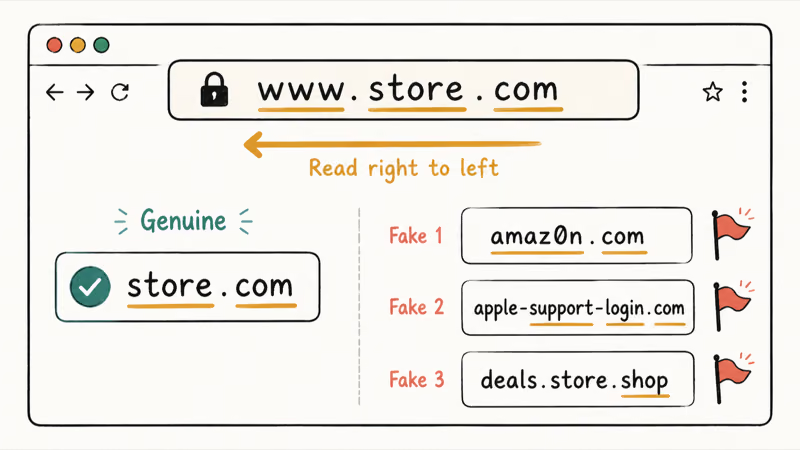
Watch for three classic tricks. Misspellings like amaz0n or paypa1, extra words bolted on like apple-support-login.com, and unusual extensions like .shop or .store standing in for a brand that normally uses .com. A genuine company almost never sells from a domain with its name buried in the middle of a longer phrase, so a name in the wrong position is a strong tell on its own.
When something looks plausible but you’re unsure, don’t click the link in the ad or email. Type the company’s known address directly instead. The same instinct protects you from phishing emails, where a familiar-looking link hides a hostile domain underneath the visible text.
#Does the Padlock Really Mean a Site Is Safe?
No, and this myth costs people dearly. The padlock only tells you the connection is encrypted. It says nothing about who runs the site.
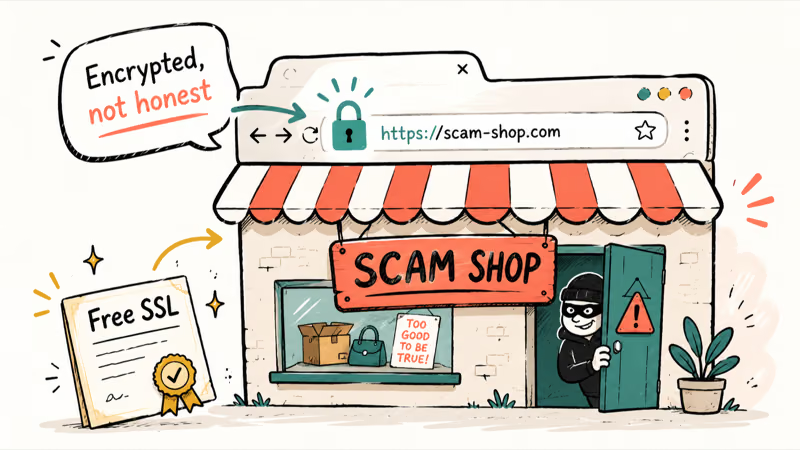
The FTC’s online-shopping advice is blunt about it, stating that “the ‘s’ after http means the site is encrypted, but it doesn’t mean it’s a legitimate site. Scammers know how to encrypt sites, too.” Free certificates are easy to obtain.
Treat the padlock as table stakes, not proof. Scam shops can display a valid padlock, which is exactly why criminals bother.
#Contact Details and Policies to Check
A real business wants to be reachable, while a scam site wants to take your money and vanish. Scan for a physical address, a working phone number, and a real customer-service email rather than a lone contact form. A store you can’t reach a human at is a red flag on its own.
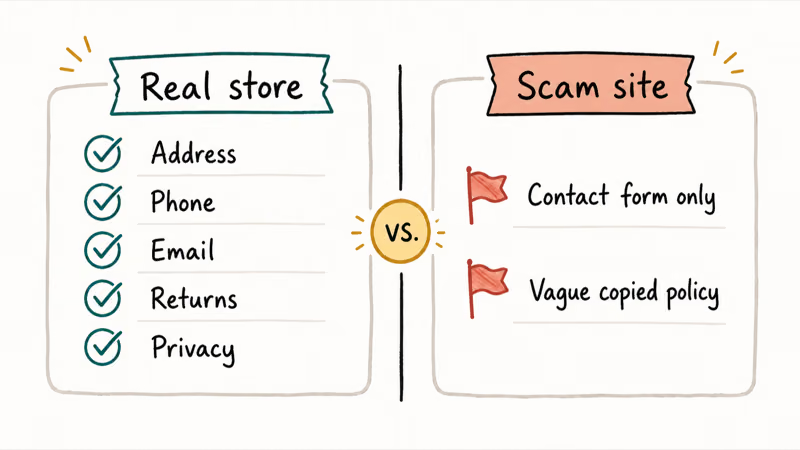
Then read the small print. Legitimate stores publish a returns policy, shipping terms, and a privacy policy. Scam sites skip these or paste in vague, copied text full of errors, so a missing or nonsensical policy page is a strong signal something is wrong, and worth more weight than any flashy “trust badge” graphic, which anyone can copy from a real store.
#Letting Reviews Do the Work
Let other people catch the scam for you. The FTC recommends you “search online for the seller’s name and the website URL, plus words like review, complaint, or scam.” It surfaces other victims fast.
Check independent sources like the Better Business Bureau or Trustpilot, not only the glowing testimonials on the site itself, since those are trivial to fake. If a device starts acting strangely after a sketchy purchase, the guide on signs your phone is hacked is the next read.
#Safe Payment and Verification Tools
How a site asks you to pay is one of the loudest red flags of all. The FTC states you should “never buy anything from online sellers that insist you can only pay with gift cards, by wire transfers, with a payment app, or with cryptocurrency,” because those methods make it almost impossible to get your money back.
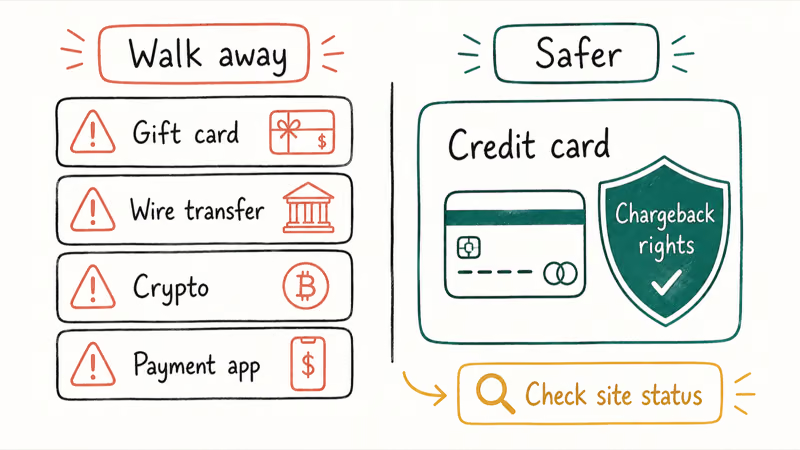
A credit card is your safety net. Both the FTC and NCSC recommend paying by credit card, since it gives you chargeback rights if the item never arrives or turns out to be counterfeit. According to the NCSC, 2-step verification on your shopping accounts adds a layer scammers can’t easily beat, and the same guidance confirms that cards “protect online purchases as part of the Consumer Credit Act” in the UK.
You can also verify a site before you trust it. Google’s Safe Browsing site-status tool lets you paste in a URL and see whether Google has flagged it as dangerous.
Scam texts often funnel people to these sites, so the guide on smishing covers the lure side of the same trap.
A malicious QR code can drop you on a fake site just as easily as a link can. The USPS delivery-fee text scam is one of the most common versions doing the rounds right now.
#Bottom Line
Judge a site on the whole picture, not one box. Read the domain character by character, ignore the padlock as proof, confirm real contact details and policies, and search the name with the word scam first. When you buy, reach for a credit card to keep your chargeback rights, and walk away the instant a site demands a gift card, wire transfer, or crypto.
#Frequently Asked Questions
Is a website safe if it has a padlock?
Not necessarily. The padlock only means the connection is encrypted, not that the seller is honest. The FTC confirms scammers encrypt their sites too, so it should never be your only check.
How do I check if a website is legitimate before buying?
Look at several signals together. Read the domain for misspellings or odd extensions, confirm there’s a real address and phone number, check that returns and privacy policies exist, and search the site name with the word scam or review. Any single one of these can be faked in isolation, so it’s the combination that tells you the truth, and if most pass but you still feel uneasy, paying by credit card keeps your options open if it goes wrong.
What are the most common signs of a fake online store?
A slightly-off domain, prices too good to be true, missing or copied policies, no real contact details, and a demand to pay by gift card or crypto. Two or three together mean you should close the tab.
Can I get my money back if I paid a scam website?
It depends on how you paid. A credit card gives you the strongest chance to dispute the charge. Gift cards, wire transfers, and crypto are designed to be hard to reverse, which is exactly why scammers prefer them.
Does https mean a website is secure?
It means the connection is secure, not the seller. The ‘s’ confirms your data is encrypted in transit between your browser and the site, which is useful on its own, but a scammer can obtain that same certificate as easily as any real business, so it reveals nothing about whether the people on the other end intend to ship your order or simply pocket the cash.
How can I report a fake website?
Report suspected scams to the FTC at ReportFraud.ftc.gov, and you can check a suspect URL against Google’s Safe Browsing site-status tool. If you entered card details, contact your bank immediately to freeze the card and dispute any charges before the scammer can use it.

Is This Bank App Real? Spot a Fake App on Your Home Screen
A bank app can land on your home screen from a web page with no install warning. Learn the checks that tell a real banking app from a phishing web app.

Passkeys Not Syncing Between iPhone and Windows? Read This
Passkeys not syncing between iPhone and Windows is by design, not a bug. Here is why iCloud passkeys skip Windows Hello and the three ways to fix it.

VPN Not Working on Snapdragon X? Why It Fails, How to Fix
Your VPN won't install or connect on a Snapdragon X Copilot Plus PC because Windows on ARM can't emulate the network driver. Here are the fixes that work.

How to Check If a Link Is Safe Before You Click It
Learn how to check if a link is safe with official-first steps: read the real domain, use the app instead, and treat scanners as a second opinion only.