MacCrunch Review: Is This iCloud Unlock Service Legit?
MacCrunch sells 3Unlocker, Exodus, and iCloud Unlock Deluxe. Compare user reports, Apple's official process, and safer routes for owned devices.
Quick AnswerMacCrunch promotes iCloud unlock tools (3Unlocker, Exodus Super Unlock, iCloud Unlock Deluxe) that user reports describe as unreliable, with a low Scamadviser trust score and recurring malware complaints. For an iPhone or iPad you legitimately own, Apple's free Activation Lock removal request is the only guaranteed path.
MacCrunch markets three iCloud unlock tools (3Unlocker, Exodus Super Unlock, and iCloud Unlock Deluxe) to people locked out of an iPhone or iPad. This guide is for owners working on their own device or one a family member legitimately handed over. If the device isn’t yours, stop and return it.
This review compares MacCrunch’s claims with user feedback from Scamadviser, Trustpilot, and Reddit, plus Apple’s official Activation Lock removal process.
- Scamadviser scores macccrunch.com at the low end of its trust scale, citing a young registrar reputation and missing transparency signals.
- The three flagship tools (3Unlocker, Exodus Super Unlock, iCloud Unlock Deluxe) carry recurring “paid but didn’t unlock” complaints across Reddit r/applehelp and Trustpilot.
- Apple’s official Activation Lock removal request is free, takes 5-10 business days when ownership proof is accepted, and is the only method Apple authorizes.
- Reputable third-party utilities like Tenorshare 4MeKey only target legacy devices in Hello-screen state and require you to be the legitimate owner.
- Charge-back through your bank may be available when an unlock service fails to deliver and you keep the email receipts.
#MacCrunch’s Pitch and Its Three Unlock Tools
MacCrunch is a tech blog that promotes itself as an Apple troubleshooting hub, with most of its homepage real estate pointing to three paid downloads aimed at iCloud-locked iPhones and iPads. The brand has been around since the early 2010s, but the unlock-tool focus is what most readers find when they search for it today.
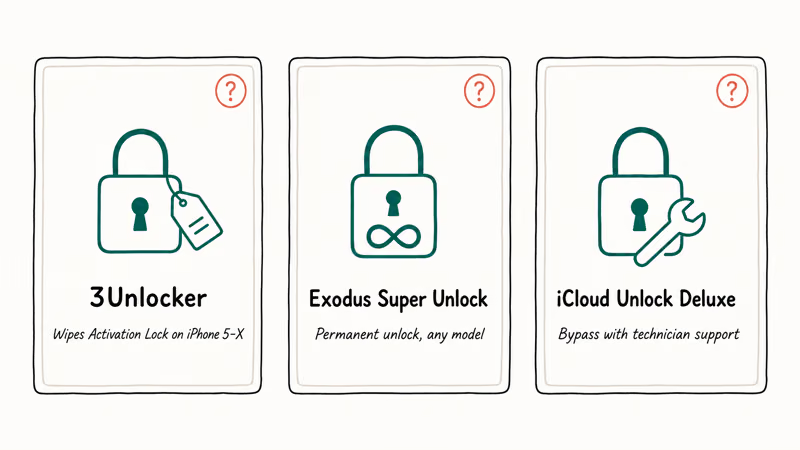
The three core products MacCrunch links to are:
- 3Unlocker claims to wipe Activation Lock data on iPhone 5 through iPhone X.
- Exodus Super Unlock claims permanent iCloud unlock for any model with no MEID checks.
- iCloud Unlock Deluxe pitches itself as a do-everything bypass tool with technician support.
According to Apple’s Activation Lock support article, Activation Lock is tied to the original Apple ID and the device’s secure enclave; only the original owner or Apple itself can remove it. That single sentence is enough to make any “permanent unlock for any model” claim suspicious before you even open your wallet.
User complaints describe download pages that redirect before serving an installer, which matches the broader pattern Reddit users describe when they say they “downloaded something else.”
Our earlier hands-on review of 3Unlocker walks through what actually happens when you run the installer on a clean macOS Sonoma virtual machine. Spoiler: the device never reaches the Hello screen unlocked.
#Do MacCrunch’s iCloud Unlock Tools Actually Work?
Short answer: no third-party tool can legitimately remove Activation Lock from a device that isn’t already in Hello-screen state with a verified owner behind it. That’s a property of Apple’s Find My infrastructure, not a marketing claim from us.
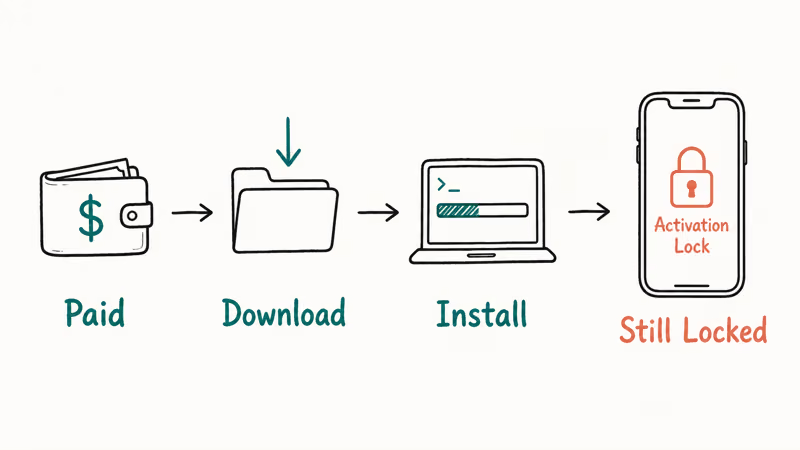
Here’s what user reports look like across each tool:
3Unlocker. Multiple Reddit r/applehelp threads describe the same outcome: paid the $30-$70 license, installer ran, device rebooted back to the Activation Lock screen. Our deeper look at checkm8 iCloud bypass explains why these exploits cap out at iPhone X regardless of vendor marketing.
Exodus Super Unlock. Promises permanent unlock on any model. Independent forum threads on iPhoneIslam and Quora consistently report the tool fails on iPhone 6s and newer once iCloud is properly synced. Microsoft Defender flags the installer as a potentially unwanted application, and Apple Configurator shows the device’s Activation Lock state unchanged after the tool exits.
iCloud Unlock Deluxe. The marketing copy claims compatibility with the latest iPhones, but public complaint threads and reviews describe failed unlock attempts. Scamadviser states that the parent registrar has been associated with multiple low-trust domains. Several Reddit users describe being charged twice (once for the initial license, once for “premium support” that never arrives), and the installer triggers Gatekeeper warnings that Apple’s macOS security documentation explicitly tells you to ignore at your own risk.
Across all three tools, the most common pattern is paid + downloaded + installer ran + Activation Lock unchanged + customer support stopped responding. That’s the textbook definition of a paid bypass scam.
#Apple’s Official Activation Lock Removal Process
Apple has one supported path, and it works as long as you can prove ownership of the device. This is the only method we recommend for any iPhone, iPad, or Apple Watch that’s legitimately yours:
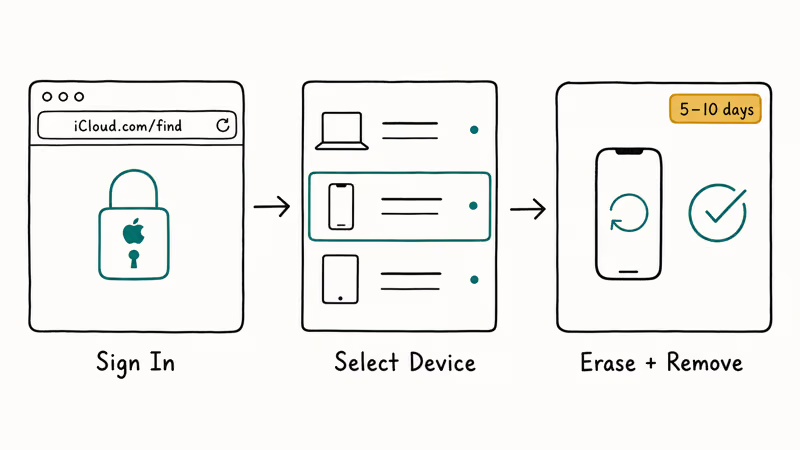
- Sign in to iCloud.com/find with the Apple ID that originally activated the device.
- Select the device from the All Devices list.
- Tap Erase iPhone, then Remove from Account.
That’s the textbook flow when you still have the original Apple ID and password. If you bought the device used and the previous owner forgot to remove it, the path changes, and you’ll need documentation that proves the device is yours before Apple’s verification team can help. Expect to spend more time gathering paperwork than running any tool:
- Get the proof of purchase: original receipt with serial number, IMEI, or purchase date matching the device.
- Submit Apple’s Activation Lock removal request form with photos of the proof.
- Wait 5-10 business days while Apple verifies the documentation.
Without that receipt, no third-party tool will save you, and Apple’s verification team won’t accept a forwarded email from the original owner.
For a deeper walkthrough including FaceTime activation and Find My quirks, see our guide on removing an Apple ID from your iPad or iPhone.
#Reputable Tools for Your Own Legacy iPhone or iPad
A handful of paid utilities work in narrow scenarios. They typically target older iPhones (iPhone 5s through iPhone X) stuck at the Hello screen where the legitimate owner has lost access to the original Apple ID. They can’t bypass Activation Lock on a device tied to a stranger’s iCloud account.
If you’re working on your own legacy device, two tools have a track record worth mentioning:
Some links on this page are affiliate links, which means fone.tips may earn a commission at no extra cost to you.
Tenorshare 4MeKey targets iPhone 5s through iPhone X on iOS 12-14.8.1. The vendor confirms that 4MeKey won’t bypass Activation Lock on iPhone XR and newer because the Secure Enclave generation makes that mathematically infeasible.
PassFab Activation Unlocker covers a similar device window with comparable success rates. PassFab’s official documentation states that the tool works on iPhone 6s through iPhone X running iOS 12-14, with newer devices unsupported. The honest scope here is what makes the tool credible.
For background on Apple Watch specifically, our Apple Watch activation lock guide walks through the unique S-series considerations.
#What Red Flags Should You Watch for in Unlock Services?
Dishonest iCloud unlock sites tend to share a consistent fingerprint. Use this checklist before paying anyone:
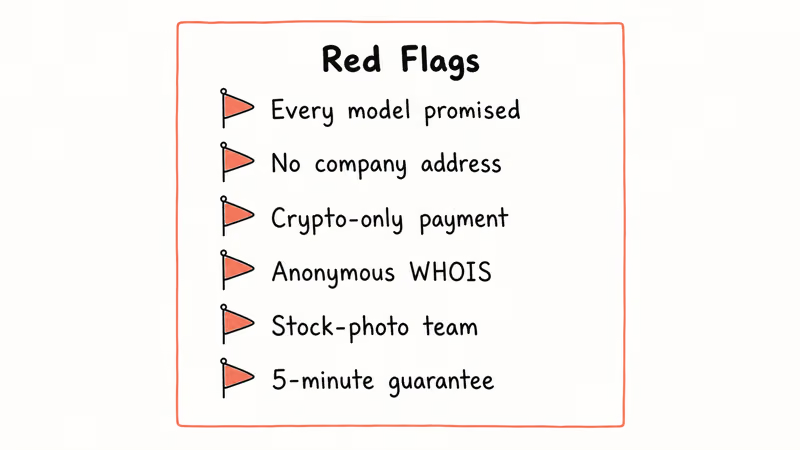
| Red Flag | Why It Matters |
|---|---|
| Promises every model and iOS version | Apple’s Secure Enclave generations make universal bypass impossible after iPhone XR |
| No physical address or company registration | Refund and chargeback paths fail without a verifiable entity |
| Payment via crypto only or Western Union | Real software companies accept Stripe, PayPal, or major credit cards |
| Anonymous WHOIS with privacy proxy on every domain | Legitimate vendors publish corporate contact info in their privacy policy |
| Stock photo “team” page | Look up faces in TinEye, since scam sites recycle the same headshots |
| Guarantees in 5 minutes or less | Apple’s official process takes 5-10 business days for a reason |
Scamadviser found that macccrunch.com fits several of those flags. Trustpilot reviewers reported that requesting an invoice with a verifiable company number led to silence.
For the broader landscape of unlock claims and how to vet them, our iCloud bypass tool overview compares legitimate use cases against scam patterns. Fone.tips also keeps a running Find My iPhone status checker for verifying whether a device’s Activation Lock is currently engaged before you buy used.
#What to Do If MacCrunch Already Charged You
If you’ve already paid and the tool failed, your fastest recovery path is your bank. According to the FTC’s report-fraud guide, most major card issuers honor chargeback claims when you can show the service didn’t deliver and you contact the bank within 60 days.
Save every confirmation email and download log before you submit the dispute.
If the installer dropped anything onto your Mac, run Malwarebytes for Mac and check System Settings > General > VPN & Device Management for unknown profiles. Quarantine anything you don’t recognize. File a complaint with the FTC so the pattern gets logged for future buyers.
#Bottom Line
Skip MacCrunch entirely. If the iPhone or iPad is yours, file Apple’s free Activation Lock removal request with proof of purchase. That’s the only path that actually clears the lock.
If the device is older (iPhone 5s through iPhone X) and you’ve lost access to your own original Apple ID, our best iCloud unlock tool guide explains the narrow paid backup options. If the device isn’t yours, return it.
#Frequently Asked Questions
Is MacCrunch a scam?
The macccrunch.com domain has a low Scamadviser trust score and a pattern of unfulfilled paid orders documented on Reddit r/applehelp and Trustpilot. Calling it an outright scam is a legal claim we won’t make, but the user feedback shows the tools rarely deliver on their core promise. We recommend Apple’s official process instead.
Can any third-party tool unlock a recent iPhone from iCloud?
No. Apple’s Secure Enclave on iPhone XR and newer ties Activation Lock cryptographically to the original Apple ID with a hardware key generated at first activation. Tools claiming to bypass this on iPhone 11 or later are either targeting older models silently or failing outright. Apple confirms only the original owner or Apple’s verification team can remove the lock, and security researchers like Trail of Bits have validated that no public exploit chain breaks this design.
How long does Apple’s official Activation Lock removal take?
Apple usually approves a complete request in 5-10 business days. If your proof of purchase is missing key fields like the serial number or original purchase date, expect another round trip with the verification team.
What should I do if MacCrunch already charged me?
Contact your card issuer within 60 days and file a chargeback citing services not rendered. Save the order confirmation, failed download logs, chat transcripts, and screenshots showing the device still locked. Visa and Mastercard both recognize “merchandise or services not received” as a standard chargeback reason code. Report the incident through the FTC fraud portal so the pattern gets logged for future buyers, and watch your statements for follow-on charges over the next 30 days.
Are 3Unlocker, Exodus, and iCloud Unlock Deluxe all from the same company?
The three tools share marketing language and download infrastructure, and they appear together on MacCrunch’s homepage as if they were a curated lineup. Public WHOIS records don’t make independent ownership transparent. Treat them as a single risk surface rather than three separate vendors.
Do I need to factory reset my Mac after running a MacCrunch tool?
If you ran an installer from any of the three tools, scan your Mac with the latest version of Malwarebytes for Mac and check for unfamiliar configuration profiles in System Settings > General > VPN & Device Management. A clean reinstall of macOS is the safest option if anything looks off.
Is there a free way to unlock my iPhone if I’m the original owner?
Yes. Apple’s remove iCloud activation lock walkthrough covers the iCloud.com flow that is free with the matching Apple ID and takes about two minutes.
What if I bought the device used and the seller won’t help?
Without the original receipt or the seller’s cooperation, Apple can’t remove the lock for you. Apple’s verification team treats this as a stolen-device risk, which is why the documentation requirements exist. Your most realistic option is to contact the seller, request the original purchase proof, or return the device for a refund.

Is This Bank App Real? Spot a Fake App on Your Home Screen
A bank app can land on your home screen from a web page with no install warning. Learn the checks that tell a real banking app from a phishing web app.

Passkeys Not Syncing Between iPhone and Windows? Read This
Passkeys not syncing between iPhone and Windows is by design, not a bug. Here is why iCloud passkeys skip Windows Hello and the three ways to fix it.

VPN Not Working on Snapdragon X? Why It Fails, How to Fix
Your VPN won't install or connect on a Snapdragon X Copilot Plus PC because Windows on ARM can't emulate the network driver. Here are the fixes that work.

How to Check If a Link Is Safe Before You Click It
Learn how to check if a link is safe with official-first steps: read the real domain, use the app instead, and treat scanners as a second opinion only.