Find My iPhone Checker: How to Verify Activation Lock (2026)
How to use a Find My iPhone checker on your own device or one you're buying. Covers Apple's official tools, IMEI lookups, and legal boundaries.
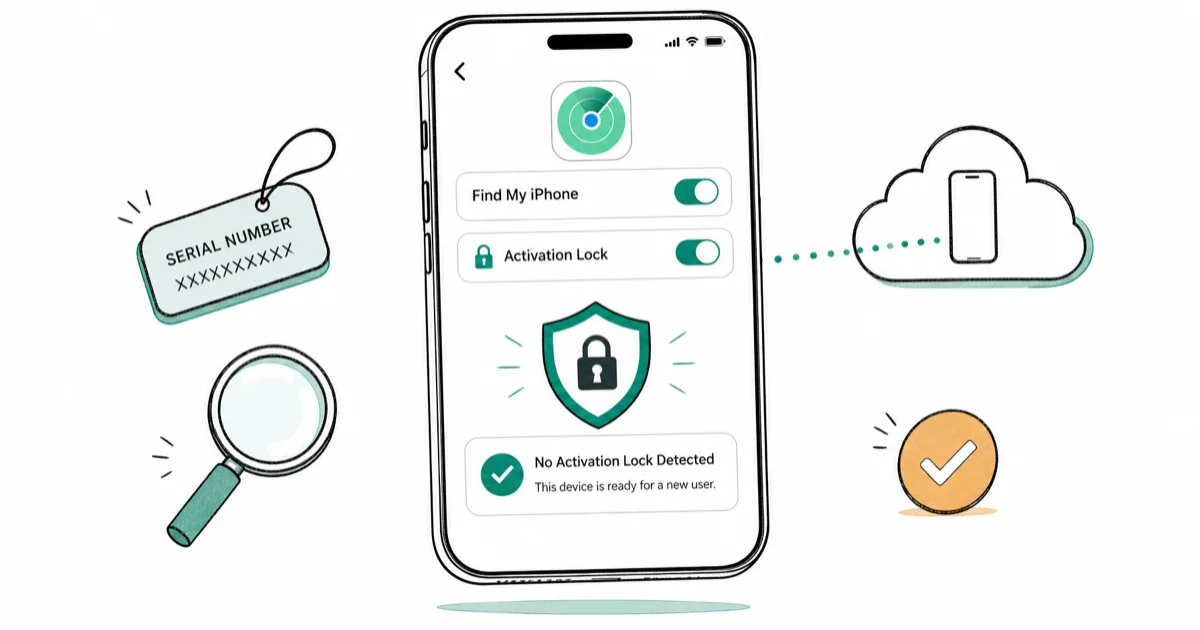
Quick AnswerTo check Find My iPhone status, go to Settings, tap your name, then Find My, on your own iPhone, or run the serial number through Apple's official checkcoverage page before buying a used device.
A Find My iPhone checker tells you whether Activation Lock is on before you hand over cash for a used iPhone. It also confirms the toggle is set correctly on a phone you already own. Three official methods cover both situations, and only the Apple-blessed checks give a result worth trusting.
This guide sticks to verification. It does not cover Activation Lock removal.
- Settings > your name >
Find My>Find MyiPhone shows the live toggle state on any unlocked iPhone - Apple retired its public Activation Lock IMEI lookup page in January 2017
- For used purchases, watch the seller run Erase All Content and Settings in person
- A fresh Hello screen is the only proof Activation Lock has cleared on a resale phone
- Apple Support won’t remove Activation Lock without the original purchase receipt
#Why Activation Lock Matters Before You Buy
Activation Lock is tied to the previous owner’s Apple ID. When Find My iPhone is on, the device phones home to Apple’s servers and refuses to activate under any other account until the original password is entered.
According to Apple, Activation Lock turns on automatically on any iPhone with iOS 7 or later the moment Find My iPhone is enabled. That single design decision is why only official verification methods are reliable. Third-party shortcuts can’t check the server-side flag.
This plays out constantly on Facebook Marketplace. A seller swears the iPhone has been erased, but after the buyer hands over the cash and gets home, the setup screen prompts for the seller’s Apple ID password instead of completing activation. A one-minute check on the spot would have caught it, turning a lost trip and a refund fight into a clean walk-away before any money changed hands.
Important framing: you’re allowed to check an iPhone you own, one you’re buying with the seller’s permission, or one where you have explicit authorization. You’re not allowed to probe someone else’s device without consent.
Apple Support will ignore any removal request that lacks original proof of purchase. That has been consistent across Apple’s support documentation for years.
#How to Check Find My iPhone on a Device You Own
Settings is the fastest checker because it shows the live toggle state. This works on any iPhone or iPad running iOS 13 or newer, which covers every supported device in 2026.
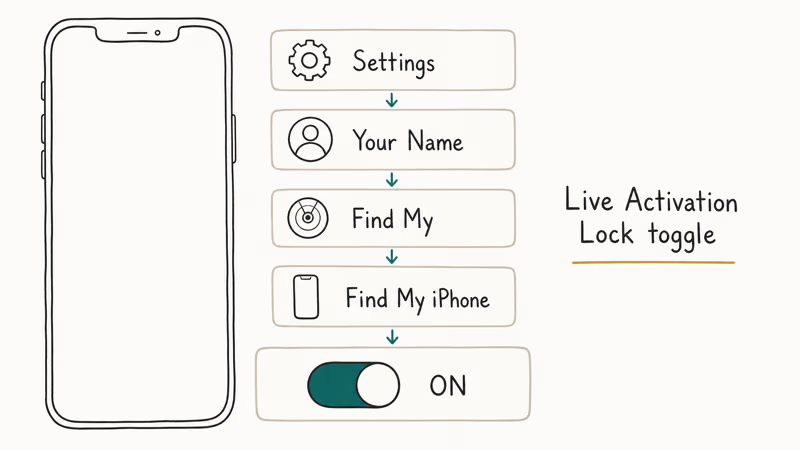
Here’s the exact path on a current iPhone running iOS 17:
-
Open Settings from the Home Screen
-
Tap your name banner at the top
-
Tap Find My
-
Tap Find My iPhone
-
Check whether the toggle is green (on) or gray (off)
Green means Activation Lock is active. Selling or giving the device away? Toggle it off here, then sign out of iCloud from the same screen.
Apple’s guide on preparing an iPhone to sell or trade in states that you should sign out of iCloud before erasing, and warns that skipping this step leaves the device tied to your Apple ID after the wipe. This is easy to reproduce: when iCloud sign-out is skipped, the screen lock is gone after a wipe, but setup still demands the previous Apple ID password.
If you get stuck at that screen yourself, our walkthrough for when this iPhone was lost and erased appears covers recovery.
You can also verify from iCloud.com. Sign in, open Find My iPhone, and check whether the device shows up in the list. A device that appears is being tracked, which means Find My is on. Related: iCloud login finder helps if you’ve forgotten which Apple ID was used.
#Can You Use an IMEI Checker to Verify Activation Lock?
Not reliably. Apple killed its public IMEI Activation Lock lookup in January 2017. The current tool at checkcoverage.apple.com shows warranty and AppleCare status only.
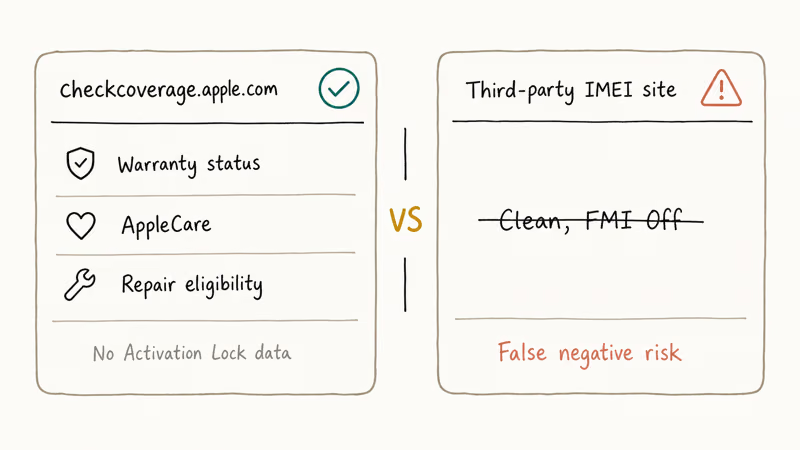
Third-party IMEI lookup sites still advertise Activation Lock status for small fees, typically $3 to $10. Some are accurate. We still don’t recommend relying on them for a purchase decision. The data they pull is scraped from carrier databases or GSMA records that can lag the phone’s actual state by weeks.
These sites frequently get it wrong: an IMEI lookup can report “Clean, FMI Off” for a device that is still signed into the seller’s Apple ID. That’s the false negative pattern that costs buyers money.
The substitute for a missing IMEI check is a live inspection.
In-person is best. Buying remotely? Ask the seller to open the phone, go to Settings > General > About, then tap Erase All Content and Settings while on a video call. A fresh Hello screen is the proof.
According to Apple’s buy and trade guidance, any used iPhone that boots past the Hello screen on first power-on hasn’t been properly reset. Walk away if that happens.
#The In-Person Checker Routine for Used iPhones
Treat the Find My iPhone check as a pre-purchase inspection, not a post-purchase surprise. A 90-second routine before money changes hands prevents the bricked-phone scenario entirely, because once the cash is gone, a locked phone leaves you chasing a refund from a stranger instead of holding a working device. Run these in-person steps with the seller present, and don’t skip any of them just because the seller seems trustworthy:
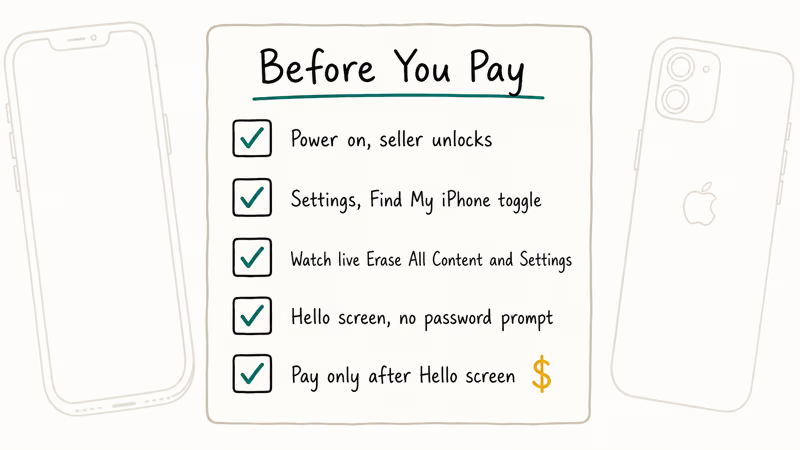
- Power on the device and have the seller unlock it
Check Settings>Find My>Find MyiPhone and hand it back if the toggle is on- Ask for live Erase All Content and Settings while you watch the Apple ID password entry
- Wait for the Hello screen with no password prompt
- Pay only after the Hello screen loads
Related reads worth keeping open while you shop for used iPhones: our guide to check if an iPhone is unlocked or locked for carrier status, plus our deep-dive on iCloud bypass tools so you understand why Activation Lock can’t be legitimately removed by a third party.
If you’re the one selling instead of buying, see how to change or delete an iCloud account from an iPhone before you hand the device over.
Walk away if the seller refuses to sign out of iCloud. Walk away if the price looks too low.
It’s probably locked or stolen if the listing is 50% below market. Apple’s support article on removing Activation Lock confirms Apple will only remove the lock with the original purchase receipt, and that service is reserved for the first buyer, not whoever ended up with the phone.
#What If You Can’t Get the Seller’s Password?
You’re stuck, honestly. Every trustworthy check involves the device being signed in or the original owner cooperating:
- The Settings check requires an unlocked phone.
- The iCloud.com check requires the Apple ID password.
- The live erase-and-setup check requires the seller’s cooperation.
Third-party “Activation Lock checker” services pop up on refurbisher forums promising results from IMEI alone. Some are honest. Apple hasn’t endorsed any of them since 2017.
According to Apple’s Find My security overview, Activation Lock status is stored only on Apple’s servers and isn’t exposed through any public API since the 2017 retirement. The document confirms the lock is enforced during activation over a secure channel. Any third-party result is inference.
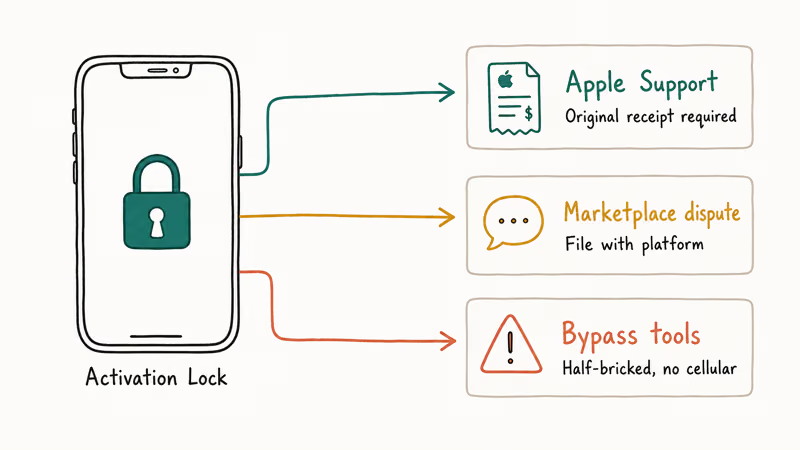
Bought a locked iPhone already and the seller has vanished? Your options are narrow. Contact Apple Support with the original receipt, if you somehow have it. File a dispute with the marketplace you bought from.
Technical workarounds usually mean questionable software. Tools like Tenorshare 4MeKey can remove the Apple ID on older iOS versions, but the device then typically loses cellular service and can’t receive iMessages, effectively a half-bricked phone. That tradeoff is why removal tools are a dead end for anyone who actually needs the device, and why legal channels, meaning Apple Support with the original receipt or a marketplace dispute, produce the only fully functional outcome.
#Legal and Privacy Limits You Should Respect
Activation Lock was introduced as an anti-theft feature in iOS 7, and law enforcement credits it with reducing iPhone theft in major US cities. It’s a consumer protection tool, which means the rules around checking and removing it are strict. Treat them as legal guardrails, not suggestions.
Three boundaries worth following every time:
- Check Activation Lock only on your own iPhone, one you’re actively buying with the seller present, or a device you’ve been authorized to check
- Never probe, guess, or brute-force someone else’s Apple ID (that crosses into unauthorized access under the US Computer Fraud and Abuse Act)
- If you bought a phone that turns out to be locked, treat Apple Support as the only legitimate channel
Respecting these limits protects the original theft deterrent that keeps iPhone resale value high. It also keeps you on the right side of consumer protection law.
#Bottom Line
Start with Settings > your name > Find My > Find My iPhone on a device you own. If you’re buying used, the only Find My iPhone checker worth trusting is watching the seller erase the device live and confirming the Hello screen appears. Skip IMEI lookups, skip Activation Lock removal tools, and walk away from any deal where the seller won’t sign out of iCloud in front of you.
#Frequently Asked Questions
Is there still an official Apple IMEI Activation Lock checker?
No. Apple retired the public Activation Lock lookup at iCloud.com/activationlock in January 2017. The current checkcoverage.apple.com page shows warranty and AppleCare status only, with no Activation Lock indicator anywhere on the page.
Can I check Activation Lock on a locked iPhone I already bought?
Power it on. If the activation screen asks for the previous owner’s Apple ID, Activation Lock is on.
Does Erase All Content and Settings turn off Find My iPhone?
Only if you signed out of iCloud first. Erasing a device while still signed in leaves Activation Lock on.
Why did my used iPhone ask for someone else’s Apple ID after I reset it?
The previous owner skipped signing out of iCloud before selling. The erase cleared personal data, but the device is still tied to their Apple ID.
How do I confirm a used iPhone is safe to buy in person?
Ask the seller to unlock it, show you the Find My iPhone toggle in Settings, then trigger Erase All Content and Settings in front of you. Pay only after the Hello screen loads without prompting for the seller’s Apple ID password. The full check takes about two minutes, and any seller who refuses is not worth dealing with at any price. Walk away.
Are IMEI-based Activation Lock checkers accurate?
Sometimes. Popular IMEI checkers are known to return false negatives, reporting a phone as clean when it’s still signed into the previous owner’s Apple ID. Treat IMEI results as a weak signal at best. Never use them as a substitute for a live erase-and-setup check performed with the seller.
Can Apple Support unlock an iPhone with Activation Lock if I have the box?
Only if you are the original purchaser and the receipt lists your name plus the device serial number. Apple Support confirms that second-hand buyers can’t use someone else’s receipt, and a forwarded email from the seller won’t be accepted.

Apple Siri Settlement: Who Qualifies and How to Claim
Apple's $250 million Siri settlement covers iPhone 15 Pro and iPhone 16 models bought June 2024 to March 2025. See who qualifies and how claims work.

iOS 26.6.1 Security Update: What Apple Fixed and Who Gets It
Apple released iOS 26.6.1 on August 17 with 29 security fixes, including an IPSec interception bug. See what it patches, who gets it, and how to update.

iPhone Adaptive Power: How It Works and When to Use It
Learn how iPhone Adaptive Power works, which models support it, what it changes, and when Low Power Mode is still the better battery-saving choice.

How to Transfer Data to a New iPhone Without iCloud
Move everything to your new iPhone without iCloud: Quick Start device-to-device transfer, wired migration, and encrypted Finder or iTunes backups.