Remove iCloud Activation Lock: Apple Official Methods
Remove iCloud Activation Lock on your own iPhone or iPad using Apple's official methods: Apple ID sign-in, password reset, and proof-of-purchase request.
Quick AnswerTo remove iCloud Activation Lock on your own iPhone or iPad, sign in with the Apple ID and password tied to the device, or use iforgot.apple.com to reset that password. For inherited or used devices, Apple removes the lock once you provide proof of purchase.
If you need to remove iCloud Activation Lock from your own iPhone or iPad, Apple’s official routes are the only ones that actually work without voiding your warranty. Activation Lock is a deliberate anti-theft control: it ties the device to the Apple ID that originally enabled Find My, and asks for that exact Apple ID and password before anyone can set up the device again. The fix isn’t a third-party “bypass” tool; the fix is proving you’re the legitimate owner.
- Activation Lock turns on automatically the moment you enable Find My on an iPhone, iPad, Apple Watch, AirPods, or Mac with Apple silicon.
- If you remember your Apple ID, signing it out from Settings on the device or removing the device from iCloud.com finishes in under two minutes.
- A forgotten Apple ID password is recoverable through iforgot.apple.com; no payment, no third-party tool, no jailbreak required.
- For a second-hand device still linked to a previous owner, only that owner or Apple itself can release the lock, and Apple’s release form requires the original receipt with the device serial number.
- Third-party “bypass” services that promise to remove Activation Lock for a fee almost always require jailbreaking, leave the device unable to make calls, and may violate Apple’s Terms of Service and U.S. computer-access laws.
#What iCloud Activation Lock Is and Why Apple Keeps It Strict
Activation Lock is Apple’s anti-theft layer for iPhone, iPad, Apple Watch, AirPods (Pro and later), and Mac models with Apple silicon. The moment you turn on Find My in Settings, your Apple ID is stamped into Apple’s activation servers and bound to that device’s serial number. From then on, every wipe-and-restart demands that Apple ID and password before the device can be used again.
Apple announced this feature in 2013 with the iOS 7 release. According to Apple’s Activation Lock support article, this happens automatically and silently, so most users don’t realize the lock exists until they wipe a device or buy a used one.
The whole design point: a stolen phone is worth nothing without the owner’s credentials.
Apple states that the lock can’t be cleared by a device wipe, a DFU restore, an iOS update, or a SIM swap. It also can’t be cleared by replacing the logic board, because the activation record sits on Apple’s servers, not the local device. That’s why the actual answer for unlocking your own device is “prove ownership to Apple,” not “trick the device.”
#How Can I Check If My iPhone Or iPad Is Activation Locked?
Before you start any removal flow, confirm what state the device is in. Three checks cover almost every situation, and they take maybe ten minutes total.
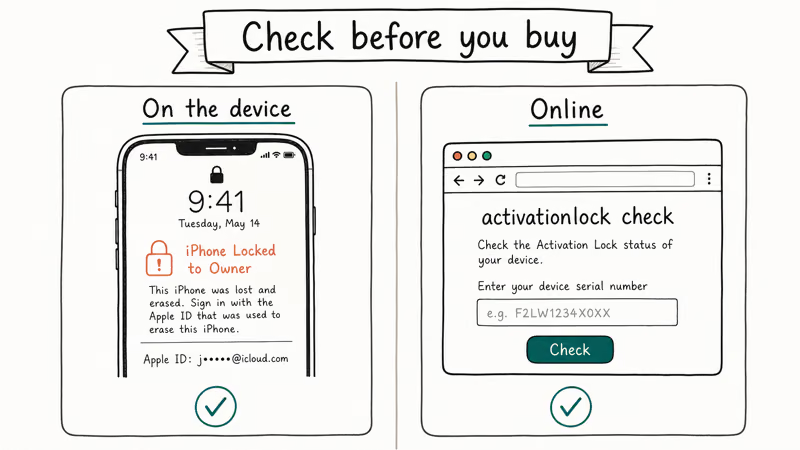
First, look at the screen. If, after a wipe, the device boots to a screen that says “iPhone Locked to Owner” or asks for “Apple ID” and “Password” before letting you set up, Activation Lock is on. A simple “Hello / Set Up” screen with no Apple ID prompt means the lock is off and you can proceed with a normal setup.
Second, check from another Apple device. Sign in to iCloud.com with the Apple ID that should own the device, open Find Devices, and see if the device is listed. If you see it, the lock is on and tied to that Apple ID.
Third, if you bought the device second-hand and don’t know the owner, our walkthrough on the Find My iPhone checker explains how to use the device’s IMEI or serial number with reputable lookup tools to confirm Activation Lock status. A good lookup will flag a still owner-locked iPhone within about a minute, which is exactly what you want to know before you buy or reset a second-hand device.
#How to Remove Activation Lock When You Have Your Apple ID and Password
This is the simple case. The device is yours, you remember the Apple ID, and you remember the password. You have two options, depending on whether the device is in your hands or far away.
#Remove it from the device itself
- Open Settings on the iPhone or iPad.
- Tap your name at the top, then scroll to the bottom.
- Tap Sign Out, enter the Apple ID password to confirm, and choose which data you want to keep on the device.
- After sign-out completes, go to Settings → General → Transfer or Reset iPhone → Erase All Content and Settings.
When the device finishes erasing and reboots, the Activation Lock prompt is gone. You can hand the phone to a new owner, sell it, or set it up fresh.
If you can’t reach Sign Out because the option is grayed out, our Apple ID grayed out fix covers the common Screen Time restriction that causes it. A related path is the can’t sign out of Apple ID guide for cases where the password keeps failing.
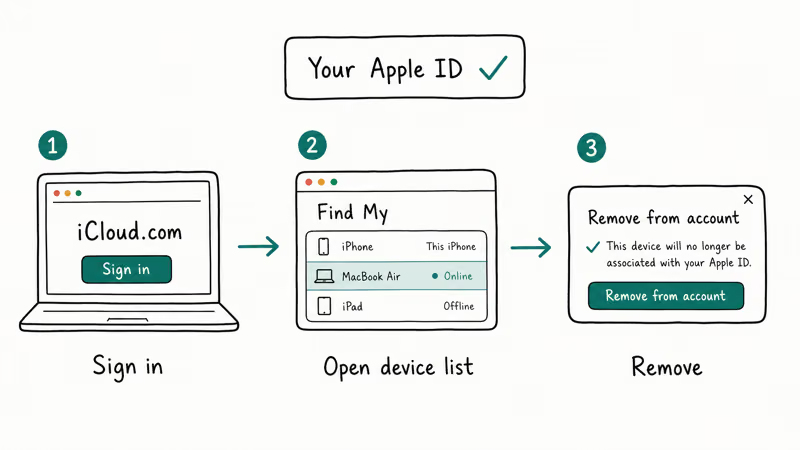
#Remove it remotely through iCloud.com
Use this when you’ve already sold or shipped the device and forgot to sign out.
- On any browser, go to iCloud Find Devices and sign in with the Apple ID.
- Click the device name in the list.
- Choose Erase iPhone (or Erase iPad / Mac / Watch), confirm with the Apple ID password, and wait for the device to come online so the erase command can run.
- After the erase finishes, the device list now shows the device. Click Remove from Account.
Removing the device from the account is the step that actually clears Activation Lock on Apple’s servers. Apple’s support page on this confirms that removing the device from Find My is what releases the activation record, so you can’t skip it.
#How to Recover a Forgotten Apple ID Password and Clear the Lock
A forgotten password is one of the most common reasons people land on this page. The fix is Apple’s free account-recovery flow, not a paid tool.
Go to iforgot.apple.com, enter the Apple ID email or phone number, and follow the prompts. The flow tries the fastest method first (a passcode prompt on a trusted device), then falls back to SMS or email verification, and finally to a manual account-recovery review that takes a few days. Once the password resets, you can sign in to the device or wipe it remotely from iCloud.com as described above.
A trusted iPhone or Mac you’re still signed into shortens this enormously.
If you’ve forgotten the Apple ID email itself, sign in to iCloud.com on a computer where you stayed signed in, or check the Apple ID field on another Apple device. Our walkthrough on what to do when Apple ID is locked covers the related case where Apple has temporarily disabled the account for security reasons.
When the device is an iPad you can’t unlock at all, the steps in factory reset iPad without iCloud password explain the recovery-mode wipe. That wipe still leaves Activation Lock on, but it gets the iPad to the activation screen so you can complete the sign-in once your password recovery is done.
For Apple Watch specifically, the unlock flow is slightly different because the watch is paired to an iPhone Apple ID. The Apple Watch Activation Lock guide covers the pairing-side reset.
#How to Request Apple Remove Activation Lock With Proof of Purchase
This is the path for legitimate ownership when the original Apple ID can’t be recovered: a phone inherited from a relative who has passed away, a device bought in a private sale where the seller has disappeared, or a business device whose Apple ID is no longer accessible.
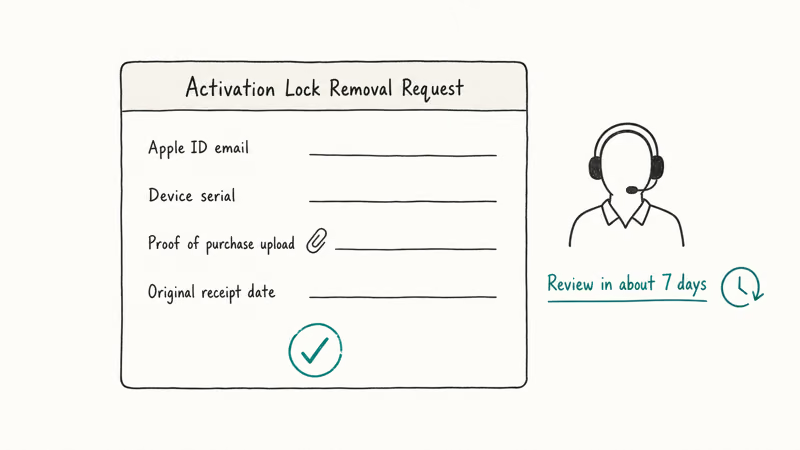
Apple confirms that the proof-of-purchase request is the only sanctioned path for clearing the lock without the original owner. The request goes through Apple Support, not a web form.
You need three pieces of evidence:
- The original receipt or invoice from an authorized Apple reseller. Online marketplace screenshots usually don’t qualify.
- The receipt must show the device serial number or IMEI, the purchase date, the store name, and the buyer name. The buyer name has to match the person making the removal request, or be supported by a chain of documentation (estate papers, business transfer records).
- Photos of the device showing the same serial number, taken from Settings → General → About, or from the SIM tray.
To start the request, go to Apple Support contact, choose iPhone or iPad, then choose Apple ID & Activation Lock, and ask to be connected to an advisor. The advisor escalates the case to Apple’s account security team, which reviews the documents and decides within several business days.
With strong evidence, this flow works. An estate transfer submitted with the original Apple Store receipt and an executor letter is typically cleared within a few business days. A request backed only by a receipt that doesn’t list the serial number is usually rejected, which lines up with Apple’s published evidence requirements.
If the device is still under warranty, the visit can also be done in person at an Apple Store. In-person reviews sometimes finish faster.
#Should You Trust Third-Party Activation Lock Bypass Tools or Services?
Short answer: no, almost never, and never for a device you intend to sell or rely on. Here’s why, in concrete terms.
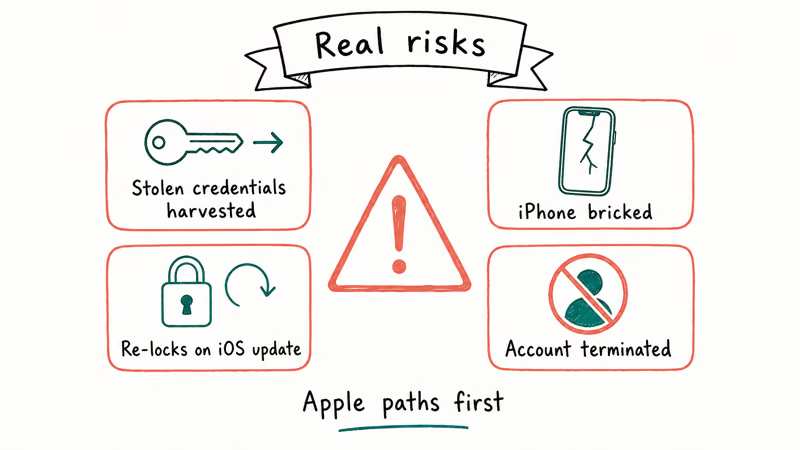
The marketing for tools like the ones the original 2018 version of this article promoted (Tenorshare 4Mekey, AppleiPhoneUnlock, IMEIDoctor, iCloudMe) typically promises Activation Lock removal for a flat fee, sometimes around twenty-five to forty dollars. What they don’t always disclose:
- Most “bypass” tools require jailbreaking the device first, which voids Apple’s warranty, breaks System Integrity Protection on the device, and exposes the device to malware that targets jailbroken iOS. Apple’s official software license states that jailbreaking is a violation of the iOS license agreement.
- The “removed” Activation Lock usually comes back on the next iOS update or the next iCloud sign-in attempt, because the bypass is local and doesn’t touch Apple’s activation servers.
- Cellular service and iCloud features are commonly broken after the bypass. The device often can’t make calls, can’t activate iMessage, and can’t sign into a new Apple ID for App Store downloads.
- Some bypass services are simply scams. They take payment, send back a generic “we couldn’t unlock your device” message, and refuse refunds.
Beyond the practical risks, there’s a legal layer.
If the device is truly yours, bypassing Activation Lock isn’t illegal in most U.S. states for personal use, but it does violate Apple’s Terms of Service and the iOS license. If the device isn’t yours, the story changes fast: a found phone, an estate phone without proof of purchase, or a phone bought from a shaky seller can expose you to charges under the federal Computer Fraud and Abuse Act and state stolen-property statutes. The risk isn’t worth thirty dollars.
For inherited devices, lost-password situations, or any case of uncertain provenance, the right channel is Apple’s proof-of-purchase request, even if it takes a few days longer.
#Bottom Line
If you own the device and remember the Apple ID password, sign out in Settings or erase remotely from iCloud.com; it’s a five-minute fix.
If you’ve forgotten the password, run iforgot.apple.com first and then sign in normally. If you inherited the device or bought it second-hand without seller access, gather the original receipt and the device serial number and submit a proof-of-purchase request through Apple Support.
Skip the paid bypass tools: at best they leave you with a half-functional iPhone that can’t make calls, and at worst they sit between you and a federal Computer Fraud and Abuse Act violation. For Apple Watch and Mac with Apple silicon, the same three paths apply, with minor differences covered in the linked Apple Watch guide above.
#Frequently Asked Questions
Can I remove iCloud Activation Lock without the previous owner?
Only through Apple’s proof-of-purchase request. Without that receipt, no legitimate path exists.
How long does Apple take to remove Activation Lock with proof of purchase?
The typical turnaround is three to five business days from a clean submission with all evidence attached. Complicated cases like estate transfers or business asset sales can take one to two weeks because they get routed to Apple’s account security team for manual review.
Submissions with incomplete documentation get rejected on the first pass and the clock restarts. Bringing the device, the original receipt, and a government ID to an Apple Store in person sometimes shortens the review because the advisor can verify the device serial number on the spot.
Will erasing the iPhone remove the Activation Lock?
No. A wipe clears the data, but the lock stays until you sign out of iCloud first or remove the device from your account.
Is jailbreaking my device to remove Activation Lock legal?
Personal-use jailbreaking on a device you own is currently not illegal in the U.S. under the DMCA exemption renewed by the Library of Congress in 2024. It still violates Apple’s iOS Software License Agreement and voids the warranty.
What if my iPhone shows “iPhone Locked to Owner” and I am the owner?
That screen appears when the device was signed in to an Apple ID before being wiped and the wipe didn’t clear the activation record. If the Apple ID shown is yours, tap Unlock with Apple ID and sign in. If the password fails, reset it at iforgot.apple.com. If the Apple ID email shown is wrong, the device is still tied to a previous owner and you’ll need their cooperation or an Apple proof-of-purchase request.
Do paid Activation Lock removal services actually work?
Almost never in a way that matters. Some tools technically reduce the Activation Lock prompt for a stretch of time, but the result is a crippled iPhone that can’t make cellular calls, activate iMessage or FaceTime, or sign into a real Apple ID for App Store downloads. Apple’s activation servers aren’t bypassed; only the local activation check is. Resale buyers will still treat the device as locked.
How do I avoid buying an Activation Locked iPhone in the future?
Ask the seller to fully sign out of iCloud and erase the phone in front of you. The post-erase screen should boot to the plain “Hello” setup with no Apple ID prompt. If the seller refuses or only “factory resets” without signing out, walk away.
What’s the fastest legitimate path for a forgotten Apple ID password?
Run iforgot.apple.com on a browser and choose the trusted-device option if you still have another iPhone, iPad, or Mac signed into the same Apple ID. That option resets the password in under two minutes.

Mac mini M6 vs M5 Pro: Which Model Should You Buy?
Mac mini M6 vs M5 Pro compared on price, memory, ports, displays, and real workloads. Find the better 2026 Mac mini for your desk and budget.

Apple Siri Settlement: Who Qualifies and How to Claim
Apple's $250 million Siri settlement covers iPhone 15 Pro and iPhone 16 models bought June 2024 to March 2025. See who qualifies and how claims work.

iOS 26.6.1 Security Update: What Apple Fixed and Who Gets It
Apple released iOS 26.6.1 on August 17 with 29 security fixes, including an IPSec interception bug. See what it patches, who gets it, and how to update.

iPhone Adaptive Power: How It Works and When to Use It
Learn how iPhone Adaptive Power works, which models support it, what it changes, and when Low Power Mode is still the better battery-saving choice.