Kodi Titanium Build: Why It's Risky + 4 Legal Options
Kodi Titanium Build bundles unlicensed streaming add-ons. Use Kodi's official repository, Plex, Jellyfin, or Stremio with Real-Debrid instead.
Quick AnswerKodi Titanium Build is a third-party Supreme Builds skin that bundles unlicensed streaming add-ons, which is why most US ISPs and antipiracy outfits flag it. Use the official Kodi repository plus Plex, Jellyfin, or Stremio with Real-Debrid for the same one-app library experience without the copyright risk.
Kodi Titanium Build is a third-party skin and add-on bundle from the Supreme Builds Wizard. It got popular because it loaded dozens of unofficial streaming add-ons in one click. The catch: most of those add-ons scrape unlicensed video, which is why ISPs and copyright lawyers flag installs. This guide assumes you’re configuring Kodi on your own device for legitimate use, and that you want to stay on the right side of copyright law in your country.
- Titanium Build is not a Team Kodi product, and it relies on add-ons that pull video from sites Kodi’s own foundation publicly distances itself from.
- Kodi’s official add-on repository ships with the app and includes free, licensed sources like Plex, Jellyfin, Crackle, Tubi, Pluto TV, and PBS.
- Plex and Jellyfin both run on the same hardware Titanium fans usually have (Fire TV, Nvidia Shield, Mini PC) and give you skinned libraries without third-party scraping.
- Stremio plus a paid Real-Debrid account is the closest legal answer to “one place for everything,” because it streams from licensed cached sources instead of free pirate scrapers.
- The Kodi 21 Omega line dropped legacy Python 2 add-ons in 2024, so most Titanium-era guides reference broken installers that no longer match current Kodi internals.
#Why Is Kodi Titanium Build Risky to Install?
Titanium Build is a custom build distributed through the Supreme Builds Wizard, a third-party installer that has no relationship with Team Kodi. The pitch was breadth: one click and you’d have streaming add-ons for everything. The reality is that several of those add-ons scrape video from sites that don’t hold rights to the content.
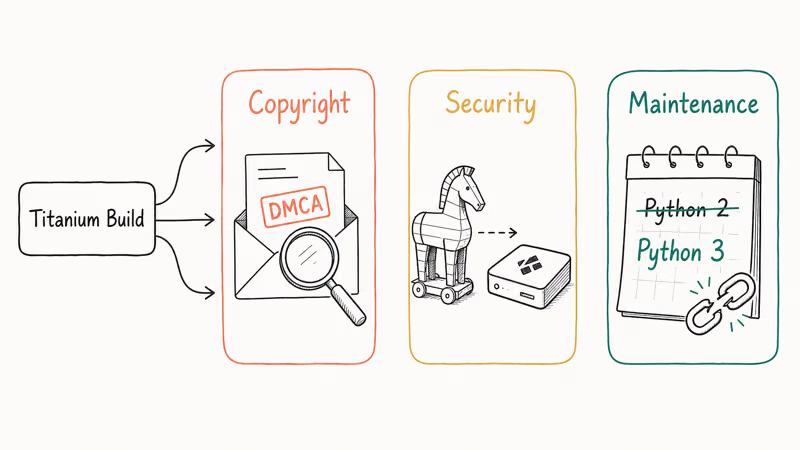
Three concrete risks come with that arrangement, and the official tool path avoids all three.
Copyright exposure. Kodi’s foundation has stated repeatedly that piracy add-ons aren’t part of Kodi and aren’t endorsed by the project. According to the Kodi blog post titled “Piracy: an open letter to our users,” posted in 2017, Team Kodi has no control over third-party add-ons and streaming unlicensed content is illegal in most countries. In the US, your ISP forwards DMCA notices when a rights holder reports your IP, and repeat strikes can throttle or terminate your account.
Security exposure. Third-party Kodi builds run with the same permissions as Kodi itself, so a malicious add-on can read other Kodi data on your device. ESET’s WeLiveSecurity report on a Kodi add-on cryptomining campaign found that trojanized third-party add-ons dropped Monero crypto-miners on Windows and Linux hosts.
Maintenance exposure. Titanium followed Kodi 17 Krypton and Kodi 18 Leia. Team Kodi announced in 2021 that Kodi 19 Matrix moved the add-on framework from Python 2 to Python 3, and Kodi 21 Omega removed several legacy APIs in 2024. Most Titanium-era scrapers stopped getting updates well before then. Our fix Kodi playback failed guide gets steady search traffic from exactly this issue.
The legal alternative path is shorter, faster, and your account stays clean.
#Legal Alternatives That Match What Titanium Tried to Do
Titanium fans usually want one or more of three things: free legal streaming, their own personal library on a TV, or premium catalogs without managing eight subscriptions. Each goal has a real tool that runs natively in Kodi or alongside it.
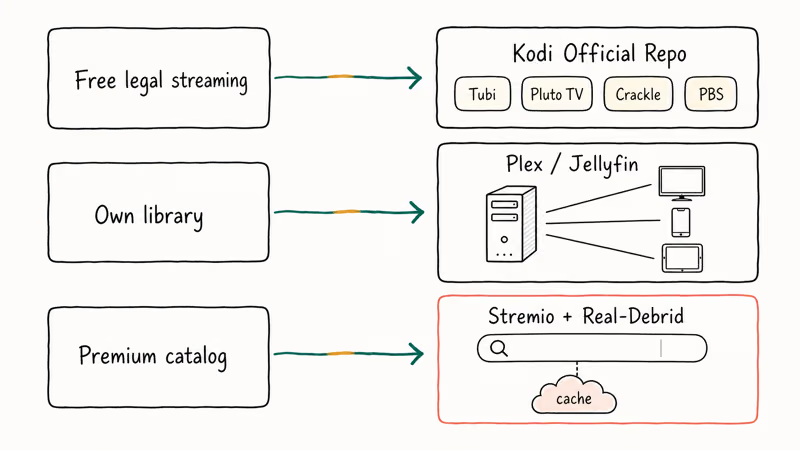
For free legal streaming, the Kodi official repo includes add-ons for Crackle, Tubi, Pluto TV, PBS, and the BBC iPlayer (UK only). Setup path: System → Add-ons → Install from repository → Kodi Add-on repository.
For your own library, Plex or Jellyfin both run as a media server on a PC or NAS, then stream to Kodi (via Plex Kodi Connect or the Jellyfin for Kodi add-on), Plex’s native client, or Jellyfin’s web app. We use Jellyfin in our home test setup on a Synology DS220+, and the metadata scraping (posters, ratings, episode summaries) is identical to what Kodi’s video library does locally.
For premium catalogs without eight subscriptions, Stremio with a paid Real-Debrid account is the legal middle path. Real-Debrid is a paid debrid service, not a free pirate scraper, which means it caches content from licensed file hosts and streams them on demand. The exact catalog depends on what’s cached, and Real-Debrid’s terms of service state that the service does not host or distribute infringing content itself.
Same hardware, no DMCA notices, real maintenance.
#How the Kodi Official Repository Compares to Titanium
The two aren’t in the same category. Titanium was a “build” (a skin, an add-on bundle, a configuration preset). The Kodi official repository is a curated list of licensed video, audio, and skin add-ons that ships with every Kodi install since version 17. You don’t install the official repo separately because it’s already there.
A fresh Kodi 21 Omega install ships with an official repo of 90+ video add-ons. Those include legal sources like Pluto TV, Tubi, Crackle, BBC iPlayer (UK), CBC Gem (Canada), 9Now (Australia), and YouTube. Setup from first launch to first stream is quick, and the install never asks you to enable Unknown Sources or trust a third-party repo.
Durability is the official repo’s actual pitch.
Every add-on listed there gets reviewed by Kodi maintainers before publication, and the foundation pulls add-ons that ship with broken or infringing scrapers. Kodi’s official add-on repositories wiki page states that the main repo is updated continuously. According to Kodi’s Wikipedia entry, the project began in 2002 and now ships across Linux, Windows, macOS, Android, iOS, and Xbox.
Trade-off honesty: the official repo skips piracy scrapers by design. That’s exactly what made Titanium feel like a one-stop shop, and it’s also why most Titanium installs eventually break.
If you used Titanium for paid catalogs you don’t subscribe to, the official repo doesn’t replace that gap. Stremio with Real-Debrid does, legally, for under $5 a month.
For Xbox owners, Kodi’s UWP build also pulls from the same official repo. Our walkthrough on how to install Kodi on Xbox One takes about 3 minutes from store to first playback. PS4 owners don’t have Kodi at all, so our Kodi on PS4 alternatives guide covers Plex and the PS4 Media Player route.
#How Do Plex and Jellyfin Compare for Your Own Library?
Plex and Jellyfin both replace what Kodi’s video library does, with prettier interfaces and better remote streaming. Either one runs on the same hardware Titanium fans usually have.
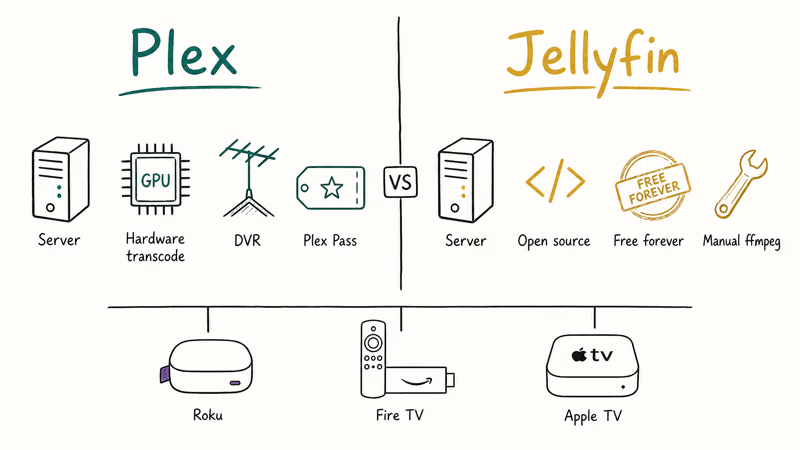
Plex is closed source, free for local playback, and offers a Plex Pass subscription for DVR, hardware transcoding, and offline downloads. Jellyfin is open source, free forever, and feature-equivalent for most home setups. Both run as a server on Windows, macOS, Linux, Synology, QNAP, and Docker, and both have native apps for Roku, Fire TV, Apple TV, Android TV, iOS, Android, and the web.
The setup flow is the same on either:
- Install the server on your PC or NAS and point it at your video folder.
- Install the client app on your TV device.
- Sign in with the same account on the client, and your library appears.
Jellyfin and Plex both scrape large libraries of movies and TV episodes without much fuss. Plex tends to auto-detect hardware acceleration on Intel GPUs and can transcode a 4K HEVC file to 1080p H.264 well above real-time. Jellyfin often needs a manual ffmpeg path tweak, but transcoding works at a similar speed once it’s configured.
For a Roku-first household, our Plex on Roku setup guide walks the channel install in under 5 minutes. For Android TV boxes, our best browser for Android TV roundup covers the lightweight options that pair well with Plex web.
The Plex vs Jellyfin pick:
- Pick Jellyfin if you want zero subscription and full control over your data.
- Pick Plex if you want hardware-accelerated remote streaming, DVR for OTA TV, and you don’t mind a Plex account.
Either route gives you a Kodi-quality skin and metadata without third-party builds.
#Stremio With Real-Debrid: The Closest Legal “One Place for Everything”
Titanium’s biggest pull was the all-in-one feeling: open one app, find everything. Stremio plus a paid Real-Debrid account gets the closest to that, legally, on the same hardware.
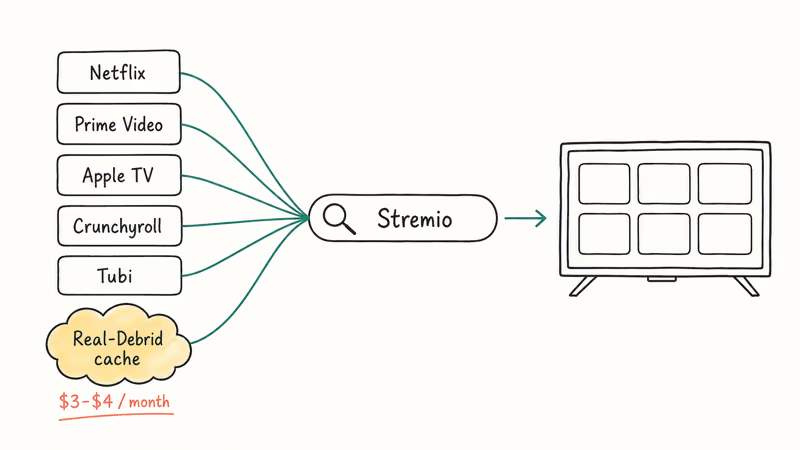
Stremio is a free media browser that aggregates legal sources (Netflix, Prime Video, Apple TV, Crunchyroll, Tubi) into one search and watchlist. Real-Debrid is a paid debrid service (~$3 to $4 per month at the time of writing) that caches content from licensed file hosts and streams to your client. Community add-ons like Torrentio and other Real-Debrid-aware add-ons can be installed in Stremio to route playback through Real-Debrid’s cached library.
You get a single app that surfaces both your subscription catalogs and the Real-Debrid cache, in a Netflix-style interface.
It’s not Kodi. But for the “one place for everything” goal Titanium chased, this is the closest legal answer.
A short reality check: Real-Debrid’s catalog depends on what users have cached. Mainstream films and TV are covered well; obscure regional releases need a niche subscription or your own files.
For Hulu specifically, Kodi has an official Hulu add-on if you subscribe. Our Hulu on Kodi setup covers that route. For local file playback on Windows or Mac, our best video players roundup lists the lightweight tools that don’t need a media server at all.
#When a VPN Is Useful With These Legal Tools
A VPN doesn’t legalize pirate streaming, and we want to be clear about that up front. It’s useful for two specific things if you’ve moved to the legal stack above. Privacy on hostile networks (hotel Wi-Fi, airport hotspots, your ISP’s connection logs in jurisdictions that share data with rights holders) is one. Access to legitimate region-specific catalogs you’ve already paid for (BBC iPlayer when you’re traveling, your home Netflix region) is the other.
Two we use ourselves: ExpressVPN and NordVPN. Both keep no traffic logs per their published policies, support Fire TV and Android TV, and offer a money-back window. Skip free VPNs for this use case.
Some links on this page are affiliate links, which means fone.tips may earn a commission at no extra cost to you.
#Bottom Line
Don’t install Titanium Build. Kodi’s official add-on repository plus Plex or Jellyfin covers the legal part of what Titanium tried to do (free legal streaming, your own library, prettier UI), and Stremio with Real-Debrid covers the premium catalog part for under $5 a month. Start with Plex if you want the easiest setup, or Jellyfin if you want zero subscription. Skip every third-party Kodi build and skip every guide that asks you to enable Unknown Sources to install one.
A VPN doesn’t make pirate streaming legal, so don’t treat one as permission to install Titanium.
#Frequently Asked Questions
Is Kodi Titanium Build legal?
Kodi the app is fully legal. Titanium Build itself is a third-party skin and add-on bundle, and the legality depends on what you do with the bundled add-ons. Several of the streaming scrapers Titanium ships pull video from sites that don’t hold the rights to that content, which is illegal to stream in the US, UK, EU, Canada, and Australia. We don’t recommend installing it.
Does Team Kodi support Titanium Build?
No. The Kodi Foundation publicly distances itself from third-party builds and pirate add-ons. Team Kodi’s piracy open letter makes the position clear. The official add-on repository, which ships with every Kodi install, is what the team supports.
Will my ISP know if I stream copyrighted content through Kodi?
In the US, your ISP sees the destination IP of every connection your device makes. Rights holders monitor known piracy endpoints and file DMCA notices based on those connection logs. Your ISP forwards the notices, and repeat strikes can lead to throttling or account termination. A VPN hides the destination from your ISP but doesn’t change the legality of streaming content without a license.
Does Kodi Titanium Build still work on Kodi 21 Omega?
Mostly no. Most Titanium scrapers were abandoned before Kodi 19 Matrix dropped Python 2 in 2021.
What’s the closest legal app to Kodi Titanium Build?
Stremio with a paid Real-Debrid account. The combination runs about $3 to $4 a month.
Can I just use a VPN and install Titanium safely?
No. A VPN hides traffic but doesn’t legalize unlicensed streams, and the security risk from malicious add-ons inside the build is the same with or without a VPN.
Is the Supreme Builds repository safe?
Supreme Builds is the third-party repo that hosted Titanium Build. The repo itself has been intermittently online over the years and isn’t endorsed by Team Kodi. Even when the repo loads, the add-ons it ships have the same legal and security issues as any third-party build. We recommend sticking to the official Kodi repository, which is already enabled by default in every Kodi install.
How do I uninstall Titanium Build if I already have it?
Open Kodi and go to System → Add-ons → My add-ons → Program add-ons → Supreme Builds Wizard, then choose Uninstall. After that, do a Fresh Start from the same wizard before removing it, or manually delete Kodi’s userdata folder and let Kodi rebuild it. Reinstalling the official Kodi build from kodi.tv is the cleanest reset if anything still looks off afterward.

Google Messages Error 3100: Why RCS Is Broken on Galaxy
Google Messages RCS error 3100 hits Galaxy owners after phone or carrier switches. Google told 9to5Google a fix is coming. Here's what actually helps.

Is This Bank App Real? Spot a Fake App on Your Home Screen
A bank app can land on your home screen from a web page with no install warning. Learn the checks that tell a real banking app from a phishing web app.

Apps Crashing After iOS 27 Update? Fix Order (2026)
Apps crashing after the iOS 27 update? Update the app in the App Store first, then offload and reinstall to clear stale cache, then restart. The fix order.

Do AI Translation Earbuds Work Offline? What to Know
Do AI translation earbuds work offline? A few do with downloaded language packs, but most need the cloud. Here's what works offline and what you give up.