How to Clear Discord Chat: 4 Methods to Delete Messages
Clear Discord chat 4 ways: close DMs, delete channel messages manually, run MEE6 bulk commands, or clone the channel. Step-by-step with API limits.
Quick AnswerDiscord has no native bulk delete. To clear chat, close a DM panel to hide direct messages from your sidebar, delete individual channel messages from their three-dot menu, or use a moderation bot like MEE6 with the !clear command to wipe up to 100 messages per request.
Clearing Discord chat takes more steps than most messaging apps because Discord pulled its native bulk-delete button from the desktop UI in 2017. The remaining options are manual clicks, a moderation bot, or a full channel clone. This guide walks through all four working methods, plus the limit each method runs into.
- Discord removed the native bulk-delete UI from its app in 2017 after admin mass-deletes overloaded shards; today’s only options are manual deletion, bots, or channel cloning.
- Closing a DM panel hides the conversation on your side only; the messages stay on Discord’s servers and the other user still sees the full thread.
- Manual deletion works fine for under 20 messages, but past that a moderation bot like MEE6 saves serious time.
- Discord’s bulk-delete API rejects any message older than 14 days, so bots can’t wipe older archives. Channel cloning is the only workaround.
- Cloning takes seconds to clear an entire channel, but every bot and webhook gets reset and has to be reinstalled in the new channel.
#What Are You Actually Deleting in Discord?
Discord stores two flavors of messages: direct messages between users and channel messages inside a server. Both live on Discord’s own infrastructure, not on your phone, which changes what “delete” means in each case.
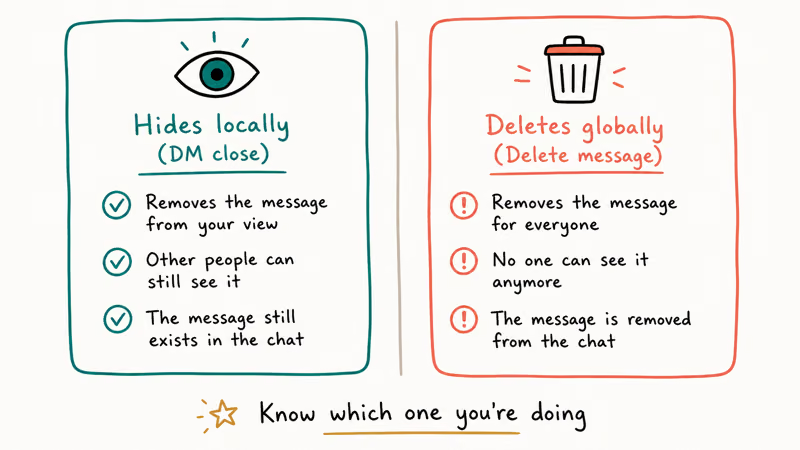
For channel messages, deletion is the real thing. The message is removed from the server history for every member who can see the channel, on every device, immediately, with no copy retained in the client. For DMs, deletion only removes your local copy of a single message; closing the conversation just hides the panel from your sidebar.
According to Discord’s permissions documentation, only users with the Manage Messages permission can delete other people’s messages in a channel. You always have the right to delete your own messages, but moderating someone else’s posts needs an explicit role grant.
Use these methods only on your own account or on servers where you have authorized moderator access.
Check roles first. Look at how to add roles in Discord and how to set up server rules before you start.
#How Do You Clear Direct Messages in Discord?
You can’t fully erase a DM thread from the other person’s view. What you can do is close the conversation panel on your side, which hides it from your DM list until either party sends a new message.
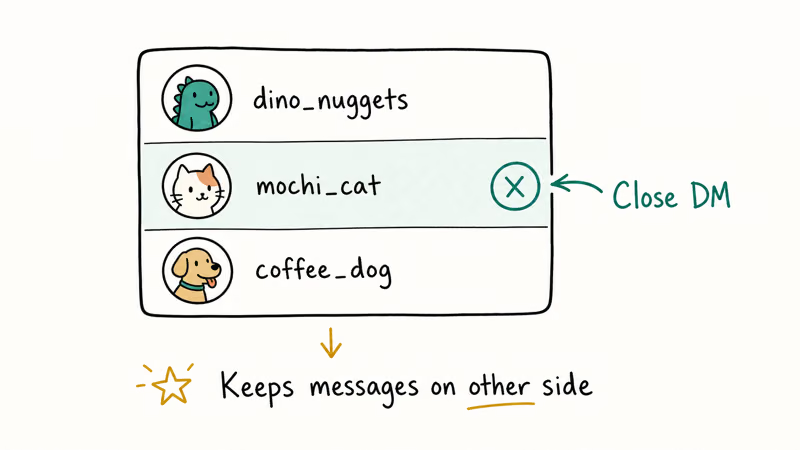
The Discord desktop app and the iOS Discord app behave the same way here. Here’s the click path:
- Open Discord and look at the left sidebar under Direct Messages.
- Hover your mouse over the conversation you want to hide. A small X appears on the right side of that row.
- Click the X. The conversation disappears from your sidebar with no confirmation prompt.
- To delete a single message you sent, hover the message, click the three-dot menu, and pick Delete Message.
There’s no undo button after you click X. Discord doesn’t show an “Are you sure?” dialog, so check twice before tapping.
The conversation reappears the moment either side sends a new message, since closing the panel doesn’t block the user. To stop the conversation completely, block them in their profile or appear offline on Discord so they don’t see you online.
Deleting a single message in a DM works differently than hiding the panel. The three-dot Delete option does a true deletion that removes the message from both your view and the recipient’s. Discord won’t notify the other person, though they may notice a gap if the message was visible to them.
#How to Delete Channel Messages One at a Time
Manual deletion is the right tool when you’re cleaning a single spam post, fixing a typo in a pinned message, or removing two or three off-topic replies. It’s clunky past 20 messages.
To delete a single message in a channel where you have Manage Messages:
- Open the channel and scroll to the message you want gone.
- Hover the message. A row of icons appears in the upper-right corner of the bubble.
- Click the three-dot More icon, then select Delete Message.
- Discord shows a confirmation dialog. Hold Shift while clicking Delete to skip future confirmations during the same session.
Deleting your own messages works the same way and doesn’t require Manage Messages.
On a busy channel, this takes several minutes of clicking. Past 50 messages, the bot method wins by an order of magnitude. The manual flow is the only option when bots fail to load or when cleaning up messages older than the 14-day API window.
#How to Bulk Delete Discord Messages With MEE6
MEE6 is the most-installed Discord moderation bot, with a !clear command that uses Discord’s bulk-delete API to wipe a chunk of recent messages in one shot. Other bots like Dyno, Carl-bot, and Discord’s own AutoMod handle similar tasks, but MEE6 is the easiest to install for first-time admins.
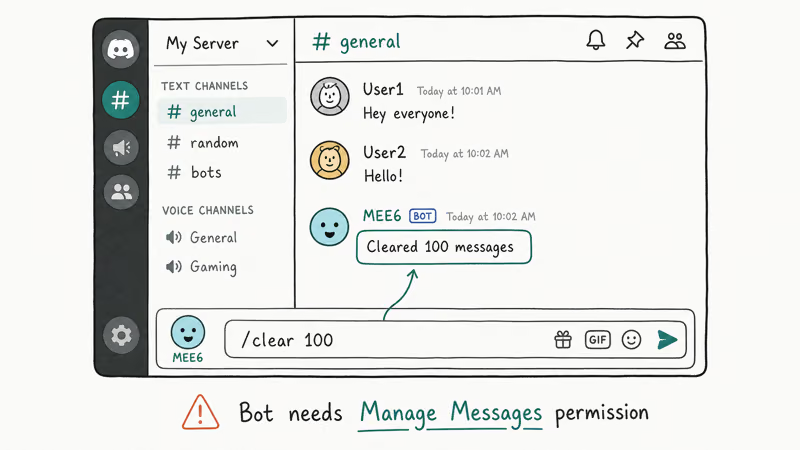
Discord’s developer reference states that the bulk-delete API accepts up to 100 messages per request and rejects messages older than 14 days. See the endpoint documentation for response codes. MEE6 wraps this endpoint, so it inherits both limits. The 14-day ceiling exists because Discord keeps recent messages in a hot cache, while older messages move to archive storage that’s costly to query in bulk, which is why even paid bots can’t get around it.
Setting up MEE6 and running a clear command:
- Sign into mee6.xyz using your Discord account. Authorize the OAuth scopes when prompted.
- Pick the server you want MEE6 to join. You need Manage Server permission on that server to add a bot.
- After redirect, open the MEE6 dashboard, find the Moderator Plugin, and toggle it on.
- Save the plugin settings. MEE6 joins your server and grants itself a default moderation role.
- Back in Discord, go to the channel you want to clean. Type
!clear 100and hit Enter. MEE6 deletes the most recent 100 messages.
You can pass a smaller number like !clear 25 for a lighter pass, or target a specific user with !clear @username 50 to wipe up to 50 messages from one person only. Anything bigger than 100 in a single command makes MEE6 issue multiple API calls, and Discord rate-limits those calls, so large jobs take longer.
A command like !clear 500 finishes in seconds across a handful of API calls. The bot leaves no trace beyond an auto-deleted confirmation message.
If MEE6 isn’t your preference, how to add bots to Discord covers the install flow for Dyno and other alternatives. After cleanup, consider setting up a welcome channel so newcomers land somewhere tidy.
#How to Clone a Channel to Wipe All Messages
Cloning is the only method that works on messages older than 14 days because it doesn’t really delete anything. It creates a fresh empty channel and dumps the old one. When you delete the original channel, the entire message history goes with it. Use this approach when an entire channel has gone off the rails or when you’re starting a new season of content.
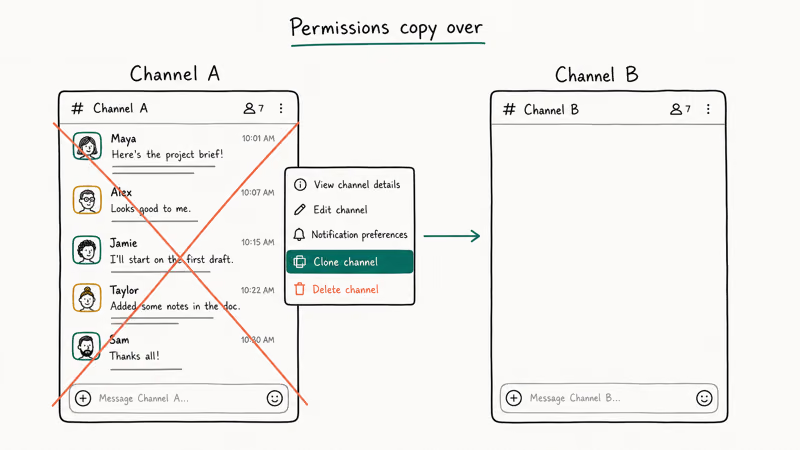
Before you clone, do three quick prep steps:
- List every bot, webhook, and integration tied to the channel. Cloning copies the channel’s settings, but bots and webhooks don’t carry over.
- Note any pinned messages or important reference posts. Save copies of anything you want to keep.
- Review the channel’s permission overrides. Cloning preserves these, but it’s worth a quick verification after the swap.
Then run the clone:
- Right-click the channel in the sidebar (or long-press on mobile).
- Select Clone Channel from the context menu.
- Confirm or rename the new channel, then click Create Channel.
- Drag the new channel into the position you want in the sidebar.
- Right-click the original channel and choose Delete Channel, then confirm.
The new channel is empty with the original permissions intact. Reinstall any bots and reconfigure webhooks against the new channel ID. That setup cost is the trade for being able to wipe years of history in moments.
Discord’s community guidelines page states that server admins are responsible for moderating content within their servers, which makes the clone trick a reasonable nuclear option when a thread has gone past saving. Use it when manual cleanup would take hours and bot clearing can’t reach old enough messages.
If you also need a deeper server audit, how to report someone on Discord covers handling rule-breaking content, and Discord text formatting helps keep new channels readable from day one.
#Method Comparison at a Glance
| Method | Best for | Speed | Hard limit |
|---|---|---|---|
| Close DM panel | Hide a personal conversation on your side | One click | Other user still sees full thread |
| Manual delete | 1-5 specific messages in a channel | ~8 seconds per message | One at a time |
| MEE6 bulk delete | Recent channel cleanup, 20-1000 messages | Seconds for a few hundred | 14-day Discord API ceiling |
| Channel clone | Wiping an entire channel's history | ~30 seconds plus bot reinstall | Loses bots, webhooks, message archive |
#Recovering Deleted Discord Messages
Once a message is removed via the API or UI, it’s gone from Discord’s user-facing endpoints. The deletion is permanent for anyone reading the channel through Discord’s apps.
Two caveats: audit-log bots keep snapshots, and Discord retains backend logs for moderation.
If your account itself was compromised and someone deleted things from your DMs or your server, that’s a different problem. The Discord got hacked guide covers account recovery and what to check first. According to Discord’s Wikipedia entry, the platform had about 150 million monthly active users as of 2024, which means automated abuse and account takeover are common enough that Discord publishes a dedicated recovery flow.
#Bottom Line
Start with MEE6 if you’re trying to clear a busy channel and the messages are under two weeks old. The !clear 100 command handles the most common cleanup case in under 10 seconds, and you only need to install the bot once per server. Fall back to channel cloning when MEE6 hits the 14-day API wall, and reserve manual deletion for cleaning up 1 to 5 specific messages.
#Frequently Asked Questions
Can you delete someone else’s messages on Discord?
Only with Manage Messages permission. Server owners always have it, and other roles need it explicitly granted.
Are deleted Discord messages recoverable by users?
No. Once a message is removed through Discord’s UI or API, it’s gone from the user-facing app on both web and mobile. Server-side data retention follows Discord’s privacy policy, but regular users can’t request access to deleted content; even server admins lose the message body once it leaves the channel. Audit-log bots that snapshot messages before deletion are the only way to keep a copy, and they need to be installed and running before the deletion happens.
Can bots delete Discord messages older than 14 days?
No bot can. The 14-day API ceiling applies to MEE6, Dyno, Carl-bot, and every other moderation tool. Clone the channel for older history.
How many messages can MEE6 delete at once?
MEE6 follows Discord’s 100-messages-per-API-call ceiling. Bigger jobs like !clear 500 get chained across multiple calls, so they take longer. The 14-day age cap still applies on every call, which means a mixed-age channel can stop deleting mid-job once it hits a message older than two weeks.
Does Discord notify users when their messages are deleted?
No notification fires. The deleted message just disappears from view.
Can you delete an entire Discord server in one click?
Yes, with one safety prompt. Open Server Settings > Overview, scroll to the bottom, and click Delete Server. Discord asks you to retype the server name to confirm, then removes every channel, message, role, and member at once. There’s no undo and no ownership transfer mid-deletion, which means a server you accidentally delete is gone for good.
How do you clear Discord chat on mobile?
The same flows work. Long-press a message for delete, swipe a DM thread to close it, and use bot commands for bulk cleanup.

Google Messages Error 3100: Why RCS Is Broken on Galaxy
Google Messages RCS error 3100 hits Galaxy owners after phone or carrier switches. Google told 9to5Google a fix is coming. Here's what actually helps.

Is This Bank App Real? Spot a Fake App on Your Home Screen
A bank app can land on your home screen from a web page with no install warning. Learn the checks that tell a real banking app from a phishing web app.

Apps Crashing After iOS 27 Update? Fix Order (2026)
Apps crashing after the iOS 27 update? Update the app in the App Store first, then offload and reinstall to clear stale cache, then restart. The fix order.

Do AI Translation Earbuds Work Offline? What to Know
Do AI translation earbuds work offline? A few do with downloaded language packs, but most need the cloud. Here's what works offline and what you give up.