How to Use Discord Text Formatting: Bold, Italics, and More
Learn Discord text formatting with Markdown: bold, italics, strikethrough, underline, code blocks, and colored text, with copy-paste examples.
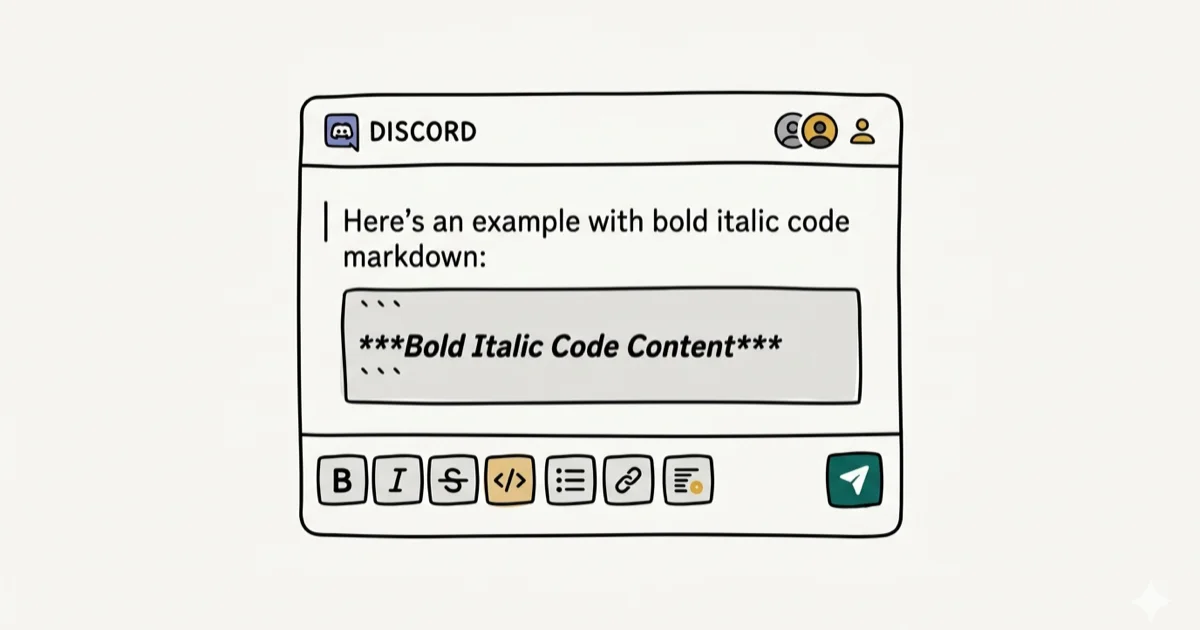
Quick AnswerDiscord uses Markdown for text formatting. Wrap text in double asterisks for bold, single asterisks for italics, double underscores for underline, and double tildes for strikethrough. Code blocks use backticks.
Discord’s chat supports Markdown-based text formatting, letting you bold, italicize, underline, and strikethrough messages without any special menus. Every formatting shortcut covered here works the same way on Discord for Windows and the iOS app, in text channels and DMs alike.
- Discord uses Markdown syntax: wrap text with symbols to change its appearance instantly
- Bold uses double asterisks, italics use single asterisks, underline uses double underscores
- Strikethrough requires two tildes on both sides of the text
- Code blocks use single backticks for inline code and triple backticks for multi-line blocks
- Colored text works through syntax code blocks, since Discord has no native color picker
#Markdown: The System Behind Discord Text Formatting
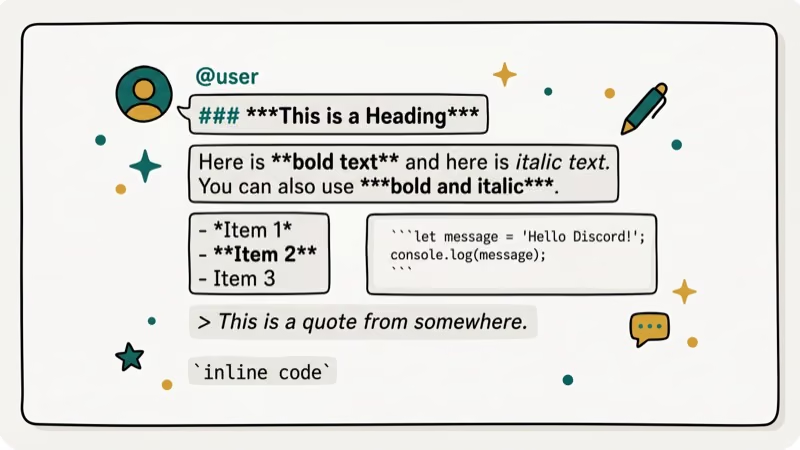
Markdown is a lightweight text-formatting language created in 2004 by John Gruber and Aaron Swartz. It turns plain-text symbols into formatted output, so **bold** becomes bold with no toolbar clicks needed.
Markdown’s official specification states that the language was designed to stay readable even in raw form, with every formatting symbol being a standard keyboard character. Discord adopted Markdown because it works across every device without relying on rich-text editors, which don’t translate cleanly through a real-time chat protocol.
Because Markdown relies only on plain keyboard characters, the formatting symbols listed below render identically across Windows, Mac, iOS, and Android. That cross-platform consistency is why platforms like Discord, GitHub, and Reddit all chose the same standard. The same guide on strikethrough in Gmail covers a different Markdown implementation for comparison.
#Basic Formatting Symbols: Bold, Italics, and Underline
Here’s every basic shortcut, with examples you can copy directly into Discord.
#Bold Text
Wrap text in **double asterisks**. Typing **great day** produces great day.
Use Shift + 8 to type an asterisk on most keyboards.
#Italics
Use *single asterisks* or _single underscores_. Both *great day* and _great day_ render as great day.
#Bold Italics
Combine both with ***triple asterisks***. Typing ***great day*** renders the text bold and italic at the same time.
#Underline
Use __double underscores__. Typing __great day__ displays the text with an underline.
#Discord Strikethrough
Use ~~double tildes~~. Typing ~~great day~~ strikes through the text. The tilde key sits in the top-left corner of most keyboards below Escape. Press Shift + ~ to type it.
You can layer styles. __*great day*__ = underlined italic; __**great day**__ = underlined bold; __***great day***__ = underlined bold italic. All three examples work in Discord’s current desktop and mobile clients.
To escape Markdown and see the raw symbols, type a backslash (\) before the formatting character. For example, typing \**bold** shows the asterisks instead of rendering bold text.
#How Do Discord Code Blocks Work?
Code blocks preserve spacing and use a monospace font. They’re useful for sharing terminal commands, error logs, and code snippets without Discord mangling the formatting.
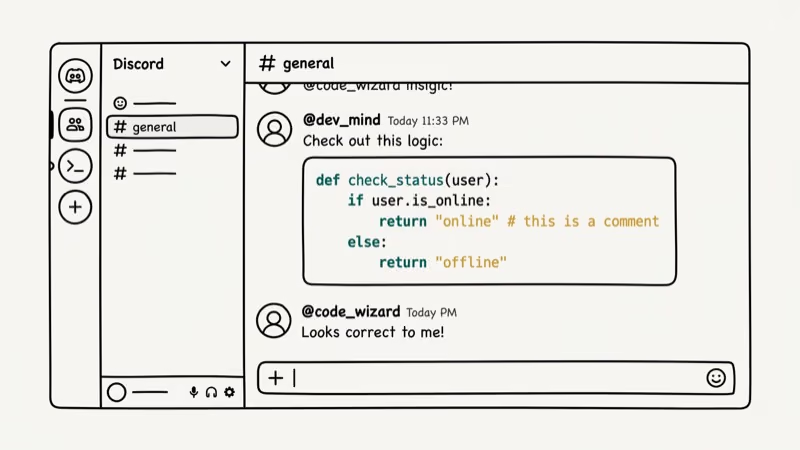
Single-line code blocks wrap text in a single backtick. Typing `ping discordapp.com` places the text in a gray box. The backtick key sits below Escape on most keyboards, just to the left of the 1 key.
Multi-line code blocks use triple backticks at the start and end. Discord keeps the entire block in a monospace box regardless of how many line breaks appear inside it.
#Adding Colored Text in Discord
Discord doesn’t include a native color picker. You can get colored output by specifying a syntax language inside a triple-backtick code block, which triggers Highlight.js, the library Discord uses to colorize code.
Discord’s official support article 210298617 confirms that syntax color in code blocks is a side effect of Highlight.js, not an officially documented feature. Wikipedia’s Markdown entry states that Markdown launched in 2004 and became widely adopted across platforms including Discord, GitHub, and Reddit.
On Discord desktop, four methods produce consistent color output:
| Color | Method | Syntax |
|---|---|---|
| Red | diff | minus sign before the line |
| Green | diff | plus sign before the line |
| Yellow | fix | no extra symbols |
| Blue | ini | text in square brackets |
Mobile Discord strips most syntax colors from code blocks. Only the desktop and web apps produce reliable color output.
Some color methods also can’t handle spaces in the target phrase, which limits what text you can colorize.
#Limitations and Known Issues with Discord Formatting
There are real constraints worth knowing before you invest time experimenting.
No font switcher. Discord uses one typeface everywhere, full stop. You can’t switch to a serif or display font through any Markdown trick or setting.
No native color picker. Colored text only works via the syntax workaround described in the section above.
Some older CSS and Apache color methods no longer work. On current Discord clients, they produce inconsistent results across different themes and client versions. Stick to diff and fix.
Related: the Text to Speech on Discord guide covers another formatting feature that many users overlook. The TeamSpeak vs Discord comparison shows how Discord’s approach to communication differs from older voice tools.
For a cross-platform view, our Discord vs Telegram article covers how Telegram handles Markdown differently.
#Should You Use Third-Party Formatting Tools?
Some Discord bots offer extended formatting options like custom fonts or colors through embed messages. MEE6 and Dyno, for example, let server admins post embedded messages with rich formatting that goes beyond standard Markdown. According to Discord’s developer portal, embedded messages support titles, descriptions, color sidebars, and field sections that plain Markdown can’t produce.
That said, bots only create embeds for server owners and admins, not regular users. For everyday formatting in chat, the Markdown shortcuts above are the only option. If you send a lot of long messages, our how to record a Discord call guide covers another useful feature for power users.
#Bottom Line
Discord’s Markdown formatting covers everything most users need. Bold, italics, underline, strikethrough, and code blocks all work instantly from any keyboard. For colored text, the diff and fix syntax-highlight workarounds are the most reliable options today. Don’t waste time on CSS or Apache methods that no longer produce consistent results on current Discord clients.
#Frequently Asked Questions
Does Markdown work in all Discord channels?
Yes, Markdown formatting works in text channels, voice channel text chat, DMs, and group DMs. The only exception is slash command inputs, which use their own format and don’t render Markdown.
Do other users need to know Markdown to read my formatted messages?
No. Discord renders Markdown automatically for everyone. The sender types the symbols; the reader sees the formatted result with no extra steps required.
Can I combine bold, italic, and underline in one message?
Yes. Using triple asterisks inside double underscores produces text that is bold, italic, and underlined at the same time. There’s no limit to how many formatting layers you can stack in a single message.
Can I remove formatting after sending a message?
You can edit the message afterward by pressing the up arrow key or hovering over it and clicking Edit. Removing the formatting symbols from the raw text will remove the formatting for everyone reading the message.
Why doesn’t colored text work on my phone?
Discord’s mobile app renders the code block container but typically strips Highlight.js syntax colors. The color methods described above only work reliably on Discord’s desktop and web applications.
What’s the easiest way to type a backtick?
On most keyboards, the backtick key is in the top-left corner below Escape. Press it once for a single backtick and type three in a row for a triple-backtick code block opener.
What happens if I use the wrong number of asterisks?
Discord processes the symbols literally. If you open with one asterisk and close with two, the extra asterisk shows as a visible character in the sent message. Always match the opening and closing symbol count exactly.
Can I use Markdown in my Discord username?
No. Discord usernames and server nicknames render as plain text only. Any Markdown symbols you type in a username will appear literally rather than as formatted output.

Google Messages Error 3100: Why RCS Is Broken on Galaxy
Google Messages RCS error 3100 hits Galaxy owners after phone or carrier switches. Google told 9to5Google a fix is coming. Here's what actually helps.

Is This Bank App Real? Spot a Fake App on Your Home Screen
A bank app can land on your home screen from a web page with no install warning. Learn the checks that tell a real banking app from a phishing web app.

Apps Crashing After iOS 27 Update? Fix Order (2026)
Apps crashing after the iOS 27 update? Update the app in the App Store first, then offload and reinstall to clear stale cache, then restart. The fix order.

Do AI Translation Earbuds Work Offline? What to Know
Do AI translation earbuds work offline? A few do with downloaded language packs, but most need the cloud. Here's what works offline and what you give up.