How to Report Someone on Discord in 2026: 4 Methods
Report harassment, spam, or threats on Discord with 4 official methods. Step-by-step guide for desktop, mobile, and the Trust & Safety center.
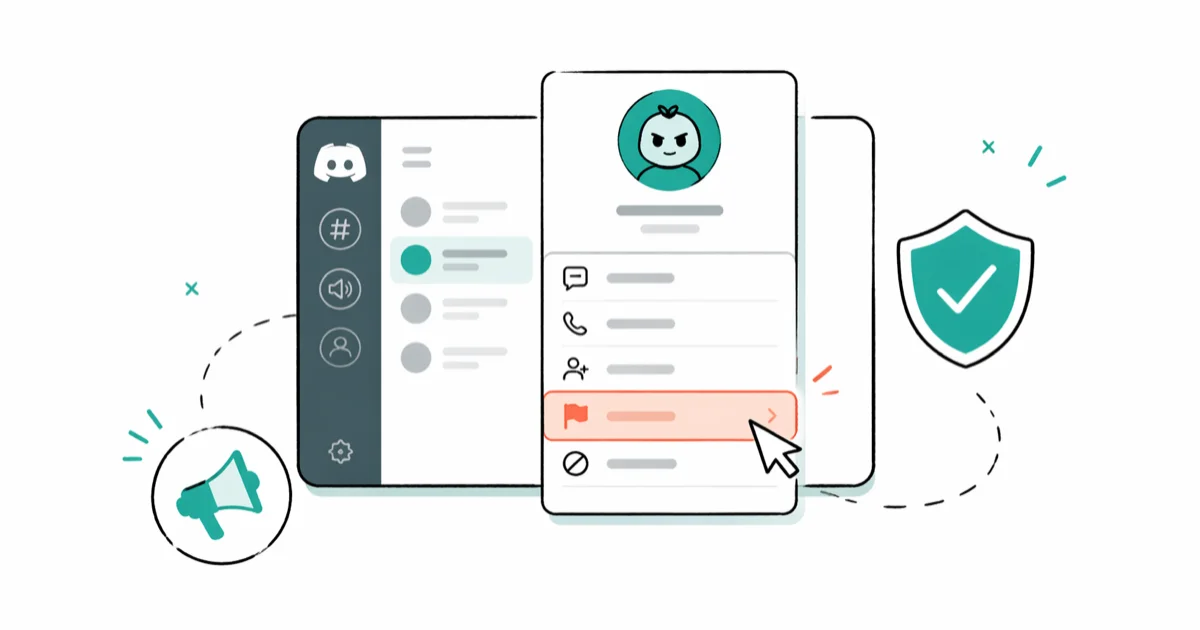
Quick AnswerRight-click any harmful message on Discord, pick Report Message, choose the violation category, and submit. For account-level abuse or threats, file a separate request at the Trust & Safety center with the user ID and message link attached.
Knowing how to report someone on Discord matters when a user crosses the line from rude into harassment, spam, threats, or sharing content that breaks the platform’s rules. Discord built a Report Message tool directly into desktop and mobile, plus a separate Trust & Safety form for account-level cases.
The right tool depends on whether you’re flagging a single message or asking for action against a user or server.
- Discord’s right-click Report Message tool works on desktop, web, and the mobile apps; it sends the message text, user ID, and channel context to Trust & Safety automatically.
- For account bans, threats of self-harm, doxxing, or wide-scale server abuse, file a separate request at the Trust & Safety center (dis.gd/request) since in-app reports only cover individual messages.
- Turn on Developer Mode in User Settings to copy user IDs, server IDs, and message links by hand when the in-app tool isn’t enough.
- Discord doesn’t notify the reported user, and most reports are reviewed in batches; complex cases can take several days.
- False reports break Discord’s Community Guidelines and can trigger action on your own account, so attach evidence and stay factual.
#When Should You Report Someone on Discord?
Not every annoying message belongs in a Trust & Safety queue. Block, mute, or kick first when the issue is personal taste or a small server dispute. Save reports for actual rule violations.
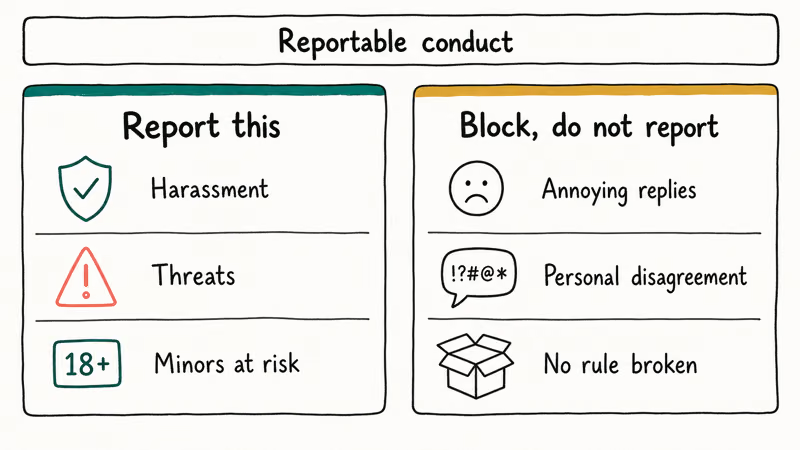
According to Discord’s Community Guidelines, reportable behavior includes harassment, hate speech, threats of violence, spam, doxxing, sharing non-consensual intimate imagery, promoting self-harm, sharing CSAM (which is also reported to law enforcement), malware distribution, and IP infringement. If the conduct fits any of those buckets, the in-app or Trust & Safety report path is the correct route.
If the message is unpleasant but not against the rules, use lighter tools first.
Right-click the user’s name and pick Block to hide their messages and DMs across every shared server. Server owners can kick or ban from the Server Settings > Members panel. The block does not notify the other person, but they can usually figure it out from missing presence.
A quick honesty check before you file: would a moderator who doesn’t know either of you call this behavior a rule break? If the answer is “probably not,” skip the report and use a server-level mod tool or just walk away from the channel.
Context helps too. According to Wikipedia’s entry on Discord, the platform launched in 2015 and expanded from gaming chat into study groups, professional servers, charity drives, fan communities, and large public hubs, so the conduct you’ll run into spans a much wider range than the gaming-only days. A tool built for one community has to cover them all, which is why Discord’s categories feel broad and picking the specific one helps reviewers route the report.
#How to Report a Message on Desktop or Browser
The fastest reporting path on Discord desktop and web is the built-in Report Message menu. The same basic flow applies in the desktop app and the browser version, so you don’t need to switch devices just to file a single-message report.
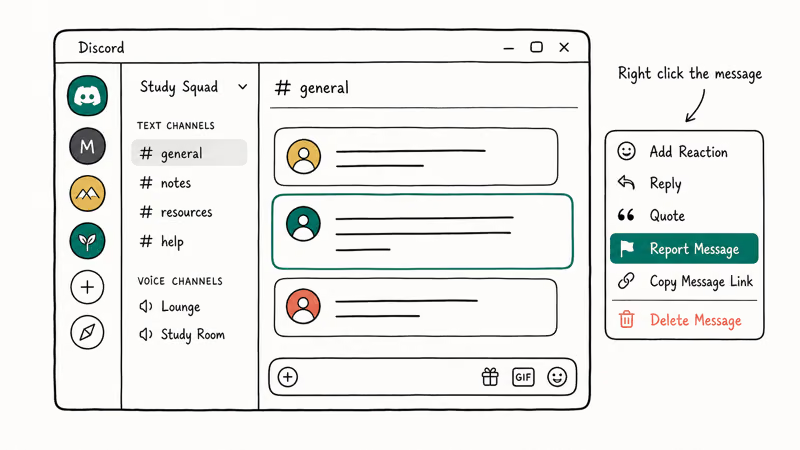
- Open the channel and find the message you want to report.
- Hover over the message until the action toolbar appears in the top-right corner.
- Click the three-dot menu (⋯) on the message.
- Pick Report Message from the menu.
- Select the violation category that matches what happened. According to Discord’s Trust & Safety guide, matching the most specific category is better than using a general “other” bucket because reports get routed to specialist queues.
- Add a short note if Discord asks for context. Keep it factual: what was said, who it targeted, why it breaks the rule.
- Click Submit Report.
Discord captures the message text, the channel name, the server ID, the author’s user ID, and a timestamp automatically. You don’t need to attach anything else for a single-message report.
No ping goes to the reported user. Blocking and reporting are separate.
#How to Report Someone From the Discord Mobile App
The mobile flow is shorter than desktop because the menu is finger-friendly and opens directly from a long-press on the message.
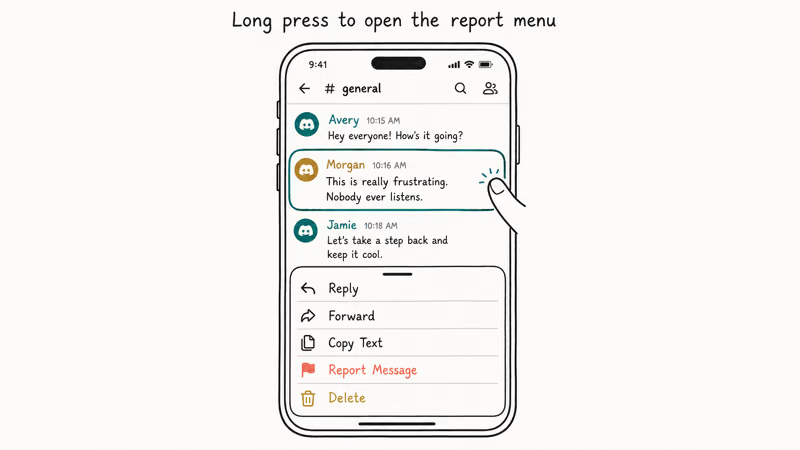
Discord’s iPhone and Android apps use the same long-press reporting pattern for individual messages.
- Open Discord on your iPhone or Android device and find the offending message.
- Long-press the message until the context sheet slides up.
- Tap Report Message (it’s near the bottom of the sheet, often colored red).
- Choose the violation category, the same set as desktop.
- Add a one or two sentence description if the screen offers a text box.
- Tap Submit.
After submission, Discord may show a brief confirmation that the report was sent.
Two mobile-specific notes worth knowing. First, if you don’t see Report Message in the long-press menu, you’re probably long-pressing your own message, since Discord hides Report on messages you sent. Second, the mobile app does not need Developer Mode for the in-app Report button, because the user ID and message link are attached automatically behind the scenes.
#How to Submit a Report to Discord’s Trust & Safety Center
Some situations don’t fit a single-message report. Use the standalone Trust & Safety request form when the issue is account-level, server-wide, or involves content that’s no longer visible to you.
The form lives at dis.gd/request. According to Discord’s Safety page, this is the primary intake channel for account-level abuse, large server reports, transparency requests, and law-enforcement-style escalations.
Here’s the path:
- Open dis.gd/request in any browser. You don’t need to be signed into Discord.
- Pick the topic that fits. Most reader cases land in Trust & Safety.
- Select the specific issue, such as harassment, threats, NSFW exposure, IP infringement, or self-harm concern.
- Enter the email tied to your Discord account in the contact field.
- Add the user ID, server ID, message link, or server invite if you can grab them. The next section covers how.
- Paste a clear description: dates, what happened, who was targeted, and any screenshots you saved.
- Hit Submit.
You’ll get an automated confirmation in your inbox within a few minutes, with a ticket number. Discord’s team replies through that thread when they need more detail.
After submitting the form, expect an automated acknowledgement first. Any follow-up depends on the report category, queue load, and whether Trust & Safety needs more detail.
For threats of imminent self-harm, the Trust & Safety form has a dedicated Self-Harm Concerns category that routes faster. If someone is in immediate danger, contact local emergency services first, because Discord’s team can’t replace a 911 or local equivalent call.
#How Do You Find User IDs, Server IDs, and Message Links?
The in-app Report button grabs IDs for you, but the Trust & Safety form sometimes asks you to paste them by hand. That’s where Developer Mode comes in.
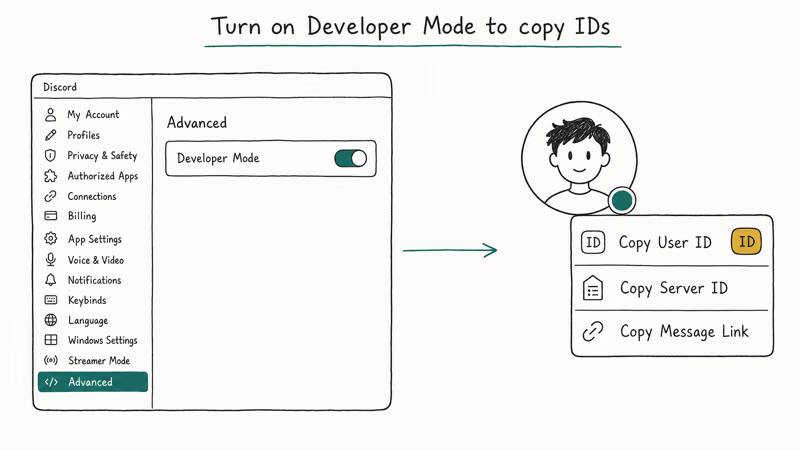
To turn it on, open Discord, click the gear icon next to your username, scroll to Advanced in the User Settings sidebar, and toggle Developer Mode to on. Now every right-click menu has Copy ID options.
| What you need | Where to right-click | Menu option |
|---|---|---|
| User ID | The username or avatar of the user | Copy User ID |
| Message link | The message itself | Copy Message Link |
| Channel ID | The channel name in the sidebar | Copy Channel ID |
| Server ID | The server icon on the far-left rail | Copy Server ID |
Table: Each ID type and where to grab it after enabling Developer Mode.
User IDs are stable. Even if the reported person changes their display name or username, the numeric ID stays the same, so the Trust & Safety team can still trace the account. That’s the main reason Discord’s form asks for the ID rather than the name.
On the mobile app, the flow is similar but the toggle lives at User Settings > Behavior > Developer Mode on iOS and User Settings > App Settings > Behavior > Developer Mode on Android. Once it’s on, long-pressing usernames or messages shows the Copy ID option.
#After You Submit: Discord’s Trust & Safety Review Process
Most reports go into a triage queue.
Discord’s Trust & Safety team prioritizes safety-critical content — threats, CSAM, self-harm — ahead of softer violations. Discord announced in their 2023 Transparency Report that their automated systems and human reviewers together handle millions of reports per quarter, with response times depending on category severity, so a hateful DM and a spam mention rarely move at the same speed even if you submit them in the same hour.
You won’t always hear back. Discord’s policy is to not share the outcome of every individual report, especially when the reviewed account belongs to someone else. You’ll get a reply if Discord needs more information from you, or if the reported user appealed and the appeal touches your report.
For the reported user, possible outcomes include a warning, temporary account suspension, permanent ban, or no action if Trust & Safety decides the content didn’t break a rule. Server-level reports can also trigger server bans or owner contact.
Repeat-offender patterns help your case. If the same person keeps targeting you after a report, file again with the new evidence each time, since clusters of reports are easier for Trust & Safety to act on than a single isolated one. While you wait, block the user, leave shared servers if you can, and lock down your DM settings under Privacy & Safety so only friends can message you.
False or vindictive reports are themselves a violation. Submitting fake reports to harass someone, mass-reporting an account in coordination with others, or claiming a rule break you know didn’t happen can get your own account actioned. Keep reports honest and evidence-based.
#Bottom Line
Use the right-click or long-press Report Message button for any single rule-breaking message. It’s the path Discord’s reviewers expect, and IDs attach automatically.
Save the dis.gd/request Trust & Safety form for account bans, server-wide abuse, threats of self-harm, or anything where the content is already gone but the user shouldn’t be. Turn on Developer Mode once so the form fields are easy to fill, and don’t expect a public outcome since Discord acts quietly. If the same person keeps targeting you, block them, leave shared servers, and submit a fresh report with new evidence each time.
For other Discord situations, see our related guides:
- Fixing the Discord overlay when it stops working
- Discord vs Teamspeak comparison
- Steps to take if your Discord account gets hacked
- How to leave a server quietly
#Frequently Asked Questions
Can you report someone on Discord anonymously?
The reported person never sees your username, server-mates aren’t notified, and there’s no public log of who filed a report. Discord’s Trust & Safety team can see who submitted the report internally, since they sometimes need to ask follow-up questions through the email tied to your account. That contact stays inside the review process.
Does Discord tell the person they were reported?
No. Discord does not send any notification, message, or warning to the reported account telling them a specific user reported them.
If the report results in a warning or suspension, the person sees the action, but not who reported it.
How long does Discord take to act on a report?
It depends on category and queue load. Reports tagged for self-harm, CSAM, or imminent violence get reviewed fastest, often within hours. General harassment or spam reports can take several days. Reports filed during major incident waves (server raids, mass spam events) can stretch longer because the queue backs up.
What if I reported someone by mistake on Discord?
Open a new Trust & Safety request at dis.gd/request, reference the original ticket number from your email confirmation, and explain that the report was a mistake. Be specific: say which message and which user, and why you don’t believe it broke a rule. Discord’s team will note the correction. There’s no penalty for one honest mistake; the rule against false reports targets coordinated or vindictive patterns.
Can I report a whole Discord server, not just a person?
Yes. Use the dis.gd/request form and pick the option for reporting a server. You’ll be asked for a server invite (or server ID) and a short description. Whole-server reports help Trust & Safety shut down communities built around abuse.
Should I report someone who’s clearing Discord chat to hide evidence?
If you suspect someone deleted messages to cover harassment or scams, mention it in your Trust & Safety report. Discord’s team retains messages on their backend for some time even after a user deletes them client-side, so the evidence may still exist on Discord’s side. Submit what you remember plus the user ID, and Trust & Safety can check the server logs. The act of clearing a chat by itself isn’t against the rules.
What’s the email for reporting Discord abuse?
Discord doesn’t use a public abuse email anymore. The old abuse@discordapp.com address pre-dates the move to the Trust & Safety form. Filing at dis.gd/request is the supported route and creates a tracked ticket. Random emails to support@discord.com that aren’t safety-related often get pointed back to the same form.

Google Messages Error 3100: Why RCS Is Broken on Galaxy
Google Messages RCS error 3100 hits Galaxy owners after phone or carrier switches. Google told 9to5Google a fix is coming. Here's what actually helps.

Is This Bank App Real? Spot a Fake App on Your Home Screen
A bank app can land on your home screen from a web page with no install warning. Learn the checks that tell a real banking app from a phishing web app.

Apps Crashing After iOS 27 Update? Fix Order (2026)
Apps crashing after the iOS 27 update? Update the app in the App Store first, then offload and reinstall to clear stale cache, then restart. The fix order.

Do AI Translation Earbuds Work Offline? What to Know
Do AI translation earbuds work offline? A few do with downloaded language packs, but most need the cloud. Here's what works offline and what you give up.