How to Enroll in Windows 10 ESU for Free: 2026 Guide
Microsoft's free Windows 10 ESU enrollment covers security updates through October 13, 2026. Here are three paths to enroll without paying $30.
Quick AnswerOpen Settings > Update & Security > Windows Update, click Enroll now, then pick Windows Backup sync or redeem 1,000 Microsoft Rewards points. Free ESU covers security updates through October 13, 2026.
If you can’t upgrade your PC to Windows 11, Microsoft’s Windows 10 Extended Security Updates program is your one-year reprieve, and two of the three enrollment paths are free: sync, Rewards points, and the paid option.
- Windows 10 free Extended Security Updates run through October 13, 2026 for any Windows 10 22H2 PC that signs in with a Microsoft account
- Three enrollment paths exist: sync Windows Backup to OneDrive (free), redeem 1,000 Microsoft Rewards points (free), or pay roughly thirty US dollars for a one-time license that covers up to ten devices
- Local accounts can’t enroll without linking a Microsoft account, child accounts are blocked entirely, and the account must hold administrator rights
- Signing out of your Microsoft account for more than 60 consecutive days breaks the free sync-path coverage until you sign back in
- European Economic Area residents enroll free without the OneDrive sync requirement under a separate regional carveout
#Who Qualifies for Free Windows 10 ESU?
Eligibility is narrower than the marketing implies. According to Microsoft’s Extended Security Updates page, the consumer program supports Windows 10 Home, Pro, Pro Education, and Pro for Workstations, but only on version 22H2 with the latest cumulative update installed. Older builds like 21H2, 2004, and 1909 can’t enroll. There isn’t a consumer-channel upgrade path for Windows 10 Enterprise or Education, and the Enroll now button stays hidden on those SKUs even when they’re fully patched.
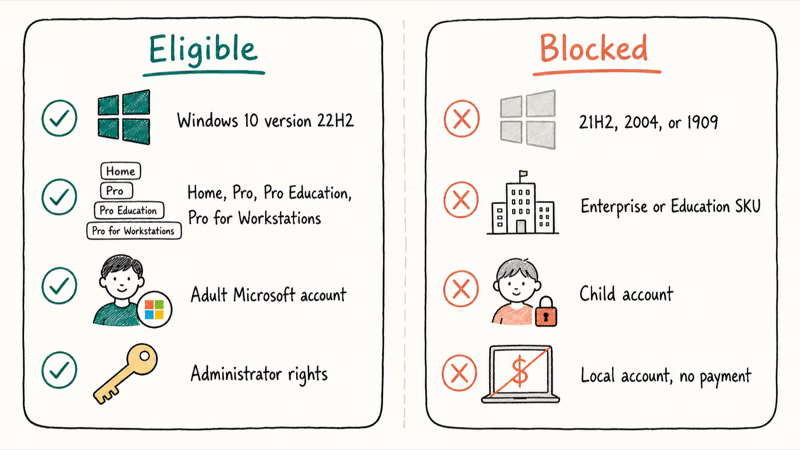
The account rules trip up most readers.
The Microsoft Learn enrollment guide states that the signed-in Microsoft account must have administrator privileges on the PC and can’t be a child account. If you manage a family device with Windows 10 parental controls, a child profile sees the Enroll now wizard but is blocked from completing it. Local Windows accounts, including ones still using the original installer-created profile, must either link a Microsoft account or pay the thirty-dollar ESU fee.
There’s one regional carveout. Microsoft Learn confirms that European Economic Area residents receive free Extended Security Updates without the Windows Backup sync requirement, a concession driven by EU competition rules.
Pre-flight cleanup matters because the wizard needs a healthy update pipeline. If your PC has been slow on Windows 10 for months or your update cache is stuck on a stale download, fix that first. The Enroll now button hides behind a fully patched 22H2 build, not a half-patched one. A non-activated install isn’t going to work either, so activate Windows 10 first if your taskbar shows the licensing watermark.
#Path 1: Enroll by Syncing Settings to OneDrive
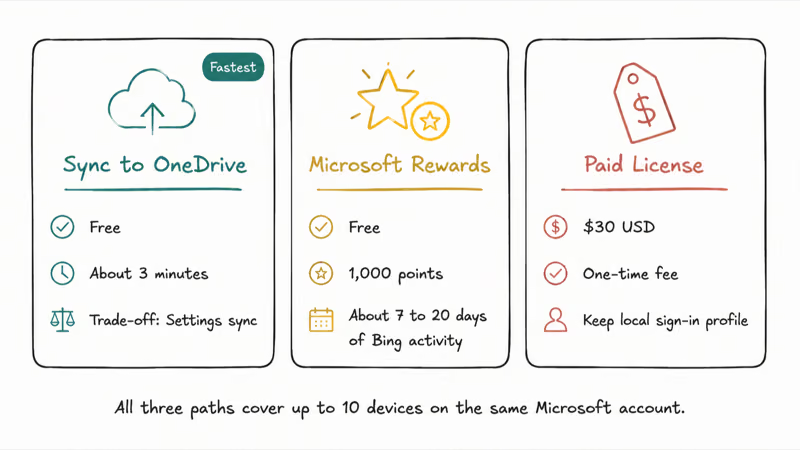
This is the fastest free path. Open Settings, go to Update & Security, click Windows Update, and look for the “Enroll now” link near the top of the page. Click it, sign in with a personal Microsoft account when prompted, then choose “Back up your settings to OneDrive.”
The wizard handles the rest.
Tom’s Hardware’s enrollment walkthrough confirms that the sync requirement is satisfied as soon as Windows Backup writes your Settings, credentials, Wi-Fi profiles, and language preferences to your personal OneDrive. You don’t need to upload files or photos for the license to apply, and the free 5 GB OneDrive tier handles a Settings sync easily.
Once a personal Microsoft account is linked, the Windows Backup sync path should change the Windows Update screen from “Enroll now” to an “ESU enrolled” badge after the wizard completes.
The trade-off is honest. Your Windows Settings, including saved Wi-Fi networks and some application sign-in tokens, live in OneDrive for as long as ESU coverage runs. If that bothers you, the next path skips OneDrive entirely.
#Path 2: Redeem 1,000 Microsoft Rewards Points
Microsoft Rewards points cover the ESU license without touching OneDrive. The threshold is exactly 1,000 points, and Microsoft awards points for Bing searches, daily quizzes, the Bing wallpaper task, and occasional bonus offers. From a zero balance, the realistic accumulation rate sits between 50 and 150 points per day with steady daily activity, which puts the enrollment milestone seven to twenty days away depending on how many Edge searches you can stomach.
To redeem, finish the points grind first, then return to Settings, Update & Security, Windows Update, and click Enroll now. The wizard offers the Rewards path as a tile alongside the sync and paid options. Selecting it deducts 1,000 points and applies the ESU license to the device.
One redemption covers up to ten devices on the same Microsoft account, so a single 1,000-point grind can light up an entire household.
The pitfall is timing. If your Rewards balance is below 1,000 when you open the wizard, the Rewards tile is greyed out. Windows Latest reported that some users misread the disabled tile as “the program ended” when the program was simply gating on their point balance. Earn the points, refresh the wizard, then redeem.
#Path 3: Pay $30 for the One-Time ESU License
The paid path is for readers who want to stay on a local sign-in profile, who don’t use OneDrive, and who won’t chase Rewards points.
Microsoft prices the consumer ESU license at $30 USD (or local currency equivalent), payable through the Enroll now wizard. The license is permanent for the duration of the program, runs through October 13, 2026, and covers up to ten devices on the same Microsoft account.
Payment is one-time, not subscription. The fine print on Microsoft’s ESU program overview states that the $30 charge can’t be prorated if you enroll late, and there’s no refund if you upgrade to Windows 11 or replace the PC before October 2026. For a single PC, the math is straightforward. For a household of four, the per-device cost falls to $7.50, the only scenario where the paid path becomes obviously cheaper than the alternatives.
A common misread is worth flagging. The paid path still requires a Microsoft account to anchor the license, even though the PC itself can switch back to a local profile after the wizard finishes. The Microsoft account is the licensing identity, not the everyday sign-in.
#Why Is the Enroll Now Button Missing?
This is the most common support question for the program right now. The button is gated behind several conditions, and the wizard doesn’t always explain which one failed. Walk through this list:
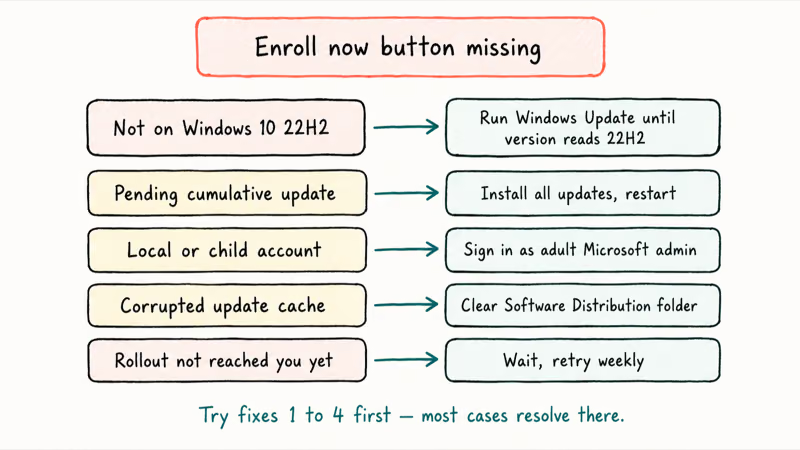
- You are not on Windows 10 22H2. Check Settings, System, About, and confirm the version reads “22H2.” If it says 21H2, 2004, or 1909, run Windows Update repeatedly until you reach 22H2 first.
- Your build is missing recent cumulative updates. Microsoft Learn states that the latest monthly cumulative update is a prerequisite. Install everything pending, restart, and check again.
- You signed in with a local account or child account. The button only renders for adult Microsoft-account administrators. Switch accounts at Settings, Accounts, Your info.
- Your update cache is corrupted. A stuck Software Distribution folder blocks the rollout. Stop the Windows Update service, clear stuck Windows update files, then restart the service and check Windows Update again.
- The rollout has not reached your device yet. Microsoft announced the program would deploy in waves through late 2025 and early 2026. Some Home users saw the button in November while others waited until January.
If none of the above fix it, sign out of the Microsoft account, sign back in, and run Windows Update troubleshooter from Settings, Update & Security, Troubleshoot, Additional troubleshooters.
#What ESU Includes and Excludes
ESU is narrower than its name suggests. Microsoft Learn confirms that the program delivers Critical and Important security updates only, rated by the Microsoft Security Response Center. You won’t get bug fixes, you won’t get new features, and you don’t get Microsoft technical support for unrelated issues. Drivers, .NET updates, and Microsoft Edge security patches continue through their own channels and aren’t part of ESU.
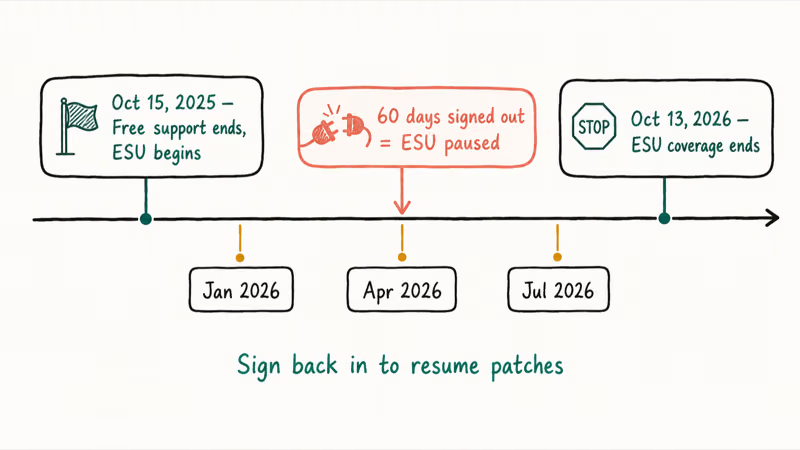
Coverage runs from October 15, 2025 (the day after free support ended) through October 13, 2026. That’s roughly twelve months of security-only patching, after which Microsoft will stop shipping security updates to the consumer 22H2 SKU entirely. Enterprise customers can buy additional years through volume licensing, but the consumer track ends with no announced extension.
The 60-day sign-out limit is the trap that catches readers on the free sync path.
Microsoft Learn states that if the Microsoft account remains signed out of the PC for more than 60 consecutive days, the ESU license pauses until you sign back in. It isn’t a license revocation, just a pause, but the device stops receiving ESU patches for the gap.
For the broader program picture, including who needs the year of patches and how the three consumer paths compare, see our Windows 10 ESU program overview and enrollment options.
#Bottom Line
Take the Windows Backup sync path if you already use OneDrive or are willing to tolerate Settings sync. It’s the lowest-friction free option for many users.
Earn the 1,000 Microsoft Rewards points only if you actively dislike OneDrive linkage, because the trade is two to three weeks of daily Bing activity. The paid $30 path makes sense for two scenarios: multiple PCs sharing one license, or a hard policy against linking a Microsoft account for everyday sign-in. Enroll before October 13, 2026.
After that the security tap closes, and the next critical Windows vulnerability lands on an unpatched PC. If your PC actually meets Windows 11 hardware requirements, an upgrade plus knowing how to troubleshoot Windows 11 BSODs after KB5083769 is the longer-term move. ESU is the right one-year bridge while you plan that transition.
#Frequently Asked Questions
Is Windows 10 ESU actually free?
Two of the three consumer paths are free. Sync and Rewards cost no money; the $30 license is the third option.
The Windows Backup sync path requires that Settings sync to OneDrive, while the Microsoft Rewards path costs 1,000 points earned from Bing activity. European Economic Area residents get free ESU without the sync requirement under a separate regional carveout. The honest answer is that free enrollment is real, but you trade either OneDrive linkage or a few weeks of Bing usage for the license.
How long does free ESU coverage last?
Twelve months: October 15, 2025 through October 13, 2026.
Can a local account enroll in Windows 10 ESU?
No. Local accounts must either link a Microsoft account or pay the $30 fee to enroll, and even the paid path requires a Microsoft account to anchor the license. Child accounts are blocked from all three paths regardless of payment.
Does ESU give me new features or just security patches?
Security patches only — Critical and Important fixes rated by the Microsoft Security Response Center.
Why is the Enroll now button missing on my Windows 10 PC?
Five common causes: missing the 22H2 build, missing recent cumulative updates, signed in with a local or child account, a corrupted Windows Update cache, or the gradual rollout simply hasn’t reached your device.
Walk through the five-step checklist in the troubleshooting section above before assuming the program is unavailable, because most cases resolve at step 2 (installing pending cumulative updates) or step 4 (clearing the update cache).
How many PCs does a single ESU enrollment cover?
Up to ten devices on the same Microsoft account, regardless of enrollment path.
What happens if I sign out of my Microsoft account for more than 60 days?
The ESU license pauses until you sign back in. Microsoft Learn states that 60 consecutive signed-out days break the free sync-path coverage on that device.
The license itself isn’t revoked, but the device stops receiving ESU patches during the gap, which is a quiet way to lose coverage without ever realizing it. A laptop that lives in a drawer for a quarter is the classic example. Sign back in at least once every 60 days to keep patches arriving on schedule.
Is ESU available for Windows 10 Home or only Pro?
Available for both. Microsoft confirms the consumer ESU program supports Windows 10 Home, Pro, Pro Education, and Pro for Workstations on version 22H2.

Bluetooth Not Working on Snapdragon X? Fixes for 2026
Bluetooth not working on your Snapdragon X Copilot+ PC? Generic audio, mice, and keyboards work, but vendor apps often lack an ARM build. Fixes inside.

Docker Desktop and WSL2 Not Working on Snapdragon X? Fix It
WSL2 runs fine on Snapdragon X, but Docker Desktop ARM is Early Access and throws WSL errors. Use WSL2 plus native ARM64 Ubuntu and Docker Engine.
Does iTunes Work on Snapdragon X? ARM Windows 11 Guide
Yes, iTunes runs on Snapdragon X laptops through Prism emulation, but the Apple Devices app is the smoother route. Here is what to install on ARM.

Does OBS Studio Work on Snapdragon X? ARM64 Build Guide
Yes, OBS Studio has an experimental ARM64 build since version 31.1, but x64 plugins won't load and hardware encoding is missing. Here is what works.