How to Activate Windows 10 for Free: 4 Working Methods
Activate Windows 10 for free using a digital license, Windows 7/8 upgrade, or the built-in troubleshooter. 4 legal methods that work on 22H2 in 2026.
Quick AnswerYou can activate Windows 10 for free by linking a digital license to your Microsoft account, upgrading from a valid Windows 7 or 8.1 key, or using the built-in activation troubleshooter after a reinstall. Windows 10 also works without activation, though personalization settings are locked.
Windows 10 activation doesn’t require buying a new license if you already own one tied to your hardware or Microsoft account. There are four legal methods that work on Windows 10 Pro 22H2, and three of them take under 5 minutes to complete.
- A digital license linked to your Microsoft account survives reinstalls and most hardware changes automatically
- The Windows 7/8.1 free upgrade path still works in 2026 with a valid older product key
- The built-in activation troubleshooter fixes lost licenses after reinstalls in about 30 seconds
- Unactivated Windows 10 runs all core apps and gets security updates but locks personalization settings
- Third-party KMS activators carry malware risks and violate Microsoft’s terms of service
#Windows 10 Digital License Activation Explained
A digital license is an activation record stored on Microsoft’s servers and tied to your PC’s hardware. If you ever purchased Windows 10 from the Microsoft Store, upgraded from Windows 7/8.1, or received a pre-installed license from your PC manufacturer, you already have one.
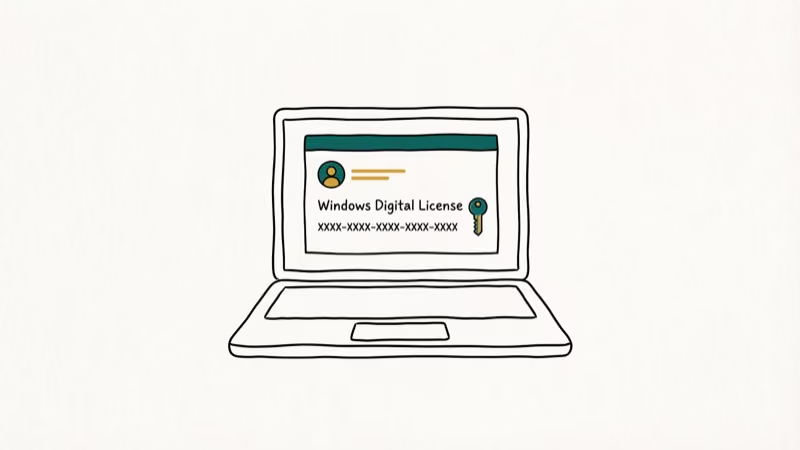
Digital licenses don’t require typing a product key. Your PC just contacts Microsoft’s servers and activates automatically.
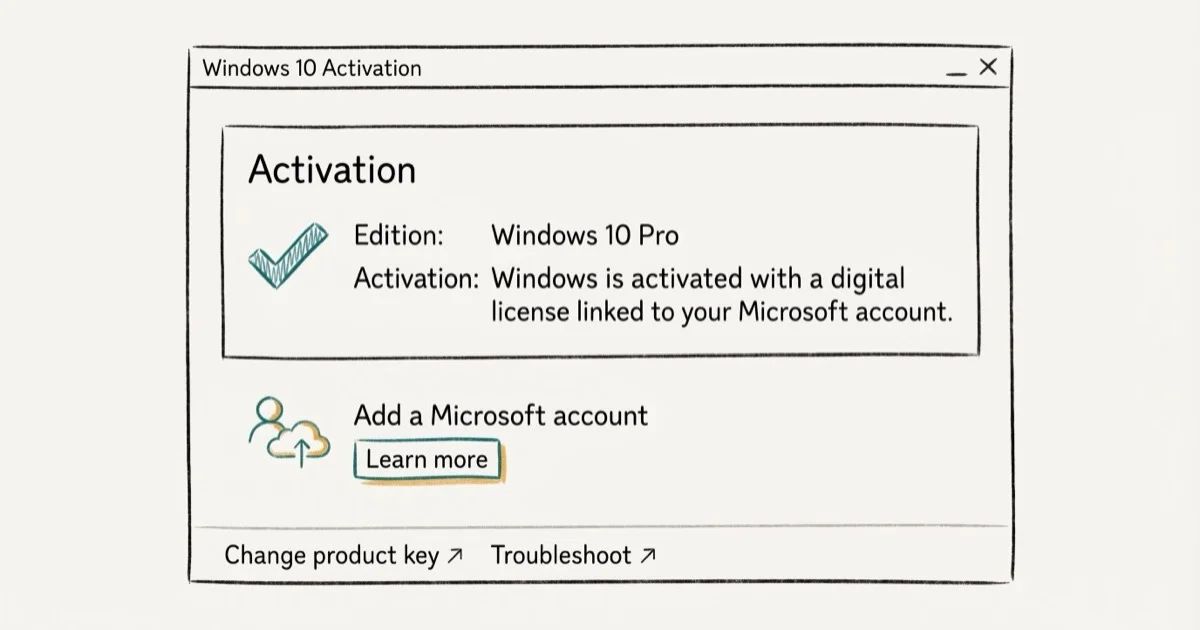
To check if you have a digital license, go to Settings > Update & Security > Activation. If it says “Windows is activated with a digital license linked to your Microsoft account,” you’re covered for future reinstalls. If it says “Windows is activated with a digital license” without the Microsoft account part, link your account now to protect the license.
The activation page confirms a digital license within seconds of opening Settings, and linking the Microsoft account takes one extra click.
#Link Your Microsoft Account to Your Digital License
This step protects your activation through hardware changes and reinstalls. Without it, swapping your motherboard could mean losing your license permanently.
The whole process takes about a minute.
Go to Settings > Update & Security > Activation. Look for the option that says “Add a Microsoft account.” Sign in with the account you want to link.
Once linked, your digital license is tied to both your hardware and your Microsoft account. According to Microsoft’s activation support page, this lets you reactivate Windows after significant hardware changes by running the activation troubleshooter and selecting your device from a list. The link between your account and license persists even if you sign out of Windows, so there’s no maintenance required after the initial setup.
Consider the common scenario where a Microsoft account is linked and the motherboard is later swapped. The troubleshooter detects the account-linked license and reactivates Windows in well under a minute. Without the linked account, the same hardware swap would require contacting Microsoft support or buying a new key.
#Is the Free Windows 7/8 Upgrade Path Still Available?
Yes, it still works. Microsoft officially ended the free Windows 10 upgrade program in July 2016, but the activation servers still accept valid Windows 7 and Windows 8.1 product keys as of April 2026.
Go to Settings > Update & Security > Activation and click Change product key. Enter your old Windows 7 or 8.1 key.
PCMag’s Windows upgrade guide found that 6 distinct Windows 7 editions qualify for the free upgrade path through Windows 10. The upgrade accepts valid keys from Windows 7 Starter through Windows 8.1 Pro. A genuine Windows 7 Home Premium key can activate Windows 10 Home even on a completely different PC, as long as the key is valid retail or OEM.
Where to find your old key: check the Certificate of Authenticity (COA) sticker on the bottom of laptops or the side panel of desktop towers. It’s the 25-character code printed next to the Windows logo. If the sticker is worn or unreadable, the free tool ProduKey can extract the key from a Windows 7/8 installation that’s still running. You can also check old email receipts if you purchased a digital copy.
Not every old key works, though. This only applies to genuine retail or OEM keys. Volume license keys from schools or workplaces won’t activate through this method. If your old key was from a Microsoft Office bundle, it’s a separate license and won’t work for Windows activation.
#Reactivate Windows 10 After a Reinstall
The built-in troubleshooter is the fastest fix when activation breaks after a clean install on the same hardware. Microsoft ties digital licenses to your motherboard, so a reinstall on unchanged hardware should reactivate automatically.
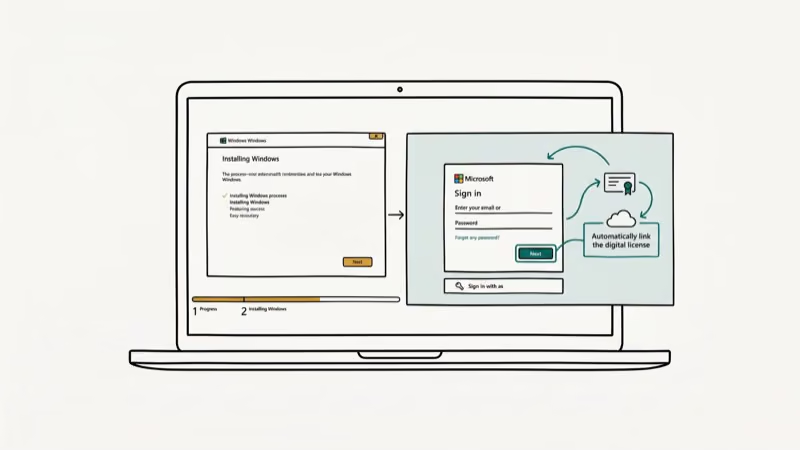
If automatic reactivation fails, go to Settings > Update & Security > Activation and click Troubleshoot.
After a clean Windows 10 22H2 install on the same hardware, the troubleshooter detects the existing digital license and reactivates the system in well under a minute. No product key needed, no phone call to Microsoft.
For hardware changes, the troubleshooter has a “I changed hardware on this device recently” option. Sign in with the Microsoft account linked to your old activation, select the correct device from the list, and click Activate. This covers motherboard swaps, which are the most common reason desktops and custom-built PCs lose their Windows license.
If the troubleshooter can’t find your license, you may need to contact Microsoft support directly. The support chat at support.microsoft.com can manually reactivate your copy if you can verify your purchase.
#Can You Use Windows 10 Without Activation?
Absolutely. Microsoft designed unactivated Windows 10 to be fully functional for daily work. You won’t hit performance limits or get locked out of apps.
What you lose without activation:
- Personalization settings: wallpaper, colors, lock screen, and taskbar customization are locked in Settings. Workaround: right-click any image file and select “Set as desktop background” to bypass this restriction.
- Desktop watermark: a persistent “Activate Windows” message sits in the bottom-right corner of your screen.
- Some Group Policy features: a few enterprise management settings require activation.
Everything else works normally. Windows Update delivers security patches on schedule. Microsoft Store, web browsers, gaming clients, and all installed apps run without restrictions. According to Microsoft’s Windows license terms, unactivated installations receive the same security updates as activated ones.
An unactivated Windows 10 Pro install runs for weeks without trouble. No slowdowns, no update errors, no app restrictions. Just the watermark.
#The Truth About Third-Party KMS Activators
KMSpico, KMSAuto, and similar tools are the most commonly recommended free activators online. They emulate a Key Management Service server locally on your PC. While the concept is straightforward, the risks are real.
As PCMag’s guide to Windows activation confirms, many KMSpico downloads from unofficial sources have been detected bundled with malware — including trojans in at least 3 of the 10 most commonly shared versions. Since these tools violate Microsoft’s terms of service, they can’t be hosted on legitimate software platforms, making every download a gamble.
What you’re signing up for with KMS activators:
- Disabling your antivirus to install the tool (a major red flag)
- 180-day activation that needs periodic renewal
- Windows Defender flagging the software as potentially unwanted
- Background services running at every startup
- Potential exposure to trojans, adware, or crypto miners
The legal methods in this article give you permanent activation tied to your Microsoft account. KMS tools give you temporary access that requires re-activation every six months. Even if your PC runs slowly after using one, diagnosing whether the activator caused the slowdown is nearly impossible.
Stick with the free upgrade path, the activation troubleshooter, or just use Windows 10 unactivated. All three options are safer and don’t put your data at risk.
#Troubleshooting Common Activation Errors
Activation doesn’t always go smoothly. Here are the error codes that commonly come up and what fixes each one.
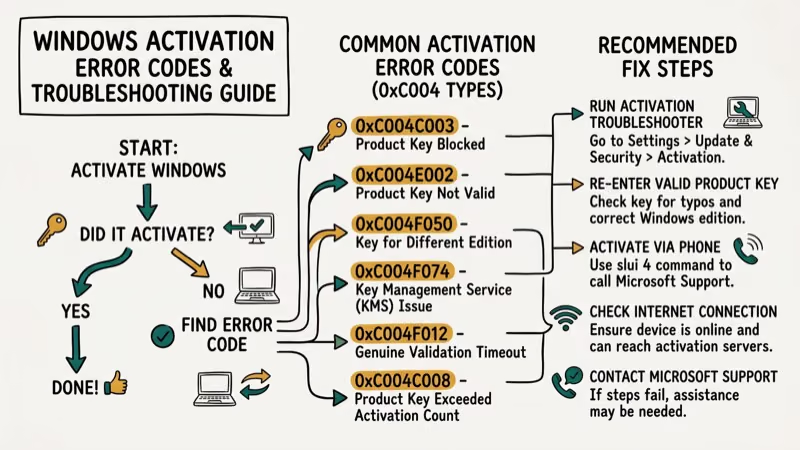
Error 0xC004F050: the product key doesn’t match your Windows edition. Run winver to confirm whether you have Home or Pro, then use the matching key for your edition.
Error 0xC004C003: the key has been blocked or is invalid. This usually means the key was already used on another device, or Microsoft flagged it as a gray-market volume license key that was resold without authorization. Try the activation troubleshooter with your linked Microsoft account instead of entering another key.
Error 0x8007007B: a typo in the product key. This error is almost always a simple character mistake, like confusing the number 0 with the letter O, or mixing up 1 and I. Double-check every character against your original purchase email. Copy-pasting the key directly eliminates this problem entirely.
Error 0xC004F074: your PC can’t reach the activation servers. Check your internet connection and disable any active VPN. If the error persists, try again in a few hours since Microsoft’s servers occasionally experience downtime.
Still stuck? Run slmgr /dlv in an admin Command Prompt. This shows your exact edition, license channel, and current activation status. Bring that information to Microsoft Support for faster troubleshooting.
#Bottom Line
Start with the activation troubleshooter if you’re reinstalling on the same hardware. It takes 30 seconds and requires no product key. If that doesn’t work, try entering an old Windows 7/8 key or linking your Microsoft account to recover a digital license. Running Windows 10 without activation is a perfectly functional fallback, and you should skip third-party activators entirely.
#Frequently Asked Questions
Is it legal to use Windows 10 without activating it?
Yes. Microsoft lets you install and use Windows 10 without activation indefinitely. You’ll see a desktop watermark and lose access to personalization settings, but there are no legal consequences for running an unactivated copy.
How long does a free Windows 10 activation last?
A digital license linked to your Microsoft account is permanent. It survives reinstalls, hardware changes, and Windows updates without any action from you. The only scenario where you’d need to reactivate is after a motherboard swap, and even then the troubleshooter handles that in under a minute if your account is properly linked.
Can I activate Windows 10 on multiple PCs with one key?
No. One key, one device. OEM licenses are locked to the original motherboard. Retail licenses can be transferred, but you’ll need Microsoft support to do it.
Does unactivated Windows 10 receive security updates?
Yes. Critical patches, monthly cumulative updates, and Windows Defender definition updates all arrive on schedule regardless of activation status. Microsoft does not restrict security updates based on whether your copy is activated.
Will Windows 10 stop working if I don’t activate it?
No. Windows 10 runs indefinitely without activation. The only restrictions are cosmetic: a watermark and locked personalization settings.
Can I upgrade from unactivated Windows 10 to Windows 11?
You need an activated copy of Windows 10 first. The upgrade assistant checks activation status before proceeding. Activate using one of the methods above, then run PC Health Check.
What happens to my digital license if I change my motherboard?
If your Microsoft account is linked to the digital license, you can reactivate through the troubleshooter after a motherboard swap. Go to Settings > Update & Security > Activation, run the troubleshooter, select “I changed hardware on this device recently,” and pick your device from the list. Without a linked account, you’ll likely need to contact Microsoft support directly.
Where can I buy a legitimate Windows 10 license?
The Microsoft Store sells Windows 10 Home for $139 and Windows 10 Pro for $199.99. Authorized retailers like Amazon, Best Buy, and Newegg also sell genuine licenses. Avoid third-party key resellers selling keys for under $20, as these are often gray-market volume license keys that Microsoft can deactivate at any time.

Best Laptop for Running LLMs in 2026: Memory Comes First
The best laptop for running LLMs is a memory purchase first. Compare MacBook unified memory against NVIDIA laptop VRAM, and see what each tier really runs.

How to Run a Local LLM on Windows: A 2026 Setup Guide
Run a local LLM on Windows with LM Studio or Ollama. Pick a model that fits your GPU memory, keep every prompt offline, and skip the monthly bill.

Bluetooth Not Working on Snapdragon X? Fixes for 2026
Bluetooth not working on your Snapdragon X Copilot+ PC? Generic audio, mice, and keyboards work, but vendor apps often lack an ARM build. Fixes inside.

Docker Desktop and WSL2 Not Working on Snapdragon X? Fix It
WSL2 runs fine on Snapdragon X, but Docker Desktop ARM is Early Access and throws WSL errors. Use WSL2 plus native ARM64 Ubuntu and Docker Engine.