Do You Need a VPN on Public WiFi? The Honest 2026 Take
HTTPS already encrypts most public WiFi traffic in 2026, so do you still need a VPN? Here is what it actually protects and when it is just theater.
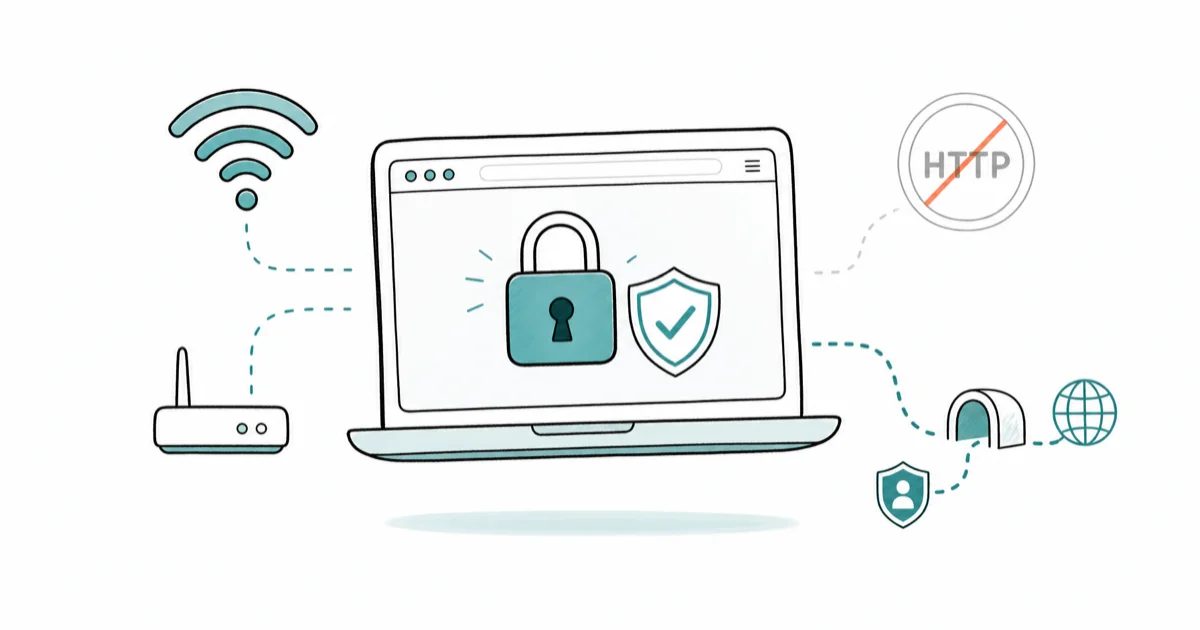
Quick AnswerOn most public WiFi in 2026 you do not strictly need a VPN, because HTTPS already encrypts the sites you visit. A VPN still helps when you want to hide which domains you reach from the network owner or use older HTTP sites.
You connect to the café Wi-Fi and a voice in your head, planted by years of VPN ads, says you’re one click from a stolen bank password. The honest answer has shifted a lot since 2018. Encryption is now the default across the web, and that quietly fixed most of the scary attacks those ads still describe. This guide explains what a VPN protects on open networks, when it earns its keep, and when it’s theater.
- HTTPS already encrypts the contents of nearly every site you visit, so a passive snooper on the same Wi-Fi sees scrambled data, not your passwords or messages.
- The thing public Wi-Fi can still expose is metadata: which domains you reach, through DNS and the connection handshake, plus your device IP on the local network.
- A VPN’s real job on public Wi-Fi is hiding that metadata from the network owner and covering the rare older site that still runs unencrypted HTTP.
- Free settings beat panic-buying a VPN: HTTPS-only mode, encrypted DNS, two-factor authentication, and up-to-date software do most of the heavy lifting at no cost.
- A reputable paid VPN runs a few dollars a month and adds one privacy layer, but it’s not antivirus, not anti-phishing, and not an anonymity cloak.
#What a VPN Actually Hides on Public WiFi
Picture what really happens when you open a website on open Wi-Fi. Your device makes a DNS lookup to turn the site name into an address, then opens an encrypted connection to that server. With HTTPS, everything inside that connection gets sealed in a tunnel the network can’t read. For the deeper background on what a VPN does, the short version is that it wraps all of this in a second tunnel to a server you pick.
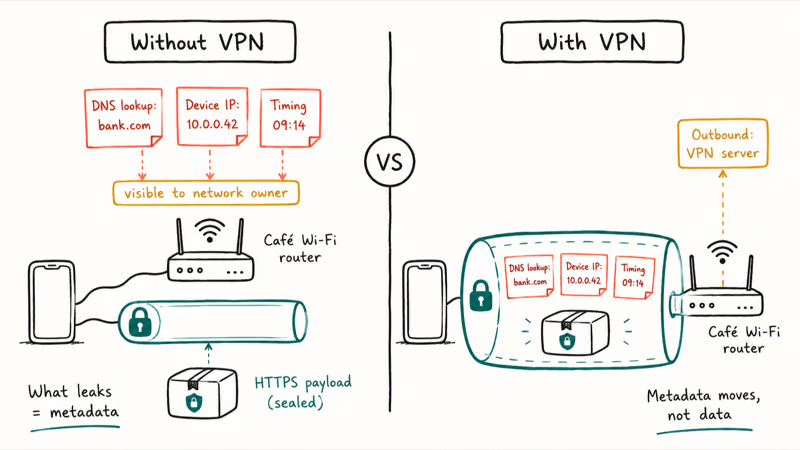
So what leaks? Metadata. The Wi-Fi operator and anyone capturing traffic can usually see the domain you’re reaching, your device’s local IP, and rough timing of your activity. They can’t see the actual pages or your keystrokes inside an HTTPS session.
A VPN changes that picture by moving the visible endpoint. Instead of the café router seeing “this laptop is talking to your-bank.com,” it sees only “this laptop is talking to a VPN server.” The domain lookups then happen on the far side of the tunnel, out of the network’s view, which is the one privacy gain that actually holds up on close inspection.
So a VPN doesn’t bolt a shield onto data HTTPS already guards. It relocates the metadata HTTPS leaves exposed.
#Do You Still Need a VPN if Everything Uses HTTPS?
This question flips the old advice on its head. Years ago, plenty of sites sent logins over plain HTTP, so anyone on the same network could grab your password with a free tool. That world is mostly gone now.
According to the FTC’s consumer guidance, “because of the widespread use of encryption, connecting through a public Wi-Fi network is usually safe.” Google’s Transparency Report states that the vast majority of pages loaded in Chrome now travel over HTTPS, up from a minority a decade ago.
The lock icon does the work people imagine a VPN does.
That matches the technical picture. How-To Geek’s analysis puts it plainly: if an attacker hijacked the network, “all the hacker would see is encrypted data.” Its caveat is the metadata gap HTTPS leaves behind: it “doesn’t solve another issue, namely that MitM attacks can still reveal your DNS requests.”
For normal browsing, banking, and shopping, the encryption does the job. A VPN is optional, not mandatory.
#The Risks That Actually Remain in 2026
Encryption fixed the password-sniffing era, but it didn’t make every concern disappear. Three things still bite.
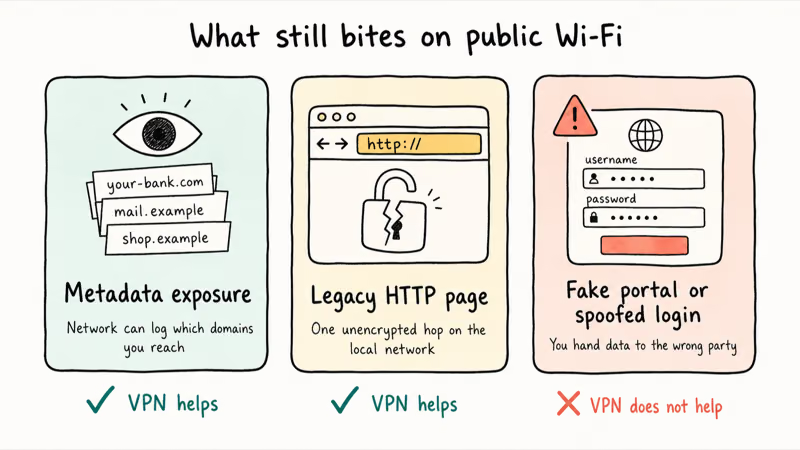
First, metadata exposure: the network owner can log which domains you reach, even if not the pages. Second, the occasional legacy site that still loads over plain HTTP leaves that one hop readable on the local network. Third, fake captive-portal pages and spoofed sites can trick you into typing credentials, and no amount of encryption saves you from handing data to the wrong party.
Notice that only the first two are network problems a VPN touches. The third is a you-problem, the same one you face on your home connection, and it’s the most common way people actually lose data on public Wi-Fi.
#When Is a VPN on Public WiFi Just Theater?
Plenty of the reasons people cite for running a VPN don’t hold up. Knowing which ones are theater saves you money and false confidence.
It doesn’t make you anonymous. Your VPN provider can see what the café router used to see, so you’re shifting trust, not erasing it. The FTC even warns that “not all VPN apps actually encrypt your information,” which means a sketchy app can leave you worse off than no app at all.
A VPN also does nothing against phishing, malware, or a fake login page. Type your password into a scam site and encryption faithfully delivers it to the scammer. The real threat on public Wi-Fi was never the strangers near you; it’s the same web traps you’d hit at home, which is why blocking cross-site tracking and spotting fake pages matter more than the tunnel.
And it won’t speed anything up. A VPN adds another hop between you and the site, so some throughput loss is a normal tradeoff for the privacy layer.
The theater is treating a VPN as a complete security product. It’s one narrow tool, not a force field.
#When a VPN on Public WiFi Is Worth It
There are real cases where flipping on a VPN is the right move, and naming them helps you use it on purpose rather than out of reflex.
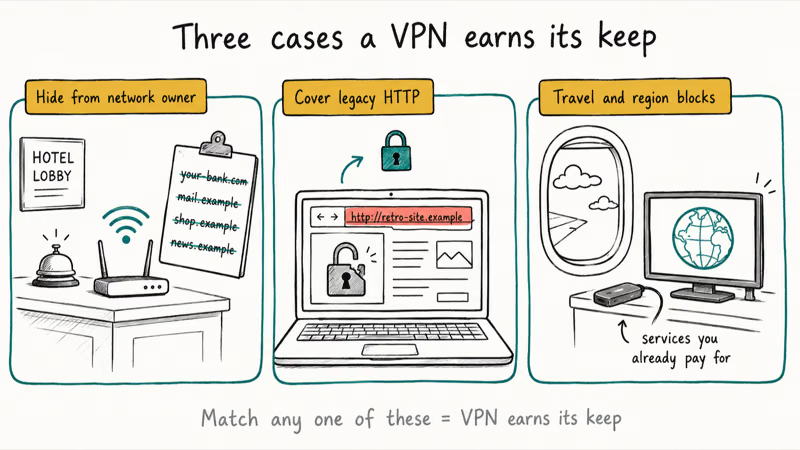
The clearest case is hiding your browsing from the network owner. On a hotel, conference, or workplace guest network, the operator can log every domain you reach, and a VPN takes that visibility away. HTTPS protects page contents, but a domain list alone can still be revealing.
Legacy HTTP sites are the second case. Wander onto one and your data really is exposed on the local network, and a VPN re-encrypts that hop. Google announced that Chrome 154, due in October 2026, will warn before insecure pages by default, which shows how rare these have become, but rare isn’t zero.
Travel is the third. A VPN can help you reach services you already pay for when a network or region blocks them, including streaming setups like VPN on Firestick.
Match any of these and a few dollars a month is reasonable. Match none and you can skip it.
#How to Stay Safe on Public WiFi Without Paying for a VPN
Most of what people buy a VPN for is already in your settings, free. Switch these on before you reach for a subscription.
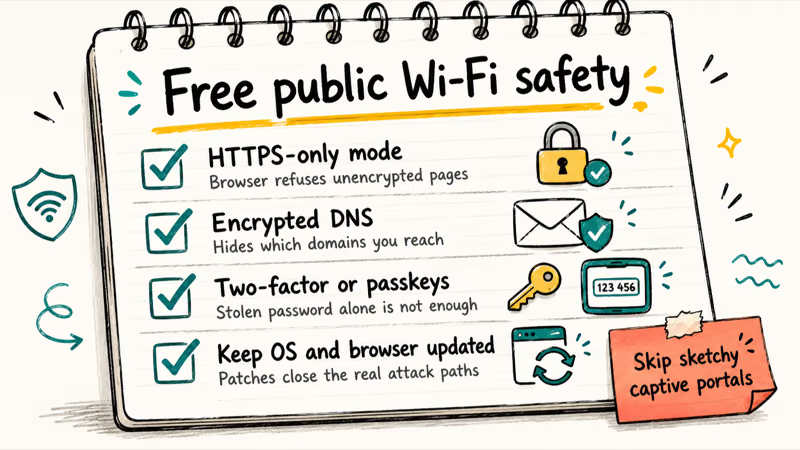
Turn on HTTPS-only mode so your browser refuses to load unencrypted pages and warns you instead of silently downgrading. Point your device or browser at an encrypted DNS provider, which hides domain lookups from the local network. Keep your operating system and browser updated, since most real attacks target old, unpatched software rather than the network itself.
Two-factor authentication belongs everywhere, and better still, set up passkeys so a stolen password alone can’t open your accounts. It also pays to know whether your credentials are already circulating, so check the dark web for your email now and then.
One habit beats every setting: don’t enter sensitive logins on a captive portal page you don’t trust, and close that tab the moment you’re past the “agree to terms” screen.
Do this and an open network is about as safe as your home connection.
#Bottom Line
For everyday browsing, banking, and shopping on public Wi-Fi in 2026, you don’t need a VPN. HTTPS already encrypts the part that matters, so turn on HTTPS-only mode and encrypted DNS first; both are free. Pay for a reputable VPN only if you want to hide which sites you reach from the network owner, you regularly hit older HTTP pages, or you travel for services you already pay for. An ad’s fear is not a reason to buy.
#Frequently Asked Questions
Can hackers see my passwords on public wifi without a VPN?
Almost never, as long as the site uses HTTPS, which nearly all of them do now. Your login travels inside an encrypted tunnel that a snooper on the same network can’t read. The real risk is typing a password into a fake or phishing page, and a VPN does nothing to stop that.
Does a VPN make me anonymous on public wifi?
No. It shifts what the network owner sees over to your VPN provider, so you trade one observer for another while staying identifiable by your accounts, logins, and browser fingerprint.
Is hotel and airport wifi more dangerous than café wifi?
Not really in terms of the network itself, since HTTPS protects you the same way on all of them. The bigger difference is the captive portal sign-in pages, which can be spoofed, and the fact that the operator can log the domains you visit. That logging is the main thing a VPN hides on these networks.
Do I need a VPN on public wifi if I only use apps, not a browser?
Apps from major services use the same HTTPS encryption as websites, so their contents are protected without a VPN. The lookups for which servers those apps contact can still leak as metadata. If hiding that metadata from the network matters to you, a VPN helps; otherwise the apps are already secure.
Will a free VPN protect me on public wifi?
Be careful here. The FTC recommends researching any VPN app first, because some don’t actually encrypt your traffic, and free ones usually have to monetize you by logging and selling your activity. A free VPN can quietly leave you less private than no VPN at all. If you decide you want one, a low-cost paid provider with a clear, audited no-logs policy is the safer choice on a network you don’t control.
Does my phone need a VPN on public wifi if I use cellular data sometimes?
Cellular data is encrypted between your phone and the carrier, so it doesn’t carry the same local-network exposure as open Wi-Fi. When you’re on cellular, a VPN’s public-Wi-Fi benefit mostly goes away. The reason to keep one running on cellular is to hide browsing from your carrier, not to fix a Wi-Fi risk.
What is the safest setting to turn on instead of a VPN?
Encrypted DNS paired with HTTPS-only mode is the highest-value free change. Encrypted DNS hides the domain lookups that otherwise leak in plain text, and HTTPS-only mode stops your browser from quietly loading insecure pages. Adding passkeys or strong 2FA on top protects your accounts even if something slips through.

Is This Bank App Real? Spot a Fake App on Your Home Screen
A bank app can land on your home screen from a web page with no install warning. Learn the checks that tell a real banking app from a phishing web app.

Passkeys Not Syncing Between iPhone and Windows? Read This
Passkeys not syncing between iPhone and Windows is by design, not a bug. Here is why iCloud passkeys skip Windows Hello and the three ways to fix it.

VPN Not Working on Snapdragon X? Why It Fails, How to Fix
Your VPN won't install or connect on a Snapdragon X Copilot Plus PC because Windows on ARM can't emulate the network driver. Here are the fixes that work.

How to Check If a Link Is Safe Before You Click It
Learn how to check if a link is safe with official-first steps: read the real domain, use the app instead, and treat scanners as a second opinion only.