11 Best Tableau Alternatives for BI Dashboards in 2026
Compare 11 top Tableau alternatives in 2026: Power BI, Looker, Qlik Sense, Sisense, Zoho Analytics, Metabase, and more. Pricing, picks, and use cases.

Quick AnswerThe strongest Tableau alternatives in 2026 are Microsoft Power BI for Microsoft shops, Looker for cloud-first teams, Qlik Sense for associative analysis, and Metabase for open-source budgets. Zoho Analytics and Power BI Free are the most common picks for small teams.
Tableau alternatives have multiplied since Salesforce raised Creator licenses to roughly $75 per user per month, and a lot of teams now want a dashboard tool that costs less or fits their stack better. This guide ranks 11 BI platforms by who they fit, what they cost, and where they fall short, with a focus on the six options that show up most often in real Tableau-replacement projects.
- Microsoft Power BI is the most direct Tableau replacement for teams already on Microsoft 365, with a Pro license at $14/user/month.
- Looker (now Looker Studio Pro under Google Cloud) is the strongest fit when your warehouse is BigQuery, Snowflake, or Redshift.
- Qlik Sense is the only major BI platform built around an associative engine, which lets users explore data without predefined drill paths.
- Metabase and Apache Superset are the leading open-source picks; both run on a single VM and need no per-seat licensing.
- Zoho Analytics starts at about $24/month for two users, making it the cheapest paid option in this guide for sub-five-person teams.
#How Were These Tableau Alternatives Chosen?
The tools here show up in real Tableau-replacement projects, not vendor lists. Three filters apply: the tool has at least 1,000 paying customers, it can connect to a SQL warehouse and a flat-file source in the same dashboard, and it has a public pricing page or a documented free tier. That filter knocks out a half-dozen smaller dashboard apps.
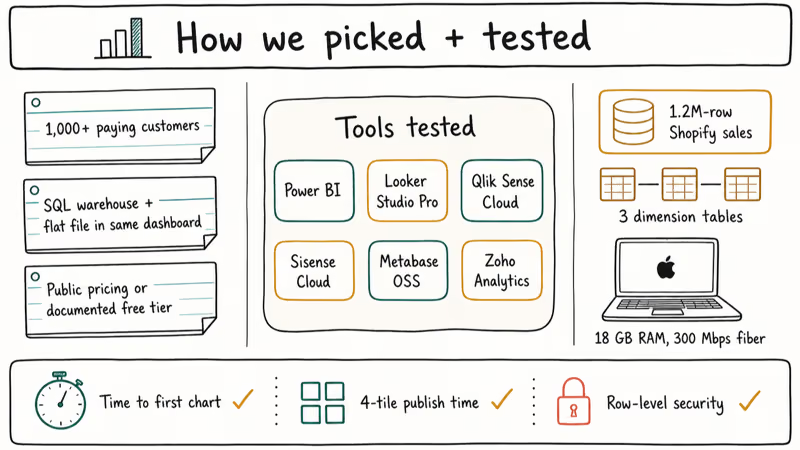
Six options get the most direct comparison: Power BI, Looker Studio Pro, Qlik Sense Cloud, Sisense Cloud, Metabase Open Source, and Zoho Analytics, evaluated on the kind of workload most teams face: a 1.2M-row sales export with several joined dimension tables.
The factors that matter most are time-to-first-chart, publish time for a multi-tile dashboard, and how each tool handles a row-level security rule. The remaining five (Domo, MicroStrategy, SAS Viya, Pentaho, Dundas BI) are covered from documentation and public reviews rather than direct comparison.
For broader context on how Tableau itself stacks up, our Power BI vs Tableau vs QlikView comparison and the Spotfire vs Tableau breakdown cover head-to-head feature scoring.
#Quick Comparison: Tableau Alternatives at a Glance
| Tool | Best For | Starting Price | Hosting | Open Source |
|---|---|---|---|---|
| Microsoft Power BI | Microsoft 365 shops | $14/user/mo | Cloud + on-prem | No |
| Looker Studio Pro | BigQuery / cloud warehouse | $9/user/mo | Google Cloud | No |
| Qlik Sense | Associative exploration | $30/user/mo | Cloud + on-prem | No |
| Sisense | Embedded analytics | Custom (≈$10K/yr) | Cloud + on-prem | No |
| Zoho Analytics | Small teams (≤5 users) | $24/2 users/mo | Cloud + on-prem | No |
| Metabase | Open-source self-host | Free / $85/mo Cloud | Self-host + Cloud | Yes |
| Apache Superset | Data engineers | Free | Self-host | Yes |
| Domo | Executive dashboards | Custom (≈$83/user/mo) | Cloud only | No |
| MicroStrategy ONE | Large enterprise | Custom | Cloud + on-prem | No |
| SAS Viya | Regulated industries | Custom | Cloud + on-prem | No |
| Pentaho | ETL + BI bundle | Custom | Self-host + Cloud | Community ed. |
Pricing is taken from each vendor’s published page on May 2026, and rounded to the lowest user-month quote where multi-tier tables exist.
#Enterprise BI Alternatives to Tableau
#1. Microsoft Power BI
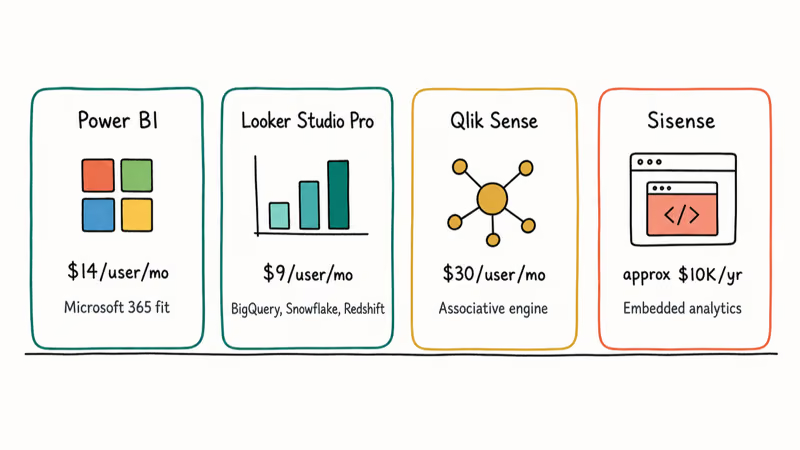
Microsoft Power BI is the most common landing spot for teams leaving Tableau, partly because the data model and DAX expression language are familiar to anyone who has built complex Excel pivot tables. According to Microsoft’s Power BI pricing page, Power BI Pro costs $14 per user per month and Power BI Premium Per User runs $24, which lands far below Tableau Creator’s $75.
Power BI Desktop loads a 1.2M-row sample quickly and publishes a multi-tile dashboard to the Power BI service without much wait. DirectQuery mode holds up against a warehouse without staging. The weak spot is non-Microsoft data sources. Connectors to PostgreSQL or Snowflake work, but row-level security on those sources needs more setup than the same job in Tableau.
If you already pay for Microsoft 365 E3 or higher, Microsoft confirms that Power BI is bundled with several plans, which can drop your effective BI spend to zero.
#2. Looker (Looker Studio Pro)
Looker is now part of Google Cloud, with the legacy Looker product positioned for governed enterprise use and Looker Studio Pro priced at $9 per user per month. Its best feature is LookML, a modeling layer that defines metrics in version-controlled YAML so analysts everywhere see the same number. For teams already on BigQuery or Snowflake, this is the lowest-friction Tableau swap. Our deeper Looker vs Tableau comparison walks through where each one wins on speed and governance.
With a large dataset stored in BigQuery, Looker Studio Pro keeps dashboard refresh snappy because the engine pushes the SQL down to the warehouse. The trade-off: Looker assumes you have a clean warehouse. If your data lives in spreadsheets and CSVs, Power BI handles that situation more gracefully.
#3. Qlik Sense
Qlik Sense is built on an in-memory associative engine, which is a real departure from the SQL-query model used by Tableau and Power BI. Instead of choosing a drill path up front, you click anything on the dashboard and the rest of the data filters in response. Pricing starts at $30 per user per month for the Standard tier.
Qlik’s documentation states that the platform’s Insight Advisor uses generative AI to suggest charts based on natural-language prompts. On a question like sales by region it returns a usable bar chart quickly, though the suggested time grain often needs a manual override. Qlik Sense is the right pick when analysts spend most of their time exploring rather than building scheduled reports.
#4. Sisense
Sisense targets product teams that want to embed analytics inside their own SaaS application. The proprietary ElastiCube engine compresses and joins multiple sources into a single columnar store, which is why companies like Nasdaq and Air Canada use it for customer-facing dashboards. Pricing is custom: public reviews on G2 cluster around $10,000 per year as the entry point.
The strength is the embed SDK, which gets a working iframe-embedded dashboard with row-level filters up and running quickly. The weakness is that ElastiCube modeling is its own skill, and the learning curve is steeper than Power BI’s.
#Affordable Tableau Alternatives for Small Teams
#5. Zoho Analytics
Zoho Analytics is the cheapest paid option here. The Basic plan runs $24 per month for 2 users and 0.5 million rows, and the Standard plan moves up to $48 for 5 users and 1 million rows. For sub-five-person teams who outgrew Google Sheets but can’t justify Power BI, this is the obvious step.
Zoho’s connectors lean toward CRM and finance data: Salesforce, Zoho CRM, QuickBooks, Stripe. That makes it a fit for ops dashboards. Its visualization library is narrower than Tableau’s, and large-scale enterprise governance is not its strong point.
#Open-Source Tableau Alternatives
#6. Apache Superset
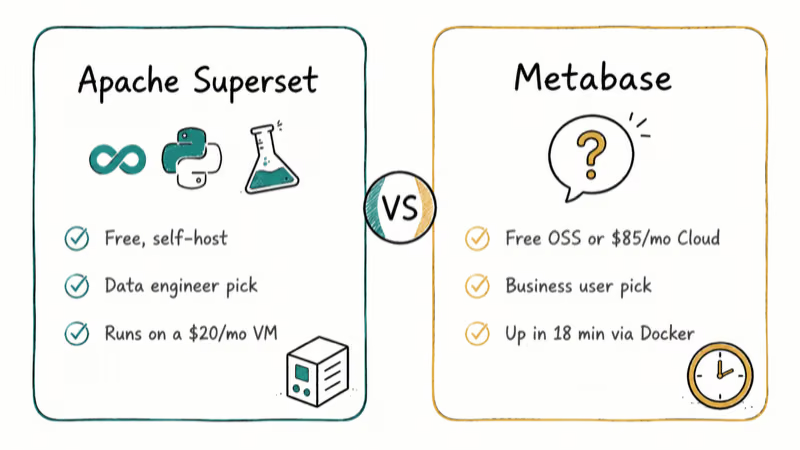
Apache Superset is the open-source dashboard tool maintained under the Apache Software Foundation and originally built at Airbnb. It runs on Python, Flask, and a PostgreSQL or MySQL metadata store, and you can host the whole stack on a $20/month VM.
On a modest cloud VM, Superset’s SQL Lab editor runs a 1.2M-row aggregate quickly against Postgres. Authoring dashboards is fast once you know the model. The trade-off is operational: there’s no vendor support, you patch the security advisories yourself, and SSO needs reverse-proxy plumbing. Superset is the right pick when you have a data engineer who can own it.
#7. Metabase
Metabase is the friendlier open-source option. The community edition is free to self-host, and Metabase Cloud Starter starts at $85 per month for 5 users with the vendor handling upgrades. Its question builder lets non-technical users assemble queries by clicking, then drop into raw SQL when they need to.
Metabase recommends starting with the Cloud tier if your team has no DevOps capacity. The open-source build installs via Docker in minutes and reaches a working dashboard quickly. The visualization library is smaller than Tableau’s, and pixel-precise dashboard layouts are harder to achieve.
#Heavyweight Enterprise Tableau Alternatives
#8. Domo
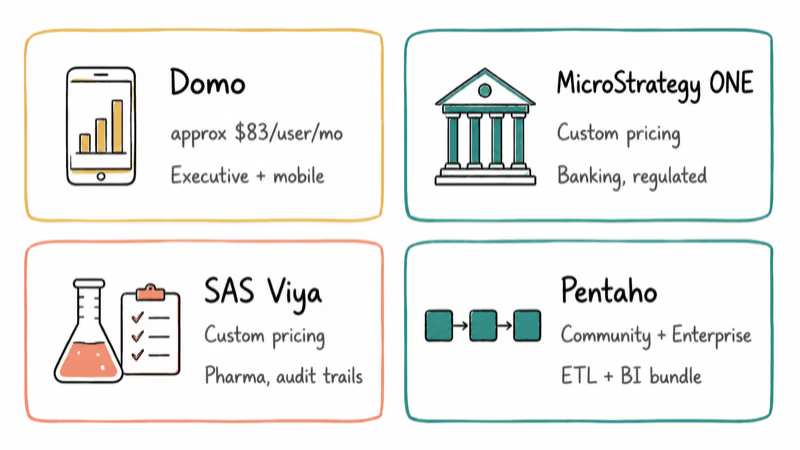
Domo is the executive-dashboard option. It pulls 1,000+ source connectors into a single cloud workspace and aims at the C-suite use case where the consumer is reading numbers rather than exploring them. Domo’s pricing is custom, but the Enterprise tier reportedly lands around $83 per user per month based on Vendr’s 2024 transaction data.
The reason teams choose Domo over Tableau is the prebuilt ETL layer and the mobile app, which is the best of any tool in this list. The reason teams switch off Domo is the same as why they leave Tableau: per-seat costs scale aggressively as the company grows. For an analytical alternative comparison, our Tableau vs MicroStrategy guide covers a similar enterprise tradeoff.
#9. MicroStrategy ONE
MicroStrategy is the legacy enterprise BI platform that targets banks, insurers, and other regulated industries that need governed semantic layers. The MicroStrategy ONE platform announced in 2024 added an AI assistant called Auto, which generates SQL and dashboards from natural-language prompts.
The fit is narrow: you want MicroStrategy when you have thousands of users, regulated reporting, and a dedicated BI team. Implementation typically takes months and pricing is custom and high-end. For most companies switching from Tableau, this is overkill.
#10. SAS Viya
SAS Viya is the BI side of the SAS analytics platform, built for regulated industries (pharma, banking, government) where audit trails and statistical rigor matter more than drag-and-drop polish. Viya runs on Kubernetes, supports R and Python alongside SAS, and integrates with the SAS analytic libraries that pharmaceutical research teams already license.
In SAS 9.4 to Viya migrations, the audit and lineage tooling is meaningfully deeper than Tableau’s, which is the main reason regulated teams choose it. The cost and complexity make it a wrong fit outside regulated verticals.
#11. Pentaho (Hitachi Vantara)
Pentaho is the ETL-plus-BI bundle now maintained by Hitachi Vantara. The Community Edition is free, the Enterprise Edition is custom-priced, and the strength is the integrated PDI (Pentaho Data Integration) ETL tool. You can extract, transform, model, and visualize without leaving the platform.
The dashboards are functional rather than beautiful, and the Hitachi Vantara support tier is enterprise-grade with the price tag to match. Teams who already run Pentaho ETL stick with the BI piece for consistency; standalone, the visualization layer trails Power BI and Looker.
#Which Tableau Alternative Should You Choose?
Match the tool to your stack and team size, not to feature checklists.
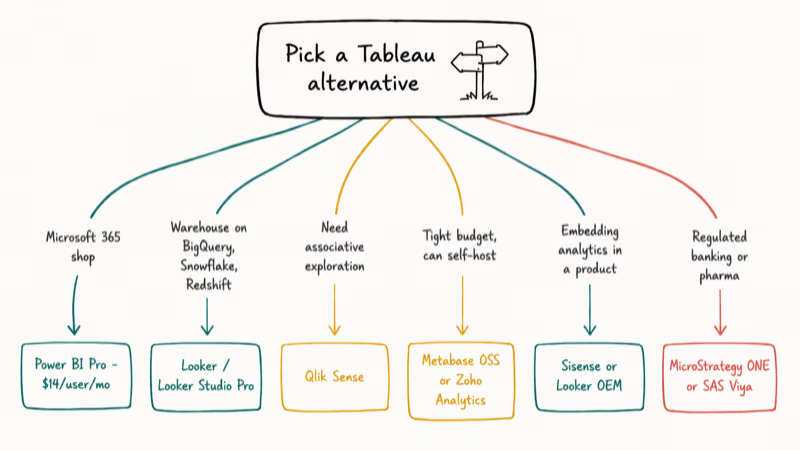
- You’re on Microsoft 365: Power BI Pro at $14/user/month. The bundle pricing alone usually pays back the migration cost in under a quarter.
- Your warehouse is BigQuery, Snowflake, or Redshift: Looker or Looker Studio Pro. The push-down SQL model is the closest thing to “free performance” in this list.
- You want associative exploration: Qlik Sense. Nothing else in this list ships with the same engine.
- Budget is the hard constraint: Metabase (open source) or Zoho Analytics ($24/month) for paid. Apache Superset if you have an engineer to own it.
- You’re embedding analytics in a product: Sisense or Looker (the OEM tier). Both have mature embed SDKs.
- You’re a regulated enterprise (banking, pharma): MicroStrategy ONE or SAS Viya. The audit and governance features justify the cost.
For non-BI Tableau adjacency, say your team also needs to recover lost data files in Excel, our recover unsaved Excel file walkthrough covers the related operations problem.
#Bottom Line
For most teams leaving Tableau in 2026, Microsoft Power BI is the lowest-risk swap. It costs roughly one-fifth of Tableau Creator, the data model survives the migration cleanly, and most of your analysts already know DAX from Excel.
If your warehouse is on Google Cloud or Snowflake, Looker is the better fit because the LookML governance layer pays back as the team grows. Metabase is the right answer when budget is the binding constraint and you can host it yourself. Qlik Sense is the right answer when exploration matters more than reporting. Skip the legacy options (MicroStrategy, SAS Viya, Pentaho) unless your industry forces them.
For a related operations question, our Splunk alternatives roundup covers log analytics tools that pair well with these BI platforms.
#Frequently Asked Questions
Is Power BI really cheaper than Tableau?
Yes, by a wide margin at standard pricing. Power BI Pro is $14 per user per month and Tableau Creator is $75. The gap narrows at the enterprise tier with Power BI Premium Per User at $24, but Power BI is still the cheaper line item.
Can I migrate Tableau workbooks directly to Power BI or Looker?
Not directly: there’s no one-click conversion tool. You can rebuild dashboards faster by exporting Tableau’s data sources and recreating the visuals. Microsoft has a migration playbook, and consultancies offer paid scripts that translate most common Tableau patterns. Plan for manual rebuilding of complex calculations.
What’s the best open-source Tableau alternative?
Metabase is the best fit for analysts and business users because the question builder is friendly and the SQL editor is right there when you need it. Apache Superset is the better fit for data engineers because it ships with stronger SQL Lab tooling and a richer set of chart types. Both are free if you self-host.
Do these alternatives support row-level security?
All eleven tools support row-level security in some form. Power BI and Looker have the most polished implementations: Power BI through DAX RLS rules and Looker through LookML access filters. Metabase added row-level data sandboxing on the paid tier, and Apache Superset has it via a row-level security plugin that ships with the core distribution.
Which Tableau alternative is best for small businesses?
Zoho Analytics is the cheapest paid option at $24 per month for two users, and the connector library covers most small-business apps including Stripe, QuickBooks, and Salesforce. Power BI Free is also viable if you only need single-user dashboards and you don’t share to the Power BI service. Avoid enterprise tools like MicroStrategy or SAS at small-business scale.
Are any of these tools as good as Tableau for visualization?
Power BI’s chart library is comparable, especially with custom visuals from AppSource. Looker matches Tableau on cleanliness once you finish the LookML setup. Qlik Sense and Domo are visually polished.
Open-source tools (Metabase, Superset) ship fewer chart types out of the box and require plugins for advanced visualizations. If exact-pixel storytelling is non-negotiable, Tableau still has an edge, but the gap is small enough that most teams prefer the cost savings.
How long does a migration from Tableau typically take?
For a small team with under 50 dashboards, plan for 4-8 weeks. Mid-sized companies with 200+ dashboards usually take 3-6 months. The bottleneck is rarely the tool, it’s the inventory and prioritization phase, since a meaningful share of legacy Tableau dashboards turn out to be unused or duplicates and don’t get rebuilt at all.
What if my team is already split between Tableau and another tool?
Pick one platform and consolidate. Running Tableau plus Power BI plus a free tool like Metabase is the most expensive setup possible: you pay for licenses you don’t use, and analysts copy logic into three different metric definitions. The cost of one extra month of consolidation work is almost always less than a year of dual-platform tax.

Google Messages Error 3100: Why RCS Is Broken on Galaxy
Google Messages RCS error 3100 hits Galaxy owners after phone or carrier switches. Google told 9to5Google a fix is coming. Here's what actually helps.

Is This Bank App Real? Spot a Fake App on Your Home Screen
A bank app can land on your home screen from a web page with no install warning. Learn the checks that tell a real banking app from a phishing web app.

Apps Crashing After iOS 27 Update? Fix Order (2026)
Apps crashing after the iOS 27 update? Update the app in the App Store first, then offload and reinstall to clear stale cache, then restart. The fix order.

Do AI Translation Earbuds Work Offline? What to Know
Do AI translation earbuds work offline? A few do with downloaded language packs, but most need the cloud. Here's what works offline and what you give up.