Mac vs PC for Video Editing: Honest 2026 Buyer Guide
Mac vs PC for video editing in 2026: ProRes media engine vs PC GPU, Final Cut vs Premiere vs Resolve, plus per-tier picks for 4K and 8K work.
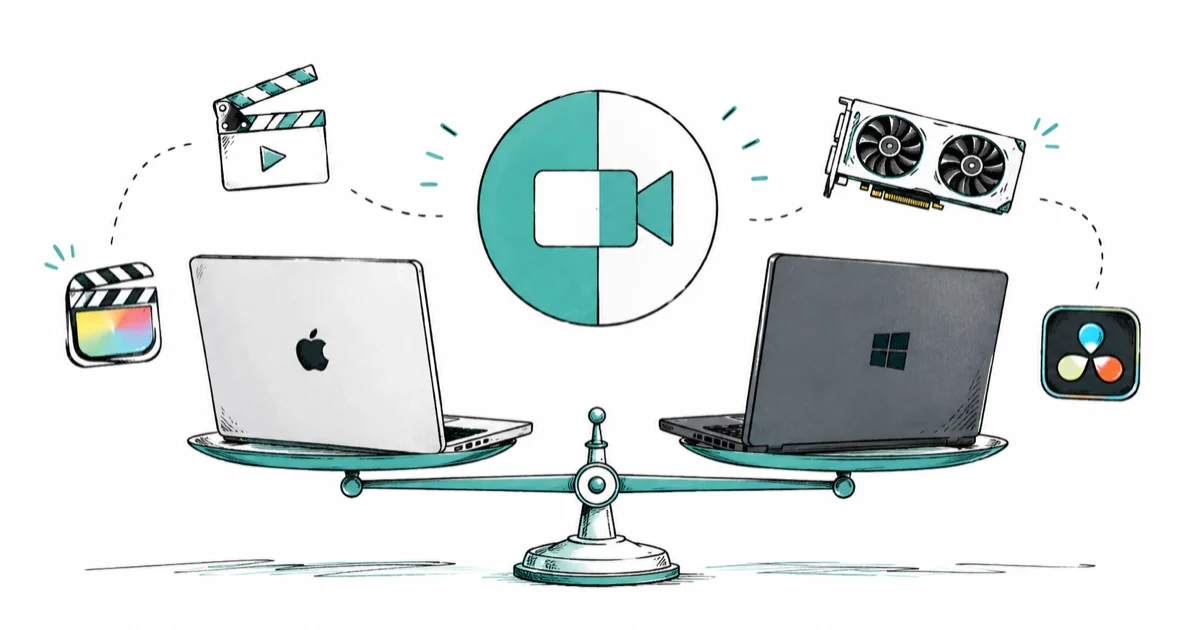
Quick AnswerPick a Mac for ProRes, Final Cut Pro, and quiet on-location battery life; pick a PC with an NVIDIA RTX GPU for DaVinci Resolve, 8K timelines, and budget GPU headroom.
Both Mac and PC edit 4K cleanly in 2026. The honest answer for video editing comes down to codec, software, and GPU headroom per dollar.
- Apple Silicon’s dedicated media engine accelerates ProRes encode and decode in hardware, so ProRes timelines scrub smoothly on Macs without a discrete GPU.
- Final Cut Pro is Mac-only and a one-time $299.99 purchase; Premiere Pro and DaVinci Resolve run on both Mac and PC.
- A mid-range PC with a recent NVIDIA RTX GPU usually beats a similarly priced Mac on Resolve color and AI effects thanks to CUDA acceleration.
- 16 GB of unified memory or 32 GB of PC RAM is the realistic floor for 4K multi-track editing; 8 GB suits only short-form 1080p work.
- For most casual and prosumer creators a Mac is the lower-friction pick; for heavy 8K or DaVinci-centric builds a PC stretches the same dollar further.
#How Mac and PC Handle Video Differently
The hardware split underneath both platforms drives almost every editing trade-off you’ll hit. Apple Silicon puts a dedicated media engine on the same chip as the CPU and GPU. That engine handles ProRes and HEVC encode and decode in fixed-function hardware, which is why ProRes timelines are usually smoother on Apple Silicon Macs than on similarly priced PCs without dedicated ProRes acceleration.
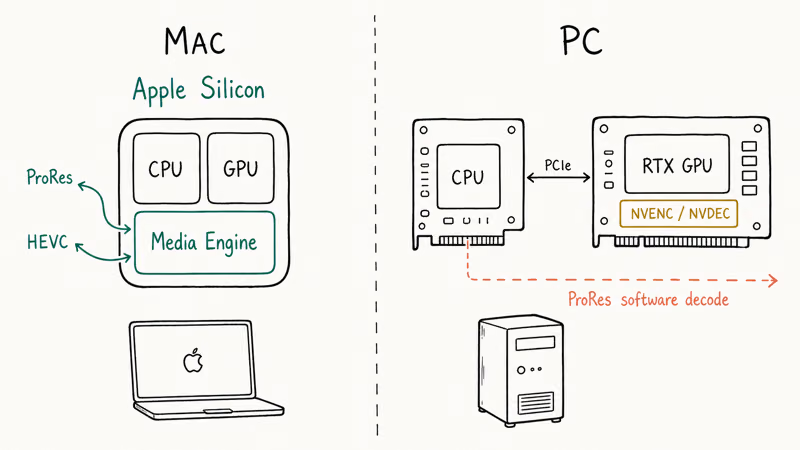
PCs take a different bet. The CPU does general work, a discrete GPU handles effects and color, and codec decode is split across whatever support the GPU vendor ships. NVIDIA’s NVENC and NVDEC blocks handle H.264 and HEVC well, but ProRes is still mostly a software decode on Windows.
The upside is that you can pair a mid-range CPU with a strong GPU and outperform a Mac on anything that scales with GPU compute. DaVinci Resolve color nodes, AI plugins, and Neural Engine alternatives all favor PCs with CUDA support. According to Blackmagic’s DaVinci Resolve product page, the free version of Resolve includes the same color grading engine the paid Studio tier uses, which makes a CUDA-equipped PC unusually strong for color work.
The other structural difference is upgrade path. A Mac is fixed at purchase: RAM, storage, and GPU are soldered or unified, so you buy what you’ll need in three years on day one. A PC tower lets you start with a 12 GB GPU and swap to a 24 GB card two years later when 8K plates arrive. That’s why studio editors who own their rigs tend to lean Windows.
#Final Cut Pro vs Premiere Pro vs DaVinci Resolve
Software choice often pins down the hardware decision faster than the specs do. Final Cut Pro is the only one of the three that doesn’t run on Windows at all, and it’s the most aggressively tuned for Apple Silicon.
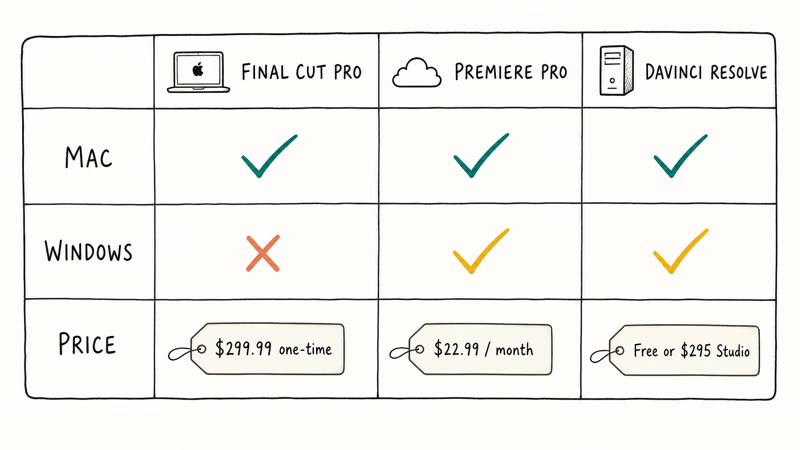
According to Apple’s Final Cut Pro page, the editor is a one-time $299.99 purchase on the Mac App Store with no ongoing subscription. Its tight Apple Silicon integration is the main reason ProRes-heavy editors often prefer Final Cut Pro on a Mac.
That pricing is a sharp contrast to Adobe’s monthly bill.
Premiere Pro is the cross-platform default, especially in studio and agency pipelines where After Effects, Photoshop, and team review tools are already plumbed in. Adobe reported that Premiere needs at least 16 GB of RAM for HD work and 32 GB or more for 4K editing, plus a dedicated GPU with 4 GB of VRAM as a minimum, on both macOS and Windows; see Adobe’s Premiere Pro system requirements for the current matrix.
Those minimums apply on both platforms, so don’t treat an 8 GB laptop as a serious 4K editing machine.
The catch on Mac is that Premiere has historically lagged Final Cut Pro in Apple Silicon optimization. An M-series Mac running Premiere will rarely feel as quick as the same Mac running Final Cut. On a PC with a recent RTX GPU, Premiere benefits from CUDA acceleration and tends to feel snappier on effects-heavy timelines than the same edit on a Mac without ProRes media.
Then there’s the third option, which tilts the math the other way.
DaVinci Resolve is the wildcard that flips the platform argument. The free version is shockingly complete, and the paid Studio license is a one-time $295 fee instead of a subscription. Resolve is also where PC builds shine, because the color page and AI tools were engineered around CUDA-capable NVIDIA GPUs. If you live in Resolve, a $1,500 PC with an RTX 4070 will often feel faster than a $2,500 MacBook Pro on the same project.
#What About 4K, 8K, and ProRes Workflows?
This is where the hardware decision gets sharp. For 4K ProRes work shot on Sony, Canon, or iPhone Pro cameras, a Mac with at least the Pro tier of Apple Silicon is the path of least resistance. The dedicated ProRes accelerators in the M4 Pro and M4 Max keep timelines responsive without proxy workflows, which saves an entire pre-edit step on every project.
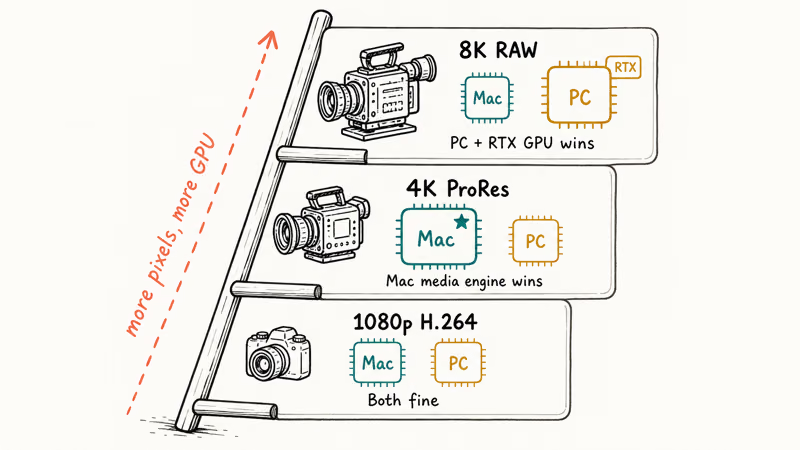
For 4K ProRes 422, Apple Silicon’s media engine is the key advantage: it keeps playback responsive without forcing a proxy workflow.
For 8K timelines or RAW formats like RED RAW and Blackmagic RAW, the math shifts toward GPU compute and storage throughput, which favors a well-spec’d PC. An RTX 4080 or 4090 with 16 GB or more of VRAM, paired with an NVMe RAID, will handle 8K Resolve workflows that would push a MacBook Pro Max into proxy territory.
The PC build also lets you over-provision storage cheaply, which matters because Apple’s ProRes documentation describes ProRes 422 as a high-data-rate codec, and one hour of 4K ProRes can easily eat 100 GB of disk. H.264 and HEVC consumer footage is the easy case. Both platforms decode these in hardware (Apple’s media engine on Mac, NVENC and Intel Quick Sync on PC), and most YouTube-style edits feel fine on a $1,000 machine from either side.
#Platform Picks by Use Case
| Use case | Best fit | Why | Picks to look at |
|---|---|---|---|
| Casual YouTube and social, 1080p-4K H.264 | Either, slight Mac lean | Both handle this easily; Mac wins on portability and battery | MacBook Air 13 M4, Dell XPS 14, Surface Laptop 7 |
| Prosumer 4K, mixed ProRes and H.264 | Mac | Hardware ProRes engine removes the proxy step | MacBook Pro 14 M4, Mac mini M4 Pro |
| DaVinci Resolve color and AI effects | PC | CUDA acceleration gives more performance per dollar | Custom RTX 4070-4080 desktop, gaming laptop with RTX 4080 |
| Final Cut Pro studio workflow | Mac only | Final Cut doesn't run on Windows | Mac Studio M4 Max, MacBook Pro 14 M4 |
| 8K RAW or heavy color grading | PC desktop | Upgradeable GPU and VRAM headroom | Custom build with RTX 4090, 64 GB RAM, NVMe RAID |
| Multi-cam wedding and event | Either | Both handle 4-8 cam 1080p multicam; Mac wins on battery for on-site offload | MacBook Pro 14 M4, Surface Laptop 7 15 |
#Casual creator under $1,200
If you mostly shoot iPhone 4K HEVC or H.264 and edit short-form content, the MacBook Air 13 M4 is the smoothest pick. The fanless design stays quiet under load, and the M4 chip handles 1080p and most 4K H.264 timelines without proxies.
As an Amazon Associate, fone.tips earns from qualifying purchases. Some links on this page are affiliate links.
On the PC side the Dell XPS 14 covers the same ground with a Windows toolchain and a discrete GPU option, and the Surface Laptop 7 is a fanless 1080p workhorse with a Snapdragon X NPU that accelerates AI background removal in Resolve. For a desktop in this tier, the Mac mini M4 is the cheapest serious Apple Silicon box you can buy and pairs nicely with a budget monitor.
A budget Windows tower with an RTX 4060 will match these picks on H.264 export speed, though you give up the polish of the macOS toolchain. For more shopping in this tier, see our roundup of the best video editing laptops under $1,000.
#Prosumer 4K ProRes from $1,800 to $2,800
This is the sweet spot for Mac. The MacBook Pro 14 M4 handles multi-stream 4K ProRes without proxies thanks to its hardware media engine, runs Final Cut Pro, Premiere Pro, and DaVinci Resolve well, and lasts most of a shooting day on battery. The Mac mini M4 Pro is the desktop equivalent and saves about $500 if you already own a monitor.
For on-location event work, the MacBook Pro’s battery life and ProRes acceleration are the practical reasons to choose it over a similarly priced Windows laptop.
A comparable PC build at this price with a Ryzen 7 or Core i7 plus an RTX 4070 beats the Mac on Resolve color and pure GPU rendering, but won’t match the Mac on ProRes playback or laptop battery life.
If portability and ProRes matter, choose Mac. If Resolve color and raw GPU throughput matter more, build a PC.
#Heavy 8K, RAW, or DaVinci Studio work
For 8K timelines, RAW workflows, or color-graded long-form work, a PC desktop is usually the better dollar value. A custom or boutique build with an RTX 4080 or 4090, 64 GB of RAM, and an NVMe RAID will outpace even a Mac Studio M4 Max in Resolve, and offers a clean GPU upgrade path two years out.
The Mac alternative is a Mac Studio with the Max or Ultra chip and 64 GB or more of unified memory. It’s the calmer, plug-and-play option, but you pay the Apple tax and lose the GPU upgrade path. There’s no affiliate slug for the desktop tier we recommend, so build to taste at a reputable system integrator.
If you want to keep storage clean during long projects, our guide on clearing system data storage on Mac covers the macOS side, and our free video editor without watermark roundup lists no-cost editors that run on both platforms.
#Cost Per Editing Hour: Mac vs PC
A PC build at any given price typically has more cores, more VRAM, and more RAM than the Mac you can buy at the same dollar amount. So on raw hardware specs, a PC almost always looks cheaper.
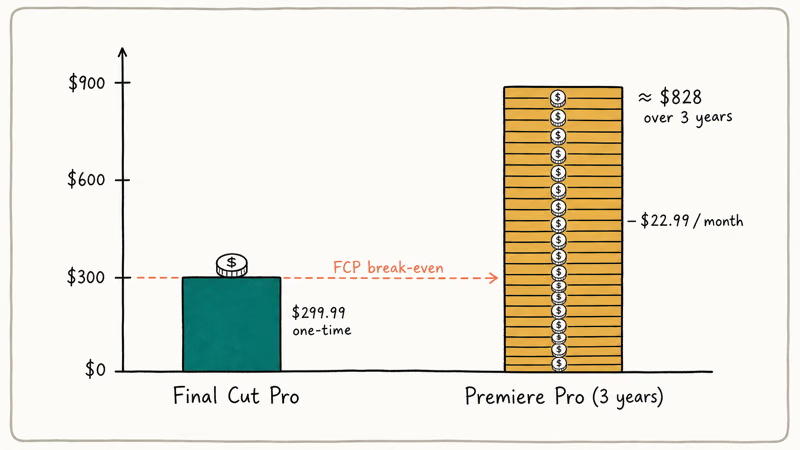
Where the Mac claws back value is in the ProRes media engine, the macOS toolchain, the resale value, and Final Cut Pro’s one-time $299.99 price compared with Premiere Pro’s $22.99 per month subscription (so roughly $276 per year, or $828 over three years). Frame.io’s M1 Ultra Mac Studio review measured Final Cut Pro exporting an Apple Silicon timeline noticeably faster than Premiere Pro on the same Mac hardware, which means the software pairing matters as much as the chip.
If your workflow is Resolve-only or Premiere-only on the GPU-heavy side, a PC at the same price will usually feel faster. If your workflow is ProRes-heavy or Final Cut-centric, the Mac’s “expensive” silicon is doing real work for you. Our DaVinci Resolve vs Premiere Pro comparison breaks down which editor pairs better with which platform.
#Can DaVinci Resolve Run Well on Both Mac and PC?
Yes, but the experience tilts toward PC for serious color work. According to Blackmagic, Resolve runs on macOS, Windows, and Linux, and the free tier ships the same color engine that’s in Resolve Studio.
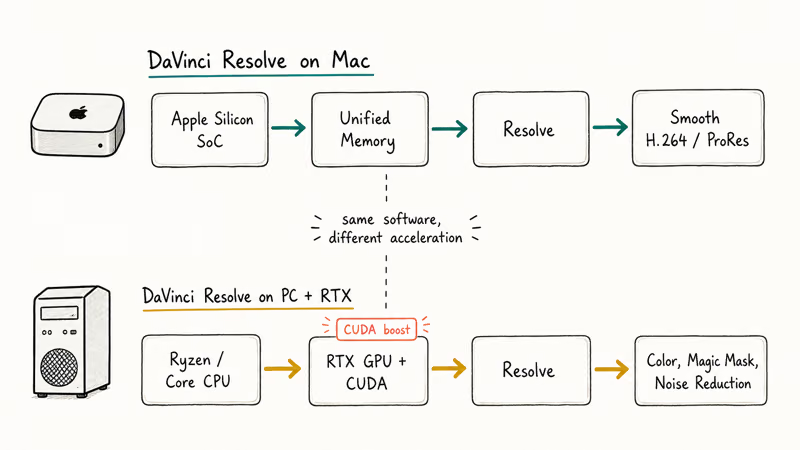
On Apple Silicon Macs, Resolve handles H.264 and ProRes timelines well.
On a PC with a recent NVIDIA RTX card, the CUDA pipeline pulls ahead on noise reduction, magic mask, and neural-engine-style effects that Resolve has invested heavily in.
If Resolve is your only editor, a CUDA PC tends to win on dollar-for-dollar performance. If you bounce between Resolve and Final Cut, a Mac is still the better all-rounder. We compared the editors in depth in our iMovie vs Final Cut Pro guide.
#Bottom Line
Pick a Mac if you shoot ProRes from a recent iPhone Pro, Sony FX, or Canon C-series camera; you want Final Cut Pro; you need a quiet, all-day-battery laptop for on-location editing; or you value the plug-and-play macOS toolchain. For most casual creators in this bucket, the MacBook Air 13 M4 is the right starting point. For prosumer 4K work, step up to the MacBook Pro 14 M4 or the Mac mini M4 Pro.
Pick a PC if you live in DaVinci Resolve and care about color performance per dollar, if you need a discrete RTX GPU for AI effects and 8K timelines, or if your team and pipeline are Premiere- or Avid-centric on Windows.
For the under-$1,200 tier the Surface Laptop 7 15 is a clean portable pick. For 8K or color-grading desktops, a custom RTX 4080-4090 tower outpaces even a Mac Studio in Resolve.
#Frequently Asked Questions
Is a Mac or PC better for video editing in 2026?
Neither is universally better. A Mac is smoother for ProRes workflows, Final Cut Pro, and quiet on-location editing; a PC with a discrete RTX GPU is faster per dollar for Resolve color, 8K RAW, AI effects, and CUDA-leaning plugins. Your codec and software pick the platform, not the logo.
Is Final Cut Pro better than Premiere Pro?
It depends on your platform and team setup. Final Cut Pro is more tightly optimized for Apple Silicon and ships as a one-time $299.99 purchase, so it’s the better value on a Mac when you don’t need Adobe’s wider ecosystem. Premiere Pro is the cross-platform default and the safer pick when you collaborate with team members on Windows, lean on Premiere project files from clients, or rely on After Effects and Photoshop integration day to day.
Do I need a Mac to edit ProRes footage?
No, but a Mac is the easiest path. PCs can decode ProRes in software through Resolve, Premiere, or Apple’s ProRes Windows codec, but the performance gap versus a Mac with a dedicated media engine is real, especially at 4K and higher resolutions. For occasional ProRes work a PC is fine; for daily ProRes pipelines a Mac saves time on every export.
How much RAM do I need for 4K video editing?
Sixteen gigabytes on Apple Silicon or 32 GB of PC RAM is the realistic floor for 4K multi-track work.
Will a PC always be cheaper than a Mac for the same editing power?
Not always end-to-end. PCs win on raw cores and VRAM per dollar, but Macs do the ProRes work for free in silicon.
Can I edit video on a MacBook Air?
Yes. A 16 GB MacBook Air M4 handles 1080p and most 4K H.264 edits; step up to a MacBook Pro 14 for long-form 4K ProRes or Resolve color work.
Does Final Cut Pro run on Windows?
No. Final Cut Pro is macOS-only and Apple hasn’t shipped a Windows version.

macOS 27 Compatible Macs: Every Supported Model (2026)
macOS 27 Golden Gate runs only on Apple Silicon Macs. Here is the full list of supported M-series models and the four Intel Macs that lose support.

macOS 27 Golden Gate: Every Major New Feature Confirmed
macOS 27 Golden Gate goes Apple Silicon only, adds a Gemini-powered Siri, refines Liquid Glass, and rebuilds Spotlight. Here is every confirmed change.

macOS 27 Liquid Glass: Every Readability Fix Explained
macOS 27 Golden Gate refines Liquid Glass with an intensity slider, better contrast, cleaner window corners, and edge-to-edge sidebars to fix readability.

macOS 27 Performance: What Golden Gate Makes Faster
macOS 27 Golden Gate speeds up AirDrop, network file browsing, Safari, and Spotlight, with core system improvements on the Apple Silicon-only release.