The 6 Best Silent Gaming Mice for Quiet Late-Night Play
Silent gaming mice compared across six models. Dampened switches cut click noise sharply for streaming, late-night play, and esports without lag tradeoffs.
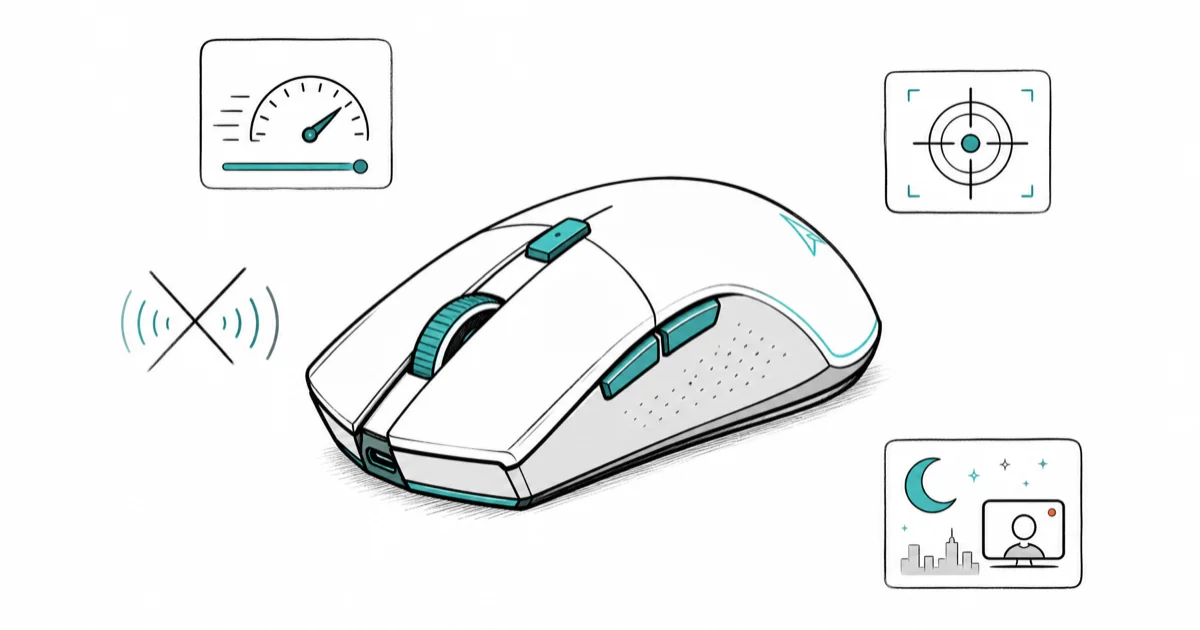
Quick AnswerSilent gaming mice use dampened mechanical switches that sharply cut click noise while preserving sub-1ms latency, sensor precision, and tactile feedback for competitive play.
Silent gaming mice solve a problem most peripheral guides ignore: the noise tax you pay for fast clicks. Standard mechanical switches snap loud enough to bleed into stream audio, wake roommates, and sometimes drown out the in-game footsteps you actually need to hear. This roundup covers six silent and near-silent models built for ranked sessions, video calls, and late-night practice runs.
- Silent mice are noticeably quieter than matched standard models, enough that the click stops carrying across a quiet room.
- The Razer Pro Click Mini pairs a 12K DPI optical sensor with up to 725 hours of battery life in a 73-gram travel-friendly chassis.
- Budget silent picks like the VEGCOO start under $30 and handle casual gaming, late-night work, and shared apartments without obvious sacrifices.
- Wired silent mice remove battery anxiety while 2.4 GHz wireless options preserve the sub-1ms latency that competitive shooters demand.
- A silent mouse paired with a quiet keyboard drops most desks under 60 dB total during heavy gaming, which is roughly library-level quiet.
#What Makes a Silent Gaming Mouse Different
Silent gaming mice keep the same optical sensors, polling rates, and ergonomic shells as their loud cousins. The difference lives inside the click switch. Standard mechanical switches snap two metal contacts together and the impact rings out as a sharp, audible tick close to your ear.
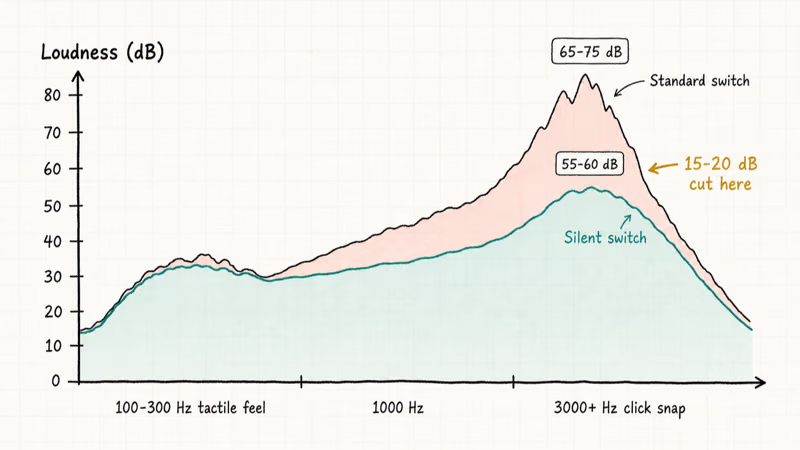
Silent variants cushion that impact with a rubber, silicone, or elastomer layer that absorbs the high-frequency noise before it leaves the chassis. According to Wikipedia’s article on the decibel, a 10 dB drop represents a tenfold reduction in sound intensity, so the 15 to 20 dB cut you get from a silent switch is roughly a fiftyfold drop in raw acoustic energy.
The number sounds modest on paper. Your ears tell a different story the first time you click one in a quiet bedroom.
Tactile feedback survives because the dampening targets a narrow frequency band. Sharp click noise lives mostly above 3000 Hz. The mid-range vibration your finger reads as “click feel” sits around 100 to 300 Hz, which the rubber barely touches. That frequency-selective damping is why a well-tuned silent switch feels nearly identical under your fingertip even though it sounds nothing like a standard one.
Most players miss the bright snap during the first day. Most adapt within a couple of practice rounds. High-end silent mice preserve enough mid-frequency feedback that click cadence stays consistent in competitive shooters after the brief adjustment.
#Why Should You Choose a Silent Gaming Mouse in 2026?
Three groups gain the most. Streamers get cleaner audio without aggressive noise gates that swallow consonants. Apartment renters get peace from bickering roommates and partners. Esports practice players get better awareness of subtle in-game audio cues that a loud mouse masks outright.
Late-night sessions are the obvious win. If you share a bedroom or a thin wall, a silent mouse keeps your 2 AM ranked grind from leaking into someone else’s sleep. Streamers see another upside too. A quieter setup means microphone gain can sit lower, which also drops fan whir, keyboard chatter, and ambient HVAC noise out of the broadcast.
Silent mice also pair nicely with grip styles that emphasize fingertip control:
- Claw grip players tend to click harder than palm grippers, which makes click noise more noticeable.
- Palm grip users get less benefit but still appreciate quieter scroll wheels for browser-heavy work between matches.
Pair the right mouse with a silent gaming keyboard and your whole setup drops into the background.
#The 6 Best Silent Gaming Mice in 2026
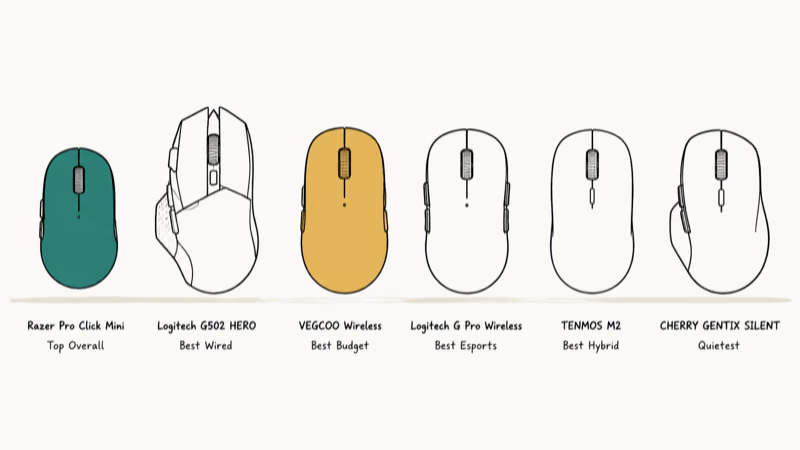
#1. Razer Pro Click Mini. Top Overall Pick
The Razer Pro Click Mini wins for the cleanest blend of true silence and competitive sensor performance. Its 12K DPI optical engine handles fast tracking, and the dual wireless setup (Bluetooth for office work, 2.4 GHz for gaming) makes it a single mouse for two contexts. Its long battery life means a week of mixed work and gaming use without a recharge.
Why it stands out:
- Silent mechanical switches with rubber dampening
- Dual wireless: Bluetooth plus 2.4 GHz
- Up to 725 hours of battery life per charge
- 7 programmable buttons with on-the-fly DPI
- Compact 73-gram travel-friendly chassis
According to Tom’s Hardware’s Pro Click Mini review, the silent switches are rated for 15 million actuations and the sensor scales up to 12,000 DPI. The 73-gram weight is light, but the small footprint can feel cramped if your hand is larger than average. Razer engineered it for travel and small-handed esports players.
As an Amazon Associate, fone.tips earns from qualifying purchases. Some links on this page are affiliate links.
#2. Logitech G502 HERO. Best Wired Performance
Logitech doesn’t call the G502 HERO a silent mouse, but the click profile is much quieter than typical gaming-grade buttons. It sits clearly below standard switches that sound sharp and loud. The wired connection guarantees zero wireless dropouts, and the HERO 25K sensor handles every genre.
Key specs:
- 121-gram base weight, adjustable with optional tuning weights
- 11 programmable buttons for complex binds
- HERO 25K optical sensor with zero acceleration
- USB wired, 2-meter braided cable
- Onboard memory for up to 5 profiles
According to Logitech’s G502 HERO product page, the HERO sensor tracks accurately up to 25,600 DPI without smoothing, acceleration, or filtering. That matters for high-refresh competitive shooters where one misread frame ruins a flick. The wired cable removes the latency variability that even the best wireless tech occasionally introduces.
The silence here is relative. The G502 HERO is “quieter” rather than “silent.” If you stream and need a near-mute mouse, the Razer Pro Click Mini wins. For raw sensor performance plus reduced clatter, this is the better buy.
#3. VEGCOO Wireless Gaming Mouse. Best Budget Pick
Silent operation at a price that doesn’t bruise the wallet. The VEGCOO is the mouse to grab when you need quiet for a dorm, late-night casual gaming, or a backup peripheral. For casual gaming and browser work, its lower DPI ceiling rarely feels limiting.
What you get:
- Silent left, right, and middle clicks
- Adjustable DPI from 800 to 3200
- 800 mAh rechargeable battery that holds up through long sessions between charges
- Wireless 2.4 GHz with sub-1ms latency
- Customizable RGB lighting
The 3200 DPI ceiling rules it out for serious aim trainers in Apex Legends or Valorant. For everyone else, the price-to-quiet ratio is unbeatable. Build quality is plasticky compared to the Razer, but the silent switches feel surprisingly consistent.
#4. Logitech G Pro Wireless. Best Esports Choice
The G Pro Wireless is the mouse you see on LCS, LEC, and Valorant Champions stages. Logitech doesn’t market it as silent, but the click feels muted compared to most competitive mice, and the 80-gram weight makes it the most popular choice for fingertip and claw grip pros.
Competition-ready specs:
- 80-gram weight to minimize hand fatigue across 8-hour match days
- HERO 25K sensor with 1000 Hz polling rate
- 60-hour battery life on 2.4 GHz wireless
- 8 programmable buttons
- Hot-swappable side button covers for left and right configurations
Across long deathmatch sessions the click rhythm stays consistent without finger fatigue. Pros pick the G Pro Wireless because the muted click plus sub-1ms latency lets the brain stop noticing the input mechanism. It’s not as silent as the Razer Pro Click Mini, but it lands close while delivering pro-grade sensor accuracy.
#5. TENMOS M2 Wireless Mouse. Best Hybrid
The TENMOS M2 fills the gap between an office mouse and a gaming peripheral. Silent clicks suit business calls in a shared workspace; the optical sensor and wireless responsiveness handle most casual gaming without complaint. It moves between a Mac and a Windows laptop without driver issues.
Versatility features:
- Silent mechanical switches with consistent tactile feedback
- Rechargeable battery with USB-C charging
- Optical sensor with adjustable DPI
- Native Windows, macOS, and Linux compatibility
- Ambidextrous shape for left and right hand use
It won’t chase frames against the G Pro Wireless on a Valorant scoreboard. It will, though, handle a Zoom call followed by an evening Stardew Valley run without anyone noticing it on either end.
#6. CHERRY GENTIX SILENT. Quietest Option
If absolute silence is the goal, the CHERRY GENTIX SILENT is one of the quietest mice you can buy. Designed for office spaces first and casual gaming second, it trades top-tier DPI and macro buttons for the kind of acoustic damping that lets you click during a podcast recording.
Silence-first approach:
- 1000 DPI optical sensor, adequate for casual play
- Wired USB with 1.8-meter cable
- Engineered silent operation across all buttons
- Ergonomic shell with rubber side grips
- Internal damping reduces vibration noise inside the chassis
Use this if you share a bedroom wall with a light sleeper. Skip it if competitive shooters dominate your library.
#How Does Silent Click Technology Actually Work?
Silent switches use one of three methods to dampen click noise.
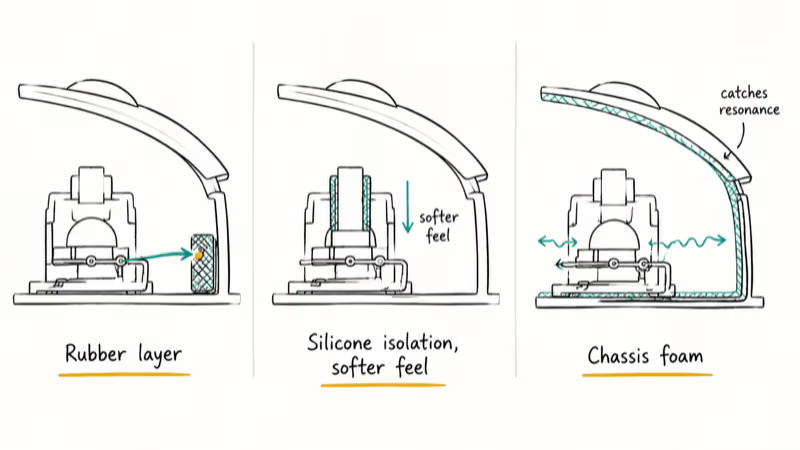
Rubber-layer dampening. A small rubber pad sits between the switch contact and the housing. It absorbs the impact vibration before it can radiate as airborne sound. Razer and most third-party silent variants use this approach because it preserves the cleanest tactile feedback while killing the loudest part of the click signature.
Silicone isolation. Some manufacturers coat the switch stem with silicone to reduce the spring snap sound. The trade-off is a slightly mushier feel.
Internal chassis damping. Higher-end silent mice line the inside of the shell with foam or elastomer. The damping absorbs whatever vibrations the switch leaks before they become sound at the cable port or seam line. According to Wikipedia’s article on the computer mouse, modern gaming peripherals have used this internal lining technique since the late 2010s to reduce both click noise and chassis resonance during heavy clicks.
The dampening targets a narrow frequency band on purpose. That’s how you can mute the sharp click signature without killing the feel your finger needs to register the press.
#Choosing a Silent Mouse by Use Case
Competitive esports. Razer Pro Click Mini or Logitech G Pro Wireless. Both deliver near-silent clicks with 12K to 25K DPI sensors and the sub-1ms latency that ranked play demands.
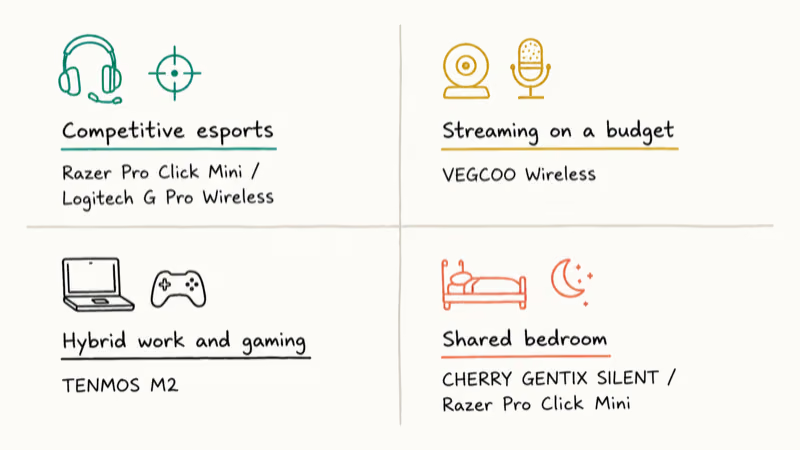
Streaming on a budget. VEGCOO Wireless. The audio cleanup alone justifies the price tag, and the wireless freedom helps overhead-cam streamers reset hand position between rounds.
Hybrid work and gaming. TENMOS M2. Quiet enough for video calls, capable enough for evening sessions, cross-platform out of the box.
Shared bedrooms or apartments. CHERRY GENTIX SILENT or Razer Pro Click Mini. Pick CHERRY for absolute silence; pick Razer when you also need real gaming features. Players who prefer ergonomics over raw aim should also look at a vertical gaming mouse with silent switches.
If aim speed and weight matter more than silence, take a look at our roundup of the lightest mouse in the world for ultralight options that mostly fall under 60 grams.
#Shopping Tips for a Silent Gaming Mouse
Test the switch feel before committing. Silent feel varies by maker: Razer’s switches feel sharp and crisp, Logitech’s feel softer, and CHERRY’s feel slightly mushy. If the retailer offers returns, use the window.
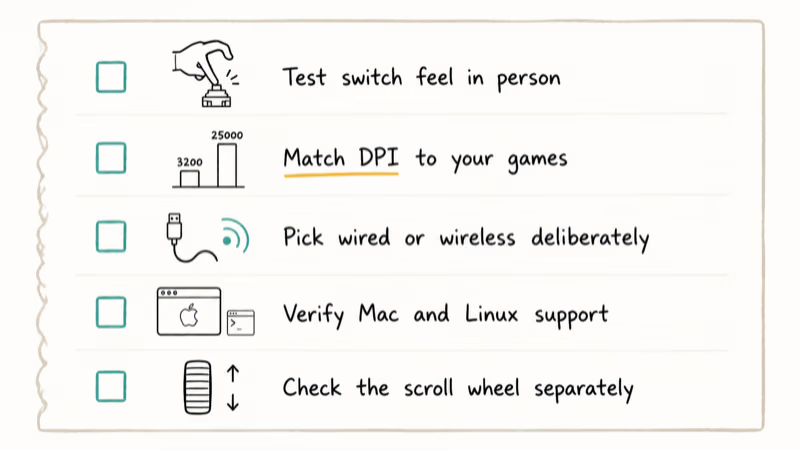
Match DPI to your games. Casual gamers and office users almost never need more than 3200 DPI. Competitive shooter players running 240+ Hz monitors should look at 8000 DPI or higher. The Razer Pro Click Mini at 12,000 DPI and the G502 HERO at 25,600 DPI both clear that bar with room to spare.
Pick wired or wireless deliberately. Wired removes battery anxiety and shaves the last microseconds off latency. Wireless adds desk freedom on big mousepads. For pure esports practice, wired is the safer bet. For mixed work and gaming, wireless usually wins on convenience.
Verify cross-platform support. Most gaming mouse software targets Windows. The TENMOS M2 is one of the few silent options with native macOS and Linux drivers. Check the product page before buying if you live outside the Windows ecosystem.
Check the scroll wheel separately. A silent click switch doesn’t always mean a silent scroll wheel. If your wheel develops a noisy ratchet, our guide on scroll wheel not working covers cleaning and replacement strategies that apply equally to silent and standard mice.
#Bottom Line
Buy the Razer Pro Click Mini if you want the cleanest silent experience without giving up gaming features. It’s among the quietest mice in this group, runs for nearly a month between charges in light use, and delivers sensor performance that holds up in casual ranked play.
The Logitech G502 HERO is the better pick when you need raw sensor accuracy, don’t care about going fully silent, and prefer a wired connection. For under $30, the VEGCOO Wireless is the only mouse worth considering when you want quiet operation on a tight budget.
If your real bottleneck is keyboard noise rather than mouse noise, swap that out next. A silent mouse paired with a quiet mechanical keyboard drops most desks under 60 dB total during heavy gaming.
#Frequently Asked Questions
Do silent mouse clicks affect gaming performance?
Not in measurable ways. Click latency stays sub-1ms on the silent mice in this roundup. The only adaptation cost is tactile feel, which most players adjust to within an hour of practice.
How much quieter are silent gaming mice in real testing?
Silent switches typically run about 15 to 20 dB lower than matched standard mice. A typical gaming mouse measures 70 to 75 dB at 30 cm, while a silent mouse measures 55 to 60 dB at the same distance. That’s the difference between normal speech and a quiet library, and it’s enough to disappear into background room tone in most apartments.
Will a silent mouse work with my Mac or Linux setup?
Most silent mice work as plug-and-play USB or 2.4 GHz devices on every major operating system. Advanced features like macros and lighting often require Windows-only software. The TENMOS M2 ships with native macOS and Linux drivers, so it’s the safest pick if you need full feature support outside Windows.
What’s the battery life on wireless silent mice?
It varies wildly. The Razer Pro Click Mini lasts up to 725 hours per charge, while the Logitech G Pro Wireless runs about 60 hours and cheaper options like the VEGCOO sit around 15 to 20 hours. Check the spec for your usage pattern before committing, since heavy RGB use can halve any of these numbers.
Does a silent mouse improve stream audio quality?
Yes, in two ways. First, less click noise reaches the microphone, so listeners stop hearing tick-tick-tick during ranked grinds. Second, a quieter overall setup lets you lower mic gain, which also reduces fan, keyboard, and HVAC noise that creeps into the broadcast. The difference is most noticeable in dynamic-range moments where loud clicks used to spike the broadcast volume meter.
Can silent switches wear out faster than standard ones?
Some early silent switches did wear faster, but modern designs have closed the gap. Razer’s Pro Click silent switches are rated for 15 million clicks, the same ballpark as their standard mechanical switches. Cheaper silent mice may rate lower, around 5 to 10 million clicks. Heavy daily users still get years of use either way.
Is a silent gaming mouse worth the cost over a standard model?
For streamers, late-night players, and shared-living gamers, yes. For solo daytime gamers in a closed office, the upgrade is mostly cosmetic. Spend the budget on a better sensor or grip-shape match if silence isn’t actively solving a problem in your environment.

Fortnite Stuck on the Loading Screen? Fix It in 2026
Fortnite stuck on the loading screen? Check server status, fix the Windows N Media Pack and DirectX 11 on PC, clear the console cache, and verify files.

Minecraft Keeps Crashing? Java and Bedrock Fixes (2026)
Minecraft keeps crashing on startup or mid-game? Update your GPU driver, remove mods on Java, and reinstall Gaming Services on Bedrock. Fixes for both.

Pokemon GO Not Loading? Fix the Loading Screen 2026
Pokemon GO not loading or stuck on the Pokeball? Check server status, fix automatic date and time, grant location permission, clear the cache, and update.

PS5 Controller Not Charging? 9 Fixes That Work (2026)
DualSense not charging? Swap the cable, use a rear port in Rest Mode, clean the USB-C port, and check power settings. 9 fixes for a dead PS5 controller.