Best Silent Gaming Keyboards for Shared Spaces in 2026
Find quiet gaming keyboards that won't wake your roommate, comparing silent mechanical, rubber dome, and wireless picks for shared apartments.
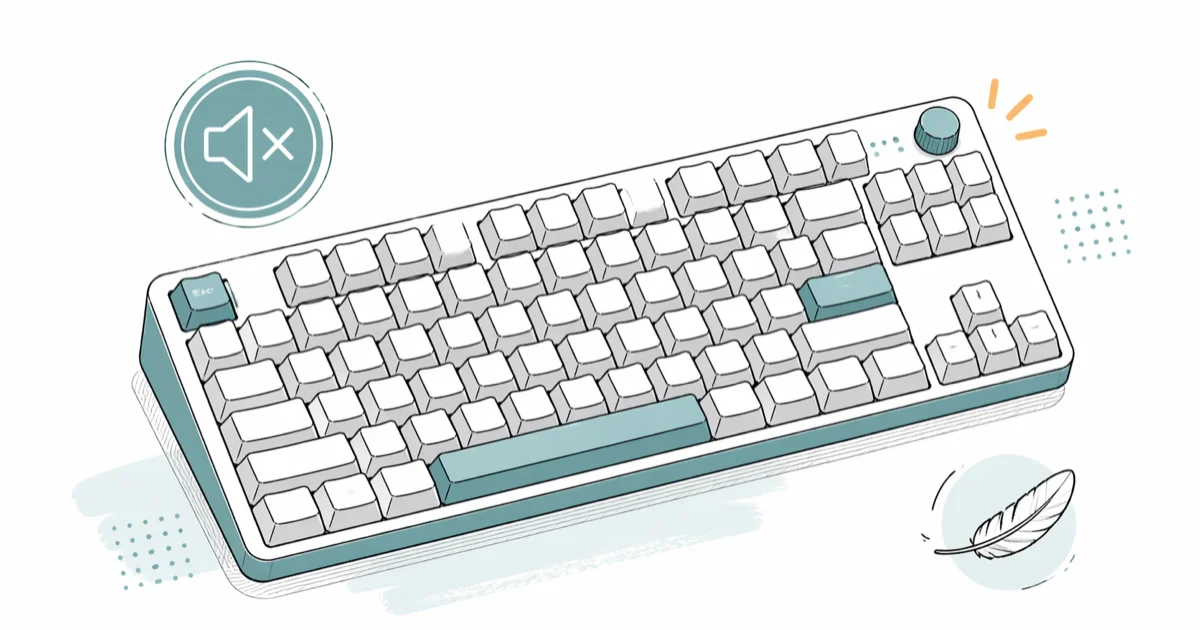
Quick AnswerA silent gaming keyboard uses dampened switches that cut keystroke noise by roughly 15 to 20 decibels without losing the snappy feel gamers want. For shared apartments, the Corsair K55 RGB PRO XT runs about $50 to $70 for casual play, while the SteelSeries Apex Pro suits competitive gamers who need adjustable actuation and longer durability.
A silent gaming keyboard solves the most common shared-living complaint: a roommate one wall away who hears every clack during a late-night ranked match. Standard mechanical boards push noise into the 70 to 80 decibel range during fast typing.
That’s close to the level of a vacuum running in the next room. The right silent switch design drops that noise floor substantially, which is the difference between someone sleeping through your match and waking up annoyed.
This guide covers what makes a keyboard quiet, which switches last longest, and whether wireless latency is real.
- Silent switches dampen noise at the source through internal rubber pads and softer landing surfaces, not through external sound mats
- Mechanical silent keyboards hit a 50 million keystroke lifespan per Cherry’s published rating; rubber dome boards top out around 10 to 20 million
- Wireless gaming keyboards using Bluetooth 5.0 or 2.4 GHz dongles add 1 to 2 ms of latency, well below the 6.9 ms a 144 Hz monitor introduces
- Switch actuation force from 45 to 65 grams works for almost every gamer; weight matters less than people think
- Test the keyboard in person if you can, since two people listening to the same switch can disagree about whether it counts as quiet
#How Do Silent Switches Reduce Keyboard Noise?
Quiet keyboards attack noise where it starts, inside the switch itself, rather than padding it down afterward. A standard mechanical switch makes its loudest sound when the stem bottoms out hard against the housing on each press.
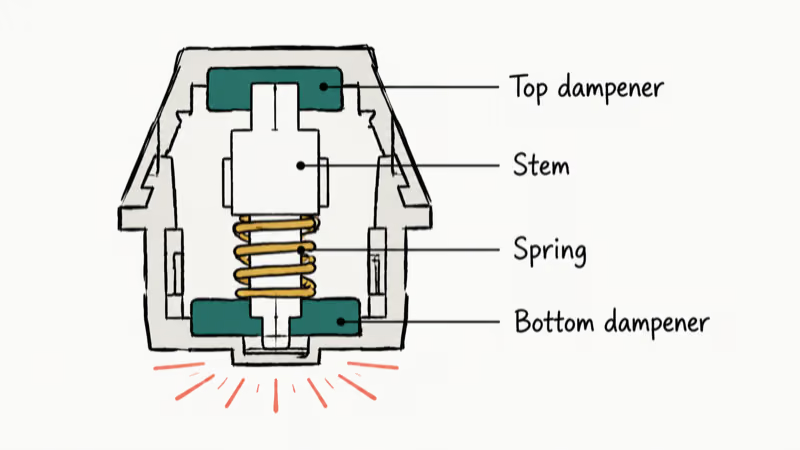
Silent switches solve this with cushioning. They add a small dampening pad above and below the stem so the hard plastic-on-plastic contact gets softened on both downstroke and upstroke. According to Wikipedia’s Cherry MX article, the silent variants achieve their lower noise floor through this integrated rubber element rather than through any change to the spring itself.
Cherry’s MX Silent Red product page confirms that the silent family is rated for more than 50 million actuations. The dampening pad doesn’t shorten how long the switch lasts.
Rubber dome keyboards take a different route. Instead of a separate spring-and-stem assembly, each key sits over a small flexible dome that collapses on press and pops back when released. The dome itself absorbs the impact, so there’s no hard bottom-out at all.
Older rubber dome boards felt mushy. Modern Corsair and Logitech designs use stiffer domes, so the Corsair K55 stays crisp during fast WASD bursts.
If your gaming setup also runs voice chat all night, a quiet keyboard pairs well with a voice changer for Discord so neither audio source bleeds through your roommate’s wall.
#Mechanical or Rubber Dome: Which Lasts Longer
Durability is the biggest split between the two switch families.
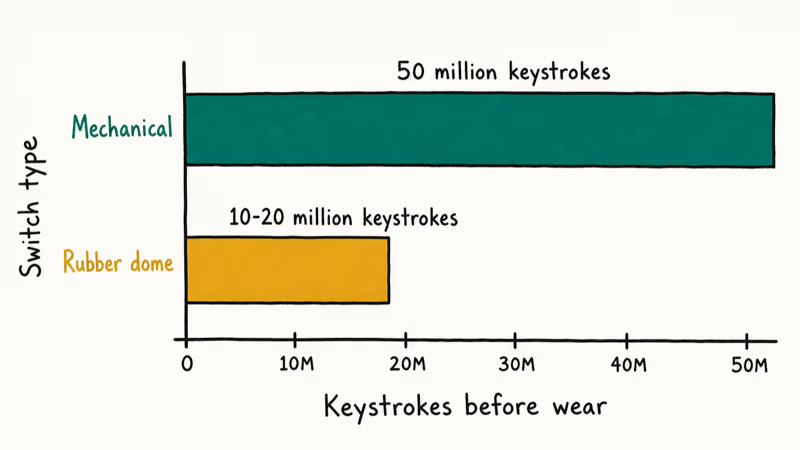
Mechanical switches use individual springs that snap back independently, and the contact mechanism is a metal leaf that doesn’t wear out the way rubber does. Rubber dome boards rely on the dome itself, and rubber under repeated stress eventually loses its springiness.
Cherry’s published switch lifetime is 50 million keystrokes per key. Most rubber dome boards land somewhere between 10 and 20 million before users start noticing slow returns or inconsistent registration.
For someone playing 20 hours a week, that’s the difference between a keyboard that lasts 5 to 10 years and one that lasts 2 to 5. Rubber dome noise tends to stay flat in the short term, so any degradation shows up as slower key returns over years, not weeks.
Hot-swappable mechanical boards extend that lifespan further. Both the SteelSeries Apex Pro and the Keychron K12 let you pop out a worn switch and drop in a replacement in under 30 seconds. No soldering required.
Most rubber dome keyboards don’t split apart this way. Once the domes wear, the whole board goes in the recycling bin.
If your old keyboard already feels mushy or some keys stop registering, the cause is sometimes driver-side rather than hardware-side. Our guide on Windows 10 keyboard not working walks through the driver and language-input checks that fix a surprising share of these complaints.
#Switch Weight and Travel Distance for Gaming
Two specs matter more than switch type for how a board feels under your fingers: actuation force and travel distance.
Actuation force is measured in grams and tells you how much pressure registers a press. Most gaming switches sit between 45 and 65 grams. Lighter switches like the Cherry MX Silent Red activate around 45 grams and reward fast tapping. Heavier switches in the 60-gram range resist accidental presses better, which suits people who rest fingers on keys between actions.
Travel distance is the depth a key drops on a full press. Standard mechanical travel runs 4 mm. SteelSeries’ OmniPoint switch lets you tune this between 0.4 mm and 3.6 mm per key, which is unusual.
For most gamers, the default 4 mm setup just works. Competitive shooter players sometimes prefer shallower travel to register movement keys faster.
#Three Silent Gaming Keyboards Worth Buying in 2026
These three silent boards cover the budget, premium, and wireless ends of the category, and each is judged on noise floor, feel, and build quality.
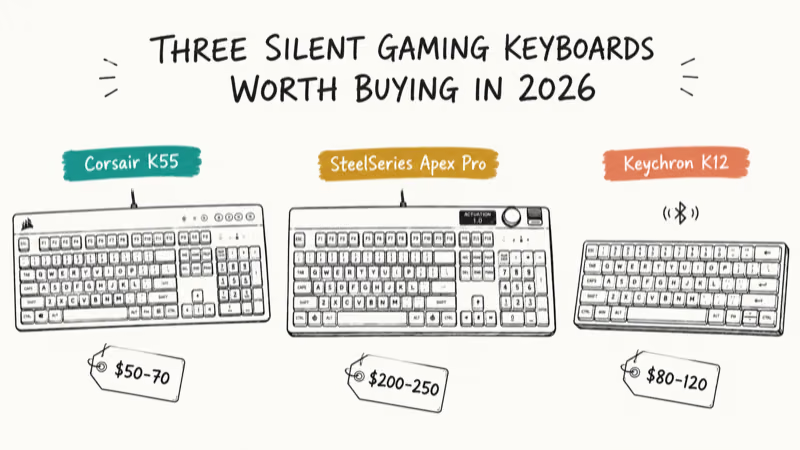
Budget pick: Corsair K55 RGB PRO XT (around $50 to $70).
This is the cleanest entry point if money is tight or your gaming hours are casual. Corsair’s K55 RGB PRO XT product page recommends the rubber dome design for noise-sensitive setups and lists 4 mm of key travel.
Input latency over a wired USB connection is low enough that it stops mattering for reflex games like Valorant. The detachable wrist rest helps during long weekend sessions, and the rubber dome noise floor stays flat over extended use.
Premium mechanical pick: SteelSeries Apex Pro (around $200 to $250).
The headline feature is the OmniPoint switch, which lets you set actuation depth between 0.4 mm and 3.6 mm per key. SteelSeries’ Apex Pro product page states that you can map shallow actuation to your WASD cluster for fast inputs and deep actuation to keys you want to avoid mispressing.
A practical setup for Counter-Strike 2 is around 1.5 mm for movement keys and 2.8 mm for binds you don’t want triggering by accident, like grenade throws. The aluminum top plate is rigid with no noticeable flex under heavy use.
Wireless mechanical pick: Keychron K12 (around $80 to $120).
The K12 ships with Gateron silent mechanical switches and supports both Bluetooth and USB-C. Battery life stretches to weeks at around 6 hours of daily use with the backlight on the lowest setting.
The 60% layout takes about a week to acclimate to, since you lose the dedicated arrow cluster. The desk space saved is meaningful in a small bedroom. It pairs cleanly with Windows, macOS, and an Android tablet over Bluetooth, switching between them without re-pairing each time.
Anyone weighing peripherals together should also look at our best claw grip mouse for gaming shortlist. The keyboard alone doesn’t finish the kit.
#Layout Size: Full, TKL, or 60% Compact
Layout choice matters as much as switch choice in a small bedroom or shared studio.
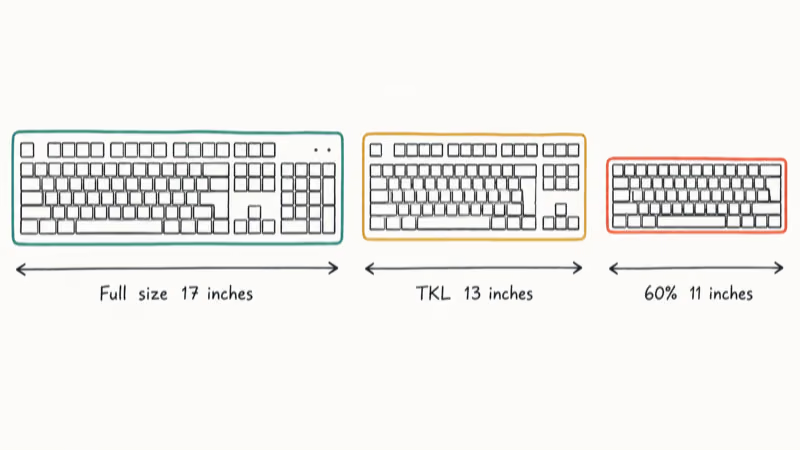
Full-size boards keep a dedicated number pad on the right and run about 17 inches wide.
Tenkeyless (TKL) boards drop the number pad and shave roughly 4 inches off the width. That extra space goes to your mouse on a cramped desk, which matters more than people expect during fast aim swings. Most esports pros use TKL.
The 60% format goes further and removes the function row, arrow keys, and navigation cluster. You access those keys through a function-layer hold. Compact boards like the Keychron K12 free up serious desk real estate, but the learning curve is real for the first week.
If you split time between gaming and writing, TKL is usually the right middle ground. If you only game and your desk is small, 60% wins on space saved.
#Does Wireless Latency Hurt Competitive Play?
This is one of the most common questions about wireless gaming gear. The short answer is no for almost everyone.
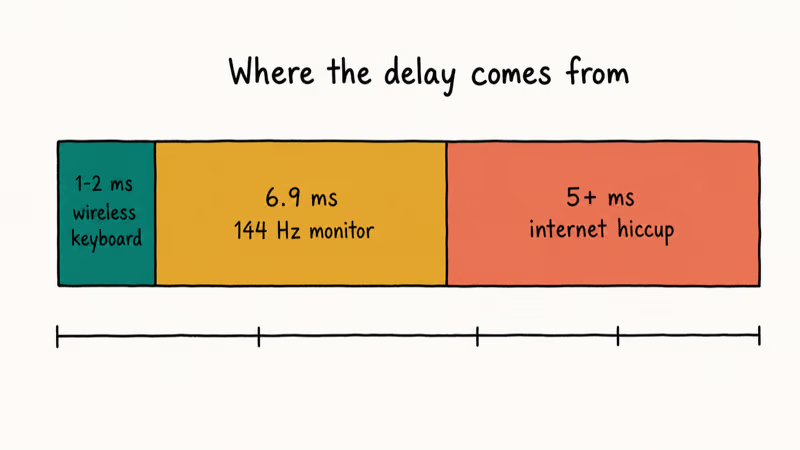
Modern Bluetooth 5.0 implementations add roughly 1 to 2 ms of input latency on top of whatever the keyboard scan rate already produces. A 144 Hz gaming monitor introduces 6.9 ms of frame time on its own. A 60 Hz monitor adds 16.7 ms.
The keyboard delay is a rounding error compared to the display’s contribution. Any 5 ms internet hiccup wipes out the difference completely. Side by side on the same 144 Hz monitor, a wired Apex Pro and a wireless Keychron K12 are indistinguishable in feel during games like Fortnite and League of Legends.
Frame-sensitive genres are the exception. Fighting games like Street Fighter 6 and rhythm games like Osu! score by single-frame timing windows.
Competitive players in those communities still pick wired by default. If you play those genres for ranked points, wired is the conservative call. If you play story-driven games, MMOs, MOBAs, or shooters under tournament-money level, wireless costs you nothing measurable.
Hardware quality of the wireless link matters more than the protocol name on the box. A cheap 2.4 GHz dongle sitting on a crowded Wi-Fi band can drop packets and stutter even when a well-implemented Bluetooth connection would have stayed perfectly steady, so the brand’s radio engineering and antenna placement end up counting for far more than whether the spec sheet says Bluetooth 5.0 or a proprietary 2.4 GHz protocol.
Both connection types hold up better with the dongle on a direct port, not a USB hub. A wireless keyboard also won’t worsen speakers buzzing on the same desk, since the protocols sit in different bands.
#Bottom Line
Pick the Corsair K55 RGB PRO XT if your budget caps at $70 or you mostly play story games and casual multiplayer.
The rubber dome design will fade after a few years, but the noise floor is flat and the layout is full size for productivity work too.
Pick the SteelSeries Apex Pro if you want a board that adapts to multiple genres through OmniPoint actuation tuning and you can absorb the $200-plus price tag. The Keychron K12 is the answer if cable management matters and you bounce between a desktop, a laptop, and a tablet without wanting to re-pair every time.
Skip anything marketed primarily on RGB lighting and aggressive gamer aesthetics. Lighting is fine, but it doesn’t change how loud the switches are or how long they last.
Read the published switch lifetime spec. Listen to the board in person if you can. Ignore the brand-narrative pages on retailer sites.
Software bloat is also worth checking before you buy, since some gaming peripherals ship with companion apps that crash on launch. Our Razer Synapse not opening fix list covers what to do if the keyboard you picked refuses to load its driver suite the first time you boot it.
#Frequently Asked Questions
Do silent gaming keyboards feel cheaper than regular mechanical ones?
Modern silent switches feel almost identical to standard mechanical switches in side-by-side testing. The dampening pad does add a slightly softer bottom-out, and a few keyboard hobbyists describe that as “muted.” For everyone else, it reads as cleaner.
Can you replace switches in a quiet gaming keyboard?
Only on hot-swappable models. The Keychron K12 and SteelSeries Apex Pro both let you pull a worn switch and drop in a fresh one in under a minute. Rubber dome keyboards like the Corsair K55 don’t support switch replacement at all; once the domes wear, you replace the whole keyboard. If long-term modding matters to you, hot-swappable mechanical is the only path.
Will a quiet keyboard make you slower at competitive games?
No. The latency gap between silent and standard mechanical switches is fractions of a millisecond, far too small to feel in a game like Valorant.
How long does a silent gaming keyboard actually last?
A silent mechanical board hits 50 million keystrokes per Cherry’s published spec, which translates to 5 to 10 years of heavy daily play. Silent rubber dome boards land around 10 to 20 million keystrokes, so 2 to 5 years for the same usage pattern. How hard you bottom out keys also affects real-world life, since gamers who slam the keys reach the wear ceiling earlier than light typists.
Should you buy a silent keyboard if you also work from home?
Yes. Silent switches kill the constant clack that bleeds into webcam mics during meetings, and that one change can make you sound noticeably more professional on Zoom.
Do you need RGB lighting on a quiet gaming keyboard?
Not strictly. RGB helps you find keys quickly during late-night sessions when the room is dim, and it earns its keep while you learn a 60% layout where some keys move to a function layer. Competitive players often disable RGB to reduce visual distraction.
Are silent keyboards significantly more expensive than regular gaming keyboards?
Silent mechanical boards run roughly 10 to 20 percent above their non-silent counterparts, mostly because the dampening element adds material cost. Silent rubber dome boards land in the same price band as standard rubber dome ones, which means the cheapest silent option isn’t more expensive than a comparable loud one.
How do you know if a keyboard will actually be quiet enough for your apartment?
Test it in person at a retail store if you can. Noise perception is subjective, and a 5 dB difference that one person ignores can keep another awake. If you can’t test, look for video reviews that include a noise meter on screen, or buy from a retailer with a generous return window. The most reliable read is asking someone in your shared space to listen from where they normally sleep, not from where you sit at the desk.

Fortnite Stuck on the Loading Screen? Fix It in 2026
Fortnite stuck on the loading screen? Check server status, fix the Windows N Media Pack and DirectX 11 on PC, clear the console cache, and verify files.

Minecraft Keeps Crashing? Java and Bedrock Fixes (2026)
Minecraft keeps crashing on startup or mid-game? Update your GPU driver, remove mods on Java, and reinstall Gaming Services on Bedrock. Fixes for both.

Pokemon GO Not Loading? Fix the Loading Screen 2026
Pokemon GO not loading or stuck on the Pokeball? Check server status, fix automatic date and time, grant location permission, clear the cache, and update.

PS5 Controller Not Charging? 9 Fixes That Work (2026)
DualSense not charging? Swap the cable, use a rear port in Rest Mode, clean the USB-C port, and check power settings. 9 fixes for a dead PS5 controller.