Xbox Controller Drift? How to Fix It Free First (2026)
Xbox controller stick drift? Update firmware, recalibrate in the Accessories app, clean the stick, and weigh DriftGuard and Hall Effect. Free fixes first.
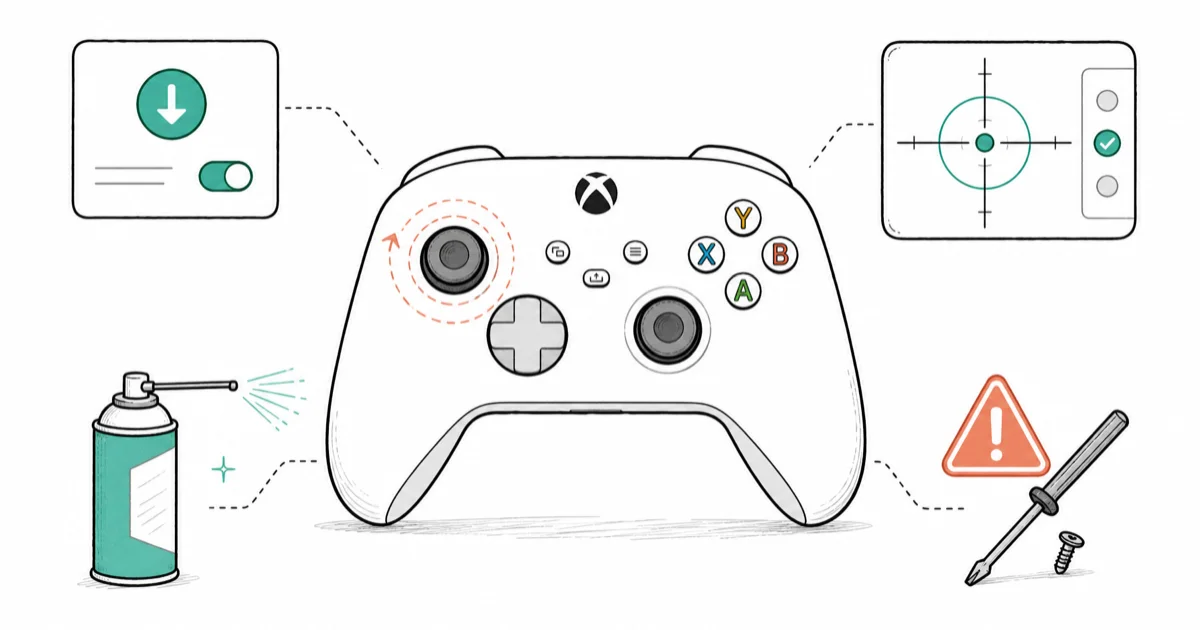
Quick AnswerTry the free fixes first: update the controller firmware and run the Recalibration tool in the Xbox Accessories app. If drift persists, clean the stick with compressed air, because a worn potentiometer needs repair, not calibration.
Xbox controller drift is the slow creep that ruins games: your character walks when you let go of the stick, the aim slides, and menus scroll on their own. It hits Series X/S pads, the older Xbox One controller, and even the pricey Elite. Before you spend a cent, several free software and cleaning fixes are worth trying.
The fixes below run from free software steps to the honest verdict on when a worn stick simply needs new hardware. Firmware updates, recalibration, and cleaning can help mild software-offset or dust-related drift, but physical stick wear needs repair or replacement.
- Update the controller firmware and run the Recalibration tool first, since both are free and can fix mild software-offset drift
- Drift caused by dust under the stick often clears with compressed air, but a worn potentiometer track can’t be calibrated away
- The 2026 DriftGuard tool writes calibration to controller memory and works on Xbox, though it can’t repair physically damaged sticks
- Microsoft covers drift under the standard one-year warranty but offers no free out-of-warranty repair, unlike Nintendo’s Joy-Con program
- Hall Effect controllers use non-contact sticks that resist drift by design, making them the smarter long-term spend
#Why Does Your Xbox Controller Have Stick Drift?
Drift comes from one of two very different causes, and which one you have decides whether any free fix can work.
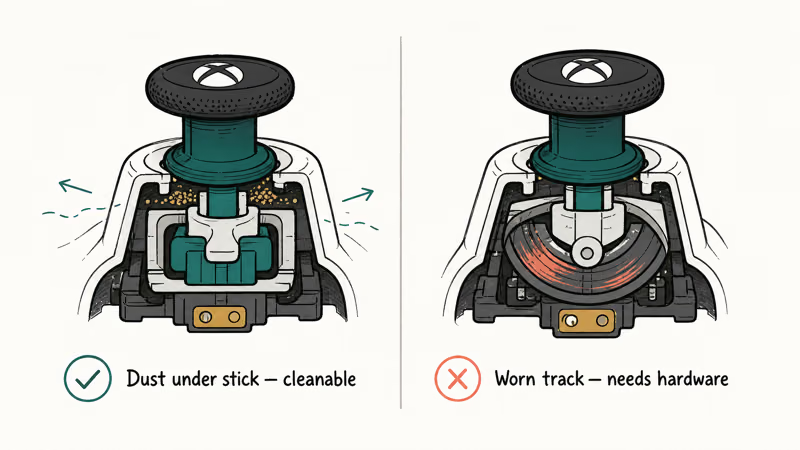
The first is dust or debris under the thumbstick, which interferes with the sensor and creates phantom input. This kind is often fixable with cleaning or recalibration. The second is wear on the potentiometer’s carbon track, the contact-based sensor inside most Xbox sticks. Over heavy use that track wears down, and once it’s physically worn, no amount of software calibration restores it.
This distinction matters because it sets your expectations. If recalibration and cleaning fix the drift, it was dust or a software offset. If they don’t, the stick hardware is worn and you’re choosing between repair, module replacement, or a new controller.
#Update Firmware and Adjust the Deadzone
Start with firmware, because an out-of-date controller can drift on a perfectly good stick.
Plug the controller into your Xbox or a Windows PC, open the Xbox Accessories app, and install any firmware update it offers. Firmware updates fix sensor-handling bugs that cause phantom input, so this alone resolves some mild drift. If the controller won’t connect to update, our Xbox controller won’t connect to PC guide gets it talking first.
If light drift remains, raise the deadzone. In games that allow it, or in the Accessories app’s button-mapping profiles, increase the stick’s deadzone so small phantom movements are ignored. This masks mild drift instantly without opening anything, though it slightly reduces fine aiming precision. It’s a stopgap, not a cure, but it keeps a drifting controller playable while you try the deeper fixes.
#Recalibrate With the Xbox Accessories App
The built-in Recalibration tool is the most useful free fix, and many players don’t know it exists.
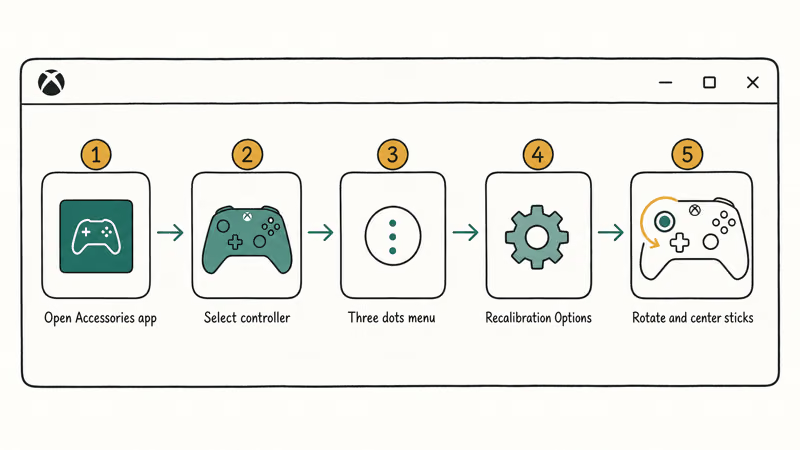
Open the Xbox Accessories app, select your controller, click the three dots (…), then choose Recalibration Options. Follow the prompts to rotate each stick through its full range and center it. This re-teaches the controller where neutral is, which corrects a drifting center point caused by a software offset rather than physical wear.
Recalibration can resolve mild drift when the cause is a shifted center rather than a worn track. According to Xbox support, the Accessories app handles firmware updates and controller calibration. According to Asurion’s Xbox stick-drift guide, recalibration and cleaning should come before any paid repair.
#Clean the Thumbstick the Right Way
If recalibration doesn’t hold, dust under the stick is the next most likely cause.
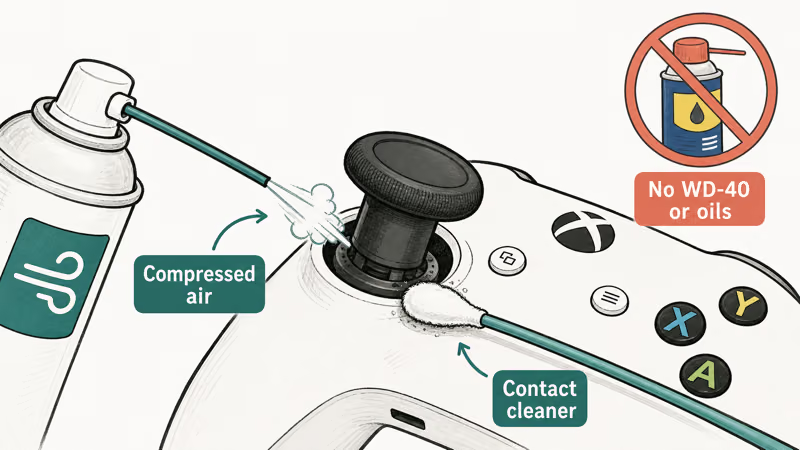
Start with compressed air: tilt the stick to one side and blast short bursts around its base to clear loose dust, rotating the stick as you go. This alone fixes a lot of dust-caused drift. For stickier residue, apply a small amount of electronic contact cleaner or 99% isopropyl alcohol on a cotton swab around the stick base, then work the stick to spread it.
Never use WD-40 or household oils, which attract dust and gum up the mechanism over time. Let any liquid dry fully before reconnecting. Cleaning buys time on a dusty stick, but if the carbon track is physically scratched, cleaning won’t help, which is the point of the next section.
#Can Software Really Fix Drift Permanently?
Honestly, it depends on the cause, and this is where most guides oversell calibration.
Software fixes (firmware, recalibration, deadzone) really do cure drift when the cause is a shifted center point or dust. They can’t fix a worn potentiometer carbon track, because that’s mechanical wear, not a software offset. This is the single most important thing to understand before spending time or money.
The 2026 DriftGuard tool changes the math a little. According to Windows Central’s DriftGuard coverage, it writes calibration data directly to the controller’s memory, which can extend the usable life of a drifting Xbox controller. But it’s still calibration, so it can’t repair physically damaged parts either.
The same software-versus-hardware split applies across platforms, as our PS5 controller stick drift and Joy-Con drift guides explain.
#Warranty Repair, Module Replacement, and Hall Effect
When the stick is physically worn, you’re past free fixes, so weigh the paid paths honestly.
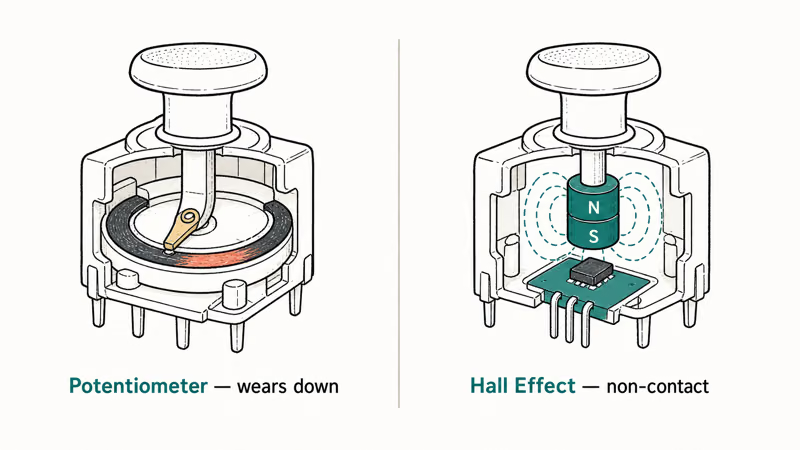
Microsoft covers drift under the standard one-year warranty, so if your controller is new, request a repair or replacement rather than fixing it yourself. Out of warranty, the picture is harsher: unlike Nintendo’s free Joy-Con drift repairs, Microsoft offers no free out-of-warranty repair, so you pay or DIY. Replacing the worn stick module is possible but requires soldering, and according to iFixit’s controller repair guides, that’s an advanced job most people shouldn’t attempt without experience.
That math is why a Hall Effect controller (from brands like GameSir, 8BitDo, or GuliKit) is often the smarter spend. Hall Effect sticks use magnetic, non-contact sensors with no carbon track to wear out, so they resist drift by design. Out of warranty, one usually beats paying to repair another potentiometer-based pad that will drift again.
If your console itself acts up, our why does my Xbox keep turning off and why is my Xbox so slow guides cover those separately.
#Bottom Line
Try the free software fixes before opening anything: update the firmware and run the Recalibration tool in the Xbox Accessories app, since they can resolve mild software-offset drift. If drift persists, compressed air and contact cleaner can clear dust-caused cases, but a scratched potentiometer track can’t be cleaned away.
The 2026 DriftGuard tool extends a controller’s life by writing calibration to memory, but can’t repair damaged sticks. If the stick is worn and out of warranty, a Hall Effect controller wins.
#Frequently Asked Questions
Why does my Xbox controller drift when I’m not touching it?
The stick’s sensor is reading movement that isn’t there. The two causes are dust under the stick, which interferes with the sensor, or a worn potentiometer track inside the stick. Dust is fixable with cleaning or recalibration. A worn track is physical damage that calibration can’t undo.
How do I recalibrate an Xbox controller?
Open the Xbox Accessories app, select your controller, click the three dots, and choose Recalibration Options. Follow the prompts to rotate each stick fully and center it.
Will cleaning the stick fix drift?
It depends on the cause. If dust under the stick is the problem, compressed air and a little contact cleaner often clear it. If the carbon track is worn, cleaning won’t help because the damage is mechanical, not dirt. Cleaning is worth trying since it’s free and quick.
Does Microsoft fix drift for free out of warranty?
No. Microsoft covers drift under the standard one-year warranty, but unlike Nintendo’s free Joy-Con repairs, there is no free out-of-warranty fix for Xbox controllers. Out of warranty you pay for repair, replace the module yourself, or buy a new controller, which is why many players jump to a Hall Effect pad once their warranty lapses.
Is DriftGuard safe to use on my controller?
DriftGuard writes calibration data to the controller’s memory and is designed as a safe calibration tool, not a firmware hack. It extends the life of a drifting controller but can’t repair a physically worn stick.
Are Hall Effect controllers really drift-proof?
They’re far more drift-resistant, not magically immune to every fault. Hall Effect sticks use magnetic, non-contact sensors with no carbon track to wear down, which is the part that fails in standard controllers. That design removes the most common cause of drift, so a Hall Effect pad is the best prevention if you’re tired of replacing controllers.

Fortnite Stuck on the Loading Screen? Fix It in 2026
Fortnite stuck on the loading screen? Check server status, fix the Windows N Media Pack and DirectX 11 on PC, clear the console cache, and verify files.

Minecraft Keeps Crashing? Java and Bedrock Fixes (2026)
Minecraft keeps crashing on startup or mid-game? Update your GPU driver, remove mods on Java, and reinstall Gaming Services on Bedrock. Fixes for both.

Pokemon GO Not Loading? Fix the Loading Screen 2026
Pokemon GO not loading or stuck on the Pokeball? Check server status, fix automatic date and time, grant location permission, clear the cache, and update.

PS5 Controller Not Charging? 9 Fixes That Work (2026)
DualSense not charging? Swap the cable, use a rear port in Rest Mode, clean the USB-C port, and check power settings. 9 fixes for a dead PS5 controller.