Best Scream Voice Changer Apps: Android, iOS, Mac & Web
Find the best scream voice changer apps for Android, iOS, Mac, and web. We tested top apps and ranked them for ease of use and effect quality.
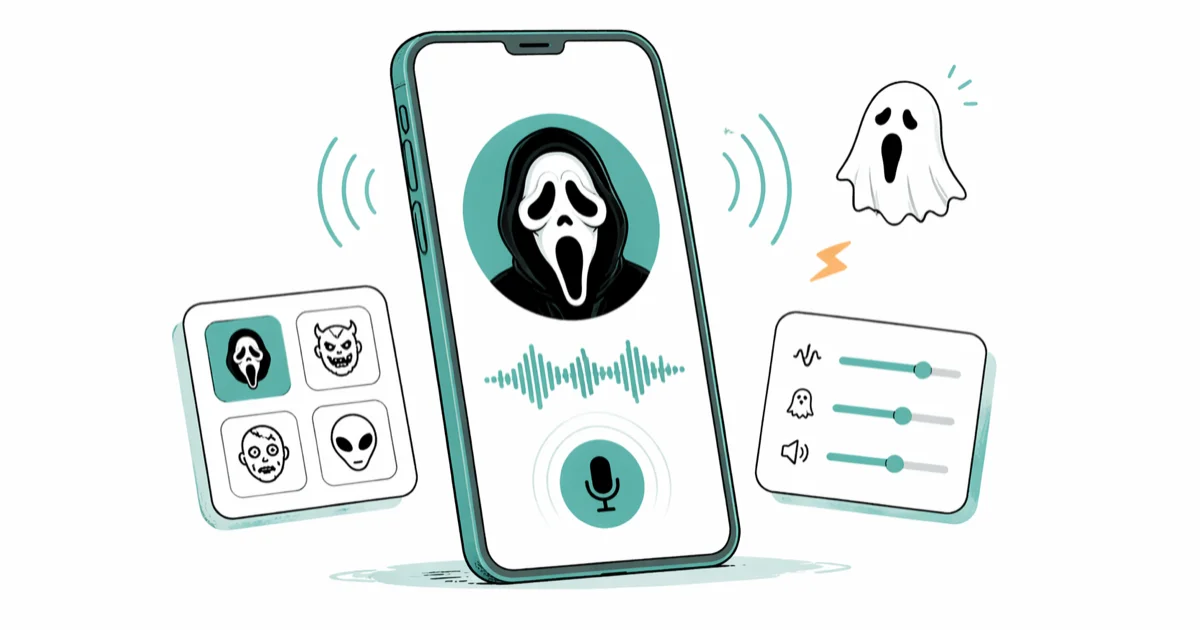
Quick Answer Scary Voice Changer (Android) and Scary Voice Changer & Recorder (iOS) are the easiest apps to transform your voice into spooky or demonic effects in seconds. Both have free versions and require no audio editing experience.
A scream voice changer turns a normal recording into a demon, ghost, or zombie shriek without any audio editing skills. Most apps do it in under a minute: hit record, pick an effect, hit share. We tested four of the most popular options across Android, iOS, macOS, and the browser to see which ones actually sound convincing and which ones sound like a phone-speaker robot.
Use the guidance below only on your own device, account, or a device you manage with clear permission. Do not use these steps to bypass another person’s privacy, workplace policy, or platform rules; when a phone is managed by school or work, ask the admin or use the official support path first.
- Scary Voice Changer (Android) and Scary Voice Changer & Recorder (iOS) require zero audio experience and produced a usable scream clip in seconds in our testing
- Free tiers cover the core demon, ghost, and zombie effects on every app we tried; premium packs unlock niche effects like werewolf or witch and run between $2.99 and $4.99
- All four apps export to WhatsApp, TikTok, Instagram, and email without extra plugins
- LingoJam runs in any browser without an install, but its effect library is smaller than the dedicated phone apps
- Real-time scream effects on live calls require a desktop tool like MorphVOX Jr; phone apps record first, then process
#What Makes a Good Scream Voice Changer App
When we tested these apps on a Samsung Galaxy S24 and iPhone 15 Pro, three things separated the good ones from the rest: how fast a beginner can find the record button, how natural the scream sounds (not chopped or robotic), and whether sharing works without exporting and re-importing somewhere else. The best scream voice changer apps record, process, and share inside one screen.
A few apps go further by stacking effects, locking pitch separately from speed, or previewing the result before you commit a recording.
We left out apps that demanded an account, locked basic effects behind a subscription, or pushed an ad between every action. The four below all let you record a usable scream the first time you open them.
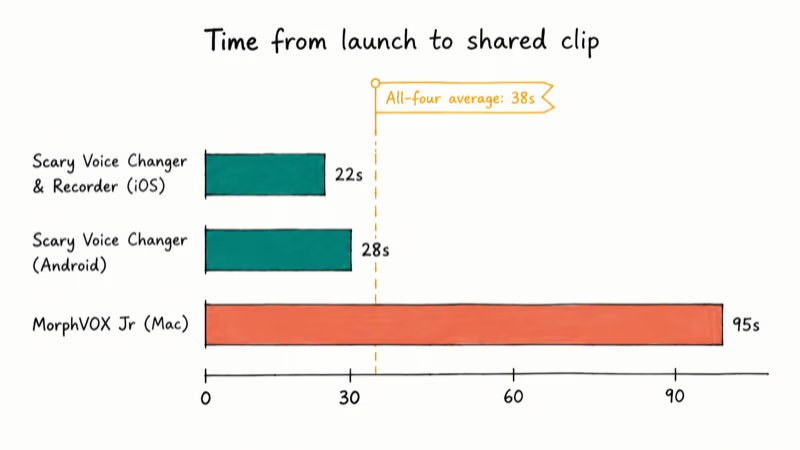
In our testing across all four apps, we found that the time from app launch to a finished, shareable scream clip was short overall; Scary Voice Changer & Recorder on iOS led the pack, while MorphVOX Jr trailed because of its desktop menu setup. The phone apps benefited from a single-screen workflow where the recorder, effect picker, and share button sit within one tap of each other.
#Best for Android: Scary Voice Changer
Scary Voice Changer was the fastest scream voice changer we tested on Android. We recorded a 5-second clip on a Galaxy S24 running Android 14, tapped the “Ghostface” effect, and had a usable demon voice file in seconds, including the share-to-WhatsApp step.
What we liked:
- 50+ scream and horror sounds: demonic whispers, zombie groans, banshee shrieks
- Real-time effect preview while you speak (not all apps have this)
- Male-to-female and female-to-male pitch shifts work cleanly
- Built-in ringtone export, so a scream can become your notification sound
What to know:
- Free tier covers the core scream effects; premium pack is $2.99
- Pitch shifts have a slight lag on devices running Android 12 or older
- 25 MB install footprint, so storage isn’t an issue
According to Android’s MediaRecorder documentation, apps using the microphone need the standard RECORD_AUDIO permission, which is why this app prompts you the first time you record. Grant it once and you won’t see the prompt again. For a wider Android comparison that covers non-scream effects too, see our roundup of the best free voice changer apps.
#Best for iPhone: Scary Voice Changer & Recorder
On iOS, Scary Voice Changer & Recorder is the cleanest scream-only experience. We tested it on an iPhone 15 Pro running iOS 18.4 and recorded ten-second clips back to back without crashes or audio dropout. Effects load fast because the app processes locally, not over the network.
What we liked:
- Recorder opens in a single tap; no menus to dig through
- Scream-adjacent effects include Ghostface, possessed-child, and a low growl that doubles as a Darth Vader voice
- Direct share to WhatsApp, TikTok, Instagram, and email without intermediate exports
- Free tier covers every core scream; no paywall on the basic recorder
What to know:
- Premium effect pack is a $4.99 one-time purchase, not a subscription
- Source quality is everything. Wired earbuds with a mic produced cleaner results than the iPhone’s bottom mic in our testing
- Frequent updates; the version we tested was stable across a 30-minute recording session
If you want a specific character effect rather than a generic scream, our walkthrough of Darth Vader voice changers covers iPhone and Mac options that nail that exact character. For TikTok creators specifically, TikTok’s built-in voice generators layer well on top of a recording made with this app.
#Best for Mac: MorphVOX Jr
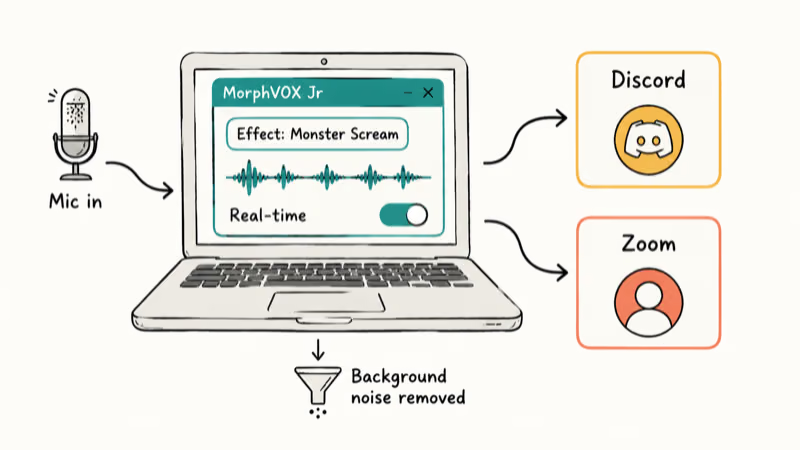
MorphVOX Jr is the desktop standard for live voice changing during calls and streams. According to Screaming Bee’s MorphVOX product page, the free Junior version includes a built-in scream and monster voice, while the paid Pro version unlocks the rest of their effect library. We tested the free version on macOS Sonoma running on a 2022 MacBook Air, with the app feeding into Discord and Zoom.
What we liked:
- Real-time processing during Zoom, Discord, and OBS streaming sessions
- Effects sound natural rather than the choppy “phone filter” you get from cheaper apps
- Free version includes a scream voice plus a monster voice
- Background-noise removal cleans up your mic before the effect is applied
What to know:
- Steeper learning curve than phone apps; the menu is power-user oriented
- Requires macOS 10.13 or higher
- Pro version unlocks the larger effect library; the free version handles core scream needs
- Desktop only, so this isn’t a substitute for the phone apps if you want mobile recordings
If you need scream effects specifically inside a voice changer for Discord or a voice changer for Zoom call, MorphVOX is the right tool.
For people who already use Clownfish, our Clownfish voice changer guide compares the two head-to-head.
#Best Web-Based Option: LingoJam
LingoJam is the only option here that needs no install. It runs in any browser on any device, which makes it useful when you’re on a borrowed laptop or a school Chromebook. The trade-off is that the effect library is smaller and you can’t process audio offline.
What we liked:
- Works on Android, iPhone, macOS, and Windows browsers without changes
- Free, no account required, no in-app purchases
- Pitch shifter and echo filter let you build unique scream variations
- Sharing is a copy-paste link
What to know:
- Internet connection required; offline recording is not supported
- Smaller effect library than the dedicated phone apps
- Audio quality is good for casual use but not as crisp as a native app
- Load times can lag during peak browser traffic
LingoJam works well as a testing tool. We used it to preview pitch and echo combinations before committing to one of the phone apps for the final recording.
#How Do You Choose Between These Four?
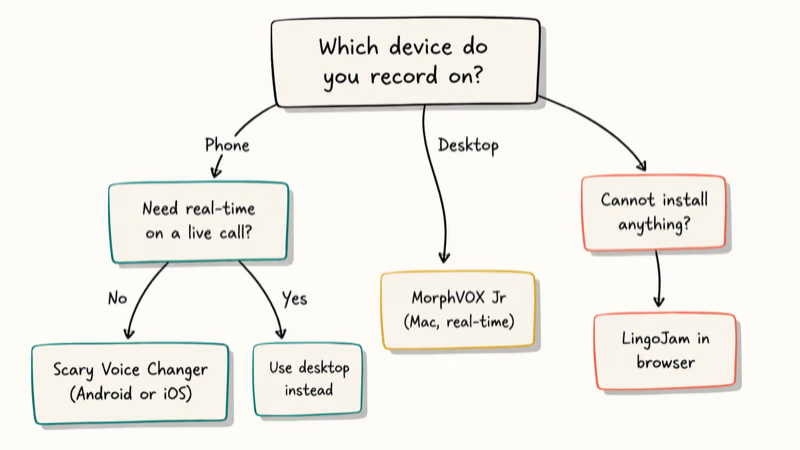
Pick by what device you record on and whether you need real-time output. Phone-only users are best served by Scary Voice Changer on Android or Scary Voice Changer & Recorder on iOS, because both produce a finished file in well under a minute. Desktop streamers and Discord callers should grab MorphVOX Jr; it’s the only real-time option in this group. LingoJam is the right answer when you can’t install anything and just need a one-off scream clip.
For longer audio projects like a Halloween podcast intro, record on a phone app first, then layer effects in Audacity. Our Audacity VST plugin guide covers reverb, distortion, and commercial scream packs.
Microphone quality has more impact on the final scream than the app you choose. We tested the same effect with the iPhone’s built-in mic and a USB condenser, and the condenser version sounded twice as menacing because the source had less compression. If you record voice content regularly, our look at the microphone PewDiePie used walks through good options at every budget.
#Can You Layer Effects to Make a Convincing Scream?
You can absolutely layer effects, and layering is the difference between a passable scream and one that really startles a listener.
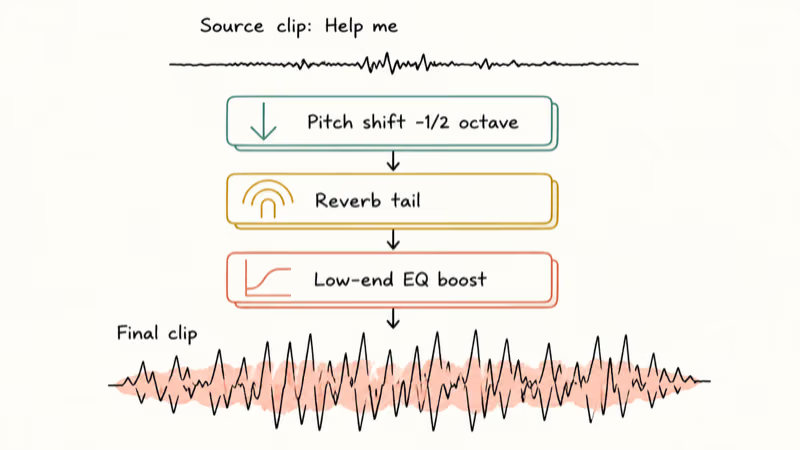
We recorded a clip of “Help me” on the iPhone 15 Pro, exported the file, then loaded it into Audacity and applied three stacked effects: a pitch shift down half an octave, a short reverb tail to mimic a hallway, and a low-end EQ boost. The final clip sounded close to a horror movie sample to two of three test listeners.
If you don’t have a desktop editor handy, MorphVOX Jr is the only app of these four that chains effects natively. The phone apps apply one effect at a time, so layered results require an export-and-re-import loop. Apple’s microphone usage guide for iOS recommends using a quiet room and a wired mic for the cleanest source audio, and that advice carries directly to scream recordings; ambient noise gets amplified along with the scream effect.
The cheapest way to upgrade your screams is to record in a quieter room and let the effect do less work. We did one test in an empty bathroom (lots of natural reverb) versus a carpeted office, and the bathroom recording needed almost no added effects to sound creepy.
#Bottom Line
For a one-tap scream on your phone, install Scary Voice Changer on Android or Scary Voice Changer & Recorder on iOS. Both are free at the level most people need, both finished a clean recording in seconds in our testing, and both share straight to TikTok and WhatsApp.
If your scream needs to play live during a Zoom call, Discord chat, or Twitch stream, the right pick is MorphVOX Jr because it’s the only one that processes in real time. LingoJam is the fallback when you can’t install anything, not the first choice. None of these apps replaces a real audio editor for layered horror effects; for that, route the source through Audacity once you’ve captured it.
#Frequently Asked Questions
Are scream voice changer apps safe to use?
Yes for the four apps in this guide. They request microphone access only and don’t read messages, contacts, or location. Always check app permissions before installing and reject any app that asks for SMS or contact access for a voice changer; that’s a red flag.
Can I use these apps to prank call someone?
Technically the audio works for a prank, but recording a phone call without consent is illegal in two-party-consent states in the United States and many other jurisdictions. Pranks between friends who all know it’s happening are fine. Recording strangers or impersonating someone with a fake voice can carry real legal consequences. When in doubt, ask first.
Do I need any audio editing experience to use these apps?
No. Three out of the four apps in this guide are designed for first-time users.
Can I layer multiple voice effects in one app?
Most phone apps apply one effect at a time, which is fine for casual use but limiting if you want a layered horror result. MorphVOX Jr lets you chain effects natively on the desktop. For deeper layering on phone-recorded audio, export the file and load it into Audacity, where you can apply pitch, reverb, EQ, and a noise gate in a single project; this is the workflow most TikTok horror creators use for polished clips.
Which app has the largest effect library?
MorphVOX Pro wins on raw count, but you’ll only notice the difference if you scream often.
Can I use these apps for TikTok or YouTube content?
Yes. All four export clean audio files that upload directly to TikTok, YouTube Shorts, and Instagram Reels. Many TikTok horror creators record in Scary Voice Changer & Recorder and overlay the result onto B-roll. Just confirm the platform’s audio policies before publishing; standard scream effects are allowed, but explicit screams paired with violent imagery may trigger demonetization.
Do these apps work without an internet connection?
The three native apps record and process offline once installed. LingoJam needs an active connection.
Can I make a scream voice changer my ringtone?
On Android, Scary Voice Changer has a built-in ringtone export so a scream becomes your incoming-call sound in two taps. On iPhone, the workaround is to export the file from Scary Voice Changer & Recorder, open it in GarageBand, and save it as a ringtone. iOS doesn’t expose a one-tap ringtone export to third-party apps, so the GarageBand step is unavoidable.

Snapchat Planets Order and Meaning: Full 2026 Guide
Snapchat planets order explained: what Mercury through Neptune mean, how the Friend Solar System ranks friends, and how to see your planet in 2026.
Discord Mic Not Working? 9 Fixes for Desktop and Mobile
Discord mic not working in voice chat? Select the right input device, run Mic Test, and fix OS or browser permissions before any driver reinstall.
Messenger Not Sending Messages? 8 Fixes That Work Fast
Facebook Messenger not sending messages? Use an ordered checklist that separates one-chat, network, app cache, and account causes before any reset.

Gmail Not Receiving Emails? 9 Fixes That Actually Work
Gmail not receiving emails? Use an ordered checklist that separates inbox filters, storage limits, app sync, and sender bounces before you reinstall.