TikTok Voice Generator: Create Engaging AI Voiceovers
Compare TikTok voice generators for quick AI voiceovers, including TikTok's built-in text-to-speech, TopMediai, FakeYou, VoxBox, FlexClip, and TikTok TTS.
Quick AnswerTikTok voice generators are AI tools that create synthetic voiceovers in different styles, accents, and characters. Popular options include the built-in TikTok text-to-speech, ElevenLabs, Speechify, and Murf, with most offering a free tier for short clips.
Are you looking to take your TikTok videos to the next level with engaging voiceovers? Adding a clear voiceover can make tutorials, jokes, product clips, and story videos easier to follow. But recording your own voiceovers can be time-consuming. That’s where TikTok voice generators come in.
These AI-powered tools make it easy to convert your video scripts to natural-sounding speech in just a few clicks. This guide compares the best TikTok voice generators available, what each one does well, and how to pick the right voice for your clips.
#What is a TikTok Voice Generator?
A TikTok voice generator, also known as a text-to-speech (TTS) tool, uses artificial intelligence to convert written text into spoken audio that closely resembles human speech. You simply input your video script, choose an AI voice, and the tool generates an audio file you can use as a voiceover for your TikTok videos.
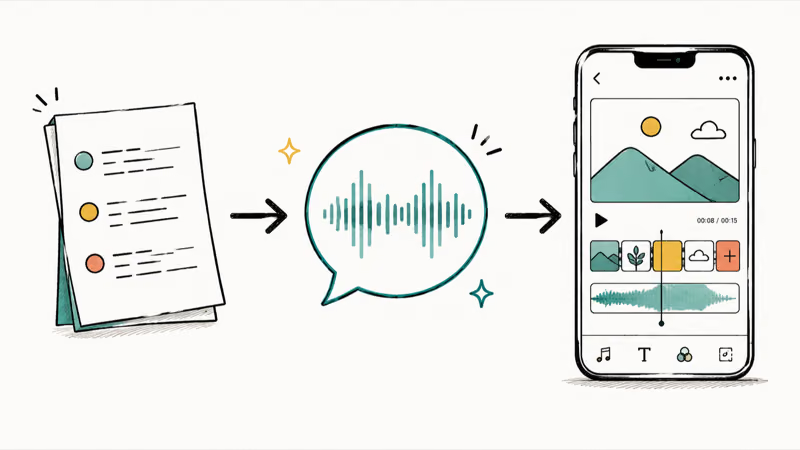
As Wikipedia’s overview of speech synthesis explains, modern systems build voices from recorded human speech rather than purely synthetic tones, which is why today’s TTS output sounds far more natural than the robotic voices of a decade ago.
According to TikTok’s accessibility page, text-to-speech converts typed text to a voiceover that plays over the text as it appears in the video. That makes TikTok’s built-in option the safest starting point before you try third-party generators.
Besides, some users say that their TikTok Text-to-Speech is not working; in this article, let’s figure out the possible reasons and best solutions you should try.
#How to Leverage the Text-to-Speech Feature on TikTok
Step 1. Click the plus sign to initiate the process of uploading or recording your TikTok video clips. Make sure the length of your video complements the duration of the text-to-speech voices.
Step 2. Once your video is ready, tap on the ‘Aa’ text tool to insert your desired text. This text will be used for the text-to-speech voiceover.
Step 3. Now, it’s time to transform your text into speech. Tap on the text-to-speech icon and choose an AI voice avatar. Pick a voice that suits your preference and hit ‘Done.’
Step 4. If you wish to modify the text-to-speech voice at any point, simply tap your text and choose ‘Change Voice.’ From here, you can select another AI voice avatar. Alternatively, tap the text and select ‘Set Duration’ to adjust the duration of your text. This action will correspondingly alter the length of the text-to-speech voiceover.
Step 5. Once you’re satisfied with your edits, tap ‘Next’ and proceed to post your TikTok video as you usually would.
According to TikTok’s Newsroom announcement for voiceover, the voiceover tool lets users add their voice to any video and record over selected parts of a clip. Also, if you wonder how to make a playlist on TikTok and rearrange the video orders, this guide explains everything about TikTok playlists.
#Top Five TikTok Voice Generators You Should Consider
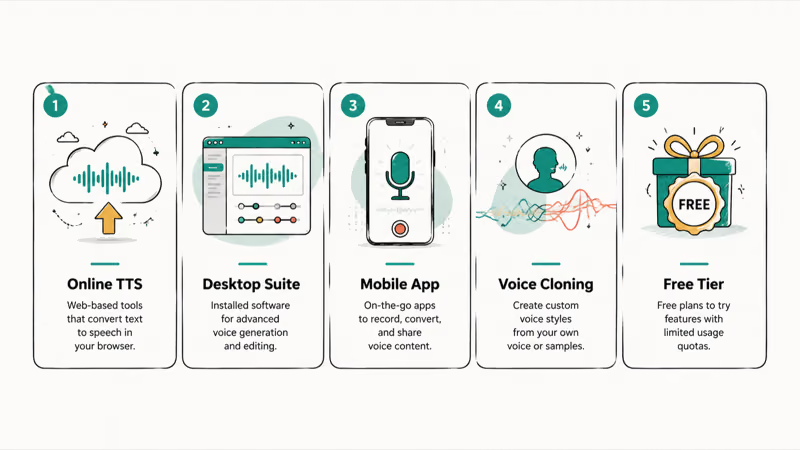
#1. TopMediai for TikTok Text-to-Speech
According to TopMediai’s text-to-speech page, its AI voice generator converts text into realistic speech and offers 3,200+ AI voices across 190+ languages and accents. That makes it a broad option when you need a voice style TikTok’s native editor does not include.
#Features & Pros:
-
Access to a large voice library
-
Support for many languages and accents
-
High-quality voices with lightning-fast conversion
-
User-friendly interface with customizable options
#Cons:
- A stable internet connection is required for smooth operation.
#2. Fakeyou
Fakeyou is a versatile online voice generator focused on character-style AI voices. Use it for parody or stylized clips, but avoid making audio that impersonates a real person without permission.
#Features & Pros:
-
Large catalog of character-style voices
-
Free usage on any device through a web browser
-
Fast conversion rate and intuitive interface
#Cons:
-
The feature to convert text to a personally recorded voice is unavailable.
-
Slow internet may cause delays in voice generation.
#3. VoxBox
VoxBox is a multipurpose voice tool that combines text-to-speech, voice recording, and conversion features.
#Features & Pros:
-
A broad selection of voice effects
-
Compatibility with various platforms
-
Multiple functionalities like Text-to-speech, speech-to-text, voice recording, video conversion, etc.
-
Natural-sounding voices are generated
#Cons:
- Software needs to be installed for usage.
#4. FlexClip
According to FlexClip’s text-to-speech tool page, the editor converts text to AI voices and saves the speech to media so it can be added to video. That makes it useful if you want to generate the voiceover and edit the clip in the same browser workflow.
#Features & Pros:
-
A wide array of high-quality, natural-sounding voices
-
Provides easy-to-use video editing tools
-
Users can customize the pitch, speed, and volume of the voice
-
Supports multiple languages
#Cons:
-
Internet connection is required for optimal use.
-
Some advanced features may require a subscription.
FlexClip combines voice generation and video editing in one browser tab, which makes it a handy addition to your TikTok toolset.
#5. TikTok TTS for Funny TikTok Voices
TikTok TTS, also known as Funny TikTok Voices, is another dynamic tool worth mentioning. It’s specifically designed to generate humorous, entertaining voices, giving a unique twist to your TikTok content.
#Features & Pros:
-
Extensive collection of entertaining and funny voices.
-
User-friendly interface makes it easy to generate voices.
-
It adds a humorous touch to your TikTok videos, enhancing engagement.
-
The voices created with this tool can be easily integrated into your TikTok videos.
#Cons:
-
Requires a steady internet connection for optimal performance.
-
Lacks advanced customization features compared to other tools on the list.
By adding a fun, humorous twist to your TikTok content, TikTok TTS for Funny TikTok Voices can significantly enhance the entertainment value and user engagement of your videos.
#What Are the Benefits of TikTok Voice Generators?
Why should you consider using an AI voice generator for your TikTok videos? Here are a few key advantages:
#Save Time and Speed Up Voiceover Creation
Recording your own voiceovers can be a time-consuming process, especially if you need multiple takes. With a voice generator, you simply input your script and let the AI do the rest. This is a huge time-saver if you’re creating videos at scale.
#Access a Variety of Realistic AI Voices
Today’s voice generators provide extremely natural-sounding AI voices in a variety of languages, accents and tones. This lets you choose the perfect voice to represent your brand.
#Engage Global Audiences With Multi-Language Support
You can make videos more accessible to worldwide audiences by generating voiceovers in multiple languages. For example, adding Spanish and Mandarin voiceovers can help viewers who would otherwise skip an English-only clip.
#Expert Tips for Creating Great TikTok Voiceovers
Adding an AI voiceover to your video is just the first step. To create truly engaging TikTok content, keep these tips in mind:
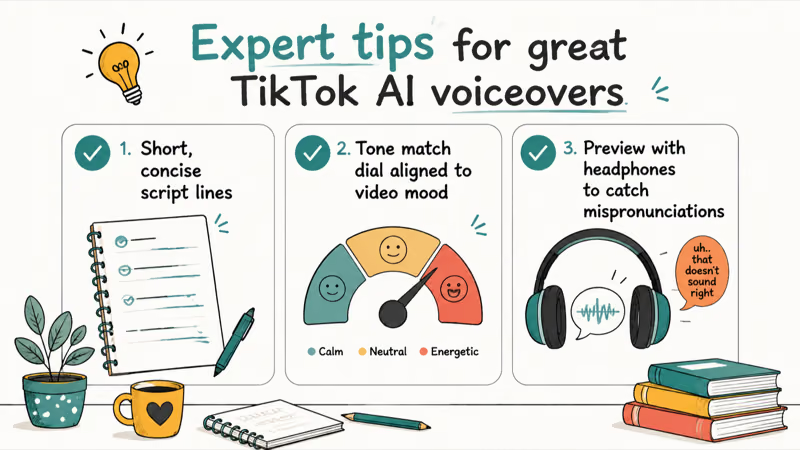
#Keep Scripts Concise
TikTok voiceovers should be short and punchy to hold viewers’ attention. Focus on one idea per clip and split long narration into multiple text cards.
#Choose AI Voices That Match Your Brand
Think about the tone and personality you want to convey and select AI voices accordingly. A playful product video might use an upbeat, casual tone, while you may want a corporate style voice for a professional brand.
#Optimize Pacing and Tone
Adjust the speaking speed and add natural pauses to help your voiceover flow naturally. You can also tweak emphasis and inflection with some AI voice tools.
#How to Add a Generated Voiceover to Your TikTok
Once a third-party tool produces your audio file, the workflow is the same regardless of which generator you used. Export the clip as an MP3 or WAV, then bring it into the TikTok editor as a sound layer.
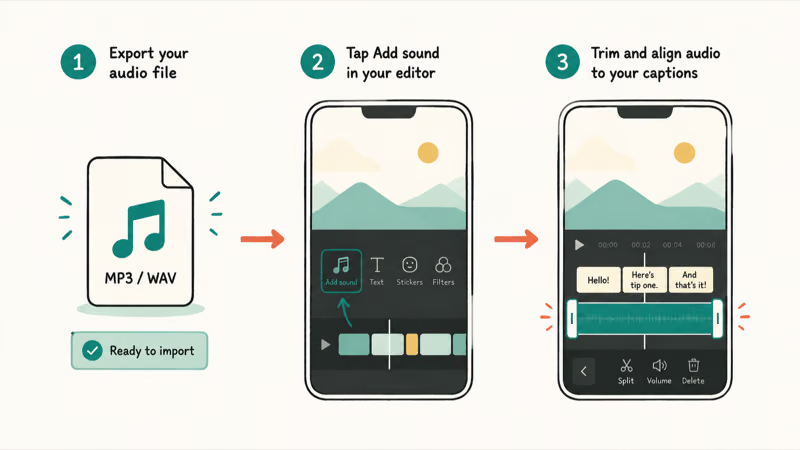
Upload your video in the TikTok app, tap Add sound, and select the exported file from your device. Trim the audio so it lines up with your on-screen text, then adjust the volume balance between the voiceover and any background music.
If you change your mind after publishing, you don’t have to start over. Our guide on editing TikTok videos after posting covers what you can still tweak, and adding multiple sounds in TikTok helps when you want a voiceover and a music bed in the same clip.
#Mistakes to Avoid With AI Voiceovers
The fastest way to make a clip feel cheap is a mismatched voice. A high-energy accent on a calm tutorial, or a flat reading on a comedy skit, breaks the mood before viewers finish the first line.
Watch out for pronunciation slips too. Names, brands, and slang often trip up TTS engines, so preview the audio and swap in phonetic spellings where a word lands wrong. Overly long scripts are another trap, since dense narration loses viewers fast.
If you want a more personal sound, TikTok also lets you alter your own recorded audio. Our guide on changing your voice on TikTok walks through the built-in effects for that.
For pure comedy TTS rather than polished voiceovers, our list of thirteen Discord /tts prank song codes shows copy-paste patterns that play as songs in a channel.
#Bottom Line
For a quick, no-cost voiceover that stays inside the app, TikTok’s built-in text-to-speech is the safest starting point. Reach for TopMediai or FlexClip when you need a voice style or language TikTok’s native editor doesn’t offer, and pick FakeYou or TikTok TTS for character and comedy clips. Whichever tool you choose, preview the audio for tone and pronunciation before you publish, and keep scripts short so the voice supports the video rather than burying it.
TikTok Tips & Tricks
#Frequently Asked Questions
Are AI voiceovers as good as human voice actors?
AI voices have become extremely realistic, but they may lack some of the nuance and emotion of human performances. However, AI is an excellent choice for most general voiceover needs, especially when speed and budget matter.
How much do TikTok voice generators cost?
Many AI voice generators offer a free tier or trial, while paid plans vary by voice quality, usage minutes, commercial rights, and export limits. Check the current pricing page before committing to a tool.
Can I use an AI voice that sounds like a celebrity?
For legal reasons, most voice generators don’t attempt to fully replicate real people’s voices. The standard AI voices are typically original characters designed to sound natural without imitating any specific public figure.
Can I convert my own voice into an AI voice on TikTok?
TikTok’s built-in tool does not have this capability. Some third-party AI generators are starting to offer custom voice cloning based on a real person’s speech, but the feature usually requires a paid plan and a short voice sample.
How many characters can TikTok’s text-to-speech feature convert?
TikTok’s native text-to-speech works best with short text blocks. With an external voice generator, you can typically convert longer scripts and then upload the audio file to your TikTok video.
Does TikTok flag videos that use third-party AI voiceovers?
TikTok does not publish a blanket penalty for external AI voiceovers, but the content still has to follow platform rules. When in doubt, avoid impersonation, disclose materially synthetic content, and use voices you have rights to use.
Which TikTok voice is most popular for viral videos?
There is no single official “most popular” voice. Pick the voice that matches the clip’s tone, and test a few options against watch time and comments.
-
TikTok voice generators make it easy to convert text to high-quality AI speech for your video voiceovers
-
Look for a tool with diverse voices, language support and customization options
-
Keep voiceover scripts concise and engaging
-
Choose AI voices that match your brand personality
-
Tweak pacing and tone for the most natural-sounding results
By following the tips in this guide and using one of the top AI voice generators, you’ll be able to give your TikTok videos a professional edge. With the power of AI-generated voiceovers at your fingertips, you can focus on what matters most – creating amazing content your audience will love.

How to Block TikTok on iPhone and Android: Parent Guide
Block or limit TikTok on your child's iPhone or Android using Screen Time, Family Link, and router settings. Step-by-step parental control guide.

TikTok Parental Controls: Setup Guide for Families
Set up TikTok parental controls using Family Pairing, Restricted Mode, and privacy settings. Step-by-step guide to protect your child on TikTok.
How to Get a TikTok Stream Key for OBS and Streamlabs
Get a TikTok stream key to broadcast from OBS or Streamlabs. Covers the 1,000-follower requirement, CarterPulse application, and OBS setup steps.

How to Make a Joint TikTok Account With Friends (2026)
Set up and manage a joint TikTok account with friends. Covers shared login setup, content planning, security tips, and the Collaboration Post alternative.