What Does Outgoing Call Mean? Calls Explained Simply
Outgoing call means you dialed someone. Learn what 1-second outgoing calls mean, how to read iPhone and Android call logs, and what carriers charge.
Quick AnswerAn outgoing call is any phone call you start by dialing someone's number. Your phone logs it the moment the network accepts the dial, even when nobody picks up.
An outgoing call is any call you start by dialing a number.
That little arrow icon next to a name in your call history is doing more work than it looks. It tells you who started the call, whether the network actually completed the connection, and (with one extra tap) how long anyone talked.
- An outgoing call is any call you initiate from a cell phone, landline, or VoIP app like WhatsApp or FaceTime.
- Your phone logs the call the second the network accepts the dial, even if nobody answers and the duration shows 0.
- iPhone stores up to 1,000 recent calls in the Recents tab; Android shows the same data under Recents or Call History.
- On unlimited US plans from Verizon, AT&T, and T-Mobile, domestic outgoing calls don’t add to your bill.
- App calls over WhatsApp or FaceTime use mobile data instead of carrier minutes and never appear in the native Phone app.
#What an Outgoing Call Actually Means
The phrase covers every call your device starts: landline, cell, WhatsApp, or FaceTime.
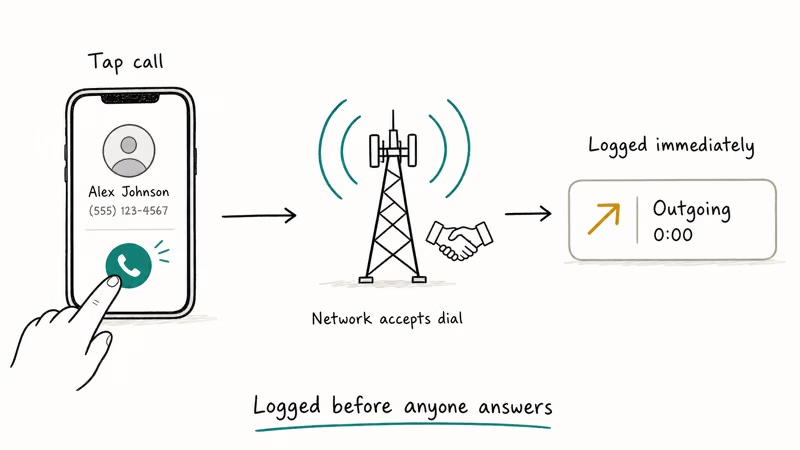
Outgoing calls are typically marked with an arrow icon pointing up and to the right. Apple states that the Recents tab keeps up to 1,000 entries and tags each one as incoming, outgoing, or missed, per its call history support page.
There’s a small wrinkle worth noting. Your phone marks the call outgoing the moment the cellular network accepts your dial request, not when the other person answers. That’s why a call that rang once and got rejected still sits in your log as an outgoing entry with a 0-second duration.
#Outgoing Call vs. Incoming Call
Here’s the side-by-side breakdown.
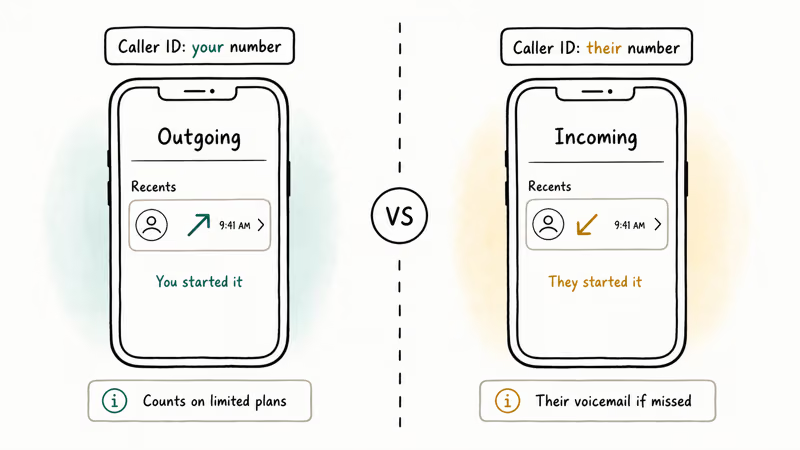
| Feature | Outgoing Call | Incoming Call |
|---|---|---|
| Who starts it | You | The other person |
| Call log icon | Arrow pointing up and away | Arrow pointing down and in |
| Plan minutes | Counts on limited and prepaid plans | Counts on most prepaid and limited plans |
| Voicemail trigger | Their voicemail plays when they don’t pick up | Your voicemail plays when you don’t answer |
| Caller ID shown | Your name and number on their screen | Their name and number on your screen |
The split matters most for billing. According to the FCC’s wireless billing guide, prepaid and limited-minute plans count both directions toward your monthly bucket, so an unanswered outgoing call still eats minutes once the network connects.
Android call logs commonly use color coding to separate connected outgoing calls, missed incoming calls, and declined or rejected calls. Samsung Galaxy phones running One UI 6.1 use the same convention, though the icon shape differs slightly. iPhone borrows the same logic but adds bold red font on missed calls, which is a bit harder to overlook than Android’s understated red triangle.
#What Does an Outgoing Call for 1 Second Mean?
A 1-second outgoing call means the network completed the connection and then something dropped it almost immediately.
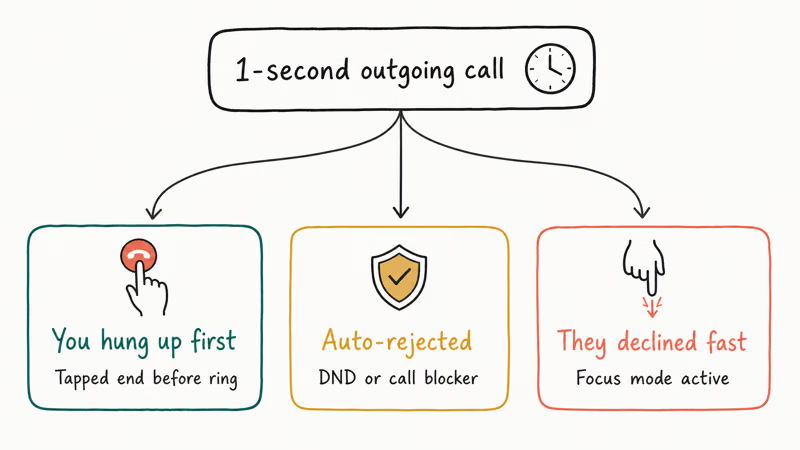
You hung up before the other line rang. If the carrier’s network has already accepted the dial, the call can post to the log even though no ringing happened on the other side.
The other phone auto-rejected. This shows up with call forwarding chains, do-not-disturb modes, or robocall blockers that cut the line as soon as they recognize a flagged number.
The recipient declined fast. A swipe-to-dismiss on either iOS or Android can register as a 1-second outgoing call from your perspective, even though their device never plays the ringtone audibly. The dismiss is instant, but the carrier still logs the handshake.
According to Google’s Phone app help center, the call moves into your log as soon as your device sends the dial signal, independent of whether the other phone ever rings out loud.
If you keep finding 1-second outgoing entries you didn’t make, suspect pocket dials first. A call blocker app can rule out automated misdials from spam or testing services.
#Checking Your Outgoing Call History
Pulling up your outgoing call history takes about ten seconds on any modern phone. Here’s the path on each platform.
#On iPhone
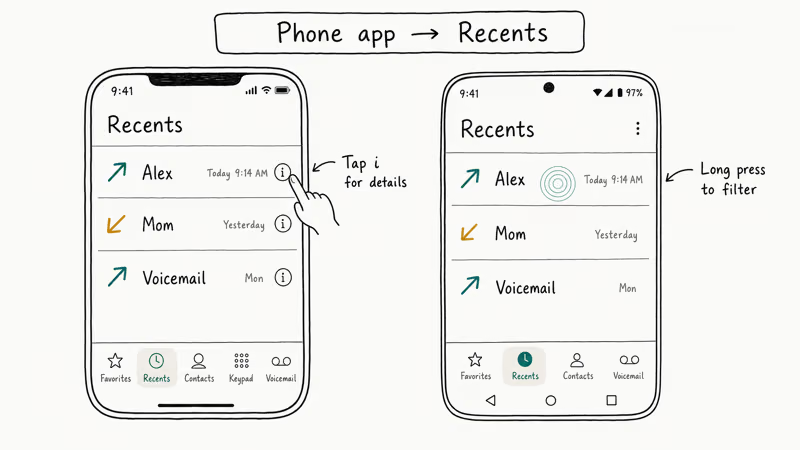
Open the Phone app and tap Recents along the bottom. Every call shows up in reverse chronological order with the outgoing arrow icon. Tap the small blue “i” next to any entry to see the exact start time, duration, and call type.
The “Missed” filter at the top hides everything except missed incoming calls, which helps when your Recents list is overloaded.
If your visual voicemail is stuck on “currently unavailable”, the Recents tab still works fine. Voicemail and call history pull from different services on the carrier side.
#On Android
Open the Phone app and tap Recents (sometimes labeled Call History depending on the manufacturer). Pixel phones running Android 15 show it as the default landing tab when you open the dialer. Samsung’s One UI 6.1 keeps it under a separate Recents tab next to Keypad and Contacts.
Long-press any entry for filter options.
You can isolate outgoing calls only, or export the full log if your manufacturer’s Phone app supports it. Xiaomi MIUI and OnePlus OxygenOS handle it slightly differently, sometimes hiding the export under a three-dot menu in the contact details view.
#Through Your Carrier
Carriers keep their own copy. Verizon, AT&T, and T-Mobile expose itemized call detail records (CDRs) through their portals, typically going back 18 months.
If you ever lose your phone or factory reset it, the carrier portal is your fallback for retrieving outgoing call history. The GSMA’s consumer information site confirms operators retain these records.
#Outgoing Calls on WhatsApp and Other Apps
Calls aren’t limited to the carrier network anymore. WhatsApp, FaceTime, Telegram, Signal, and Zoom all let you place outgoing calls over Wi-Fi or mobile data, with no SIM card needed. The mechanic mirrors the carrier version: tap a contact, the app routes through the internet, and the entry lands in that app’s own call tab.
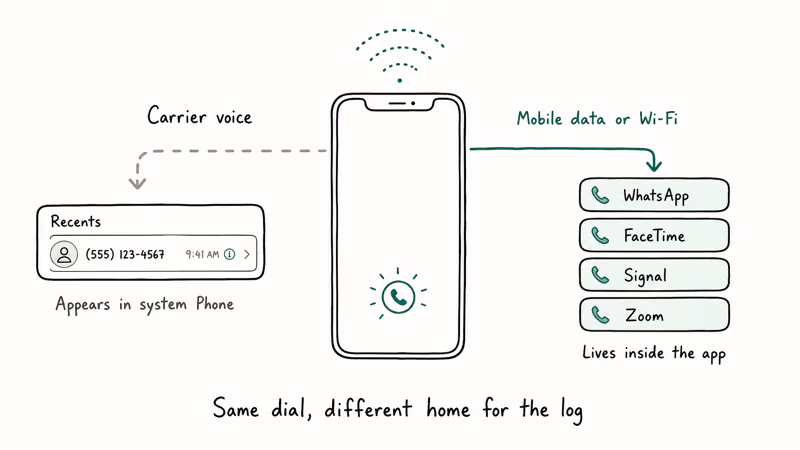
One caveat sits beneath all of this: the call only works when both ends have active data on the same app. Voice quality now rivals carrier calls when both networks are healthy.
The trap is that app-based outgoing calls don’t show up in the native Phone app. They live inside the app’s own Calls tab instead. If you’re trying to look up a call you placed last week and you can’t find it in the Phone app, that’s the first place to check.
FaceTime is the rare exception: those entries stay in the Phone app’s Recents on iPhone, but only because Apple wires FaceTime into the system call log directly. Telegram, Signal, and Zoom all stay siloed inside their own apps, just like WhatsApp.
VoIP outgoing calls also chew through data instead of minutes. According to WhatsApp’s data usage explainer, a typical voice call uses around 0.5 MB per minute, so a ten-minute conversation lands near 5 MB. Video calls run roughly 5 MB per minute on the same setup. If you’re on a tight prepaid data bucket or a 1 GB monthly plan, a few hours of WhatsApp video calls can chew up a noticeable slice.
#Do Outgoing Calls Cost Money?
How outgoing calls hit your bill depends entirely on plan type. Here’s how it actually breaks down on the three biggest US carriers.
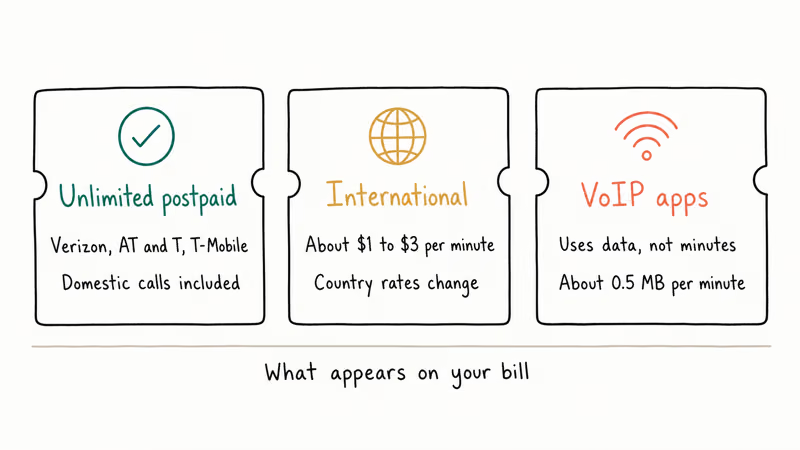
Unlimited postpaid plans from Verizon, AT&T, and T-Mobile bundle unlimited domestic outgoing calls, so domestic minutes usually don’t appear as a separate billable line item.
International outgoing calls work differently. Calling a UK landline from a US phone without an international add-on costs roughly $1 to $3 per minute, depending on the carrier. According to T-Mobile’s international calling rates page, country-by-country rates change without notice, so always check before a long call abroad.
Wi-Fi calling doesn’t change how outgoing calls are billed. If your iPhone Wi-Fi calling stops working and you re-enable it, domestic calls still count as standard outgoing minutes. Wi-Fi calling just swaps the radio: the call rides your internet connection instead of cellular signal, which helps in basements and dead zones.
VoIP calls through WhatsApp, FaceTime, Zoom, and Signal use data only. These outgoing calls never appear on your phone bill, but they do count against your monthly data cap if you’re not on Wi-Fi.
#When Outgoing Calls Fail to Connect
When outgoing calls won’t connect at all, the issue is usually carrier-side or radio-side rather than something exotic. One common pattern: a call connects for half a second, drops, and then your phone shows last line no longer available on the next attempt. That’s an iOS bug surfacing in the call log, not a billing or network issue.
On Android, a stuck system service called com.samsung.android.incallui can force-close every outgoing call attempt on Samsung devices. A force-stop and clear-cache cycle fixes it most of the time without a full reboot.
If you can dial out but the other person can’t hear you, the iPhone speaker-not-working-on-calls fix list covers the audio routing issues that show up after iOS updates. Same diagnostic logic applies if callers can’t hear you on iPhone: the call placed fine, the audio path is the problem.
#Bottom Line
If you only remember one thing: an outgoing call is any call you start, and your phone logs it the second the network accepts the dial. Don’t worry about 1-second entries unless they keep appearing without your input. For Recents on iPhone or Android, the path is Phone app → Recents → tap the i icon. For unlimited US postpaid customers, domestic outgoing calls are already paid for.
#Frequently Asked Questions
Does an outgoing call mean the other person answered?
No. Your phone logs the outgoing call the moment the network accepts the dial, even when the call rolls to voicemail or gets declined. The duration field is what tells you whether anyone actually picked up. A duration of 0
means no connection on the other side.Why does my call log show an outgoing call I didn’t make?
Pocket dials are the most common cause. Some caller ID apps also place silent test calls during initial setup.
Can you tell if an outgoing call was answered or went to voicemail?
iPhone shows the duration on each call, and anything under five seconds usually means voicemail picked up before a real conversation started. Android phones on Verizon and T-Mobile sometimes label voicemail-routed calls separately. The most reliable answer comes from your carrier’s call detail records, which flag voicemail terminations explicitly.
What’s the difference between an outgoing call and a dialed call?
Same thing, different era. Older landline bills used “dialed”, modern smartphones use “outgoing”.
Do outgoing calls show up on the other person’s phone?
Yes. Your outgoing call lands as an incoming call on their device, with your name and number on caller ID. If you’ve blocked your caller ID for the call, they’ll see “No Caller ID” or “Private Number” instead. The call still appears in their Recents either way.
Are outgoing calls on WhatsApp the same as regular outgoing calls?
Mechanically yes, billing-wise no. WhatsApp calls travel over the internet instead of your carrier voice channel and show up only in WhatsApp’s Calls tab. WhatsApp calls can drop when one side switches between Wi-Fi and cellular mid-conversation, so plan to stay on one network if the call is important.
How long does an outgoing call ring before going to voicemail?
Most US carriers ring for 25 to 30 seconds before routing to voicemail. That’s roughly four to six rings.
Can my employer see my outgoing calls on a work phone?
If the device is company-issued and enrolled in mobile device management (MDM), then yes. Your employer can legally pull outgoing call numbers, durations, and timestamps from the carrier portal or MDM dashboard, since US privacy law generally treats company-owned devices as employer property. For anything you’d rather keep separate, use your own device on a separate line such as a Google Voice alternative.

Mac mini M6 vs M5 Pro: Which Model Should You Buy?
Mac mini M6 vs M5 Pro compared on price, memory, ports, displays, and real workloads. Find the better 2026 Mac mini for your desk and budget.

Apple Siri Settlement: Who Qualifies and How to Claim
Apple's $250 million Siri settlement covers iPhone 15 Pro and iPhone 16 models bought June 2024 to March 2025. See who qualifies and how claims work.

iOS 26.6.1 Security Update: What Apple Fixed and Who Gets It
Apple released iOS 26.6.1 on August 17 with 29 security fixes, including an IPSec interception bug. See what it patches, who gets it, and how to update.

iPhone Adaptive Power: How It Works and When to Use It
Learn how iPhone Adaptive Power works, which models support it, what it changes, and when Low Power Mode is still the better battery-saving choice.