Best Google Voice Alternatives for 2026: 5 Top Picks
Looking for a Google Voice alternative in 2026? We compare 5 VoIP picks on price, call features, and integrations so you can pick the right one.
Quick AnswerOpenPhone is the best Google Voice alternative for most small teams in 2026 with real US numbers, unlimited US and Canada calls, AI call summaries, and shared inboxes from $19 per user per month. Grasshopper, RingCentral, Dialpad, and Nextiva fit other budgets and team sizes.
A solid Google Voice alternative gives you a real business phone number, calls and texts on every device, and the features Google Voice keeps trimming back. This guide compares five top business phone services on price, call features, and number porting so you can skip the guesswork.
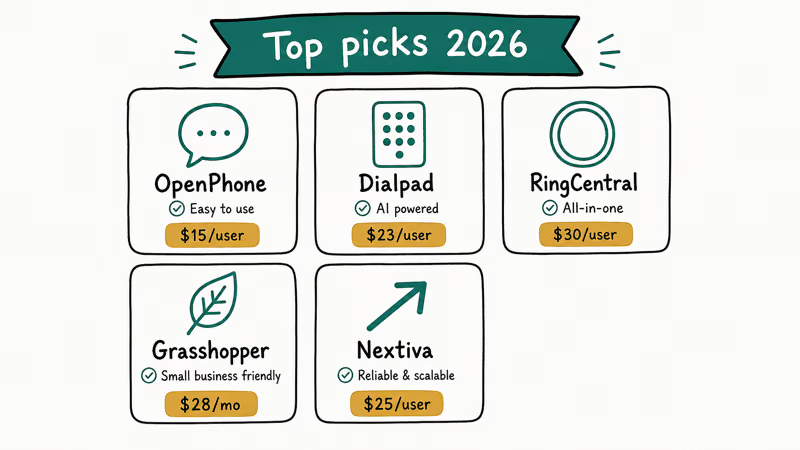
- OpenPhone is the best all-around pick for solo founders and small teams at $19 per user per month with unlimited US and Canada calls.
- Grasshopper’s $32 monthly Solo plan is the lowest barrier if you need a toll-free or vanity number but only one inbox.
- RingCentral fits teams of 5 or more that need video, SMS, and an auto-attendant in a single bundle from $30 per user per month.
- Dialpad’s AI call summaries and live transcription are the sharpest in this group and start at $27 per user per month.
- Nextiva works best for sales teams that want a desk phone option plus CRM integrations on the Core plan at $30 per user per month.
#Why Google Voice Falls Short for Most Teams
Google Voice was built around personal Gmail accounts, and that history shows the moment a team tries to grow on it. There’s no shared inbox for SMS, no analytics dashboard, no native CRM integration, and no toll-free option on the free consumer tier. If you’re trying to look professional or split call volume across several teammates, you’ll hit a wall.
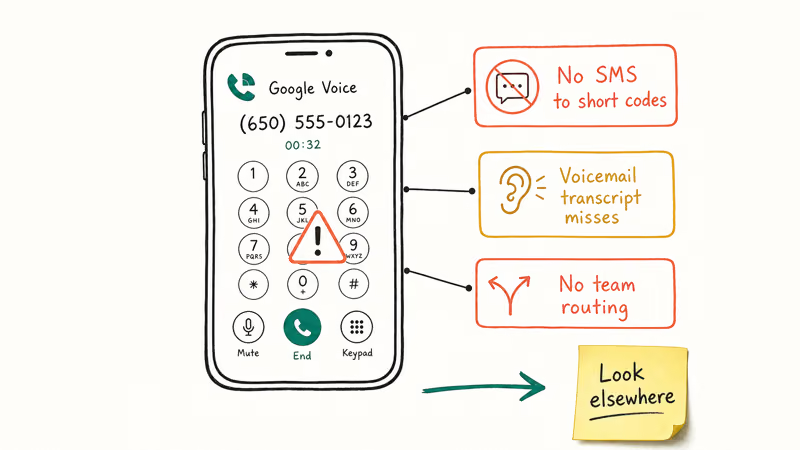
Even the paid Google Workspace tiers leave gaps. According to Google, only 2 of the 3 paid Voice tiers include multi-level auto attendants, and Premier is the only tier with calling outside the US and Canada, per the official Voice plan comparison page. The free consumer tier is more limited still: you can’t add a second user, can’t route by hours, and can’t see message threads in any shared view.
A few dealbreakers come up most often:
- You can’t add a teammate to the same number on the free plan.
- Voicemail transcription is decent but can’t be tagged or assigned.
- Outbound caller ID sometimes shows the underlying mobile number when forwarding fails.
- Porting your number out is a manual process that takes 2 to 3 weeks.
If any of those is a daily friction, it’s time to compare alternatives. For context on what Google Voice’s paid tiers actually include, see our deeper breakdown of Google Voice for Business pricing.
#What to Look For in a Google Voice Alternative
The right pick depends on team size, call volume, and whether you need an actual desk phone. Weigh each tool against the same checklist:
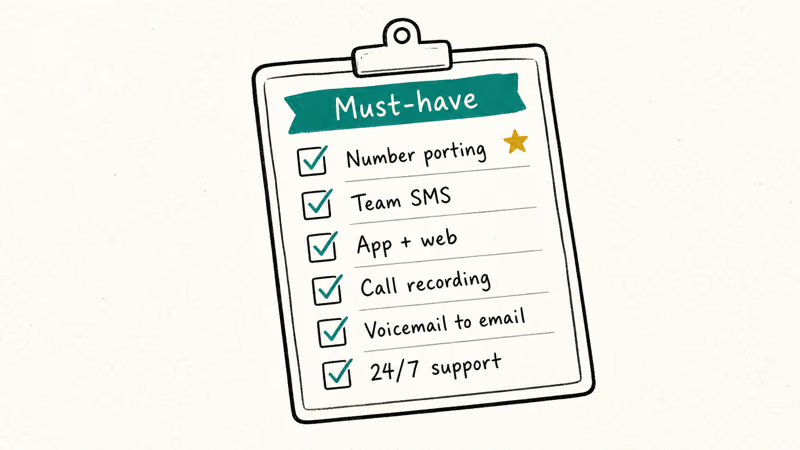
- Real US phone number with full SMS, MMS, and voice support.
- Shared inboxes so multiple teammates can read and reply to texts.
- Auto-attendant or IVR for routing callers by department.
- Call recording and transcription for sales coaching and compliance.
- Mobile and desktop apps that stay reliable on hotel Wi-Fi.
- Integrations with the tools you already use, like HubSpot, Slack, or Salesforce.
- Transparent pricing with no hidden per-minute or per-message overages.
- Number porting in and out without a multi-week ordeal.
Two trade-offs come up repeatedly across these tools. Cheaper options tend to skimp on integrations, and enterprise platforms force you to buy seats you don’t need. Pick the smallest plan that covers your real workflow.
#How to Evaluate These Google Voice Alternatives
Most of these services offer a 7-day or 14-day free trial, so you can run real calls and texts before committing. Test each tool the way you’ll actually use it: place outbound calls from both iOS and Android, run a few SMS threads with teammates, and, if you’re porting a number, confirm the port path completes end to end.
Pay attention to call audio quality on both a wired headset and a weak Wi-Fi connection, since the difference shows up fast. App launch speed, transcription accuracy, and how long it takes to set up a basic auto-attendant from a cold start are the other details that separate a polished service from a clunky one.
#The 5 Best Google Voice Alternatives in 2026
#1. OpenPhone
OpenPhone is the alternative we recommend first for most teams under 25 people. It feels like an iMessage-style inbox with phone calls bolted on, which is what small teams actually want.
Call setup is quick on both the mobile and desktop apps, and the AI call summary feature writes a usable recap of a long call almost immediately. Texts thread across teammates without the confusion you’d get sharing a personal phone.
Features that matter:
- Local and toll-free US and Canada numbers, with porting in 5 to 10 business days.
- Shared phone numbers for sales, support, or recruiting inboxes.
- Free AI call summaries and call transcripts on Business plan.
- Native HubSpot, Salesforce, Slack, Zapier, and Gong integrations.
- Snippets, scheduled messages, and auto-replies for after-hours coverage.
Pricing: According to OpenPhone’s pricing page, plans run from Starter at $19 per user per month to Business at $33 per user per month (billed annually), with one US or Canada number included per user.
Who it’s best for: Solo founders, sales teams under 25, and anyone who wants a Google Voice replacement that looks and feels modern.
#2. Grasshopper
Grasshopper has been around since 2003 and is the right pick if you want a virtual phone number but don’t want to pay per seat. Every plan is flat-rate, so adding employees doesn’t increase the bill.
On mobile, Grasshopper’s app handles calls and texts cleanly, though the desktop client feels dated next to OpenPhone. Vanity number search works well and usually surfaces several usable 1-800 options quickly.
Features that matter:
- Local, toll-free, or vanity numbers including 1-800, 1-888, 1-877, and 1-866.
- Unlimited extensions on every plan, even the cheapest.
- Voicemail transcription and email delivery.
- Business texting from your main line.
- Wi-Fi calling so you can route around weak cell signal.
Pricing: Grasshopper’s pricing page lists three plans: Solo at $32 per month for 1 number and 3 extensions, Partner at $58 for 3 numbers and 6 extensions, and Small Business at $94 for 5 numbers and unlimited extensions.
Who it’s best for: Service businesses, freelancers, and small offices that want one shared number routed to several phones without paying per user.
#3. RingCentral
RingCentral is the heavyweight option and the most likely to scale past 100 employees without forcing a migration later. It bundles voice, video, SMS, and team messaging into one app called RingEX.
The iOS and Android apps hold up well even over a flaky hotel network, with calls dropping only rarely. Setting up the auto-attendant takes a while the first time, which is on the slower side.
Features that matter:
- Multi-level IVR auto-attendant with after-hours routing.
- Video meetings up to 100 participants on the Core plan, 200 on Advanced.
- Team SMS, internal chat, and document sharing in one client.
- Native integrations with Microsoft 365, Google Workspace, HubSpot, and Salesforce.
- Call recording, voicemail-to-email, and full international calling on higher tiers.
Pricing: RingCentral’s RingEX plans page lists Core at $30 per user per month, Advanced at $35, and Ultra at $45, billed annually.
Who it’s best for: Teams of 5 or more that need video conferencing, real auto-attendants, and a single bill for collaboration plus phone service.
#4. Dialpad
Dialpad is the AI-first pick and the most useful tool in this list for sales teams that live on the phone. The real-time transcription is shockingly accurate and the post-call AI recap saves real coaching time.
The transcription keeps up with normal speech and only stumbles on technical jargon or names with unusual spelling. Coaching cards pop up mid-call to flag filler words, which tends to feel useful for newer reps and obnoxious for veterans.
Features that matter:
- Real-time AI call transcription on every plan.
- AI-generated call summaries with action items emailed after each call.
- Voice intelligence flags sentiment, talk-to-listen ratio, and competitor mentions.
- Native CRM integrations with Salesforce, HubSpot, Zendesk, and Outreach.
- SIP-compatible desk phone support if you don’t want to use the app.
Pricing: Dialpad’s Connect pricing page lists Standard at $27 per user per month and Pro at $35 per user per month, both with unlimited US and Canada calling.
Who it’s best for: Sales teams of 3 to 50 reps that want call coaching and AI summaries baked in, not bolted on through a separate Gong or Chorus contract.
#5. Nextiva
Nextiva sits between RingCentral and OpenPhone on complexity. It’s the pick when you want VoIP plus a built-in CRM and don’t want to wire two separate tools together.
On both the mobile app and a supported desk phone like a Yealink T31P, devices register without manual SIP configuration once you enter the provisioning code. Audio quality on a wired connection is hard to distinguish from a landline.
Features that matter:
- Unlimited voice calling in the US and Canada on every plan.
- Threaded SMS and MMS on the Engage tier and above.
- Built-in NextivaONE CRM with pipeline tracking and call notes.
- Video conferencing up to 250 participants on Power Suite.
- Desk phone provisioning from Yealink, Poly, and Cisco vendors.
Pricing: Nextiva’s public pricing page lists Digital at $25 per user per month, Core at $30, Engage at $40, and Power Suite at $60, billed annually.
Who it’s best for: Sales-heavy teams that want a phone system and a lightweight CRM under one login, and offices that still need desk phones at reception.
#How Do These Alternatives Compare on Price and Features?
A side-by-side view is easier than scrolling back through each section.
| Tool | Starting price | Unlimited US/Canada calls | Toll-free option | AI features | Best fit |
|---|---|---|---|---|---|
| OpenPhone | $19 per user / month | Yes | Yes (paid add-on) | Call summaries on Business | Solo founders, small sales teams |
| Grasshopper | $32 / month flat | Limited (3,000 minutes pool) | Yes | No | Service businesses, freelancers |
| RingCentral | $30 per user / month | Yes | Yes | Yes (Advanced+) | Mid-market teams of 5+ |
| Dialpad | $27 per user / month | Yes | Yes | Yes (every plan) | Sales teams 3-50 |
| Nextiva | $25 per user / month | Yes | Yes | Limited (Power Suite) | Sales + desk phones |
A few details that don’t fit neatly in a table: OpenPhone and Dialpad include AI features in their base plans, while RingCentral gates real AI behind the $35 Advanced tier. Grasshopper is the only flat-rate tool, which makes the math better past 4 or 5 users.
If you handle international calls, Dialpad and RingCentral cover the most countries on their higher tiers. According to Dialpad’s international pricing reference, the Pro plan includes calling to roughly 70 countries at no extra per-minute charge.
#Can You Port Your Google Voice Number to These Tools?
Yes, every tool on this list will accept a Google Voice port for a number you own. Google requires you to release the number first from your own account, which is a $3 one-time fee paid through your Google account. The receiving service then files the port and runs through carrier validation in 5 to 10 business days.
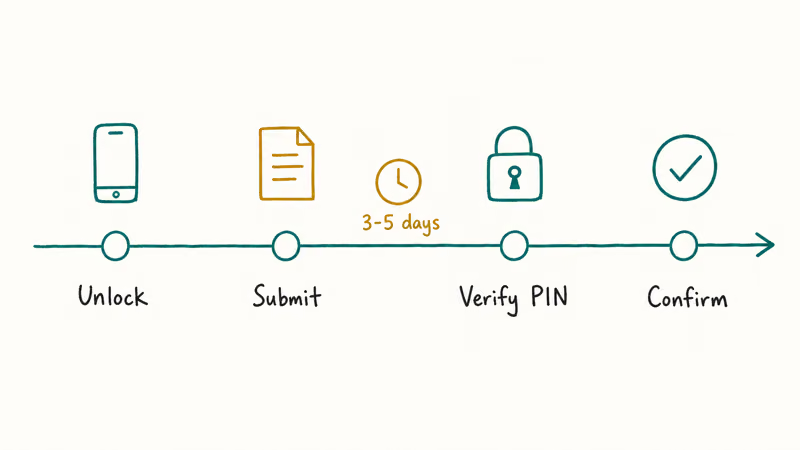
Number ports typically land within a 5 to 10 business day window across these providers, with the major carriers usually on the longer end and the smaller services often a bit quicker. Keep your Google Voice account active until the new service confirms the port has completed, or your number will return to Google’s pool.
#Picking the Right Google Voice Alternative for Your Team
Across all five tools, the choice usually comes down to three questions.
Are you a solo founder or under 10 people? Start with OpenPhone. It’s the closest experience to Google Voice in spirit but actually built for a team. The Starter plan covers 90% of what most small teams need, including tracking the Google Voice account email you’re trying to leave behind for cleanup.
Do you want one number that rings several phones with no per-user fee? Grasshopper is the answer. The Solo plan at $32 a month covers a 5-person plumbing crew the same as a 1-person dental office.
Are you running a sales or support team? Pick Dialpad if you want AI coaching, or RingCentral if you also want video meetings in the same app. Nextiva is the third option if you also want a built-in CRM and aren’t already locked into HubSpot or Salesforce.
A side note on workflow: if you currently rely on Google Voice for things like leaving voicemails without calling or routing calls when outgoing call status shows you’re unavailable, every tool here covers those workflows with cleaner controls.
#Bottom Line
For most readers landing on this page, OpenPhone is the answer. It’s the most direct replacement for Google Voice’s day-to-day feel, it has a real shared inbox, AI call summaries are included on Business, and the $19 entry price beats every per-seat competitor on this list. The shared-number experience alone is worth the price difference over Google Voice’s free tier for an outbound support workflow.
Move to RingCentral or Nextiva only if you’ve outgrown OpenPhone’s 25-user sweet spot or you really need an enterprise auto-attendant tree. Pick Dialpad if your sales team will use the AI features daily. Save Grasshopper for the specific case where you want one number, several handsets, and a flat monthly bill.
#Frequently Asked Questions
Is there a free Google Voice alternative?
Most paid services offer 7 to 14 day free trials, but a truly free business plan is hard to find in 2026. OpenPhone, Grasshopper, and Dialpad all offer 7-day free trials with full feature access. Free options like TextNow or TextFree exist for personal use, but they show ads, lack shared inboxes, and aren’t suitable for business communication.
Can I port my Google Voice number to another service?
Yes, you can port a Google Voice number to most VoIP providers for any number registered to your own account. According to Google’s number porting support page, you’ll pay a one-time $3 release fee and the receiving carrier handles the rest. The full process takes 5 to 10 business days for most services and 2 to 3 weeks for the slowest ports. Always keep the Google Voice number active until the port completes.
Do these alternatives work in countries outside the US?
Coverage varies. OpenPhone supports US and Canada numbers only, while Grasshopper and Nextiva also focus on those two regions. RingCentral and Dialpad both offer numbers in 40 plus countries on higher tiers. If you need an international footprint, ask the provider’s sales team for a country list first.
Can I use a business phone service on my personal phone?
Yes. Every tool here has a mobile app for iOS and Android that runs alongside your normal phone app. Calls and texts from the business number go through the business app, so your personal number stays private. Running two separate business numbers on a single iPhone alongside your personal line works without conflicts.
Will my old Google Voice voicemails transfer?
No. Voicemails are tied to Google’s servers and don’t transfer with a port. Download anything you need before you cancel the Google Voice account. If you’ve forgotten the credentials to access those voicemails, our guide to forgot voicemail password recovery covers the steps.
Are these services HIPAA or HITECH compliant?
RingCentral, Dialpad, and Nextiva offer HIPAA-eligible plans with a signed Business Associate Agreement, usually on their mid-tier and above. OpenPhone offers HIPAA compliance on the Business plan. Grasshopper does not currently advertise HIPAA support. Always verify the latest compliance status with the provider’s legal team before sharing PHI.
How do these tools compare to a regular SIM card or second cell line?
A separate SIM gives you a true cell number with carrier-grade reliability, but you pay per line and get none of the shared inbox, transcription, or routing features. VoIP tools like OpenPhone or RingCentral cost less per user, scale to teams, and let you keep one device. The trade-off is that VoIP needs reasonable internet and isn’t a substitute for landline 911 service.
How traceable are business numbers from these services?
Trace rules differ by provider. Business VoIP numbers from RingCentral or Nextiva are tied to a verified business account on file and can be identified through subpoena to the provider. Free consumer tools like TextNow or TextFree work differently, and we cover the specifics in our breakdowns of TextNow number lookups and whether TextFree numbers can be identified.

Google Messages Error 3100: Why RCS Is Broken on Galaxy
Google Messages RCS error 3100 hits Galaxy owners after phone or carrier switches. Google told 9to5Google a fix is coming. Here's what actually helps.

Is This Bank App Real? Spot a Fake App on Your Home Screen
A bank app can land on your home screen from a web page with no install warning. Learn the checks that tell a real banking app from a phishing web app.

Apps Crashing After iOS 27 Update? Fix Order (2026)
Apps crashing after the iOS 27 update? Update the app in the App Store first, then offload and reinstall to clear stale cache, then restart. The fix order.

Do AI Translation Earbuds Work Offline? What to Know
Do AI translation earbuds work offline? A few do with downloaded language packs, but most need the cloud. Here's what works offline and what you give up.