NVIDIA RTX AI PC Explained: The GPU Side of AI PCs
NVIDIA RTX AI PC explained: how RTX GPU Tensor Cores handle heavy AI an NPU can't, with up to 686 laptop TOPS. The GPU side of the AI PC, made clear.

Quick AnswerAn NVIDIA RTX AI PC is a laptop or desktop with a GeForce RTX GPU whose Tensor Cores handle heavy AI work that an NPU can't, like local large language models, image generation, and video. RTX 40 Series laptop GPUs deliver up to 686 AI TOPS, far above the 40-TOPS NPU class.
As of June 2026, the term AI PC usually points at the NPU and Microsoft’s Copilot+ tier. NVIDIA RTX AI PCs tell the other half of the story. These are machines with a GeForce RTX GPU whose Tensor Cores run heavy AI that a Copilot+ NPU simply can’t touch, like local large language models, image generation, and AI video. It’s the GPU side of the AI PC, and it matters most for creators and power users.
The confusion is understandable. Both an NPU and a GPU can run AI, but they aren’t the same chip and they don’t do the same job. This guide draws that line.
- An RTX AI PC is a system with a GeForce RTX GPU whose Tensor Cores accelerate heavy AI workloads
- RTX 40 Series laptop GPUs deliver up to 686 AI TOPS, far above the roughly 40-TOPS NPUs in Copilot+ chips
- The NPU and the GPU are different chips: NPUs handle light, always-on AI efficiently, GPUs handle heavy AI fast
- RTX is the pick for local large language models, AI image and video generation, and GPU-accelerated creative apps
- An RTX laptop can also be a Copilot+ PC if its CPU has a 40-TOPS NPU, so the two aren’t mutually exclusive
#What an RTX AI PC Actually Is
An RTX AI PC is any laptop or desktop with a GeForce RTX or NVIDIA RTX GPU used to accelerate AI. The defining hardware is the GPU’s Tensor Cores, dedicated AI accelerators built into the graphics chip that speed up the math behind deep learning and generative models.
According to NVIDIA’s RTX AI PC overview, these GPUs power a large library of AI applications and games, with hundreds of RTX-accelerated titles available. The point is scale of horsepower, not efficiency.
That’s the key difference from the NPU story. Where a Copilot+ NPU is about doing light AI without draining the battery, an RTX GPU is about doing heavy AI fast.
#How Is an RTX GPU Different From an NPU?
This is the question that clears up most of the confusion, so it’s worth slowing down. An NPU and a GPU are two separate chips, and they’re tuned for opposite priorities. The explainer on the NPU versus GPU versus CPU covers the full breakdown, but here’s the short version.
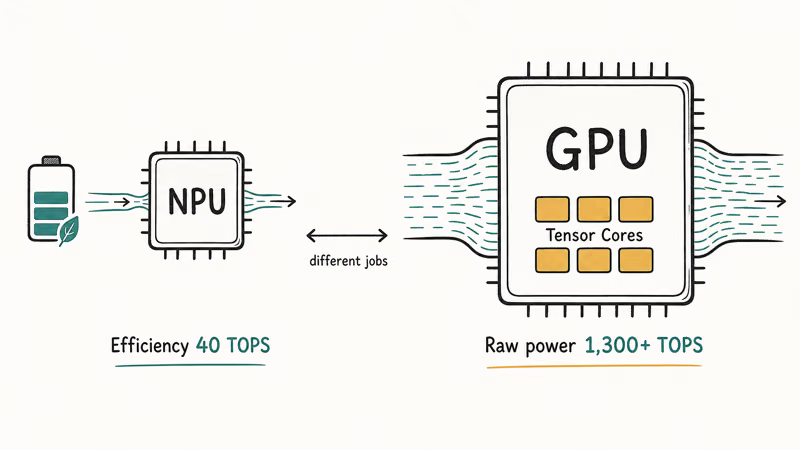
The NPU is for efficiency. It runs light, always-on AI like background blur and live captions while sipping power, which is why Microsoft set the Copilot+ bar at an NPU rated 40 TOPS or more. The GPU is for raw throughput. It handles the heavy stuff, and the gap is enormous: according to NVIDIA’s AI performance breakdown, a GeForce RTX 4090 delivers “more than 1,300 TOPS,” while Copilot+ NPUs deliver “upwards of 40 TOPS.”
So they aren’t rivals. They’re teammates. The NPU keeps small AI running cheaply in the background, and the GPU steps in when the workload gets too big for the NPU to handle.
#The Heavy AI Tasks That Need an RTX GPU
The dividing line is roughly this: anything generative and large wants the GPU. Running a local large language model, generating images with Stable Diffusion, upscaling or generating video, and accelerating creative apps like Premiere or Blender all lean on the GPU’s Tensor Cores, not the NPU.
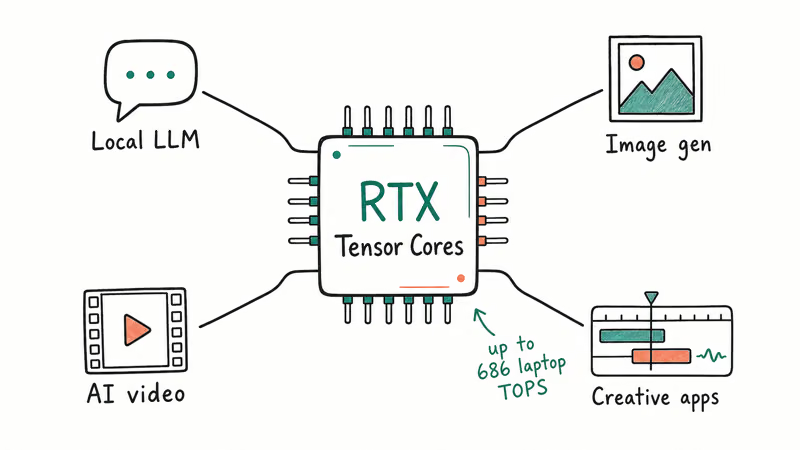
Local image generation and local language models are GPU-class workloads because they need far more throughput than a 40-TOPS NPU is built to provide. NVIDIA states that RTX 40 Series laptop GPUs deliver up to 686 AI TOPS, and even a mid-range RTX 4070 laptop GPU delivers 321 AI TOPS.
That’s an order of magnitude past the NPU class. For light Copilot+ features it’s overkill, but for serious local AI it’s the only thing that keeps up.
#Can a Laptop Be Both an RTX AI PC and a Copilot+ PC?
Yes, and many are. The two labels describe different chips, so a single laptop can have both. If its CPU includes an NPU rated at 40 TOPS or higher, it qualifies as a Copilot+ PC, and if it also has a GeForce RTX GPU, it’s an RTX AI PC too.
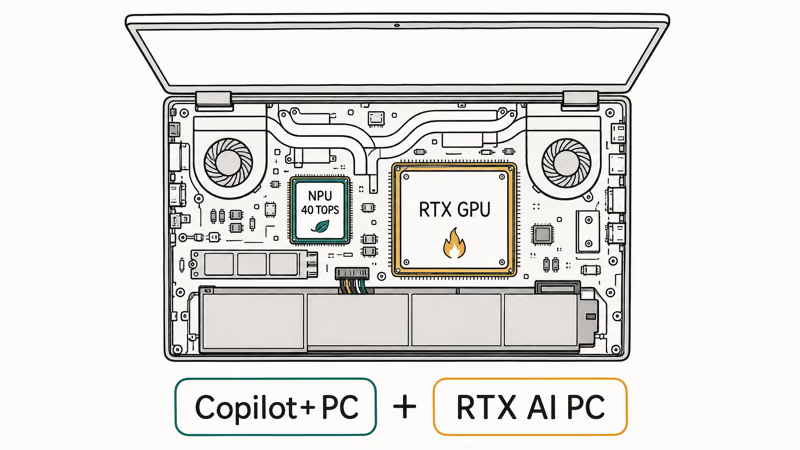
That combination is common in creator and gaming laptops. You get the NPU for efficient background AI and Windows Copilot+ features, plus the RTX GPU for heavy lifting. According to Microsoft’s Copilot+ PCs developer guide, the NPU is what unlocks the on-device Windows AI features, and the guide on what a Copilot+ PC is explains that side of the pairing.
The takeaway: RTX and Copilot+ aren’t either-or. A well-specced laptop can be both at once.
#How RTX Compares to the Copilot+ Chip Families
RTX sits at a different layer than the chip-family debate. Snapdragon, Intel, and AMD compete on the CPU and NPU side. An RTX GPU is a separate add-on any of them can pair with.
So the two decisions stack rather than overlap. First you pick a CPU platform, then you decide whether you also want a discrete RTX GPU for heavy AI. The Snapdragon X vs Intel Core Ultra vs AMD Ryzen AI comparison covers the first decision, and the GPU question is a layer on top of it.
#Who an RTX AI PC Is For
RTX is the pick if you do heavy, GPU-bound AI or creative work, full stop. That’s local LLMs, AI image and video generation, 3D rendering, and GPU-accelerated editing. Light AI use is different: for Windows Studio Effects and Live Captions, a plain Copilot+ laptop with a good NPU is enough, and it’ll usually be thinner and last longer on a charge than a discrete-GPU machine that’s running a hungrier chip just to sit idle.
When Studio Effects auto-framing stalls on an AI PC webcam, walk through our AI webcam auto-framing not working fixes before you blame the GPU.
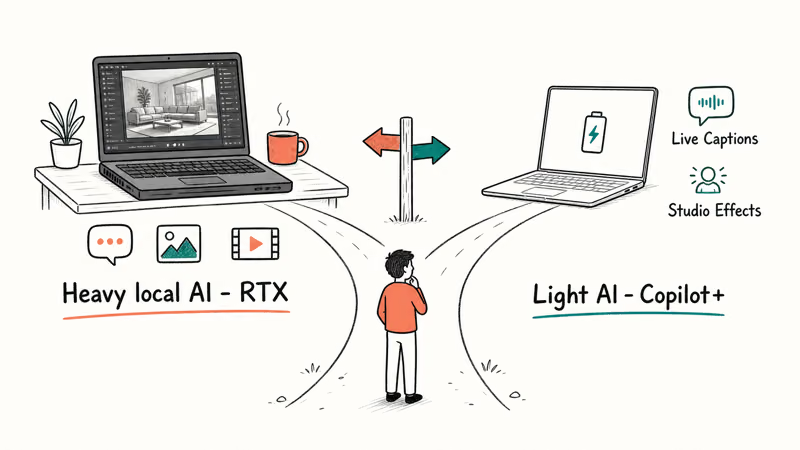
Still weighing whether you need any AI silicon at all? The AI PC vs regular laptop and do you need an AI PC guides both work through it. For RTX specifically, the rule is simple: buy it for the heavy workloads, skip it for the light ones.
#Bottom Line
Get an NVIDIA RTX AI PC if you run local large language models, generate AI images or video, or use GPU-accelerated creative apps, because the RTX GPU’s Tensor Cores do heavy AI that an NPU can’t. If your AI needs are light and you mostly want Copilot+ features, pick a standard Copilot+ laptop with a 40-TOPS NPU instead. The honest framing: the NPU is for efficiency, the GPU is for power, and the best creator laptops include both.
AI PCs and Copilot+ Laptops
#Frequently Asked Questions
What is an NVIDIA RTX AI PC?
It’s a laptop or desktop with a GeForce RTX or NVIDIA RTX GPU used to accelerate AI work. The GPU’s Tensor Cores handle heavy tasks like local language models and image generation that an NPU isn’t built for.
Is an RTX GPU the same as an NPU?
No. They’re separate chips with different jobs. An NPU runs light, always-on AI efficiently to save battery, while an RTX GPU runs heavy AI fast at far higher TOPS. NVIDIA’s figures put a desktop RTX 4090 above 1,300 TOPS against roughly 40 TOPS for a Copilot+ NPU, so the GPU is for raw power, not efficiency.
How many TOPS does an RTX laptop GPU have?
NVIDIA states that RTX 40 Series laptop GPUs deliver up to 686 AI TOPS, with a mid-range RTX 4070 laptop GPU at 321 AI TOPS. Both sit far above the roughly 40-TOPS NPUs that define the Copilot+ tier.
Do I need an RTX GPU for AI on Windows?
Only for heavy AI. Light Copilot+ features like Live Captions, Recall, and Windows Studio Effects run fine on a regular NPU. You need an RTX GPU if you want to run local large language models, generate AI images or video, or use GPU-accelerated creative software, since those tasks are too demanding for a 40-TOPS NPU.
Can an RTX laptop also be a Copilot+ PC?
Yes. The labels describe different chips, so one laptop can be both. If its CPU has a 40-TOPS NPU and it also has a GeForce RTX GPU, it counts as both. Creator and gaming laptops often do.
Is an RTX AI PC better than a Copilot+ PC?
Neither is strictly better; they serve different needs. An RTX AI PC excels at heavy, GPU-bound AI and creative work, while a thin Copilot+ laptop wins on battery, weight, and efficient background AI. Choose based on whether your AI use is heavy and local or light and assisted.

Best Laptop for Running LLMs in 2026: Memory Comes First
The best laptop for running LLMs is a memory purchase first. Compare MacBook unified memory against NVIDIA laptop VRAM, and see what each tier really runs.

How to Run a Local LLM on Windows: A 2026 Setup Guide
Run a local LLM on Windows with LM Studio or Ollama. Pick a model that fits your GPU memory, keep every prompt offline, and skip the monthly bill.

Bluetooth Not Working on Snapdragon X? Fixes for 2026
Bluetooth not working on your Snapdragon X Copilot+ PC? Generic audio, mice, and keyboards work, but vendor apps often lack an ARM build. Fixes inside.

Docker Desktop and WSL2 Not Working on Snapdragon X? Fix It
WSL2 runs fine on Snapdragon X, but Docker Desktop ARM is Early Access and throws WSL errors. Use WSL2 plus native ARM64 Ubuntu and Docker Engine.