NuPrice Review 2026: Local Repricer for Amazon Sellers
Honest NuPrice review for Amazon FBA sellers in 2026, covering local repricing, FBA offer visibility, workflow limits, pricing fit, and safety basics.
Quick AnswerNuPrice is a desktop repricing app that runs locally on Mac or Windows, refreshes Amazon FBA prices in seconds, and lets you click any visible price to update your listing. It costs about $14.95 a month or $129 a year with no per-SKU fee, which makes it best suited to used-book and collectibles sellers who want every offer in the stack rather than only the top API results.
NuPrice takes a different angle on Amazon repricing. Instead of running in the cloud and polling Amazon’s API on a schedule, the tool installs as a desktop app on your Mac or Windows machine and reprices on demand, one click at a time.
Whether the local-only approach beats the cloud subscriptions most FBA sellers default to depends entirely on what you’re selling.
- NuPrice runs as a desktop app on macOS and Windows, so price refreshes happen on your own machine instead of a vendor’s queue.
- Pricing is flat at about $14.95 a month or $129 a year, with no per-SKU fee and no upsell tiers attached to inventory size.
- One-click repricing replaces manual typing, and the tool stamps each SKU with the date its price was last touched.
- A Days-in-Inventory column and a color-coded sales-rank column let you spot stale stock without calculating dates by hand.
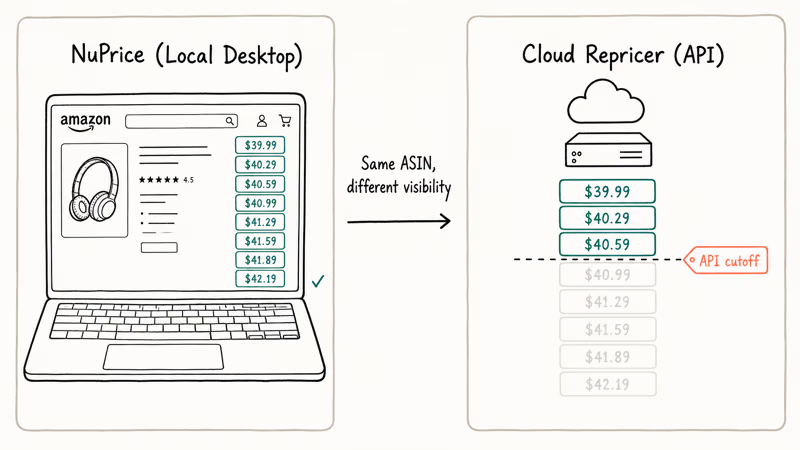
- Cloud repricers that lean on Amazon’s API often only see the top 15 to 20 offers per ASIN, while NuPrice loads every offer the buyer-facing detail page exposes.
#What Is NuPrice and Why Does Local Matter?
NuPrice is a downloadable repricing tool aimed at Amazon FBA sellers, with a focus on media categories like used books where the offer stack runs deep. It doesn’t live in a browser tab and it doesn’t run while your computer is asleep. You launch the app, it pulls your live inventory from Seller Central, you click prices, and you close it.
That sounds like a step backward at first. The interesting part is what happens when you compare it with the data most cloud repricers actually see.
According to Amazon’s Selling Partner API documentation, the Product Pricing operations return competitive pricing data for items offered on a marketplace, but the response is a slice of the offer stack rather than every listing on the detail page. Tools that build on those endpoints are working from a sample, not the whole picture.
NuPrice avoids that ceiling by reading the same product detail page a buyer would. Because the requests come from your own machine, the tool can show visible FBA offers, the New Buy Box, and the Used Buy Box on the same row. That difference matters most on slower-moving used books, where competing FBA prices below the API’s typical cutoff may be the actual sale prices.
Wikipedia confirms that Amazon launched FBA in 2006. Repricing accuracy remains a major margin lever for FBA sellers.
If you also sell on other marketplaces, you may already track competitor pricing differently. The Wayfair price tracker walkthrough covers one of those workflows, and the comparison highlights how much friction NuPrice removes when you want every offer in one place.
#How Much Does NuPrice Cost?
NuPrice has historically used a flat-rate plan rather than a tiered SKU model. Confirm the current price on the NuPrice site before you subscribe, since vendor pricing tends to drift over time.
There’s no per-SKU surcharge, which is the part that matters if you sell at scale. A used-book seller with 8,000 SKUs pays the same monthly fee as a new seller with 200, and you don’t get pushed into a higher tier when you cross an arbitrary listing count. That pricing shape rewards growth instead of taxing it.
The trade-off is real. NuPrice doesn’t run when your computer is off, so the flat fee isn’t really comparable to a cloud subscription that watches your catalog while you sleep.
#Setup and First-Run Experience
Setup is a standard desktop-app authorization flow. You install the desktop app, sign in with your Amazon Seller credentials through the standard MWS or SP-API authorization flow, and let it sync your inventory once. The app pulls SKUs, ASINs, current prices, and condition data into a single grid.
The first launch is slower than later sessions because the tool has to fetch every active listing.
After that, opening NuPrice loads cached metadata and only refreshes prices when you ask it to. The local model means no spinning loader for a queue you can’t see.
If your Amazon Seller credentials get into a strange state during setup, that’s usually a Seller Central problem rather than a NuPrice problem. Our guides on the payment revision needed Amazon error and Amazon account on hold message walk through the most common causes and how to clear them, since both situations can block third-party tools from authenticating.
#Daily Workflow on the Information Row
Each row in NuPrice represents a SKU, and the left side of that row is the information block. Custom SKU sits at the leftmost column, sortable by clicking the header. Next to it sits the fulfillment method, the product title, the condition, and a small link icon that opens the live Amazon detail page in your browser when you need to verify something the row doesn’t show.
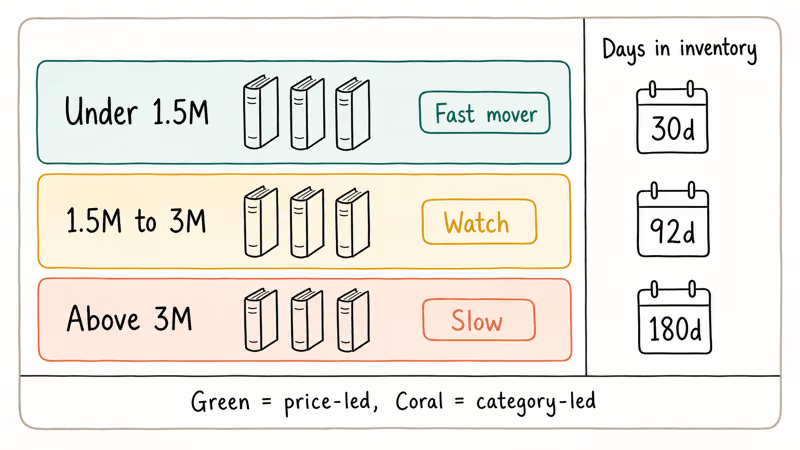
Sales rank lives next to the title, color-coded so you don’t have to read the number to know whether the SKU is a fast mover.
Green covers ranks under 1.5 million, orange covers 1.5 million to 3 million, and red covers anything above 3 million. For used books in particular, that traffic-light split lines up with the rough mental categories most sellers already use.
The SKU column is the most useful primary filter once inventory grows past a few hundred items. Typing a partial SKU into the search field narrows the grid, and the column header sort is faster than re-running a Seller Central report. If you ever need to dig back through historical records on the Amazon side, our note on finding Amazon archived orders covers how to pull the matching transaction data.
#Pricing Column: Where the Repricing Happens
The right side of each row is the pricing column, and this is where the local-only approach earns its keep. On a fresh launch, the column shows a single button labeled Reveal Current Prices. Click it and NuPrice pulls competitive offers for that ASIN directly from the product detail page.
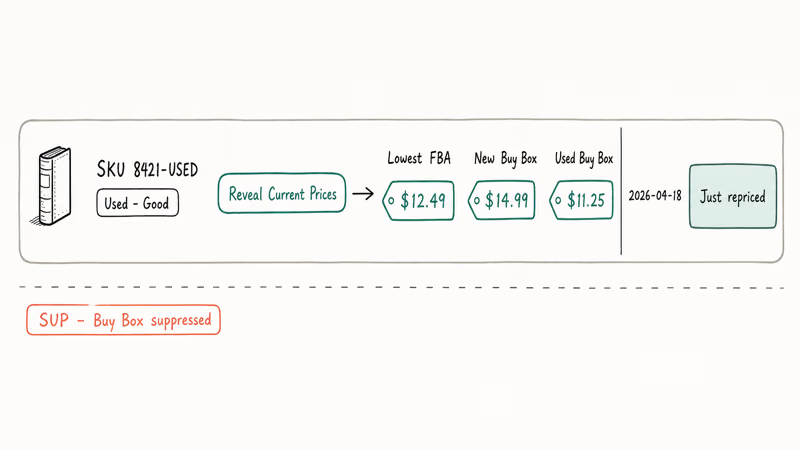
Once the data loads, you see the lowest FBA price, both Buy Box columns, and merchant-fulfilled offers. If Amazon hides the Buy Box for a SKU, the column shows SUP.
The repricing action itself is a single click. You click the competing price you want to match, and NuPrice updates your listing through the Seller API in the background. The cell then turns blue to mark that this row was just repriced, and a date stamp appears on the far left.
That blue marker matters more than it sounds.
When you reprice 200 SKUs across two sessions in the same week, the blue cells make it obvious which rows you’ve already touched and which still need attention.
#Days in Inventory and Color-Coded Ranks
Days in Inventory is a separate column showing how long each SKU has been sitting on the shelf. According to Amazon’s Seller Central help, long-term storage fees in the U.S. fulfillment network apply to inventory aged beyond a defined threshold, so knowing exactly how old a SKU is changes whether you reprice aggressively or send a removal order.
NuPrice surfaces that age as a sortable number.
Sort descending and the rows that have been on the shelf the longest float to the top of the grid. This makes it easier to review older inventory first and decide whether a price cut or removal order makes sense.
The color-coded sales rank in the same row tells you whether the slow movement is the SKU’s fault or just the category’s pace. A green rank with a high days-in-inventory count usually means your price is the issue. A red rank with the same age count means the book is just slow, and a price cut may not save it.
#Filters and Sorting
Above the grid sits a filters bar. You can sort by SKU, days in inventory, current price, fulfillment method, or condition by clicking the column header, and you can layer a search filter on top to scope down to a category.
There’s no rule engine like the kind cloud repricers ship with, so you don’t write conditional logic that says “if Buy Box drops below X, match minus a penny.” NuPrice expects you to make the call yourself once you can see the data.
If you treat repricing as a daily review session rather than a hands-off automation, that fits.
If you wanted full automation, you probably wouldn’t have downloaded a desktop app in the first place. NuPrice trades polling speed for visibility, and that trade only makes sense for sellers who care more about seeing the whole stack than about reacting to it within seconds.
#NuPrice Limitations You Should Know
The biggest limitation is the local runtime model: the app only works while your computer is awake and the app is open. Cloud repricers reprice while you sleep. NuPrice doesn’t. Sellers who handle daily volume that depends on automated reaction speed will find this a hard blocker rather than an annoyance.
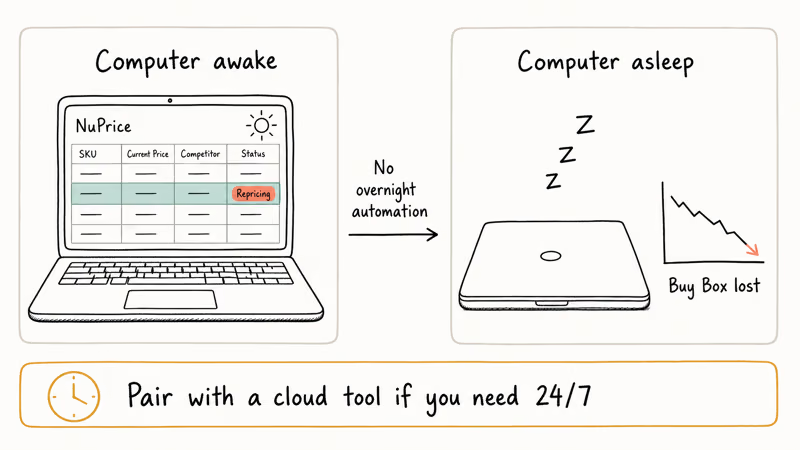
The second limitation is the lack of a rule engine. There’s no minimum price floor that auto-rejects a competitor undercut below your cost basis, and there’s no “stay within X dollars of Buy Box” automation. You set prices by clicking on the visible competitor stack, not by writing rules that fire when conditions match. This works fine if your catalog is small enough to review by hand, and it gets harder past a few thousand SKUs.
Reporting is also lightweight. The app gives you the date a SKU was last touched and the current price on the row, but there’s no built-in chart for repricing history or sell-through performance over time. If you need that depth, you’ll probably keep a separate Seller Central reporting workflow alongside it.
Sellers who care about cross-platform behavior should also vet payment processors and storefronts independently, the way our eBay vs Poshmark breakdown weighs the trade-offs between marketplaces.
The last gap is international scope.
NuPrice’s documented support skews to U.S.-based sellers, and if you also fulfill from outside the U.S. or use overseas suppliers, vet the tool against your specific marketplace before subscribing. As a starting point, our note on whether AliExpress is safe and legit covers due-diligence patterns that apply to any cross-border sourcing decision.
#Bottom Line
NuPrice earns its $14.95 a month for sellers whose catalog skews to used books, used media, or any category where the FBA stack runs deeper than what API-first repricers expose. The flat fee, the desktop-local approach, and the one-click repricing column add up to a tool that fits a daily review workflow without making you pay per-SKU as the catalog grows.
It fits sellers with a used-condition catalog who already do a manual repricing pass and just want to make that pass faster.
Sellers running high-velocity, new-condition arbitrage, where a competitor undercuts at 3 a.m. and you lose the Buy Box by sunrise, should keep their cloud repricer with the rule engine and 24/7 polling. NuPrice isn’t built for that fight, and using it as your only repricer would put you at a real disadvantage. For everyone else in between, it’s the cheaper, more transparent option, and the local model removes the API blind spots that cost you sales without your knowing.
To dig deeper into Amazon-side account hygiene that surrounds any repricing setup, our Amazon profile link guide covers how to manage the public-facing storefront URL that buyers see when comparing offers.
#Frequently Asked Questions
Is NuPrice safe to use with my Amazon Seller account?
NuPrice authenticates through Amazon’s standard third-party authorization flow, which means you grant the tool a scoped token instead of handing over your password. Amazon’s developer policies require approved tools to handle credentials this way, and revoking access at any time from Seller Central immediately cuts NuPrice off. As long as you download from the official site rather than a mirror, the credential exchange is the same one used by every other Seller-Central-integrated tool.
Does NuPrice need to be open all day to keep prices updated?
Yes. NuPrice only reprices while the desktop app is running, which is the main difference between it and cloud repricers. If your business depends on overnight automated reactions to competitor moves, NuPrice on its own won’t cover that.
Can I use NuPrice on multiple Amazon marketplaces?
NuPrice supports multiple Amazon marketplaces through the same Seller account. You connect each marketplace separately during setup and switch between them inside the app. According to Amazon’s Seller Central marketplace help, the same global account can list across regions, and the tool follows that structure. If you sell across more than two marketplaces, plan to spend extra time in the first session getting each one synced.
What happens if Amazon’s API limits my requests?
Amazon enforces rate limits on the Selling Partner API to keep automated traffic from overwhelming the system. NuPrice batches requests to stay under those limits, but if you click Reveal Current Prices on a very large batch in quick succession, you may see a temporary throttle. Wait a minute and try again with a smaller batch.
Does NuPrice work for new sellers with under 50 SKUs?
It works, but the value-per-dollar calculation is different at small inventory sizes. If you only have 50 SKUs to manage, you can probably reprice everything by hand in 20 minutes once a week without paying $14.95 a month for a tool.
Where NuPrice starts to pay for itself is when manual repricing in Seller Central becomes the bottleneck, which usually happens somewhere past 200 to 300 active SKUs. New sellers below that threshold should focus on Seller Central fundamentals first and consider NuPrice once their inventory crosses into the territory where every minute saved per SKU adds up.
Can I export my repricing history from NuPrice?
The app doesn’t have a deep historical export, but it does keep the last-repriced date stamp visible in the grid, which you can copy into a spreadsheet for record-keeping. For full repricing analytics, most sellers pair NuPrice with Seller Central’s order and pricing reports.
How does NuPrice handle the Used Buy Box vs the New Buy Box?
NuPrice shows both Buy Boxes as separate columns in the pricing block when both are eligible for your account. Amazon’s seller documentation confirms that the Buy Box rotates between eligible offers based on factors including price, fulfillment method, and seller performance, so you may see one Buy Box and not the other depending on your eligibility. If neither shows, the SUP indicator in the column tells you Amazon has temporarily suppressed both.
Is there a free trial?
NuPrice has historically offered a short trial window so sellers can test the workflow against their own inventory before subscribing. The exact length and terms have changed over time, so check the current trial policy on the NuPrice site before you commit to a paid plan.

Google Messages Error 3100: Why RCS Is Broken on Galaxy
Google Messages RCS error 3100 hits Galaxy owners after phone or carrier switches. Google told 9to5Google a fix is coming. Here's what actually helps.

Is This Bank App Real? Spot a Fake App on Your Home Screen
A bank app can land on your home screen from a web page with no install warning. Learn the checks that tell a real banking app from a phishing web app.

Apps Crashing After iOS 27 Update? Fix Order (2026)
Apps crashing after the iOS 27 update? Update the app in the App Store first, then offload and reinstall to clear stale cache, then restart. The fix order.

Do AI Translation Earbuds Work Offline? What to Know
Do AI translation earbuds work offline? A few do with downloaded language packs, but most need the cloud. Here's what works offline and what you give up.